
65% of businesses plan to spend more on AI, yet only 28% report strong returns. Then where should your business start with AI? Target costly bottlenecks, validate quick wins, and scale what delivers ROI.
Your team is buried in repetitive tasks. Customer requests keep piling up. Operational costs are rising. You know AI could help, but where should your business start with AI without wasting money on the wrong solutions?
You’re not alone. According to Dun & Bradstreet’s 2026 survey, 65% of businesses plan to increase AI spending, yet only 28% report broad or strong returns.
So, what’s holding businesses back? Often, it’s not the technology. It’s knowing which problems to solve first, what tools to choose, and how to measure success.
The good news? You don’t need a massive AI budget to get started. You need the right starting point.
This guide shows you how to assess AI readiness, identify high-value opportunities, implement AI in five practical steps, measure ROI, and avoid costly mistakes.
How to Assess Your Business’s AI Readiness?
One thing I’ve noticed about AI adoption is how quickly businesses jump into choosing tools. They explore AI chatbots, automation platforms, and custom solutions. But they often overlook a more important question: Is the business actually ready for AI?
I believe the best place to start is by understanding what’s already working and what’s slowing the business down. You don’t need perfect data or advanced technology from day one. You need a clear picture of your current capabilities.
From my perspective, this is where AI adoption becomes more meaningful. I’ve come to see that the real opportunity isn’t just automating tasks or saving a few hours. It’s creating better ways for teams to work, make decisions, and deliver value. That’s the difference between implementing AI and building an AI-driven business.
This thinking aligns with the vision shared by Ershadul Hoque, Founder and CEO of Riseup Labs:
“Your AI journey doesn’t begin with technology. It begins with a question: What could your business achieve if it worked smarter? Find that opportunity, take the first step, and turn your vision into reality.”

That’s where a business AI readiness assessment becomes useful. It helps you identify practical opportunities, spot potential risks, and avoid unnecessary investments.
Here’s how I would approach it.
1. Identify Business Problems and AI Opportunities
I would start by looking at everyday business challenges rather than AI features. Which tasks consume the most time? Where do employees face repeated delays? What frustrates customers?
Take an omnichannel contact center as an example. Agents may spend hours answering the same delivery or billing questions. Meanwhile, customers wait longer for complex issues.
This could be a good starting point for conversational AI. It can handle routine inquiries. Agent-assisted solutions can also help employees resolve difficult requests faster.
My suggestion is to identify three recurring problems. Then compare their business impact, implementation costs, and risks. Start with the one that offers the clearest value.
2. Evaluate Data Quality and Availability
Here’s something I would never overlook: AI is only as useful as the information it can access.
Before introducing an AI solution, I would check the quality of existing business data. Is the customer information accurate? Are important documents updated? Can employees easily access the information they need?
Review data stored in your CRM, ERP, data warehouse, or data lake. Look for missing records, outdated information, and access restrictions.
For example, a generative AI assistant powered by large language models (LLMs) might need access to company policies. Retrieval-Augmented Generation (RAG) can connect the assistant to approved knowledge sources. Vector databases can help retrieve relevant information.
In many cases, this is more practical than starting with proprietary data fine-tuning.
3. Review Technology and Integration Capabilities
I’ve always found it more practical to work with existing business systems before considering a complete technology replacement.
Start by reviewing your cloud computing infrastructure, APIs, and legacy software. Can your systems share information securely? Will the new AI solution fit into existing workflows?
For example, an AI chatbot may need customer order details from your CRM. An API integration can provide that information without replacing the entire system.
The technology choice also matters. Natural Language Processing (NLP) helps process text. Machine Learning (ML) supports predictions. Computer Vision can extract information from images and documents.
My advice is simple. Choose technology that solves your problem and fits your existing infrastructure. Avoid unnecessary complexity.
4. Assess Team Readiness and Security
Even the most advanced AI solution can struggle if employees don’t know how to use it.
That’s why I would involve the people who manage these processes every day. Ask what slows them down. Understand their concerns. Identify where AI could support their work.
For sensitive operations, human-in-the-loop (HITL) automation is especially useful. It keeps employees involved in reviewing important decisions and handling exceptions.
Security deserves the same attention. Review your data governance policies, access controls, and responsible AI practices.
Check applicable GDPR requirements. When evaluating vendors, review relevant SOC 2 reports and security controls.
If you’re outsourcing AI development, confirm how your partner handles confidential information.
5. Estimate Business Value and Implementation Costs
Before approving an AI investment, I would ask one question: How will we know it’s working?
A successful AI project should improve something measurable. That could mean faster customer support, fewer processing errors, or lower operational costs.
For customer experience management (CXM), I would focus on metrics such as:
- First Contact Resolution (FCR) to measure issues resolved during the first interaction.
- Customer Satisfaction Score (CSAT) to track service satisfaction.
- Average Handle Time (AHT) to measure customer interaction time.
- Net Promoter Score (NPS) to understand customer loyalty and willingness to recommend.
Next, calculate the total cost of ownership (TCO). Include software, integration, employee training, maintenance, and security expenses.
Compare these costs with expected financial benefits to estimate return on investment (ROI).
My approach would be to start with a small AI pilot. Track the results against current performance. Expand only when the business value becomes clear.
Real-World AI Insights
Can Your Business Go Beyond AI Adoption?
See how Riseup Labs became an AI-native organization.
Explore Our AI JourneyWhich Business Areas Should Adopt AI First?
Where should your business start with AI? The best starting point is a department with repetitive tasks, high operating costs, or frequent workflow delays.
However, not every department needs AI immediately. Focus on areas where automation can solve real problems and deliver measurable results.
For most businesses, customer service, software development, and administrative operations offer practical, high-impact AI entry points.
Customer Service

Customer service is one of the most practical areas to start AI adoption. Support teams often handle repetitive questions, high call volumes, and long response queues. These challenges increase costs and affect customer satisfaction.
According to Gartner’s 2026 AI Customer Service Survey, 91% of surveyed customer service leaders face executive pressure to implement AI. But adopting AI alone won’t improve customer experience. Businesses need to choose the right use cases.
Conversational AI, Natural Language Processing (NLP), and Generative AI can help businesses automate routine inquiries and improve customer experience management (CXM).
Here are some practical AI applications:
- AI Chatbots: Automate tier-1 customer inquiries, answer FAQs, and deliver 24/7 support across digital channels while reducing live agent workloads.
- AI Voice Agents: Automate inbound and outbound calls, handle routine voice inquiries, and provide 24/7 phone support while reducing call volumes for human agents.
- Agent Assist Solutions: Use large language models (LLMs) to suggest answers, retrieve information, and provide real-time assistance during customer conversations.
- Predictive Call Routing: Use machine learning (ML) to direct customer requests to suitable agents based on available information.
- Intelligent Process Automation (IPA): Combine AI with robotic process automation (RPA) to handle routine tasks such as ticket updates and service requests.
- Workforce Optimization (WFO): Analyze interaction patterns to support staffing forecasts and improve contact center planning.
Example: A growing e-commerce business receives hundreds of daily questions about orders, deliveries, and returns. An AI-powered omnichannel contact center can handle common requests across WhatsApp, live chat, and voice channels. Complex issues are transferred to human agents.
The business can track first contact resolution (FCR), average handle time (AHT), customer satisfaction score (CSAT), and call deflection rates to evaluate results.
Best starting point: Automate repetitive customer inquiries first. Expand to AI-augmented customer support workflows once performance and customer satisfaction are validated.
Software Development and Operations

Software development and IT operations are strong starting points for SaaS companies, technology businesses, and large enterprises.
Development teams often spend considerable time writing routine code, testing applications, fixing bugs, and maintaining documentation. IT teams also manage recurring support tickets and system incidents.
Generative AI, machine learning, and intelligent automation can reduce manual effort across these processes.
Common applications include:
- AI-Assisted Coding: Generate code suggestions, explain existing code, and support software refactoring.
- Automated Software Testing: Generate test cases, identify potential defects, and support regression testing.
- AI-Powered IT Helpdesk: Classify tickets, answer technical questions, and automate approved troubleshooting workflows.
- Predictive IT Monitoring: Analyze system logs and identify unusual activity before it causes major disruptions.
- AI Knowledge Management: Use retrieval-augmented generation (RAG) and vector databases to find relevant technical information from internal documentation.
Example: A SaaS company experiences frequent product release delays because developers spend too much time preparing test cases. AI-assisted testing can generate initial test scenarios and reduce repetitive work. Engineers then review the results before deployment.
For enterprise environments, AI solutions may require integration with existing software through application programming interfaces (APIs), cloud computing infrastructure, or AI middleware.
Measure success through development cycle time, testing effort, defect rates, and deployment reliability.
Best starting point: Introduce AI into repetitive development or IT support tasks. Keep human review in place for security-sensitive changes and production deployments.
Finance and Human Resources

Finance and HR teams handle large amounts of paperwork. Manual data entry takes time. Processing errors can also create delays.
Intelligent automation and machine learning (ML) can simplify these tasks. They reduce repetitive work. They also help employees focus on more important responsibilities.
Common AI applications include:
- Invoice Processing: Extract invoice details and flag errors.
- Expense Management: Classify expenses and detect unusual transactions.
- Financial Forecasting: Analyze historical data to support budget planning.
- HR Virtual Assistants: Answer employee questions about policies and benefits.
- Employee Onboarding: Automate document collection and routine onboarding tasks.
Example: A multinational company receives hundreds of employee policy questions every month. An AI-powered HR assistant can provide answers from approved documents. Complex requests go to HR specialists.
Businesses can track processing time, error rates, and administrative costs.
Sensitive decisions still need human oversight. Data privacy and security must also remain priorities.
Best starting point: Automate document-heavy and repetitive administrative workflows. Keep financial approvals and consequential employee decisions under appropriate human supervision.
How to Implement AI in Business: 5 Practical Steps
Starting with AI doesn’t mean changing your entire business overnight. A successful AI strategy begins with one clear problem. It also needs the right technology, reliable data, and measurable goals.
Follow these five practical steps to implement AI with less risk and better results.
Step 1: Define the Problem and Business Goal
Start by identifying what slows your business down. Look for repetitive tasks, high operating costs, and customer service delays.
Choose a problem that AI can realistically solve. Then set a clear and measurable goal.
For example, an omnichannel contact center may struggle with high call volumes. Conversational AI can automate tier-1 customer inquiries. It can also reduce pressure on human agents.
What you should do:
- Identify the most time-consuming business processes.
- Find workflow bottlenecks and recurring problems.
- Prioritize high-impact AI opportunities.
- Set measurable goals for cost, speed, or service quality.
Example goal: Reduce average handle time (AHT) by 20% within three months without lowering customer satisfaction.
Choose one business problem with measurable value. Avoid adopting AI simply because it is trending.
Step 2: Assess Data and Technical Readiness
AI needs reliable data and suitable technology to work effectively. Review your existing systems before selecting an AI solution.
Check data stored in your customer relationship management (CRM) and enterprise resource planning (ERP) systems. Review your data warehouse, data lake, and cloud computing infrastructure.
Make sure the data is accurate, accessible, and secure.
What you should do:
- Check data quality and remove outdated information.
- Review existing software and integration capabilities.
- Identify available application programming interfaces (APIs).
- Evaluate security, privacy, and data governance requirements.
- Assess whether legacy systems need AI middleware integration.
For example, a customer support chatbot may need access to order information. An API can connect the chatbot to your CRM or order management system.
Some generative AI solutions use retrieval-augmented generation (RAG). This allows large language models (LLMs) to retrieve relevant information from approved business documents. Vector databases can support this process.
Prepare your data and systems first. This reduces integration problems and improves AI reliability.
Step 3: Select the Right AI Solution
Not every business problem requires the same AI technology. Choose a solution based on your goals, budget, and technical needs.
Different AI technologies serve different purposes.
- Conversational AI: Handles customer inquiries through chatbots and voice agents.
- Generative AI: Creates content, summarizes information, and assists employees.
- Machine Learning (ML): Analyzes data to identify patterns and make predictions.
- Natural Language Processing (NLP): Helps systems understand and process human language.
- Computer Vision: Extracts information from images and scanned documents.
- Intelligent Process Automation (IPA): Combines AI with robotic process automation (RPA) to automate business workflows.
For example, a BPO company may choose AI voice agents to handle routine calls. A finance team may use intelligent document processing for invoices.
Also, consider whether to build custom AI software or buy an existing platform. An AI development partner can help with complex requirements.
What you should evaluate:
- Integration with existing business systems.
- Implementation and maintenance costs.
- Security and data privacy capabilities.
- Scalability and customization options.
- Human oversight and vendor support.
Select AI technology based on the problem. Focus on practical value rather than advanced features.
Step 4: Launch a Small AI Pilot
Avoid deploying AI across your entire organization immediately. Start with a small AI pilot project.
A pilot tests how AI performs in a real business environment. It helps you identify problems before making a larger investment.
Choose one department, workflow, or customer segment. Define the pilot’s scope and success criteria.
What you should do:
- Select a limited business process.
- Establish baseline performance metrics.
- Test the AI solution with real-world scenarios.
- Collect feedback from employees and customers.
- Monitor errors, response quality, and security risks.
For example, a SaaS company could test an AI chatbot for common billing questions. The chatbot handles routine requests. Complex cases go to human agents.
Use human-in-the-loop (HITL) automation for sensitive tasks. Test the system for incorrect answers and generative AI hallucinations.
Follow responsible AI practices. Protect personal information under applicable data privacy laws, including GDPR.
Test AI on a small scale first. Fix problems before expanding to other teams or departments.
Step 5: Measure Results and Scale
After the pilot, compare the results with your original goals. Check whether AI improved efficiency, reduced costs, or delivered better customer experiences.
Choose performance metrics that match your business objectives.
For customer service, track:
- First Contact Resolution (FCR): How often customer issues are resolved during the first interaction.
- Customer Satisfaction Score (CSAT): How satisfied customers are with the service.
- Average Handle Time (AHT): How long agents spend handling customer interactions.
- Net Promoter Score (NPS): How likely customers are to recommend your business.
For other departments, measure time savings, error rates, productivity, and process completion times.
Calculate the total cost of ownership (TCO). Include software, infrastructure, integration, training, and maintenance costs.
Then compare those costs with verified financial benefits. This helps determine your AI return on investment (ROI).
If the pilot meets your goals, expand gradually. Add more workflows, users, or business functions. Continue monitoring performance after deployment.
How to Measure ROI from Your First AI Project
Your first AI project should deliver measurable business value. Faster processes and fewer manual tasks are good signs. But do they actually save money?
Return on Investment (ROI) helps you answer that question. It compares the financial benefits of AI with its total costs. This helps you decide whether to improve, expand, or stop the project.
Here’s how to measure AI ROI in three simple steps.
1. Track the Right AI Performance Metrics
Start with the goals you set before implementation. Record your current performance. Then compare it with results from your AI pilot.
Choose key performance indicators (KPIs) based on the business process.
| Business area | Key AI performance metrics |
|---|---|
| Customer Service & CX | First Contact Resolution (FCR), Average Handle Time (AHT), Customer Satisfaction Score (CSAT) |
| Software Development & IT | Development time, testing costs, defect rates |
| Finance | Invoice processing time, error rates, cost per transaction |
| Human Resources | Onboarding time, employee inquiry resolution time |
| Sales & Marketing | Conversion rate, Customer Lifetime Value (CLV), Net Promoter Score (NPS) |
For example, an AI-powered omnichannel contact center can track call deflection and cost per resolution. It can also measure improvements from agent assist solutions.
Focus on both efficiency and quality. Faster responses have little value if customers remain dissatisfied.
2. Calculate the Total Cost of AI Implementation
Next, calculate the Total Cost of Ownership (TCO). This includes more than the initial software price.
Consider these expenses:
- Development and licensing: Custom AI development, platform subscriptions, and model usage fees.
- Infrastructure: Cloud computing, data storage, and processing costs.
- Integration: Connecting AI with CRM, ERP, and existing systems through APIs.
- Operations: Maintenance, employee training, and ongoing performance monitoring.
- Security: Data governance, privacy controls, and compliance requirements.
Include the cost of human oversight. Some generative AI solutions need employees to review incorrect outputs.
Use the same time period for costs and benefits. This gives you a more accurate ROI calculation.
3. Calculate AI ROI and Compare Results
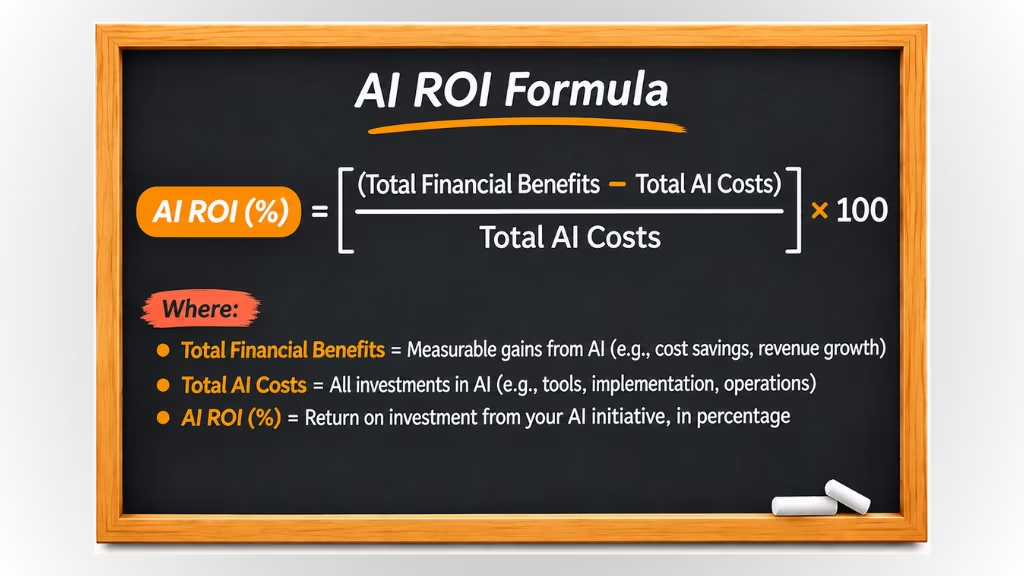
Once you know the benefits and costs, use this formula:
AI ROI (%) = [(Total Financial Benefits − Total AI Costs) ÷ Total AI Costs] × 100
Example: A mid-sized SaaS company introduces conversational AI to automate routine customer support.
Assume the following first-year results:
| Financial metric | Amount |
|---|---|
| Annual cost savings | $60,000 |
| Total AI implementation and operating costs | $40,000 |
| Net financial benefit | $20,000 |
| First-year ROI | 50% |
The company generates $20,000 in net financial benefits. Its first-year ROI is 50%.
Note: These figures are illustrative. Actual results depend on implementation costs, service volume, and verified savings.
Also, distinguish between time saved and money saved. Reduced employee workload does not always mean lower expenses. Count productivity gains as financial benefits only when their value can be demonstrated.
Should You Build, Buy, or Outsource Your AI Solution First?
Build AI when you need full control and custom features. Buy AI for faster deployment and lower upfront costs. Outsource AI when you need specialized expertise. The right choice depends on your budget, technical resources, and business goals.
Each approach has different benefits and limitations. Understanding these differences helps you make a better investment decision.
1. Build: Develop a Custom AI Solution
Building AI means developing a solution with your internal team. It offers greater control over features, data, and system architecture.
This approach works well for enterprises with unique business needs. It may involve custom machine learning (ML) models, generative AI, or intelligent process automation (IPA).
Key benefits:
- Full control over AI development and customization.
- Greater flexibility for complex business workflows.
- Direct ownership of proprietary code and technology.
- More control over data governance and security.
Challenges: Custom development requires skilled AI engineers, reliable infrastructure, and ongoing maintenance. Upfront costs can also be high.
Best for: Large enterprises, SaaS companies, and technology businesses with strong internal development teams.
2. Buy: Choose a Ready-Made AI Platform
Buying AI means using an existing software platform. This is often the fastest way to start AI adoption.
Businesses can purchase conversational AI tools, AI-powered CRM software, or agent assist solutions. Many platforms support integration through application programming interfaces (APIs).
Key benefits:
- Faster implementation with less development work.
- Lower initial investment for many use cases.
- Built-in features, updates, and technical support.
- Easier deployment for common business processes.
Challenges: Customization may be limited. Subscription costs can increase as usage grows. Vendor lock-in and data privacy also need attention.
Best for: Startups, mid-sized businesses, and digital-first companies with standard automation needs.
3. Outsource: Work with an AI Development Partner
Outsourcing means hiring an external AI development company. The partner helps design, build, integrate, and maintain your AI solution.
This approach provides access to specialized skills. It can also support legacy system AI integration and enterprise automation.
For example, a multinational company may need an AI-powered omnichannel contact center. A technology partner can integrate conversational AI with its existing CRM and business systems.
Key benefits:
- Access to experienced AI developers and consultants.
- Custom solutions without building a large internal team.
- Support for complex API integration and cloud infrastructure.
- Technical assistance during deployment and scaling.
Challenges: Quality depends on the partner’s expertise. Businesses must also review data security, intellectual property ownership, and long-term support agreements.
Best for: Enterprises, growing businesses, and organizations with limited internal AI expertise.
| Factor | Build | Buy | Outsource |
|---|---|---|---|
| Implementation speed | Usually slower | Usually faster | Depends on project |
| Customization | High | Limited | High |
| Upfront cost | Often high | Often lower | Varies by scope |
| Technical expertise | Strong internal team | Limited expertise | External specialists |
| Scalability | Internally managed | Vendor-dependent | Depends on architecture |
| Best use case | Proprietary AI | Standard AI tools | Complex AI projects |
Common Mistakes Businesses Should Avoid When Starting with AI
AI adoption can improve efficiency and reduce operational costs. However, poor planning can lead to wasted investments and disappointing results.
Here are six common mistakes businesses should avoid when starting with AI:
- Adopting AI without clear goals can waste resources and lead to poor business outcomes.
- Ignoring data quality and system integration can cause inaccurate AI outputs and workflow disruptions.
- Automating everything at once increases implementation costs, complexity, and operational risks.
- Overlooking AI security and governance can expose sensitive data and create compliance risks.
- Neglecting employee training and human oversight can reduce AI effectiveness and service quality.
- Failing to measure roi and long-term costs makes it difficult to evaluate AI performance and financial value.
Start Your AI Journey with the Right Technology Partner
Knowing where your business should start with AI is important. But successful implementation requires the right strategy, technology, and expertise.
This is where an AI-native global technology company provides AI digital transformation services, custom software development, BPO, and customer experience (CX) solutions.
From identifying AI opportunities to automating workflows and integrating AI into existing systems, the focus is on solving real business challenges. This helps organizations improve efficiency, reduce operational costs, and scale with confidence.
AI Digital Transformation Services can help you identify the right opportunities, set clear priorities, and take practical steps toward AI adoption.
Worried Your Next AI Project Might Fail?
Let’s build a strategy around what actually works.
Contact Us NowFinal Thoughts
So, where should your business start with AI? Start with a real business problem, not the latest technology. Identify repetitive tasks, assess your AI readiness, and choose solutions that deliver measurable value.
You don’t need to automate everything at once. Begin with a small AI pilot. Track its performance, measure return on investment (ROI), and expand based on proven results.
Successful AI adoption takes more than choosing the right tools. It requires clear goals, reliable data, and the right expertise.
Whether you’re a startup or a large enterprise, the best AI strategy is one that solves today’s challenges and supports tomorrow’s growth.
Frequently Asked Questions
Find answers to common questions about starting your AI journey and making the right decisions for your business.
What is the first step in adopting AI for a business?
The first step is identifying a specific business problem that AI could solve. Assess your current workflows, data availability, and technical readiness before selecting an AI solution. Focus on measurable improvements rather than adopting technology without a clear purpose.
Which business processes are easiest to automate with AI?
Repetitive, high-volume, and well-defined processes are often the easiest starting points. Examples include customer inquiry handling, document processing, ticket classification, data extraction, appointment scheduling, and internal knowledge retrieval. Actual implementation complexity depends on integration and compliance requirements.
Can small businesses start using AI?
Yes. Small businesses can begin with affordable, ready-made AI tools for customer support, marketing, administrative tasks, and workflow automation. They don’t necessarily need dedicated AI engineers or extensive datasets. Starting with one practical use case helps control costs and implementation risks.
Do businesses need technical expertise to implement AI?
Not always. Many commercial AI platforms require limited technical knowledge for basic setup. However, custom AI development, enterprise integrations, data security, and complex automation typically require specialized expertise. Businesses can work with external AI development partners when internal resources are limited.
Should a company start with AI chatbots or workflow automation?
It depends on the business problem. AI chatbots are useful for managing customer or employee conversations, while workflow automation is better suited to repetitive operational tasks. If your main challenge involves customer inquiries, start with conversational AI. If it involves internal process delays, prioritize workflow automation.
What is the difference between AI adoption and AI transformation?
AI adoption involves introducing AI tools or capabilities into specific business activities. AI transformation is a broader organizational change that redesigns workflows, operating models, and decision-making processes around AI. Adoption can be an early step toward transformation, but implementing individual tools does not automatically transform a business.
Can AI integrate with existing business software?
Yes. Many AI solutions can integrate with CRM, ERP, helpdesk, cloud, and other enterprise applications through APIs, webhooks, middleware, or native connectors. Integration feasibility depends on the software’s architecture, available interfaces, security requirements, and data accessibility.
How long does it take to implement AI in a business?
Implementation timelines vary by project complexity. A simple AI tool may be configured in days or weeks, while a focused pilot can take several weeks or months. Custom enterprise AI solutions involving complex integrations, governance, and organizational changes may require several months or longer.
How much data do you need to start using AI?
There is no universal minimum data requirement. Some AI applications use pretrained models and require little proprietary training data. Others, such as custom predictive analytics systems, need sufficient high-quality historical records. Data relevance, accuracy, and representativeness are often more important than volume alone.
When should a business hire an AI development partner?
A business should consider hiring an AI development partner when it lacks specialized expertise, requires custom AI functionality, needs complex system integrations, or faces significant security and scalability requirements. A partner can also help evaluate feasibility and plan implementation before major investments.
This page was last edited on 9 November 2026, at 4:28 pm
Start a conversation with our team to solve complex challenges and move forward with confidence.