
Shopify maintenance and support keeps your store fast, functional, conversion-ready, and reliable after launch. It covers theme and app checks, checkout testing, performance, tracking, SEO, backups, access reviews, and ongoing fixes. Regular maintenance helps prevent small technical issues from becoming lost sales.
Launching your Shopify store is only the first step. Once you start getting traffic, orders, app updates, theme changes, and new campaigns, small issues can start showing up.
The tricky part is that many of these problems are easy to miss. A discount may stop working on mobile, an app could affect the cart, a product page might become slower, or tracking may stop recording purchases correctly. Your store can still look fine while these issues quietly hurt sales.
That is where Shopify maintenance and support comes in. Regular maintenance helps you catch problems early, keep the shopping experience smooth, and make sure your store stays fast, reliable, and ready to grow.
In this guide, we’ll cover what Shopify maintenance includes, how often you should do it, what Shopify already handles for you, common issues to watch for, costs, and when professional support makes sense.
What Is Shopify Maintenance?

Shopify maintenance is the ongoing process of checking, fixing, updating, and improving the parts of your online store that your business controls.
That includes your storefront theme, installed apps, product information, integrations, analytics, SEO settings, custom code, checkout configuration, and customer-facing experience.
Shopify handles much of the platform infrastructure behind the store. But everything your team builds, installs, configures, or changes still needs attention.
Shopify support complements maintenance by giving your business technical assistance when something breaks or when you need a new store change, campaign update, integration, or improvement.
Together, maintenance and support help a Shopify store remain stable while continuing to evolve.
Why Is Shopify Maintenance Important?
Your Shopify store keeps changing after launch. New apps are installed, campaigns go live, products are updated, themes are customized, and tracking tools are added.
Each change creates another chance for something to stop working as expected. Regular Shopify maintenance helps you catch those problems early and keeps the store ready for customers, campaigns, and growth.
1. Prevent Revenue-Losing Store Issues
Not every Shopify problem causes a full outage.
Sometimes a discount stops applying, an add-to-cart button fails on one device, a shipping option disappears, or a payment method stops working for certain customers.
Because the rest of the store still looks normal, these problems can stay unnoticed while sales are being affected.
Regular testing helps catch these issues before customers have to report them.
2. Keep Your Shopify Store Fast
Store performance can gradually decline as you add apps, tracking scripts, larger images, campaign widgets, and custom code.
That matters because customers expect product and checkout pages to respond quickly.
Google recommends aiming for an LCP within 2.5 seconds, INP under 200 milliseconds, and CLS under 0.1 for good Core Web Vitals performance.
Regular performance checks help you identify what is slowing the store down before speed becomes a bigger usability or SEO problem.
3. Protect the Customer Experience
A good ecommerce experience depends on more than page speed.
Navigation needs to work, products must display correctly, forms should submit, mobile layouts need to remain usable, and customers should be able to move smoothly from product discovery to checkout.
Maintenance helps you find small usability problems that may otherwise create friction and reduce customer confidence.
4. Keep Apps, Themes, and Customizations Working Together
Your Shopify store does not operate in isolation.
Themes change, apps are updated, APIs evolve, and developers add custom Liquid or JavaScript. A change in one area can sometimes affect another.
For example, a theme update may affect a customized section, while a newly installed app could interfere with the cart or add unnecessary scripts.
Regular maintenance gives you a chance to test these changes before they turn into larger problems.
5. Maintain SEO and Organic Visibility
Everyday store management can create SEO problems without you realizing it.
Products are removed, collection URLs change, pages become slower, internal links break, and old campaign pages remain indexed.
Over time, these issues can affect how easily search engines crawl and understand your store.
Regular Shopify maintenance helps you find broken links, redirect problems, technical SEO errors, outdated metadata, and performance issues before they accumulate.
6. Keep Analytics and Marketing Data Reliable
Your marketing decisions are only as good as the data behind them.
Theme changes, new apps, checkout modifications, consent tools, or tracking updates can affect GA4 events, advertising pixels, and purchase tracking.
If those systems stop recording correctly, your team may think conversions have dropped when the actual problem is measurement.
Regular tracking checks help make sure the numbers your marketing team relies on still reflect what customers are actually doing.
Ultimately, Shopify maintenance is not just about keeping your website online. It helps protect sales, performance, customer experience, search visibility, and the reliability of the systems your ecommerce team uses every day.
Need Reliable Shopify Support Without Building Another Internal Team?
Riseup Labs provides ongoing Shopify maintenance, development, app assistance, performance monitoring, tracking support, and store improvements through monthly support plans.
What Does Shopify Handle vs. What Does Your Team Maintain?
This is one of the most important distinctions in Shopify maintenance.
Shopify is a hosted ecommerce platform, so merchants are not responsible for maintaining everything underneath their website.
| Shopify Primarily Handles | Your Business Still Maintains |
|---|---|
| Hosting infrastructure | Store theme and custom code |
| Core Shopify platform | Theme customizations |
| Core platform upgrades | Installed Shopify apps |
| Platform-level availability | App configurations |
| Core checkout technology | Checkout settings |
| Platform security infrastructure | Staff and collaborator access |
| Platform APIs | API integrations |
| SSL capabilities | Domain configuration |
| Shopify admin | Products and collections |
| Core system development | Analytics and pixels |
| Platform improvements | SEO and redirects |
| Core commerce functionality | Store-specific bugs |
This means Shopify maintenance should focus on your store implementation, not unnecessary server administration already handled by Shopify.
What Should Shopify Maintenance Include?
Shopify maintenance covers much more than fixing bugs when something goes wrong. It should help keep your storefront, apps, checkout, performance, products, tracking, and other important parts of the store working properly.
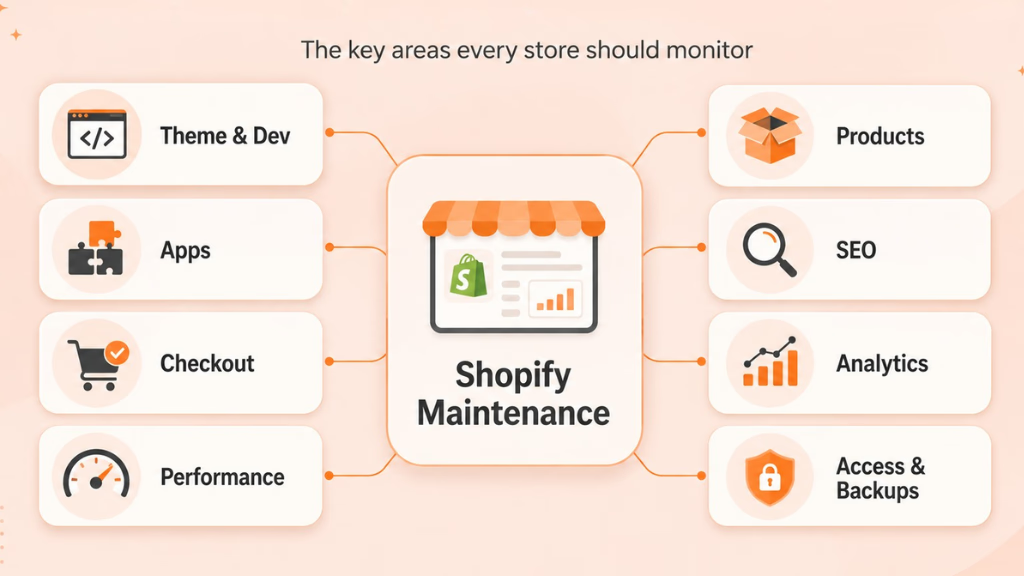
The exact maintenance needs will depend on your store size, app stack, customizations, and how frequently you make changes.
Here are the areas that usually need the most attention.
1. Theme Maintenance and Development
Your Shopify theme controls much of what customers see and interact with, so even small theme problems can affect the shopping experience.
Custom Liquid, JavaScript, new sections, landing pages, and app code can all change how your theme behaves.
Regular theme maintenance may involve fixing layout issues, cleaning outdated code, testing new customizations, checking mobile responsiveness, and reviewing updates before publishing them.
For major changes, it is safer to work on a duplicated or unpublished theme first instead of editing the live storefront directly.
2. Shopify App Maintenance
Apps make Shopify flexible, but they can also create unnecessary complexity over time.
For example, an app installed for a short campaign may still be running scripts months after the campaign has ended.
During an app review, check:
- Whether the app is still being used
- Whether another app provides the same function
- Whether it is slowing down the store
- Whether its permissions are still necessary
- Whether it conflicts with your theme or other apps
A quarterly app audit is usually enough for most stores, although stores that frequently install marketing tools may need to review them more often.
3. Checkout, Payment, and Shipping Testing
Checking your homepage does not tell you whether your entire buying journey works.
A Shopify store can look perfectly normal while customers are running into problems with discounts, shipping options, subscriptions, payments, or checkout.
That is why periodic test orders are important.
Test the combinations that matter most to your business, including different devices, payment methods, discount codes, shipping locations, and subscription options.
For stores processing a high volume of orders, checkout testing should be one of the highest-priority maintenance tasks.
4. Shopify Performance and Core Web Vitals
Shopify stores often become slower gradually.
New apps, tracking scripts, campaign widgets, larger images, custom JavaScript, and old theme code can all add extra weight over time.
Regular performance maintenance should look at what is actually slowing the customer experience rather than simply trying to achieve a perfect PageSpeed score.
The priority should be a fast, stable shopping experience while keeping the functionality your customers and marketing team actually need.
5. Product and Collection Maintenance
Not every Shopify maintenance task is technical.
Outdated prices, unavailable variants, incorrect inventory, old images, and poorly configured collections can create just as much friction for customers as a coding problem.
Stores with large or frequently changing catalogs should regularly review product data, variants, collections, inventory, metafields, and availability.
6. Technical SEO Maintenance
SEO problems often appear during normal ecommerce activity.
A product gets removed without a redirect. A collection URL changes. An old campaign page remains indexed. Internal links continue pointing to outdated pages.
Regular technical SEO checks can help identify issues such as:
- Broken links and 404 pages
- Missing or incorrect redirects
- Canonical problems
- Duplicate content
- Outdated metadata
- Structured data errors
- Indexing issues
These checks become especially important after redesigns, migrations, major theme changes, or large catalog updates.
7. Analytics and Tracking Maintenance
Your analytics should also be checked regularly, especially after theme, app, consent, or checkout changes.
Important events such as product views, add-to-cart actions, checkout starts, purchases, subscriptions, and form submissions should continue recording correctly.
If Shopify, GA4, and your advertising platforms suddenly report very different results, do not immediately assume customer behavior changed.
The tracking setup may be the problem.
8. Access, Backup, and Recovery Checks
Shopify manages much of the platform security, but your business still controls who has access to the store.
Review staff accounts, collaborator access, app permissions, authentication settings, and connected services regularly. Former employees, freelancers, agencies, or unused apps should not keep access they no longer need.
You should also keep appropriate theme copies and store-data backups before significant changes.
A useful question to ask is not just:
“Do we have a backup?”
But:
“If something breaks, do we know exactly what we can restore and how?”
Shopify Maintenance Checklist by Frequency
Not every maintenance task needs to happen every day. A simple schedule makes it easier to keep important checks from being forgotten.
| Frequency | Recommended Shopify Maintenance |
|---|---|
| Daily/Ongoing | Review failed orders, payment problems, inventory issues, alerts, and customer-reported bugs |
| Weekly | Check important pages, products, links, forms, discounts, and major customer journeys |
| Monthly | Run test purchases, review performance, check mobile UX, verify analytics, and review important apps |
| Quarterly | Audit apps, SEO, theme health, access, integrations, content, and recovery readiness |
| Before Campaigns | Test landing pages, discounts, tracking, inventory, checkout, and mobile layouts |
| After Major Changes | Run QA, verify tracking, retest checkout, review performance, and confirm rollback options |
Shopify’s website maintenance guidance also recommends frequent operational checks, monthly performance reviews, and broader quarterly maintenance. Shopify estimates that even a small website may require roughly four to 10 hours of maintenance per month.
More complex Shopify stores with custom development, larger catalogs, multiple integrations, or frequent campaigns may require considerably more.
Common Shopify Maintenance Problems
Even a well-built Shopify store can develop issues over time. Most of them are not major failures at first, but if they are left unchecked, they can affect performance, customer experience, tracking, and sales.
App Bloat
Shopify apps are easy to install, which is why stores often collect more of them than they actually need.
An app added for a short campaign may still be running scripts months later. Over time, unused or overlapping apps can increase costs, slow down the storefront, and make troubleshooting more difficult.
A regular app audit helps you remove what is no longer useful and keeps your store easier to manage.
Theme Changes Can Break Custom Code
Theme updates can create problems when your store uses custom Liquid, JavaScript, or heavily modified sections.
Instead of updating the live theme immediately, test important custom features on a duplicate or unpublished theme first. Keeping a backup or rollback option also makes it much easier to recover if something behaves unexpectedly.
Checkout Issues Can Be Easy to Miss
A store may look perfectly fine while customers are running into problems during checkout.
Issues with discount codes, shipping options, subscriptions, payment methods, or the cart may only appear under specific conditions. That is why periodic test orders are more reliable than simply browsing the storefront.
Mobile Experience Can Slowly Get Worse
Mobile problems often build up over time.
A popup, chat widget, sticky cart button, and promotional banner may each work well on their own. But when they appear together, they can make the screen crowded and difficult to use.
Regularly test the full buying journey on mobile, especially after adding new apps or campaign elements.
Tracking Can Break After Store Changes
Theme updates, checkout changes, consent tools, and new apps can all affect analytics and advertising pixels.
If purchase or conversion data suddenly looks unusual, check the tracking setup before assuming customer behavior has changed. Broken events can lead to poor marketing decisions even when actual sales are stable.
Deleted Products Can Create Broken URLs
Removing a discontinued product without checking the URL first can create 404 errors and waste existing SEO value.
Before deleting important product or collection pages, check whether they receive traffic or backlinks. If they do, redirect them to the most relevant alternative page instead of leaving a dead URL.
Does Shopify Have a Maintenance Mode?
Not in the same way many self-hosted platforms use a dedicated site-wide maintenance page for routine development.
For most Shopify theme work, you can make changes to an unpublished or duplicated theme, test them, and publish only when everything is ready.
A safer workflow is:
Backup → Develop → Test → QA → Publish → Verify
For longer business interruptions, Shopify also provides options for temporarily pausing store activity depending on account and plan circumstances.
Routine Shopify maintenance, however, usually should not require taking the live store offline.
How Much Does Shopify Maintenance Cost?
Shopify maintenance typically costs anywhere from $50 to $1,500+ per month, depending on your store size, customizations, app stack, and the level of technical support you need.
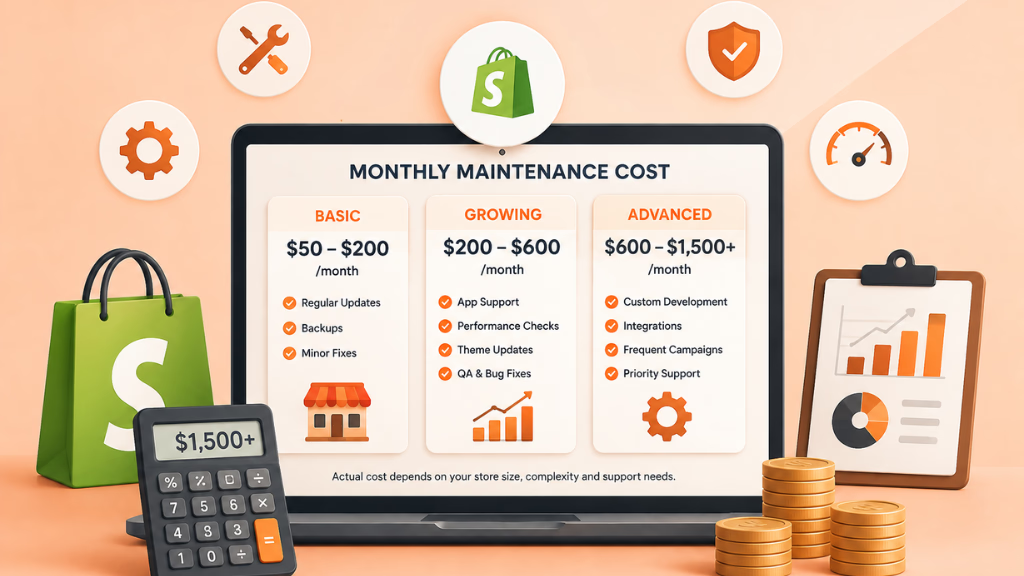
Shopify’s own website maintenance guide estimates that basic upkeep for smaller ecommerce businesses can range from $40 to $500 per month, while outsourced maintenance for larger or more complex ecommerce stores can reach a few hundred to several thousand dollars per month.
As a practical benchmark:
- $50–$200/month: Light maintenance for smaller stores, such as routine checks, minor fixes, backups, and basic updates.
- $200–$600/month: Ongoing support for growing stores that need app assistance, theme updates, performance checks, tracking fixes, and regular QA.
- $600–$1,500+/month: More advanced support involving custom Liquid or JavaScript work, frequent campaigns, integrations, subscriptions, CRO improvements, or ongoing development.
- $1,500+/month: High-volume, Shopify Plus, or development-heavy stores may need dedicated support, faster response times, complex integrations, and larger monthly development capacity.
These are general benchmarks rather than fixed Shopify rates. Your actual maintenance cost depends largely on how much ongoing work your store requires.
A simple Shopify store with a standard theme and a few apps will naturally cost less to maintain than a store with custom code, subscription workflows, ERP or CRM integrations, frequent campaigns, and a large product catalog.
Shopify plan fees, paid apps, premium themes, and third-party software are also usually separate from maintenance service costs.
Instead of choosing a maintenance plan based only on price, compare the scope of support, response times, development capacity, and how much revenue could be affected if store issues are left unresolved.
DIY Shopify Maintenance vs. Professional Support
Not every Shopify store needs an external maintenance company.
The right choice depends on your team’s technical capacity and how important Shopify is to your revenue.
| DIY Shopify Maintenance May Work When | Professional Support May Make Sense When |
|---|---|
| The store is relatively simple | Shopify is a major revenue channel |
| You use few apps | You rely on many apps or integrations |
| There is little custom code | Custom Liquid or JavaScript is important |
| Changes are infrequent | Campaigns and product launches are frequent |
| Someone owns maintenance internally | Nobody clearly owns technical maintenance |
| Your team understands Shopify | Marketing waits on technical fixes |
| Delayed fixes have limited impact | Store problems can immediately affect revenue |
A small store with a straightforward theme may comfortably handle routine Shopify maintenance internally.
A growing DTC or subscription brand may reach a point where the internal cost of delayed fixes becomes higher than the cost of structured support.
How to Choose a Shopify Maintenance and Support Provider
Do not judge a maintenance provider only by how many tasks appear in its package.
Start by asking whether the provider understands Shopify and ecommerce operations.
A capable team should understand areas such as Liquid, themes, apps, checkout configuration, APIs, performance, analytics, and ecommerce QA.
Then evaluate the working process.
Look for clear answers to questions such as:
- How are store changes tested before publishing?
- What happens when an urgent revenue issue occurs?
- What is included in the monthly scope?
- How are custom development requests handled?
- Are response times clearly defined?
- Do you receive reporting on completed work?
- Can the provider support more complex requirements as your store grows?
One particularly important distinction is response time vs. resolution time.
A provider may acknowledge and begin investigating an issue quickly without being able to guarantee exactly when a complex third-party problem will be solved.
That distinction should be transparent.
Riseup Labs, for example, explicitly defines its support plans around different response expectations and scopes rather than presenting response time as guaranteed resolution time.
Shopify Maintenance Should Support Growth, Not Just Fix Problems
Shopify maintenance should not only be about fixing things after they break. As your store grows, it should also help your team launch faster, improve the shopping experience, and support new business needs.
For example, your marketing team may need a new campaign landing page, while your ecommerce team may want a better product template, improved mobile UX, cleaner tracking, or a new subscription or inventory integration.
That is why effective Shopify maintenance usually works across three stages:
| Stage | Goal |
|---|---|
| Protect | Keep important store functions stable and reliable |
| Improve | Enhance speed, UX, tracking, and conversion paths |
| Scale | Support new features, integrations, and ongoing growth |
This approach turns maintenance from a reactive support task into an ongoing part of improving and scaling your Shopify store.
Why Choose Riseup Labs for Shopify Maintenance and Support?
Choosing the right Shopify maintenance partner is not just about fixing bugs. You need a team that can keep your store stable, support ongoing improvements, and respond as your ecommerce needs grow.
Riseup Labs’ Shopify Maintenance and Support Services help businesses manage day-to-day store operations while supporting long-term improvements and growth.
Here’s what makes the service useful:
- Shopify-Focused Support for themes, apps, checkout, and store functionality
- Ongoing Maintenance to keep important parts of the store working smoothly
- Performance Support for speed, Core Web Vitals, and storefront experience
- App and Integration Help for troubleshooting and connected systems
- Analytics and Tracking Support to keep ecommerce data reliable
- Scalable Development Support for new features, campaigns, and growing store needs
With the right maintenance partner, your Shopify store becomes easier to manage, improve, and scale without relying on last-minute fixes.
Final Thoughts
A Shopify store is easier to maintain than many self-hosted ecommerce platforms, but it is not maintenance-free.
Your theme, apps, products, tracking, integrations, custom code, SEO, campaign pages, and customer purchase journey continue changing long after launch.
Good Shopify maintenance and support gives those changes a process.
Instead of waiting for customers to discover problems, regularly test your store, review your app stack, monitor performance, verify tracking, protect important changes, and assign clear responsibility for ongoing maintenance.
The goal is simple:
Keep your Shopify store reliable enough to sell today and flexible enough to grow tomorrow.
Frequently Asked Questions About Shopify Maintenance
Does a Shopify Store Need Maintenance?
Yes. Shopify manages much of its hosted platform infrastructure, but your theme, apps, products, custom code, integrations, analytics, SEO, and customer experience still need regular maintenance.
What Is Included in Shopify Maintenance?
Shopify maintenance commonly includes store testing, theme support, app reviews, checkout checks, performance optimization, catalog updates, technical SEO, tracking verification, access reviews, backup preparation, and bug fixes.
How Often Should Shopify Maintenance Be Done?
Critical store issues should be reviewed as they occur. Basic storefront checks can be performed weekly, deeper performance and checkout testing monthly, and broader app, SEO, theme, and access audits quarterly.
How Much Does Shopify Maintenance Cost?
Costs vary considerably by store complexity. Shopify’s general ecommerce guidance estimates basic maintenance for smaller ecommerce sites at around $40–$500 per month, while larger or professionally managed stores may cost considerably more.
Can I Maintain My Shopify Store Myself?
Yes. DIY maintenance can work well for simpler stores when someone on your team understands Shopify and consistently performs the required checks. More complex stores often benefit from dedicated professional support.
What Is the Difference Between Shopify Maintenance and Shopify Support?
Maintenance focuses on recurring preventive work such as testing, monitoring, audits, performance checks, and store health. Shopify support focuses on resolving issues and completing technical changes when your business needs them.
Does Shopify Have Maintenance Mode?
Routine Shopify development generally does not require putting the live store into a traditional maintenance mode. Theme changes can usually be prepared and tested using unpublished or duplicated themes before deployment.
When Should I Hire a Shopify Maintenance Company?
Consider professional support when technical tasks regularly delay your team, Shopify contributes significant revenue, your store relies on custom development or integrations, or technical problems could immediately affect campaigns and sales.
This page was last edited on 27 August 2026, at 12:29 pm

Start a conversation with our team to solve complex challenges and move forward with confidence.