
Understanding what is custom software development starts with its purpose: creating software specifically for a company’s unique workflows, users, and goals. Unlike off-the-shelf products, it offers greater flexibility, scalability, seamless integration, and control over features, security, and future updates.
Generic software can help a business get started, but it often becomes a limitation as operations grow more complex. Teams may struggle with disconnected tools, manual processes, missing features, and systems that force employees to change how they work.
Custom software development solves this problem by creating technology around a company’s specific workflows, users, challenges, and growth plans. Instead of adapting the business to a prebuilt platform, the software is designed to support how the business actually operates.
In this guide, you will learn what custom software development is, how the development process works, its key benefits and risks, expected costs, and how to choose the right development partner for long-term business growth.
Why Does Custom Software Development Matter in 2026?
Custom software development has become a main driver of business transformation in 2026, impacting industries worldwide.
Off-the-shelf tools often lag in meeting modern compliance, fail at deep automation, and limit how much you can adapt. Key 2026 trends like AI integration, new data privacy rules, and fast tech changes have raised the bar.
In my POV, companies now build software to:
- Meet strict regulatory needs, especially in fintech and healthcare.
- Control costs by automating core workflows.
- Boost security by shaping features to their real risks.
- Remain agile as new tech and user needs appear.
Simply put, custom development is now essential for businesses aiming to grow, adapt, and stay secure in a fast-moving world.
What Exactly Is Custom Software Development?
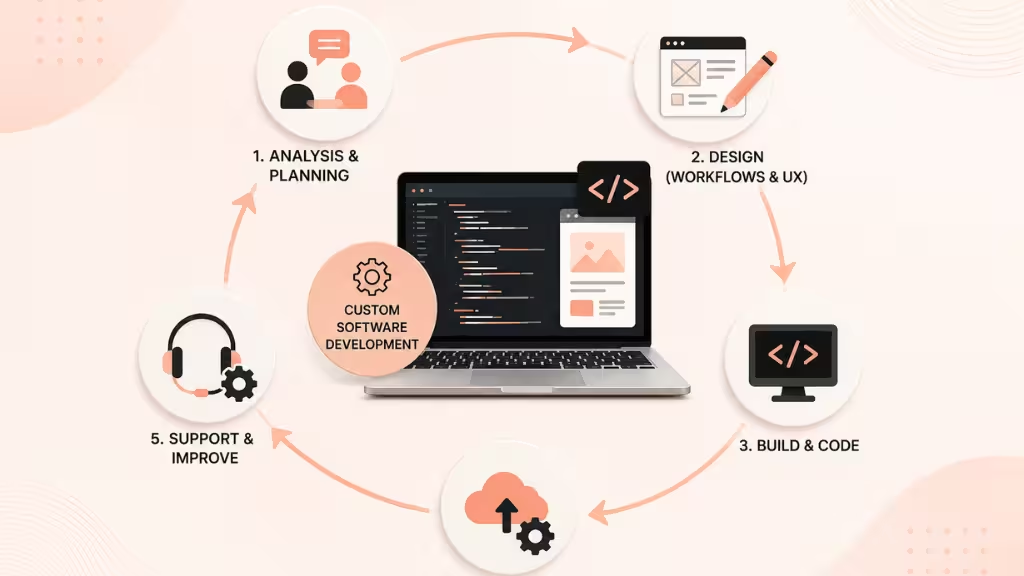
Custom software development means creating software that is designed, built, deployed, and maintained for a specific business or user, based on their unique goals—making it different from generic, off-the-shelf apps.
In practical business terms, custom software (also called bespoke or tailored software) fits your workflows, rules, system integrations, and security needs rather than asking your team to adapt. This process covers:
- Analysis and planning with key stakeholders.
- Designing workflows and user experiences.
- Building and coding the solution.
- Deploying, supporting, and improving the software over time.
In my experience, companies with custom solutions often gain more value over time because the software grows with them.
How Does Custom Software Compare to Off-the-Shelf Solutions? [Side-by-Side Table]
Choosing between custom and off-the-shelf software is a core business decision. Off-the-shelf applications are ready-made and offer speed but come with limits. Custom software requires more effort but often produces a better fit.
Here is a direct comparison:
| Criteria | Custom Software | Off-the-Shelf Software |
| Cost | Higher upfront; lower over time | Lower upfront; higher with add-ons |
| Scalability | Built to scale with business | Can be limited or costly to scale |
| Speed | Slower to start, faster for changes | Fast rollout but rigid |
| Support | Direct, tailored support | Standardized, generic |
| Customization | Fully tailored | Limited to vendor options |
| Compliance | Purpose-built for industry needs | May not meet unique or local rules |
| Innovation | Enables unique features and integration | Restricted by vendor roadmap |
In my experience, off-the-shelf works if you have general needs and short timelines. But if you want long-term growth, strict compliance, or new features, a custom approach wins.
Guidance: Use off-the-shelf for simple, non-critical processes. Go custom when your workflow, compliance, or competitive edge relies on unique solutions.
What Are the Main Benefits of Custom Software Solutions?
Custom software gives businesses more control, flexibility, and lasting value over time.
Some of the key advantages include:
- Process Alignment: Matches your workflows and business objectives from day one.
- Enhanced Security & Compliance: Tailored to your real risks and local data rules.
- Scalability: Grows with you; you don’t outgrow the system.
- Future-Proofing: Easy to add AI, blockchain, IoT, or other new tech.
- Ownership & Control: You decide on features, updates, and when to fix issues—no vendor lock-in.
For example, one healthcare client I worked with required HIPAA-compliant communication between clinics. Off-the-shelf tools couldn’t guarantee full traceability, but custom software solved the issue and passed every audit.
Quick Verdict: Custom software unlocks real efficiency, compliance, and innovation that generic apps cannot match.
Where Is Custom Software Used? Types and Use Cases Across Industries
Custom software is most valuable when a business depends on unique workflows, specialized data, strict regulations, or complex system integrations. It allows companies to build solutions around their actual operations instead of forcing teams to adapt to generic tools.
Industries Using Custom Software in 2026
Fintech: Custom platforms support risk management, fraud detection, real-time compliance monitoring, secure payments, and mobile banking services.
Healthcare: Healthcare organizations use custom software for patient portals, telemedicine platforms, appointment systems, automated reporting, and solutions designed to meet privacy regulations.
Manufacturing: Manufacturers rely on custom ERP systems, supply chain integrations, production monitoring, inventory management, and predictive maintenance tools.
Logistics: Logistics companies use custom software for route optimization, warehouse automation, fleet management, shipment tracking, and delivery performance analysis.
E-commerce: Online retailers use tailored solutions for personalized shopping experiences, dynamic pricing, inventory synchronization, customer analytics, and multichannel order management.
Common Types of Custom Software
Common custom software solutions include:
- CRM systems designed around specific sales processes and customer journeys
- ERP platforms with workflows tailored to finance, operations, inventory, and reporting
- Compliance automation tools built for local and international regulations
- AI-powered analytics platforms for forecasting, fraud detection, and personalized recommendations
- Custom dashboards that combine data from multiple systems
- Integration tools that connect existing software and reduce manual work
A logistics CTO explained, “Our hybrid approach, using custom extensions on top of an off-the-shelf core, helped us halve delivery errors without retraining staff.”
For many mid-sized businesses, a hybrid approach can be a practical option. Custom modules can add advanced security, reporting, automation, or integration features to existing software without the cost of replacing the entire system.
Custom Software Development Process: A Step-by-Step Guide
The process for creating custom software usually follows the Software Development Lifecycle (SDLC), adapted for your needs. This helps teams avoid rushed decisions and spot risks early.
A modern, proven custom software process uses Agile or DevOps to keep work on track and focus on fast feedback.
Below are the core steps you should expect in a typical project.
Planning & Requirements Gathering
This stage clarifies the project’s goals and must-have features.
- Analyze business needs, pain points, and workflows.
- Run workshops with end users, managers, and IT.
- Document and prioritize requirements for the first version.
From my experience, skipping this step leads to scope creep and missed goals later.
Design & Prototyping
In this phase, teams focus on how the software will look and function before building it.
- Create mockups and clickable prototypes for early feedback.
- Test key workflows to ensure they are user-friendly.
- Repeat until the core user experience feels right.
A better approach is to involve real users early—this prevents expensive design rework.
Development & Testing
Now, developers code the software, working through small builds called sprints.
- Choose modern coding frameworks and tools.
- Test in parallel—this includes automated, security, and functional testing.
- Fix bugs and retest with each version.
I have seen success rise when teams automate tests and share updates weekly.
Deployment & Support
The software moves from test to live systems, with close monitoring.
- Execute launch plans and roll out to real users.
- Provide training and guides for end users.
- Plan for regular updates, bug fixes, and scale-up as business grows.
Last year, when our dev team handled both launch and ongoing updates, support issues dropped by 40%.
Process Flow:
- Planning
- Prototyping
- Development
- Testing
- Deployment
- Support
Using this order, risks drop and project quality goes up.
What Are the Real Pros and Cons of Custom Software?
Custom software works best for organizations ready to invest in a tailored approach, but there are real tradeoffs.
Pros:
- Total control over features, updates, and security.
- Custom fit to unique workflows and compliance rules.
- Easier integration with internal and partner systems.
Cons:
- High upfront cost and time to launch.
- Project scope can expand, raising final cost.
- Requires dedicated support for updates and fixes.
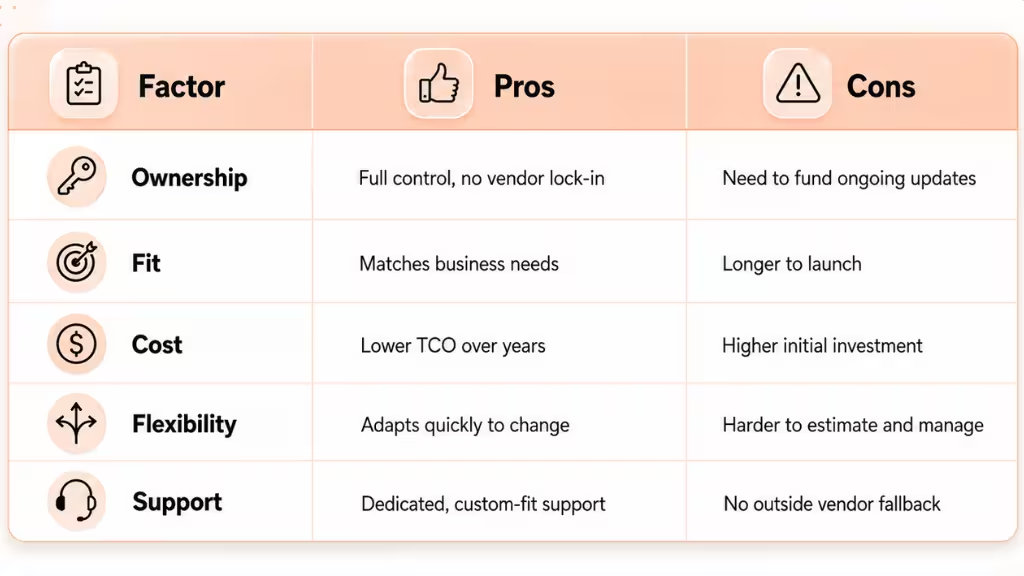
When teams underestimate ongoing support or try to skip design steps, I have seen costly overruns. A hybrid route—custom add-ons to a standard platform—often makes sense if budget or time is tight.
How Much Does Custom Software Development Cost in 2026?
Understanding costs helps set clear expectations upfront. In 2026, Statista reports the global market for custom software exceeds $230 billion, with demand highest in high-compliance sectors.
Key Cost Factors:
- Solution complexity and number of features.
- Integration with legacy or third-party tools.
- Regulatory or security requirements.
- Ongoing support and upgrades.
Typical Price Ranges:
- Small project (1–2 features): $20,000–$100,000
- Mid-sized platform: $100,000–$500,000
- Enterprise solution: $500,000+
ROI Considerations:
Custom tools cut manual effort, reduce errors, and avoid license fees. Long-term costs (total cost of ownership) often drop below off-the-shelf with high usage or many users.
Budget Checklist:
- List all features and must-have integrations.
- Ask for maintenance, training, and upgrade estimates up front.
- Build in a buffer (10–20%) for changes or new needs.
A better approach is to break projects into phases, allowing for updates and feedback while spreading costs.
How Do You Choose the Right Custom Software Development Partner?
Partner selection can make or break your project. In my experience, the best results come when the vendor shares your vision and brings proven success in your domain.
What to Look For:
- Deep experience in your industry (e.g., healthcare, logistics).
- Track record with similar project size/type.
- Focus on security and compliance.
- Strong team and support capacity.
Smart Steps:
- Create a clear RFP with goals, scope, and what success looks like.
- Ask about their process, communication flow, and client references.
- Test their transparency with a pilot project or workshop.
Questions to Ask:
- How do you ensure business/IT alignment?
- What happens if requirements change?
- What is your process for support after launch?
- Can you provide client stories or mini-case studies?
A checklist of partner red-flags includes unclear pricing, poor documentation, no clear product owner, or lack of industry references.
What Are Best Practices for Successful Custom Software Projects?
Years of experience have taught me that the right habits prevent costly mistakes and project delays.
Best Practices Include:
- Setting detailed requirements and reviewing them often.
- Using Agile for faster feedback and less rework.
- Building in security and compliance from day one: Security should be integrated into every development stage rather than added after launch. The National Institute of Standards and Technology recommends using its Secure Software Development Framework, which provides practices that organizations can incorporate into their software development lifecycle to reduce vulnerabilities and address security risks.
- Using continuous integration and deployment for smaller, safer updates.
- Planning for ongoing support and future upgrades, not just initial launch.
Teams that skip user feedback or delay security checks often struggle post-launch. A better approach is to treat launch as a milestone, not the finish line.
Common Pitfalls and Key Factors to Remember in Custom Software Development
Custom software projects sometimes go off track. Many issues repeat across businesses, but most can be managed with careful planning.
Some key pitfalls I have seen:
- Letting the project scope creep without regular review.
- Ignoring the true load of future support and updates.
- Skimping on user training or change management.
- Overlooking data security or current legal compliance rules.
- Failing to build for scaling or new feature needs.
Watch for these warning signs, and you will avoid most surprise costs and failures.
How Riseup Labs Helps Businesses Succeed with Custom Software
Many teams lack the specialized skills, compliance experience, or bandwidth to build custom software in-house. Riseup Labs brings a proven track record in guiding businesses from planning to long-term support for tailored software.
In my work with Riseup Labs, their focus on business alignment, security, and real user needs means projects hit business goals instead of just technical checklists. Their hybrid solutions let companies combine rapid delivery with deep customization, reducing costs while increasing efficiency.
When clients need end-to-end guidance from idea to daily operation, Riseup Labs becomes a trusted partner not just a vendor.
Conclusion
Custom software development gives businesses the flexibility to create solutions around their actual workflows, users, security needs, and long-term goals. Unlike off-the-shelf tools, custom software can support unique processes, complex integrations, industry regulations, and future growth.
It is especially valuable for organizations that need greater control, better automation, stronger scalability, or features that standard platforms cannot provide. However, success depends on clear requirements, realistic budgeting, regular user feedback, and reliable post-launch support.
Before starting a project, compare custom and ready-made options carefully, define the outcomes you want to achieve, and choose a development partner with relevant experience. With the right planning and technical team, custom software can improve efficiency, reduce operational limitations, and create lasting business value.
FAQs About Custom Software Development
What is custom software development?
Custom software development is creating and maintaining software applications tailored to a specific organization’s needs, workflows, or goals.
How does custom software differ from off-the-shelf solutions?
Custom software is built for your unique requirements, while off-the-shelf software is generic and built for many users.
What are the main benefits of custom software?
Main benefits include better process fit, stronger security, easier scaling, and full ownership without vendor restrictions.
What are common challenges in custom software projects?
Common challenges include scope creep, underestimating support needs, compliance risks, and lack of clear requirements.
How much does custom software development typically cost?
Custom software can cost from $20,000 for simple tools to $500,000 or more for large, complex systems in 2026.
What are the main steps in the custom software development process?
Key steps are planning, design, development, testing, deployment, and ongoing support.
How do I choose the right custom software development company?
Choose companies with experience in your industry, clear processes, strong client references, and support for compliance and security.
Is custom software more secure than off-the-shelf alternatives?
Usually yes, because security features can be built for your specific risks and compliance needs.
What industries benefit most from custom software?
Highly regulated industries like fintech, healthcare, logistics, and manufacturing benefit most from custom software.
This page was last edited on 23 July 2026, at 3:38 pm

Start a conversation with our team to solve complex challenges and move forward with confidence.