
A data annotator labels and tags raw data—such as images, text, video, or audio—to create reliable machine learning training data. They follow guidelines, use annotation tools, check for accuracy, and support AI teams.
AI cannot learn without clean, labeled data. Businesses depend on reliable machine learning training data to power smarter systems and meet user needs. The hidden workforce behind that progress is often invisible.
Data annotation specialists—called data annotators—make sense of chaos, turning raw data into clear instructions for machines. Teams feel urgency, with more AI projects needing high-quality annotation than ever before.
In this guide, you will get a plain answer to “what is a data annotator,” see exactly what the job involves, compare tools, learn about skills and salaries, and decide if data annotation is the path for you, your team, or your project.
What Is a Data Annotator?
A data annotator is a person who labels raw data for use in artificial intelligence (AI) and machine learning (ML). They enable AI systems to “see,” “read,” or “hear” information during training.
Data annotation matters because no AI model can make good predictions without accurate, clearly labeled training data. Even the smartest machine learning algorithms are useless if given mislabeled or poor-quality input.
In my experience, teams often underestimate how foundational a good data annotator is. The success of autonomous vehicles, virtual assistants, or medical diagnostic systems all depend on precise human annotation for model accuracy, fairness, and safety.
Key responsibilities of a data annotator:
- Follow instructions and annotation guidelines closely
- Use software tools to label images, text, video, or audio
- Check work for accuracy and fix errors
- Collaborate with QA, data science, and annotation team members
- Document problems or unclear data
Why Is Data Annotation Essential for AI and Machine Learning?
Data annotation is the backbone of modern AI and ML projects. Well-labeled data teaches models to recognize objects, understand speech, or parse text correctly.
Labeled data acts as ground truth. It shows the model, “This is a cat,” or “This is a positive customer review,” helping it make accurate decisions in real situations. Inconsistent or biased annotation leads to ML errors, unreliable outputs, or unfair decisions.
From my perspective, the real issue is often not fancy algorithms—it’s whether the training data is trustworthy and thoughtfully labeled at scale.
Impacts and applications of data annotation:
- Increases model accuracy and fairness
- Lowers chances of bias and costly errors
- Makes AI safer in healthcare, self-driving cars, chatbots, finance, and more
- Fuels faster AI innovation as more high-quality labeled data becomes available
What Does a Data Annotator Do?

Data annotators handle the precise work of turning raw, messy data into structured, labeled information used for AI and ML model training. Their work powers key features in everyday technology.
Day-to-day, annotators might read medical notes, draw boxes around traffic signs in images, tag items in video clips, or label spoken words. Each task follows strict guidelines to ensure annotations are consistent, accurate, and useful.
Key Responsibilities of a Data Annotator
Data annotators have hands-on roles that require focus, patience, and a sense of responsibility. Here’s what their work involves.
Before diving into tasks, annotators must understand what the data means for each specific project. Getting clear instructions is vital, or mistakes will multiply.
Typical responsibilities:
- Review annotation instructions and guidelines
- Use annotation software (e.g., CVAT, SuperAnnotate) to label data types
- Ask questions if cases are unclear or data is ambiguous
- Double-check your labels for errors or consistency issues
- Work with QA leads or project managers to resolve disagreements
- Participate in peer reviews to improve team accuracy
- Keep clear records of uncertain or edge-case data
In my POV, what separates good annotators from great ones is a mix of skill, communication, and thorough self-checks.
What Is the Typical Data Annotation Workflow?
The annotation process follows a clear, repeatable sequence. This keeps projects on track and helps assure consistent results no matter who is labeling the data.
Each step builds on the last. Skipping any part increases the risk of quality breakdowns later.
Typical workflow steps:
- Receive dataset and project overview
- Study annotation guidelines until clear on label rules
- Set up annotation tool and environment
- Label data samples, following instructions exactly
- Review work for accuracy before submitting
- Participate in quality control (QC) checks or peer reviews
- Revise labels as needed based on feedback
- Submit completed data for final integration
How Do Data Annotators Ensure Quality and Accuracy?
Quality and accuracy sit at the heart of effective data annotation. Unchecked errors in labels can derail entire AI projects.
Teams must blend people-driven QA checks with automation or consensus methods where possible. In my experience, rushing annotation or skipping reviews nearly always backfires.
Quality control practices:
- Review your own labels for errors or unclear boundaries
- Cross-check data with a peer or lead validator to spot inconsistencies
- Use consensus (labeling by two or more people) on difficult cases
- Follow regular audits and feedback cycles from QA team leads
- Leverage automated QA tools to flag missed annotations or non-compliance
The mistake I see often is believing that speed is more important than accuracy. Both matter–but accuracy is non-negotiable for long-term value.
What Skills and Tools Do Data Annotators Need?
The best data annotators combine technical know-how with strong attention to detail and communication. In my experience, soft skills often matter as much as tool mastery.
Project leads and teams must choose annotation platforms and tech setups that fit the data type and scale of each job. Your equipment and environment will impact both speed and quality.
Must-Have Technical and Soft Skills
To thrive as a data annotator, you need more than just familiarity with AI concepts and software. The job can be repetitive and sometimes unclear, so patience and adaptability are key.
Top skills for data annotators:
- Attention to detail: Spotting small differences or edge cases
- Patience: Handling repetitive tasks and reviewing work carefully
- Communication: Asking clear questions when guidelines are unclear
- Adaptability: Working with changing instructions or ambiguous samples
- Basic tech literacy: Navigating platforms and file formats
- Sometimes basic coding skills: Useful for tools that allow scripting (e.g., Python)
- Teamwork and feedback: Improving accuracy through discussions
In my experience, annotators who ask smart questions and document edge cases speed up project learning for everyone.
Top Data Annotation Tools and Platforms (Comparison Table)
The right annotation tool can double productivity and help avoid project delays. The best choice depends on your data type, scale, and integration needs.
Below is a practical comparison of leading platforms used in 2026:
| Tool | Data Types | Key Features | Best For | Pros |
|---|---|---|---|---|
| CVAT | Image, Video | Custom labels, automation, open source | Research & Enterprise | Free, scalable, integration ready |
| SuperAnnotate | Image, Video, Text | AI-assisted annotation, QA, analytics | Scale-ups & Agencies | Fast, great for teamwork |
| Labelbox | Image, Video, Text | Model integration, QA, workflows | Enterprises | Collaboration, analytics |
| VGG Image Annotator | Image | Lightweight, offline, simple | Small teams, education | Free, easy for quick tasks |
In my POV, project fit is more important than raw features. For large video annotation or heavy quality control, SuperAnnotate often speeds up review cycles. For pure open-source or academic setups, CVAT is a reliable choice.
Equipment and Setup for Data Annotation
A well-organized workspace makes annotation more accurate and comfortable, especially for remote work. Proper tools also help prevent errors due to fatigue.
For most tasks, you do not need very high-end hardware, but speed and ergonomics will save you hours.
Recommended setup:
- Reliable laptop or desktop (with up-to-date OS)
- Dual monitors for viewing guidelines and annotation screens at once
- Stable, fast internet connection (essential for cloud-based tools)
- Ergonomic mouse and keyboard to ease long sessions
- Adjustable chair, good lighting to reduce eye strain
Productivity hack: Many annotators find that using keyboard shortcuts and a simple project checklist increase daily throughput and reduce mistakes.
What Types of Data Annotation Are There and What Do They Involve?
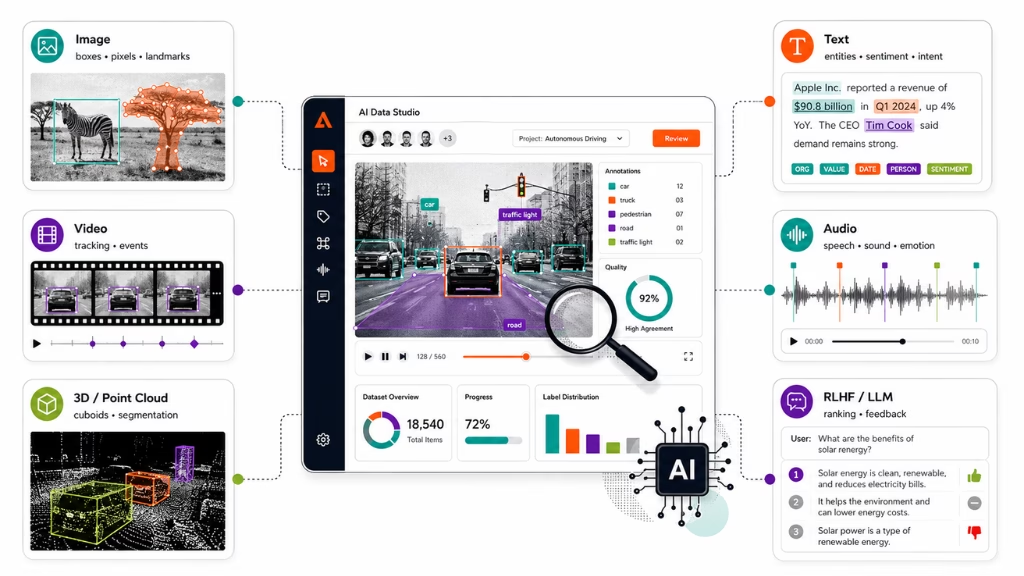
Data annotation is not one-size-fits-all. The techniques and tools depend on whether you are labeling text, images, video, audio, or 3D data. Each type plays a different role in real-world AI projects.
In my experience, matching the right technique to the data saves time and makes your work easier to automate or audit later.
Image Annotation
This involves outlining, marking, or tagging objects in pictures. It is the backbone of computer vision AI.
Common methods:
- Bounding boxes: Draw squares or rectangles around items (e.g., cars, faces)
- Semantic segmentation: Marking exact pixels belonging to an object
- Polygon or landmark annotation: Outlining shapes or points (e.g., for anatomy or retail)
Popular industries: medical imaging, retail (product detection), security, self-driving vehicles.
Text Annotation
Here, data annotators label words or phrases to teach natural language understanding.
Common tasks:
- Named entity recognition: Tag names, dates, products
- Sentiment labeling: Identify tone as positive, negative, or neutral
- Intent detection: Find what a user wants (e.g., booking, asking a question)
Popular industries: chatbots, customer feedback analysis, search engines, LLM (large language model) training.
Video Annotation
In video, the challenge is to label scenes frame by frame, track moving objects, or tag sequences over time.
Tasks:
- Object tracking: Following a car or person through many frames
- Event classification: Marking important moments (e.g., a stop sign being passed)
Popular uses: autonomous vehicle navigation, safety monitoring, sports analysis.
Audio Annotation
Audio annotation is used to train speech recognition or sound classification systems.
Tasks:
- Speech-to-text alignment: Labeling start and end of each spoken word
- Sound event tagging: Identifying specific noises (sirens, alarms, speech types)
- Emotion annotation: Detecting speaker mood in a clip
Industries: voice assistants, transcription services, customer support bots.
Point Cloud and 3D Annotation
This advanced method handles LiDAR, radar, or depth sensor data for 3D mapping.
Tasks:
- Object segmentation or labeling in 3D space
- Cuboid annotation for shape and distance measurements
Key uses: robotics, AR/VR, autonomous navigation.
LLM-Focused and RLHF Annotation (2026 Update)
LLM training, especially with RLHF (reinforcement learning from human feedback), needs annotators who judge AI responses or rank answers for alignment.
Tasks:
- Human evaluation of chatbot responses
- Ranking answer quality in conversational AIs
- Providing user-like feedback for model fine-tuning
In this area, clear thinking and fairness matter even more, as feedback shapes entire AI behaviors.
How to Build a Career in Data Annotation: Skills, Salary & Remote Opportunities
Data annotation has matured into a real tech career, not just a temp gig. You do not need a high-level degree to start, but attention to detail and willingness to learn are essential.
For job seekers and remote workers, the role offers flexibility, global reach, and potential paths into data management or machine learning.
Career Paths and Qualifications
Many begin as entry-level annotators and move into QA, specialization (e.g., medical annotation), or even ML operations. Upskilling with domain knowledge (linguistics, radiology, etc.) makes you more valuable.
Typical pathways:
- Entry-level (no degree required for basic projects)
- Upskilling to senior/QA lead
- Specialization (niche data, industry-specific annotation)
- Pathways into machine learning ops, data curation, or annotation team management
The mistake I see often is thinking you must know coding to start. While helpful for growth, most roles start with non-technical basics.
Salary Data and Remote/Freelance Expectations in 2026
Earning potential varies by region, data type, industry, and experience level.
| Role/Level | Typical Monthly Salary (USD) | Notes |
|---|---|---|
| Entry-Level Annotator | $900–$1,400 | Higher for complex data |
| Specialist/QA Lead | $1,500–$2,500 | Depends on domain expertise |
| Freelance/Project-based | $7–$15/hour | Rates on Upwork, other sites |
| Team Lead/Manager | $2,700–$4,500+ | Advanced QA, supervision |
Location and remote opportunities expand every year, with a growing share of jobs on freelance platforms or run by global teams.
Remote Work Realities and Job Platforms
Remote data annotation is now standard across the industry. The primary benefits are flexible hours and wide job access.
Benefits:
- Work from anywhere with internet
- Choice of global projects
- Flexibility for part-time or full-time
Challenges:
- Social isolation and repetitive work
- Need for strong self-discipline
- Competition for entry-level projects
Popular job marketplaces:
- Upwork (freelance)
- DataAnnotation.tech
- Riseup Labs
- Company career pages (AI, annotation vendors)
- Specialized agencies recruiting ML data labelers
A better approach is to build a specialization or QA skill to stand out in remote markets.
Certification and Upskilling
Microcredentials give a career boost, and some advanced doors open only for those with healthcare, linguistics, or advanced QA backgrounds.
Sample certifications:
- Annotation platform certifications (CVAT, SuperAnnotate badges)
- Coursera/Udemy microcourses in data annotation
- Riseup Labs’ own upskilling tracks (if available)
- Domain courses (medical, legal, etc.)
In my experience, showing you can follow strict guidelines and pass QA checks is more important than formal degrees.
What Are the Best Practices, Common Challenges, and Industry Standards?
Good annotation relies on consistency, fairness, and efficiency. Teams that skip clear guidelines or lack quality checks often struggle with project errors and bias.
Following industry best practices reduces mistakes and speeds up onboarding for new annotators.
Annotation best practices:
- Create and keep detailed annotation guidelines (with clear edge-case notes)
- Review and update guidelines as project needs evolve
- Use templates or checklists for every labeling task
- Minimize bias by promoting diversity among annotators and reviewing for fairness
- Share difficult cases with the whole team for consensus
- Regular QC audits with open feedback
Common challenges:
- Unclear instructions or shifting targets
- Inconsistent labeling across large remote teams
- Annotator bias or fatigue
- Handling ambiguous or subjective data
Sample Quality Assurance Checklist:
- Did I follow all label instructions?
- Are all required labels present and correct?
- Did I mark edge cases or uncertainties for review?
- Have I completed a peer or automated QC check?
From what I have observed, investing one extra hour in guideline review often saves days of costly rework.
How Riseup Labs Supports Data Annotation Teams and Careers
Choosing an expert partner streamlines annotation for any project scale. Riseup Labs offers annotation solutions, tool support, and career pathways for annotators and project teams.
From platform training to QA best practices, their guidance helps companies set up robust annotation pipelines and individuals upskill into high-demand roles.
If you want support with scalable annotation, workflow automation, or are searching for remote job opportunities with real QA systems, consider starting with Riseup Labs’ resources and solutions.
Conclusion
Data annotation is the critical first step for building reliable AI. Data annotators turn raw signals into structured knowledge, powering safe, ethical, and useful machine learning models across industries.
With demand growing for both technical and soft skills, this career path suits those who value precision and learning. Proper guidelines, modern tools, and strong QA separate average workflows from great outcomes.
Riseup Labs and similar expert partners offer both annotation services and the chance for individuals to build a lasting career in AI training data. Reliable annotation will remain the hidden engine of every serious AI innovation.
For teams ready to elevate quality, or for job seekers considering annotator roles, the right resources, tools, and training make the difference. The future belongs to those who understand—and invest in—the people and processes that make AI work.
If you are interested, download our checklist or join a practice project now to take the next step into real-world data annotation.
FAQs
What does a data annotator do?
A data annotator labels raw data—such as images, text, audio, or video—to create training datasets for AI model development, following strict guidelines and using annotation tools.
What skills are required to be a good data annotator?
Attention to detail, patience, ability to follow complex instructions, strong communication, adaptability, and basic tech literacy are required to succeed as a data annotator.
What tools do data annotators use?
Data annotators use tools like CVAT, SuperAnnotate, Labelbox, and VGG Image Annotator to label images, text, audio, or video for machine learning.
Is data annotation a good remote job?
Yes, data annotation is a flexible remote job. It offers global access, project variety, and part-time or full-time schedules, especially for reliable self-starters.
What are the types of data annotation?
Main types are image annotation, text labeling, video annotation, audio annotation, 3D point cloud labeling, and LLM fine-tuning tasks for conversational AI.
How do data annotators ensure annotation quality?
Annotated data goes through self-review, peer review, consensus labeling, and automated or manual quality control checks to ensure high accuracy.
Can anyone become a data annotator?
Most entry-level data annotation roles do not require a degree. Anyone with good attention to detail, tech skills, and willingness to learn can start.
What is the typical workflow for a data annotator?
The workflow includes guideline review, tool setup, data labeling, quality checks, peer review, and submitting finished annotations, often followed by feedback and revisions.
How important is data annotation for AI and ML?
Data annotation is essential. It defines the quality and reliability of machine learning models. Without well-labeled data, AI cannot learn or make accurate decisions.
What is the salary or earning potential for data annotators?
In 2026, data annotator salaries range from $900 to $2,500 monthly for full-time roles. Freelancers usually earn $7–$15 per hour, depending on skill and specialization.
This page was last edited on 5 August 2026, at 10:45 am

Start a conversation with our team to solve complex challenges and move forward with confidence.