Computer vision is a branch of artificial intelligence that allows machines to understand and interpret visual information from images, videos, and real-world environments. Using AI, deep learning, and image processing, computer vision helps systems recognize objects, detect patterns, analyze scenes, and make intelligent decisions.
Every day, humans instantly recognize faces, understand objects, read signs, and interpret the world around them without even thinking. But teaching machines to see and understand the same visual information is one of the biggest challenges in artificial intelligence.
This is where computer vision comes in.
Computer vision enables machines to analyze and understand images, videos, and visual data by using AI and deep learning techniques. From unlocking smartphones with facial recognition and helping self-driving cars navigate roads to supporting doctors in medical diagnosis, computer vision is transforming how machines interact with the world.
As AI continues to evolve, computer vision is becoming a powerful technology behind smarter automation, improved decision-making, and innovative solutions across industries.
What is Computer Vision?
Computer vision is a subfield of artificial intelligence that focuses on enabling computers to interpret and make decisions based on visual data such as images and videos much like the human visual system. Unlike simple image processing, which might involve adjusting brightness or removing noise, computer vision aims to understand and analyze the content of visual inputs in a meaningful way.
At a fundamental level, computer vision systems are designed to answer questions like:
- What objects are present in an image?
- Where are those objects located?
- How are they moving over time?
- What is happening in the scene?
To do this, computer vision combines principles from machine learning, pattern recognition, neural networks, and signal processing. Thanks to advances in deep learning, particularly convolutional neural networks (CNNs), modern computer vision systems can now perform tasks with remarkable accuracy from facial recognition and medical diagnosis to object tracking in autonomous vehicles.
Two Key Technologies of Computer Vision
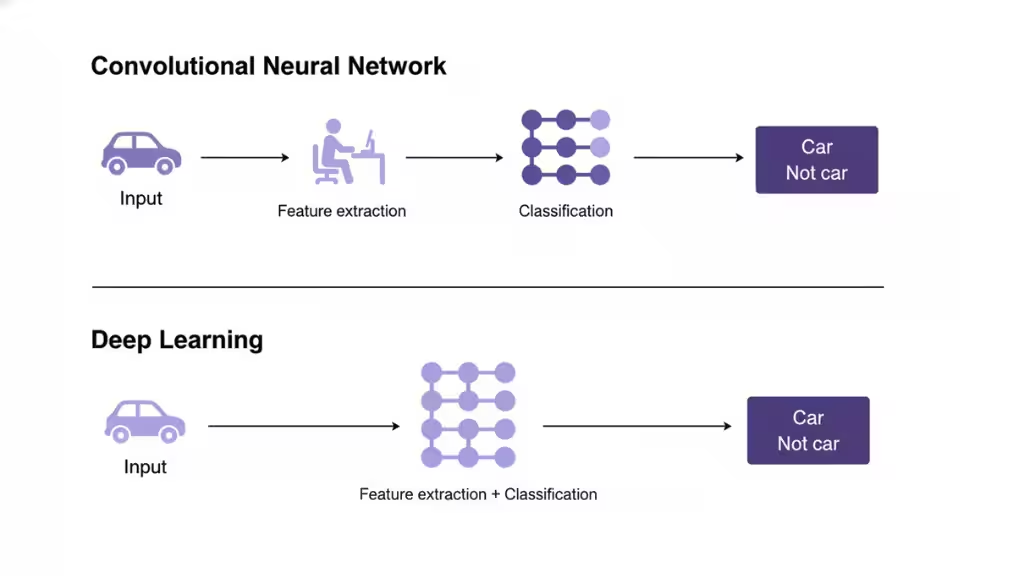
Two key technologies of computer vision are Deep Learning and Convolutional Neural Networks (CNNs). Deep learning enables computers to learn from large datasets without explicit programming, while CNNs are a specific type of deep learning architecture that is especially effective at processing image data by breaking it down into pixels and identifying patterns through mathematical operations.
Deep Learning
What it is: A subset of machine learning that uses artificial neural networks with multiple layers to learn from data.
How it works: By being exposed to vast amounts of visual data, the network can autonomously identify patterns and features in images.
Application: It allows systems to perform tasks like object recognition and image classification by learning to differentiate between visual inputs on their own.
Convolutional Neural Networks (CNNs)
What it is: A specialized type of neural network designed specifically for processing grid-like data, such as images.
How it works: CNNs process images by breaking them into smaller parts (pixels) and applying mathematical operations called “convolutions” to detect features like edges, corners, and textures.
Application: This process is crucial for analyzing visual data, enabling systems to “learn” from images with increasing accuracy through multiple iterations.
How Does Computer Vision Work?
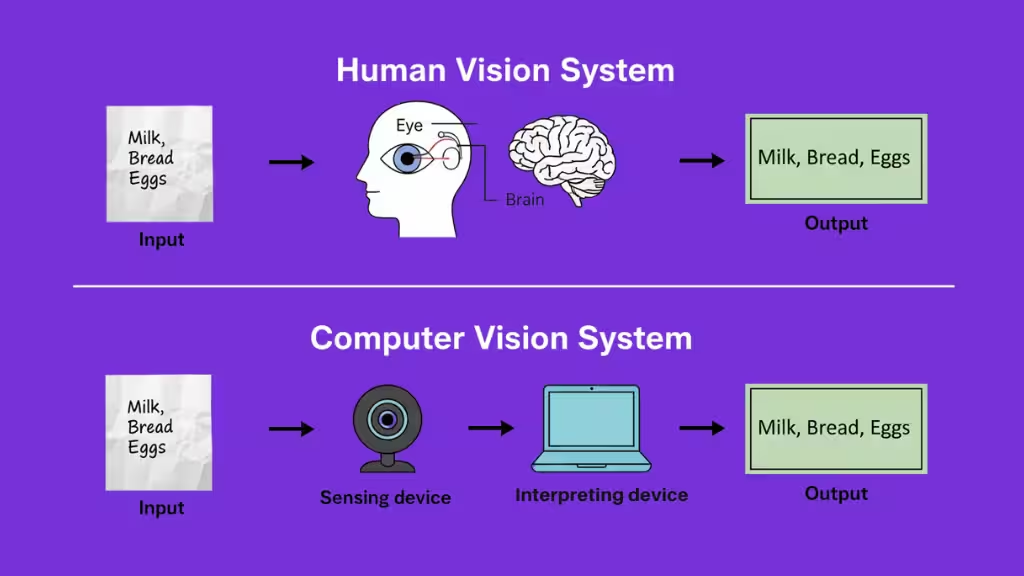
A computer vision system may seem simple from the outside: a camera captures an image, and the AI identifies what it sees. However, behind this process is a complex pipeline where machines transform raw visual data into meaningful information.
Similar to how the human brain processes what our eyes see, computer vision systems capture, analyze, and interpret visual inputs through multiple stages. These stages enable machines to recognize objects, understand environments, and make intelligent decisions.
1. Image Acquisition: Capturing Visual Data
The first step is collecting visual information from the real world. Cameras, scanners, drones, medical imaging devices, and other sensors capture images or videos that become the foundation for the computer vision system.
This raw visual data can come in different formats, such as images (JPEG, PNG) or video streams (MP4). The quality and accuracy of this input directly affect how well the system performs in later stages.
2. Image Preprocessing: Cleaning and Preparing the Data
Raw images often contain unwanted noise, inconsistent lighting, or variations that can make analysis difficult. Before an AI model can understand the image, the data needs to be cleaned and optimized.
During preprocessing, computer vision systems may:
- Resize images to a standard format
- Reduce noise and unwanted details
- Adjust brightness and contrast
- Normalize image data
- Improve important visual patterns
This step ensures that the AI model receives clear and consistent information, improving accuracy and reliability.
3. Feature Extraction: Finding Important Visual Patterns
After the image is prepared, the system begins identifying meaningful patterns within the visual data.
Traditional computer vision methods focus on manually identifying features such as:
- Edges
- Shapes
- Colors
- Textures
- Object boundaries
Modern AI-based systems use deep learning models that automatically learn these features from large amounts of data. Instead of being programmed to look for specific patterns, neural networks discover important visual details on their own.
4. Model Training and Analysis: Teaching Machines to Understand Images
Once visual features are extracted, machine learning models analyze them and connect patterns with real-world meaning.
During training, the AI system learns from thousands or millions of labeled examples. For instance, a model designed to recognize cars learns by analyzing many images of different vehicles until it understands common patterns.
Depending on the task, different AI models can be used for:
- Image classification: Identifying what an image contains
- Object detection: Finding and locating objects within an image
- Image segmentation: Separating different objects or areas in an image
- Visual recognition: Understanding people, environments, or activities
At this stage, the system moves beyond recognizing pixels and begins understanding what those pixels represent.
5. Output and Decision-Making: Turning Vision Into Action
The final stage is where computer vision delivers useful results. The system converts its analysis into actionable information, such as identifying an object, detecting a problem, or triggering an automated response.
The output may include:
- Object labels
- Detection boxes around objects
- Segmented image areas
- Text descriptions
- Automated decisions
For example, in a self-driving vehicle, computer vision can detect pedestrians, traffic signs, and other vehicles, allowing the system to make real-time driving decisions.
In many applications, the results are connected with other systems that automate actions, generate insights, or continuously improve performance.
Computer Vision Tasks
Computer vision algorithms can be trained on many different tasks. Each task focuses on a specific way of interpreting visual data, from simple classification to detailed scene understanding and quality inspection. The most common tasks include image classification, object detection, image segmentation, object tracking, face and person recognition, edge detection, image restoration, feature matching, scene understanding, scene reconstruction, optical character recognition, video motion analysis, pose estimation, image generation, and visual inspection.
- Image Classification
- Object Detection
- Image Segmentation
- Object Tracking
- Face and Person Recognition
- Edge Detection
- Edge Detection
- Image Restoration
- Feature Matching
- Scene Understanding
- Scene Reconstruction
- Optical Character Recognition
- Video Motion Analysis
- Pose Estimation
- Image Generation
- Visual Inspection
Image Classification
Image classification assigns one or more labels to an image based on what it contains. Given an input image, the model predicts the most likely class from a predefined set, such as cat, dog, tumor, or no tumor.
Modern systems typically use convolutional neural networks (CNNs) trained on large labeled datasets. During training, the network learns to detect patterns such as shapes, textures, and colors that distinguish one class from another. In production, classification is often the first step in an automated decision pipeline, for example, deciding whether a medical image should be flagged for further review.
Object Detection
Object detection identifies and localizes multiple objects within a single image or frame. It combines two core ideas:
- Object localization, which predicts where objects are by drawing bounding boxes.
- Image classification, which assigns a label to each box (e.g., car, bus, pedestrian).
In traffic footage, for example, an object detection model can detect all vehicles, classify them, and show where they appear in the scene.
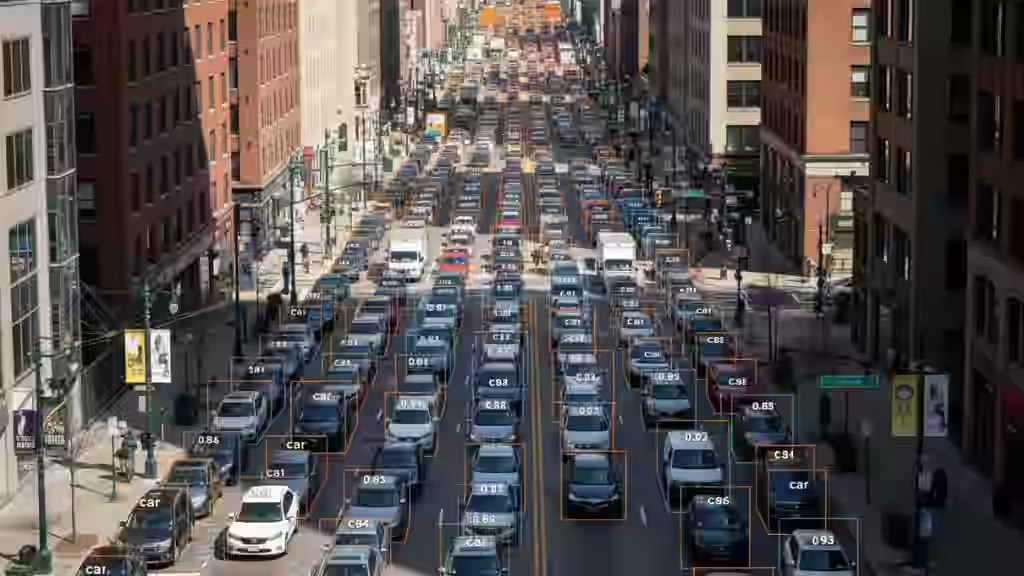
Common architectures include R-CNN-style two-stage detectors, which first propose regions of interest and then refine them, and single-stage detectors such as YOLO (You Only Look Once), which perform localization and classification in one pass and are fast enough for real-time use.
Image Segmentation
Image segmentation provides a pixel-level understanding of an image. Instead of just drawing boxes, it divides the image into segments and assigns each pixel to a class or object instance.
Segmentation is more precise than bounding boxes, especially when objects overlap or have irregular shapes. In medical imaging, for example, segmentation can outline tumors or organs with high accuracy, rather than just indicating a rough region.
Segmentation tasks are often grouped into three types: semantic segmentation, where every pixel is labeled with a category (road, building, sky); instance segmentation, where pixels are grouped by individual object instances; and panoptic segmentation, which combines both instance-level separation and full-scene labeling.
Object Tracking
Object tracking follows an object as it moves across a sequence of frames in a video. Once an object is detected, the tracker keeps its identity over time, even as it changes position, scale or orientation.
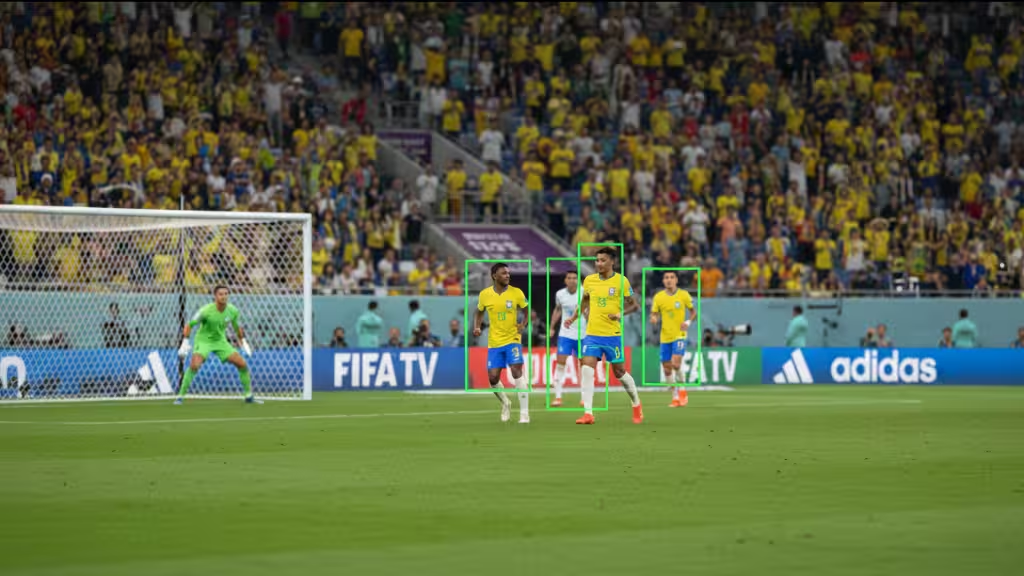
Tracking is essential in scenarios where motion and behavior matter, such as monitoring a person across surveillance cameras, tracking a ball in a sports broadcast, or following a robot’s target in a factory. Many modern systems combine frame-by-frame detection with motion models to maintain consistent tracks.
Face and Person Recognition
Face and person recognition focus on identifying who or what a person is, not just detecting their presence. A typical pipeline includes:
- Detecting the face or person in the image.
- Extracting distinctive features, such as distances between facial landmarks or body proportions.
- Comparing these features to stored representations to determine identity or similarity.
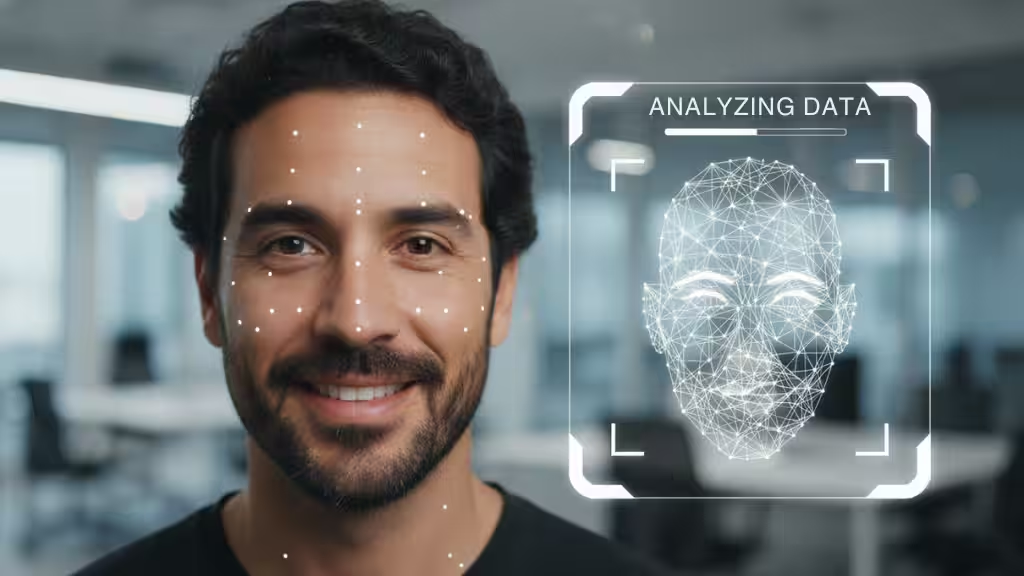
This capability underlies biometric authentication (like unlocking smartphones with a face scan), access control systems, and large-scale image search, where users want to find all photos of a particular person in a collection.
Edge Detection
Edge detection finds sharp changes in intensity or color that usually correspond to object boundaries, lines, and contours. Algorithms such as Sobel or Canny filters highlight these transitions and produce an edge map of the scene.
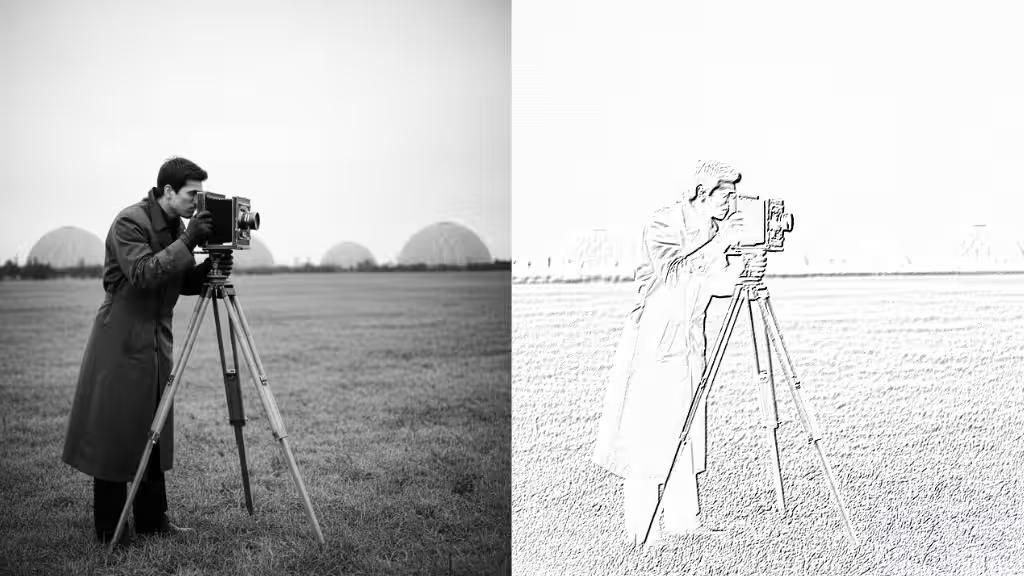
Edge information is often a first step in more advanced tasks. It simplifies the image, making it easier to detect shapes, extract features, or separate foreground from background.
Image Restoration
Image restoration aims to recover a clean, high-quality image from a degraded version. Degradation may be caused by noise, blur, compression artifacts, low resolution or poor lighting conditions.
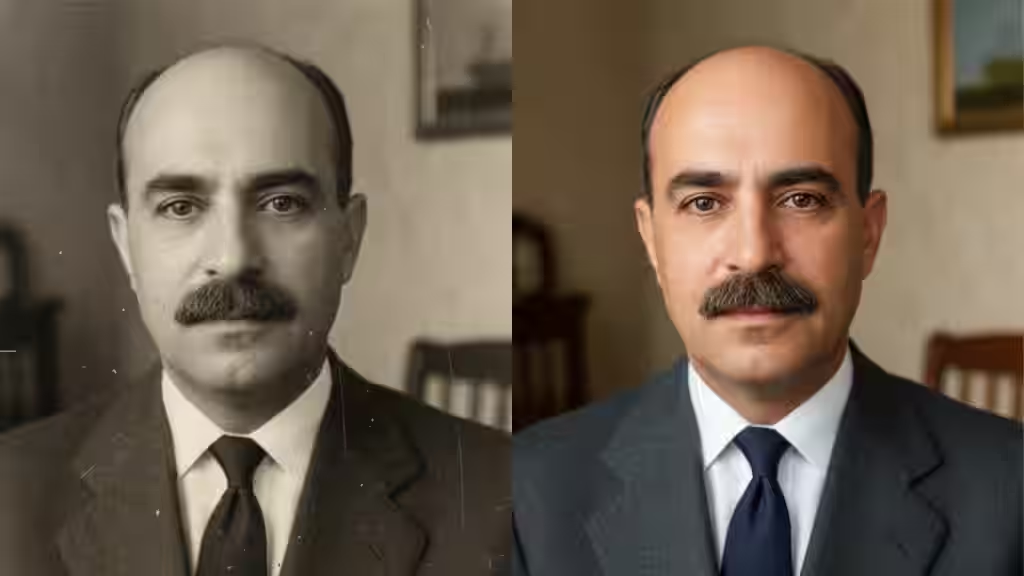
Traditional approaches use mathematical models and filters, while modern methods rely heavily on deep learning, such as denoising autoencoders or super-resolution networks. Restoration is critical in fields like surveillance, astronomy, historical archiving, and medical imaging, where data quality cannot be easily improved at capture time.
Feature Matching
Feature matching identifies corresponding points or regions between two or more images. The system first detects local features (for example, corners or distinctive textures) and computes descriptors for them, then finds matches across images based on similarity.
This task is foundational for many higher-level applications, including panorama stitching, 3D reconstruction, visual localization, and augmented reality. By knowing how images relate to each other, systems can align them, estimate camera motion or overlay virtual content consistently.
Scene Understanding
Scene understanding goes beyond detecting individual objects. It aims to interpret the overall context of a scene and the relationships between entities: who is doing what, where, and to whom.
Models combine object detection, segmentation and sometimes depth estimation to build a structured representation of the scene. Techniques such as graph neural networks can model spatial and semantic relationships between objects, while vision-language models can generate natural language descriptions like “a person crossing the street in front of a moving car.”
This richer understanding supports applications such as autonomous driving, robotics, and smart environments, where decisions depend on the full context, not just isolated objects.
Scene Reconstruction
Scene reconstruction builds a three-dimensional representation of an environment from two-dimensional images or video. By analyzing multiple views, estimating depth, and inferring geometry, the system creates a 3D model that captures the shape and layout of the scene.
This is used in robotics (for navigation and manipulation), AR/VR (for realistic virtual environments), architecture, and digital twins. Reconstruction can be dense, generating full surface models, or sparse, focusing on key structures and points.
Optical Character Recognition
Optical character recognition (OCR) converts text embedded in images, scanned documents or video frames into machine-readable text.
A typical OCR pipeline includes image capture, preprocessing (such as binarization, noise reduction, and deskewing), and text recognition. The recognition stage locates characters or words and classifies them based on learned patterns.
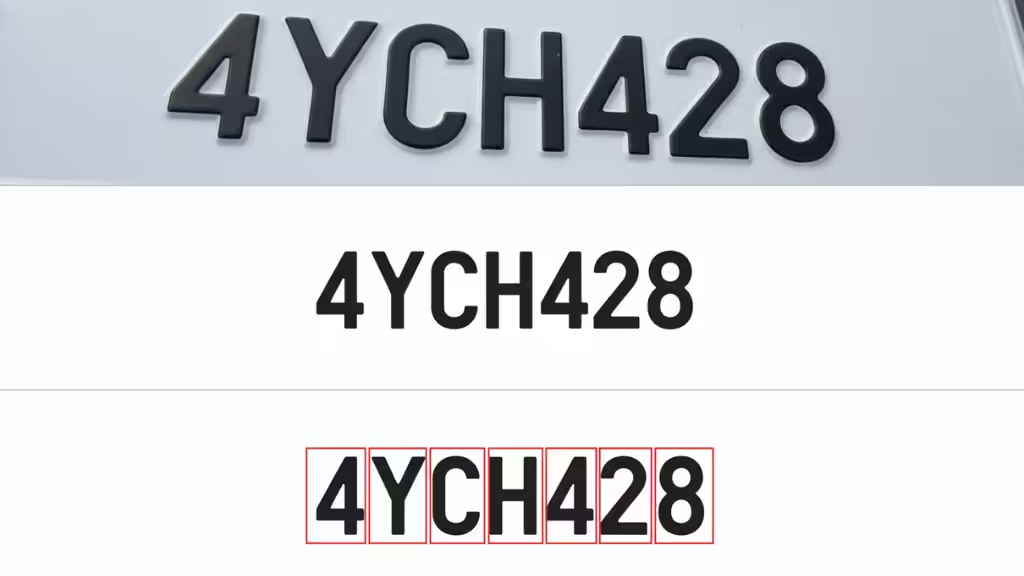
Modern OCR systems use convolutional and transformer-based architectures to handle different fonts, layouts, and languages. They often work at the word or line level rather than one character at a time, which improves speed and robustness. OCR is central to document digitization, automated form processing, and license plate recognition.
Video Motion Analysis
Video motion analysis focuses on understanding how objects move across time. It may compute optical flow (pixel-level motion), extract trajectories for tracked objects, or detect unusual movement patterns.
This task is used in traffic analysis, crowd monitoring, sports performance analysis, and safety systems. For example, motion analysis can detect sudden runs, falls, or abnormal behavior that may require human attention.
Pose Estimation
Pose estimation estimates the position and orientation of key points on a body or object, typically represented as a skeleton of joints. For humans, this includes shoulders, elbows, knees, hips, and other landmarks.
By tracking these key points, pose estimation enables gesture recognition, activity analysis, and fine-grained motion tracking. It powers applications such as fitness apps that evaluate exercise form, VR systems that mirror a player’s movements, and industrial robots that react to worker positions.
Image Generation
Image generation uses generative models to create synthetic images from scratch, from noise, or from input conditions such as text prompts.
Common model families include diffusion models, which iteratively denoise random inputs to produce realistic images; generative adversarial networks (GANs), which train a generator and discriminator in competition; and variational autoencoders (VAEs), which learn compressed representations of images and sample from that latent space.
Generated images are used for creative content, design exploration, simulation, data augmentation, and more. When combined with language models, these systems can turn natural-language descriptions into detailed visuals.
Visual Inspection
Visual inspection automates the process of checking physical products and structures for defects. Cameras capture images or video of the target, and computer vision models analyze them to spot anomalies such as cracks, scratches, misalignments, or missing components.
Object detection highlights where defects are located, while segmentation can outline their precise shape and size. Visual inspection systems are widely used in manufacturing, electronics, automotive, food processing, and infrastructure maintenance to improve quality, reduce manual labor, and increase safety.
Use Cases of Computer Vision Across Industries
Computer vision has moved from being an experimental AI technology to something businesses actively use every day. Whenever a machine recognizes a face, analyzes a medical scan, detects a product defect, or understands a road scene, computer vision is working behind the scenes.
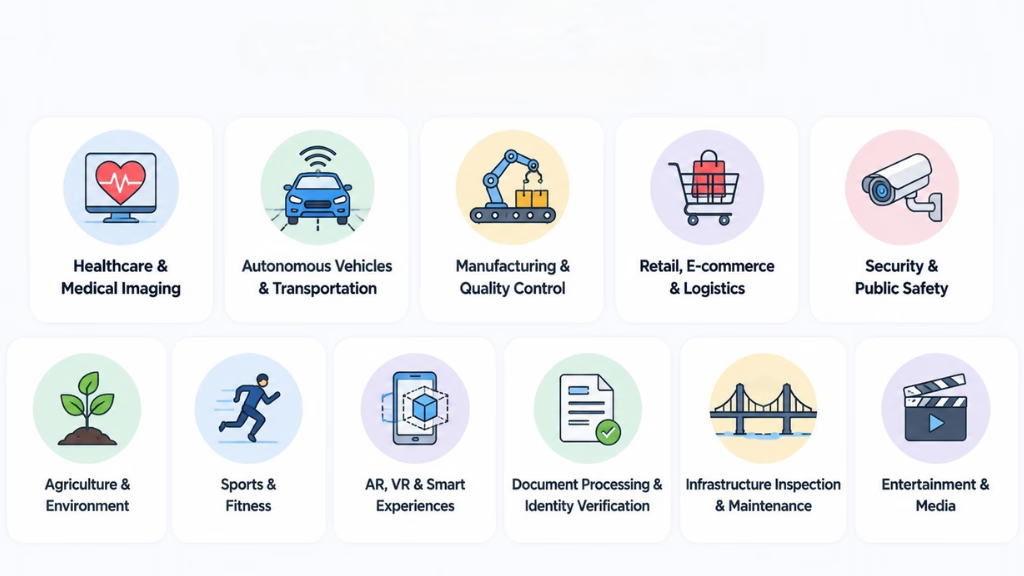
Its biggest advantage is simple: it helps machines understand visual information and turn it into useful insights. From improving healthcare decisions to automating industrial processes, computer vision is creating new possibilities across industries.
Healthcare and Medical Imaging
Healthcare is one of the areas where computer vision has the greatest impact. Medical professionals often need to analyze thousands of images, and AI can help identify patterns that may be difficult to detect manually.
Computer vision is used for analyzing X-rays, CT scans, MRIs, and pathology images to help detect diseases, identify abnormalities, and support faster diagnosis. While it does not replace doctors, it acts as an additional tool that helps medical teams make more informed decisions.
Autonomous Vehicles and Transportation
Self-driving vehicles rely heavily on computer vision to understand the world around them. Cameras and AI models work together to identify vehicles, pedestrians, traffic signals, road signs, and lane markings in real time.
This technology is also improving everyday transportation systems by helping monitor traffic flow, detect accidents, and create safer roads.
Manufacturing and Quality Control
In manufacturing, even small errors can lead to major losses. Computer vision helps companies automate inspections and maintain consistent product quality.
AI-powered cameras can identify defects, check product measurements, inspect components, and guide robotic systems on production lines. This allows manufacturers to detect problems earlier, reduce waste, and improve overall efficiency.
Retail, E-commerce, and Logistics
Computer vision is changing the way people shop and how businesses manage products. Online stores use visual search technology to help customers find products by uploading images, while physical stores use AI to monitor inventory and understand customer behavior.
In warehouses, computer vision helps track packages, verify labels, manage stock, and support automated systems that make order fulfillment faster and more accurate.
Security and Public Safety
Security systems are becoming smarter with the help of computer vision. Instead of relying only on people watching camera feeds, AI can analyze video footage and identify important events automatically.
Applications include identity verification, access control, crowd monitoring, and detecting unusual activity. This helps security teams focus on real threats instead of manually reviewing hours of footage.
Agriculture and Environmental Monitoring
Computer vision is helping farmers make better decisions by providing insights that are difficult to gather manually. Images from drones, satellites, and field cameras can be analyzed to monitor crop health, detect diseases, and identify areas that need attention.
The technology is also used for environmental monitoring, helping track changes such as deforestation, flooding, and pollution.
Sports and Fitness
Sports teams use computer vision to better understand player performance and improve training strategies. AI systems can track player movement, analyze game footage, and generate detailed performance insights.
In fitness applications, computer vision can analyze body movements and provide feedback on exercise form, making personalized training more accessible.
Augmented Reality and Smart Experiences
Computer vision is a key technology behind many augmented reality (AR) and virtual reality (VR) experiences. It allows devices to understand surroundings, track movement, and place digital elements into the real world.
From trying furniture in your home before buying it to controlling devices through gestures, computer vision is making digital interactions more natural.
Document Processing and Identity Verification
Many businesses still deal with large amounts of paperwork and manual data entry. Computer vision helps automate these processes by extracting information from documents such as invoices, receipts, forms, and identity cards.
Banks, fintech companies, and other organizations use these systems for faster onboarding, document verification, and reducing repetitive administrative work.
Infrastructure Inspection and Maintenance
Inspecting bridges, pipelines, power lines, and industrial equipment can be expensive and risky. Computer vision allows organizations to monitor these assets using cameras, drones, and automated systems.
AI can identify issues such as cracks, corrosion, or equipment damage, helping companies perform maintenance before problems become more serious.
Entertainment and Creative Industries
Computer vision is also transforming creative fields. Filmmakers, game developers, and content creators use it for motion capture, visual effects, video editing, and content management.
It helps automate time-consuming creative tasks while giving artists new ways to design and experiment.
Computer Vision Frameworks and Tools
Modern computer vision is powered by a rich ecosystem of libraries and frameworks. These tools handle low-level image operations, high-level deep learning workflows and end-to-end deployment, so you don’t have to reinvent everything for each project. Below are some of the most widely used tools for building computer vision systems.
OpenCV
OpenCV (Open Source Computer Vision Library) is one of the oldest and most popular libraries for computer vision. It focuses on classical image processing and computer vision algorithms and is written in C++ with bindings for Python and other languages.
With OpenCV, you can:
- Load, save and manipulate images and video streams
- Perform operations like filtering, edge detection, thresholding and morphological transforms
- Detect features such as corners and keypoints (e.g., ORB, SIFT-like features)
- Work with geometric transforms, camera calibration and stereo vision
OpenCV is often used for preprocessing, quick prototyping and traditional computer vision pipelines. Even in deep learning systems, it’s common to use OpenCV for data loading, augmentation and visualization while delegating model training to a deep learning framework.
PyTorch
PyTorch is a deep learning framework widely adopted by researchers and practitioners, especially for computer vision and natural language processing. It provides a flexible, Pythonic interface and dynamic computation graphs, which makes experimentation and debugging more intuitive.
For computer vision, PyTorch offers:
- Tensors and GPU acceleration for efficient numeric computation
- High-level APIs to define and train neural networks
- TorchVision, a companion library with common vision datasets, model architectures (like ResNet, Faster R-CNN, Mask R-CNN) and image transforms
PyTorch is heavily used in research because it makes it easy to implement custom architectures and training loops. It is also used in production through libraries like TorchServe, ONNX export and integration with deployment frameworks.
TensorFlow
TensorFlow is another major deep learning framework, widely used in industry. It supports both Python and other languages and provides a scalable runtime for training and deploying models on CPUs, GPUs and TPUs.
For computer vision, TensorFlow provides:
- Keras, a high-level API that simplifies model definition and training
- TensorFlow Vision and example models for classification, detection and segmentation
- Tools for serving models in production, including TensorFlow Serving, TensorFlow Lite (for mobile and embedded) and TensorFlow.js (for running models in the browser)
TensorFlow is often chosen for larger, production-grade systems where tooling around deployment, model management and cross-platform support is important. Many pre-trained computer vision models are available in TensorFlow format through model zoos and hubs.
YOLO (You Only Look Once)
YOLO is a family of object detection architectures designed for real-time performance. Unlike two-stage detectors that first propose regions and then classify them, YOLO performs detection in a single pass, directly predicting bounding boxes and class scores from the input image.
Key characteristics of YOLO-based models:
- End-to-end detection in one forward pass
- Good trade-off between speed and accuracy, suitable for live video and embedded devices
- Implementations available in frameworks like PyTorch, and often wrapped in easy-to-use repositories and tools
Developers use YOLO when they need fast, reasonably accurate object detection for tasks such as traffic monitoring, people counting, retail analytics or robotics. Variants and forks of YOLO provide options tuned for speed, accuracy or specific deployment targets.
scikit-image
scikit-image is a Python library for image processing built on top of NumPy and SciPy. It focuses on clear, well-documented implementations of classical algorithms rather than deep learning.
With scikit-image, you can:
- Perform common image processing routines (filtering, denoising, morphology)
- Work with segmentation, feature extraction, and color space conversions
- Analyze measurements from labeled regions, such as area, perimeter or intensity
scikit-image fits well in scientific and analytical workflows, especially in combination with libraries like pandas, matplotlib and scikit-learn. It is often used when you need interpretable, algorithmic processing rather than training deep models, or as a lightweight alternative to OpenCV in pure Python environments.
Together, these tools cover most of the computer vision lifecycle: OpenCV and scikit-image for classical processing, PyTorch and TensorFlow for deep learning, and YOLO as a specialized solution for high-performance object detection. A typical project will mix several of them for example, using OpenCV for video capture and preprocessing, PyTorch or TensorFlow for model training, and a YOLO-based model for fast detection in production.
A Brief History of Computer Vision
Computer vision might feel like a very modern field, but its roots go back more than half a century. The story of computer vision is really the story of three converging trends: better algorithms, more data, and more compute.
| Years / Period | Description |
|---|---|
| 1950s–1960s | Early work on pattern recognition and artificial neurons. Systems like the Mark I Perceptron showed that simple image classification (e.g., distinguishing basic shapes) was possible, marking some of the first practical “seeing” machines. Computer vision began to emerge as a distinct research area, focusing on edges, simple 3D reconstruction, and basic pattern recognition. |
| 1970s–1980s | Development of core image processing and feature extraction techniques. Researchers built algorithms for filtering, edge detection, and simple feature detectors, enabling more robust analysis of real-world images. Early end-to-end pipelines appeared in robotics and industrial inspection, combining image capture, preprocessing, and rule-based decision logic. |
| 1990s–2000s | Shift toward statistical learning with engineered features. Computer vision systems relied on hand-crafted descriptors (edges, corners, textures, SIFT-like features) combined with machine learning models such as SVMs and boosted trees. CNNs were known but not yet practical at scale, so “classical vision” (features + shallow models) dominated applications like face detection and document analysis. |
| 2010s | Deep learning revolutionized computer vision. Large labeled datasets, GPUs and improved training methods enabled deep CNNs to outperform classical approaches by a large margin. Models like AlexNet, VGG, Inception, and ResNet set new benchmarks in image classification and were quickly adapted for object detection, segmentation, pose estimation, and more, pushing performance to near or above human level on several benchmarks. |
| 2020s–present | Rise of transformers, foundation models, and multimodal vision. Vision Transformers (ViT) became strong alternatives to CNNs for many tasks. Large multimodal models jointly process images and text, enabling capabilities like image captioning, visual question answering and text-to-image generation. Computer vision is now tightly integrated with broader AI systems and used as a core component in many real-world products and services. |
Future Trends of Computer Vision
Computer vision is evolving quickly. Instead of building AI models that perform only one specific task, the industry is moving toward smarter systems that can understand images, videos, and real-world environments more naturally.
Here are some of the major trends shaping the future of computer vision
Foundation Models and General-Purpose Vision AI
Traditional computer vision models were usually designed for specific tasks, such as detecting objects or classifying images. However, newer vision foundation models are changing this approach by allowing one model to handle multiple tasks.
These models can be adapted for different applications with less training data, making computer vision solutions faster and easier to develop.
Multimodal AI and Vision-Language Models
The future of computer vision goes beyond recognizing images. Modern AI systems are learning to combine visual information with text, audio, and other data sources.
Vision-language models can understand images, answer questions about visual content, generate descriptions, and follow instructions based on what they see.
This will make computer vision systems more interactive and closer to human-like understanding.
Edge AI and Real-Time Computer Vision
More computer vision applications are moving from cloud processing to devices such as smartphones, cameras, robots, and vehicles.
Edge AI allows systems to process visual data directly on the device, providing:
- Faster responses
- Improved privacy
- Lower operating costs
- Real-time decision-making
This is especially important for autonomous vehicles, smart cameras, robotics, and industrial automation.
Generative AI and Synthetic Data
Generative AI is creating new opportunities for computer vision by producing realistic images, videos, and synthetic training data.
Synthetic data helps businesses train AI models for situations where real-world examples are limited, such as rare manufacturing defects, medical conditions, or dangerous environments.
This allows organizations to develop more accurate and reliable vision systems.
3D Vision and AI-Powered Robotics
Future computer vision systems will become better at understanding three-dimensional environments. Advances in 3D vision, spatial understanding, and AI-powered robotics are helping machines interact more effectively with the physical world.
These technologies will support applications such as:
- Advanced robotics
- Augmented and virtual reality
- Digital twins
- Autonomous machines
Efficient and Responsible Computer Vision
As computer vision models become more powerful, businesses are focusing on making them faster, smaller, and more responsible.
Future improvements will focus on:
- Reducing model size and energy usage
- Improving accuracy with less data
- Reducing bias in AI systems
- Protecting user privacy
- Making AI decisions more transparent
Responsible AI will become increasingly important as computer vision expands into areas like healthcare, security, and public infrastructure.
Conclusion
Computer vision has evolved from simple pattern recognition experiments into a mature field that underpins many of today’s most advanced AI systems. At its core, it gives machines the ability to see: to capture visual data, process it, understand it and act on it. That capability now powers applications from medical imaging and autonomous vehicles to retail analytics, robotics, manufacturing and creative tools.
Looking ahead, computer vision will be even more tightly integrated with language, robotics and reasoning. For anyone working in AI today, understanding computer vision is not optional; it’s a core skill that will continue to open doors to new ideas, products and research directions.
FAQs
What is computer vision in simple terms?
Computer vision is a field of AI that teaches computers to understand and interpret visual information from images and videos. Instead of just storing or displaying pictures, computer vision systems analyze them to answer questions like “What is in this image?”, “Where are the objects?” and “What is happening here?”
How is computer vision different from image processing?
Image processing focuses on transforming images enhancing contrast, removing noise, resizing or filtering. Computer vision goes a step further and tries to understand the content of the image. In other words, image processing changes how an image looks; computer vision tries to reason about what the image means.
Is computer vision the same as AI or machine learning?
Computer vision is a subfield of artificial intelligence, and most modern systems rely heavily on machine learning and deep learning. AI is the broader concept of machines performing intelligent tasks, machine learning is the set of techniques used to learn from data, and computer vision is about applying these ideas to visual data specifically.
What are the most common computer vision tasks?
Some of the most common tasks include image classification (assigning labels to images), object detection (finding and labeling objects in images), image segmentation (pixel-level labeling), object tracking (following objects in video), face and person recognition, OCR (reading text in images), pose estimation, image generation and automated visual inspection.
Which programming language should I use to start with computer vision?
Python is the most popular choice for modern computer vision because it has strong ecosystem support: OpenCV, scikit-image, PyTorch, TensorFlow, many pre-trained models and a large community. C++ is also common in performance-critical or embedded applications, often in combination with Python for prototyping.
Do I need a deep learning background to work with computer vision?
You can start without a deep learning background by using classical techniques and pre-built models from libraries. However, for modern, high-performance systems, understanding the basics of deep learning (neural networks, convolution, training, overfitting, and evaluation) is increasingly important. A practical approach is to start with ready-made models, then learn the underlying concepts as you customize and fine-tune.
What kind of data do I need to train a computer vision model?
You typically need a large set of images (or video frames) that are representative of the problem you want to solve, along with labels. For classification, labels might be categories; for detection, bounding boxes; for segmentation, pixel-level masks. Newer approaches like self-supervised learning and synthetic data can reduce the amount of manual labeling required, but having clean, relevant data is still crucial.
Where is computer vision used in everyday life?
Even if you don’t see it, computer vision is running behind the scenes in many places: face unlock on phones, automatic tagging in photo apps, product recommendations based on what you look at, traffic cameras, warehouse robots, quality inspection in factories, content moderation on social platforms and document scanning in banking apps.
Is computer vision only for big tech companies?
No. With open-source libraries, cloud APIs and pre-trained models, small teams and even individual developers can build useful vision applications. You can start with simple use cases like automatic document scanning, basic defect detection or small-scale analytics and scale up as your needs and resources grow.
What are the main challenges and risks in computer vision?
Some key challenges include dealing with limited or biased data, handling edge cases and environmental variation (lighting, occlusion, motion blur), ensuring robustness to attacks or adversarial inputs, and meeting latency and resource constraints on edge devices. On the risk side, face and person recognition raise privacy and fairness concerns, and vision errors in safety-critical domains (such as healthcare or autonomous driving) can have serious consequences. Designing, testing and monitoring systems carefully is essential.
This page was last edited on 2 September 2026, at 12:28 pm

Start a conversation with our team to solve complex challenges and move forward with confidence.