
The AI data annotation process is a step-by-step workflow: set project goals, write annotation guidelines, prepare data, choose the right tool, train annotators, annotate, review for quality, and refine. This approach is key for trusted, effective machine learning results.
Getting AI projects right is harder than ever—quality data is now the main barrier. Without precise, labeled datasets, even the best AI models fall short in the real world. Every team I know faces intense pressure to deliver trustworthy, production-ready AI.
The real issue is that most bottlenecks trace back to data annotation mistakes or weak processes. I have seen teams overspend, miss deadlines, or struggle with bias just because the annotation workflow was flawed.
If you want results you can trust, this guide will unpack the entire AI data annotation process for 2026: modern step-by-step workflow, tool selection, common pitfalls, quality assurance, and up-to-date industry frameworks that smooth collaboration from start to finish.
What is the AI Data Annotation Process and Why Does It Matter?
The AI data annotation process is the set of steps used to label raw data—like images, text, audio, video, or 3D scans—so machine learning models can learn from it.
In my experience, the strength of an AI model depends almost entirely on the precision and consistency of its training data. Labeled data fuels algorithms to see patterns, make predictions, and generalize reliably. Poor annotation causes serious issues—lower accuracy, hidden bias, unpredictable errors—and leaves business teams guessing instead of making decisions with confidence.
You see this across every sector. Autonomous vehicles need millions of labeled images for safe navigation. In healthcare, annotated scans drive accurate diagnoses. The global data collection and labeling market is estimated to reach $6.3 billion in 2026, according to Grand View Research, highlighting the growing importance of high-quality annotated data for AI and machine learning.
What Are the Main Types of Data Annotation for AI?
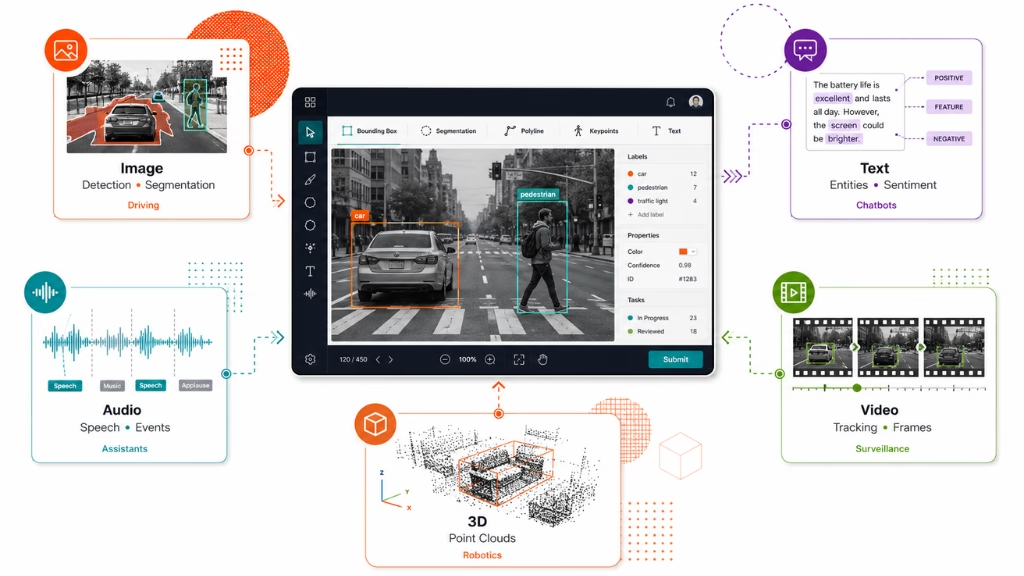
Understanding the main types of data annotation lets you match your workflow and tools to your AI project’s needs. Each data type comes with its own process, challenges, and real-world use cases.
When planning, you should map each data modality to the best-fit annotation methods. Here is a quick breakdown:
| Data Type | Typical Tasks | Common Tools | Example Use Case |
| Image | Object detection, classification, segmentation | CVAT, LabelImg | Autonomous driving, diagnostics |
| Text | Entity tagging, sentiment, intent annotation | Prodigy, Labelbox | Chatbots, compliance monitoring |
| Audio | Speech labeling, event detection | Audacity, Labelbox | Voice assistants, security |
| Video | Frame-by-frame object tracking | CVAT, VGG Image Annotator | Surveillance, retail analytics |
| 3D | Point cloud object labeling | Supervisely, Scale AI | Robotics, AR/VR navigation |
In practice, a single project often spans several types—say, image and text for a retail analysis AI. Picking matching tools and methods early helps avoid costly rework.
Step-by-Step Guide to the AI Data Annotation Process
A structured approach to data annotation makes large projects scalable and improves both data quality and model outcomes. Here, I’ll break down each step as I’ve used and improved it in the field.
Define Annotation Goals and Project Scope
Start by clarifying what your model needs to learn and the intended use of your AI. Define clear objectives, what data will be used, labeling requirements, privacy limits, and target metrics.
- Align project goals with business priorities.
- Select performance metrics—accuracy, recall, etc.
- Identify compliance requirements (like the latest AI Act or data privacy rules).
Missing this step often leads to rework. Define scope before collecting a single sample.
Develop and Document Annotation Guidelines
I’ve seen many teams skip documentation, causing confusion and label drift. Instead, create written guidelines that spell out every rule, example, and edge case.
- List all annotation classes and their definitions.
- Show clear, concrete examples (both correct and incorrect).
- Include behavior for special or ambiguous cases.
Having a guideline template—updated for 2026 standards—keeps teams in sync and boosts quality.
Prepare and Preprocess Data for Annotation
Before any labeling, clean and prep your data. This is the time to address data quality and privacy concerns.
- Remove irrelevant or duplicate entries.
- Standardize formats and file naming.
- Apply anonymization if needed.
Managing domain-specific oddities early saves time. In my POV, skimping on cleaning often doubles annotation costs later.
Select the Right Annotation Tools and Platforms
Choosing the right tool impacts cost, quality, and scale. Your choice should reflect the kind of data, integration needs, and compliance demands.
Here is a quick 2026 comparison of leading tools:
| Tool | Modalities | Integrations | Pricing |
| Labelbox | Image, text, video, audio, 3D | Major cloud, APIs | Tiered |
| CVAT | Image, video | Open standards | Free/Open |
| Supervisely | 3D, image | SDK, APIs | Custom |
| Prodigy | Text, image | Python, REST | License |
| Scale AI | All major | APIs, cloud | By quote |
| Dataloop | Image, video | Cloud, edge | Tiered |
Make a shortlist, evaluate on compliance, UI, cost, and support for your main data types.
Train and Certify Annotators
Great guidelines are useless without trained annotators. The mistake I see often is throwing raw tasks at new hires. Instead, build a training program.
- Recruit annotators matching your domain (medical, automotive, retail, etc).
- Use training modules and practice sets with known answers.
- Test annotator skills before full project assignments.
- Track accuracy and address biases with regular refresher modules.
Ongoing feedback and periodic certification further cut bias and improve trust.
Execute the Annotation Workflow
Now assign tasks, track progress, and keep communication tight between teams. Good workflow software supports remote collaboration, task splitting, and real-time status overviews.
- Assign data to annotators in manageable batches.
- Monitor progress and resolve blockers fast.
- Set up clear channels for questions or disputes.
In the last major project I led, having visible dashboards and quick escalation paths prevented project slips.
Review, Validate, and Assure Quality
Quality assurance is what separates bad data from great data. Use both human and automated review layers.
- Start with self-review from annotators.
- Add peer and senior validator checks.
- Use automated checks for label consistency, missing data, or format errors.
A good practice is “gold data”—use a set of expert-labeled samples as a benchmark for ongoing QA.
Iterate and Refine Process
The best teams treat annotation as a living process. Adjust for errors, update guidelines, and keep improving.
- Track error rates and analyze trends.
- Feed back common mistakes into the guideline revision.
- Retrain annotators as edge cases emerge.
After project wrap-up, run a post-mortem to gather what worked and what needs improvement. That knowledge should flow into the next cycle.
What Roles Are Involved in a Modern Data Annotation Team?
Successful annotation projects need defined roles. I have seen projects fall apart when teams get this wrong.
Most annotation teams in 2026 follow this core structure:
| Role | Responsibilities | Certification Path |
| Annotator | Label data accurately using guidelines | In-house or vendor |
| Validator | Review, correct, and validate annotated data | Internal certification |
| Reviewer | Spot check samples, flag systemic errors | Senior staff or domain lead |
| Team Lead/Manager | Oversee workflow, assign tasks, and ensure timelines | Project management cert |
Having domain experts at the annotation or validation stage builds trust and meets regulatory or quality standards. Opt for certified annotators where possible.
How to Ensure Quality Assurance in AI Data Annotation
If you skip QA, you risk flawed models and business mistakes. Consistent, process-driven quality assurance in data annotation is non-negotiable.
Here is how I structure QA in annotation projects:
- Use consensus labeling to compare results from multiple annotators.
- Insert “gold data” tasks with known labels for hidden accuracy checks.
- Run spot checks on random batches for each annotator.
- Blend automated QA tools with manual validator reviews.
- Record error rates and review them in weekly QA meetings.
- Update QA checklists as workflows evolve.
- In 2026, LLM-based audits are standard for large-scale projects.
A typical QA checklist includes:
- Are labels consistent with guidelines?
- Are all required fields filled?
- Did validators cross-check at least 10% of data?
- Are edge cases flagged and reviewed?
- Did automated checks pass all critical formats?
Keep these checklists updated and visible to all team members.
Mistakes to Avoid in the AI Data Annotation Process
Mistakes can ruin an entire dataset, wasting weeks of work. In my experience, most errors fall into a few clear categories.
- Missing or outdated annotation guidelines
- Poor team communication, causing confusion and rework
- Using the wrong tool for data type or scale
- Incomplete or ineffective annotator training
- Skipping or rushing validation steps
Quick reference—bad vs good annotation:
| Example Type | Bad Annotation | Good Annotation |
| Image Object Detection | Boxes overlap or miss targets; classes wrong | Precise boxes; correct class every time |
| Text Entity Tagging | Inconsistent tagging, ambiguous spans | Clear, guideline-following tags only |
A better approach is to spot these early—run periodic audits and gather annotator feedback.
AI Data Annotation Tools: 2026 Comparison
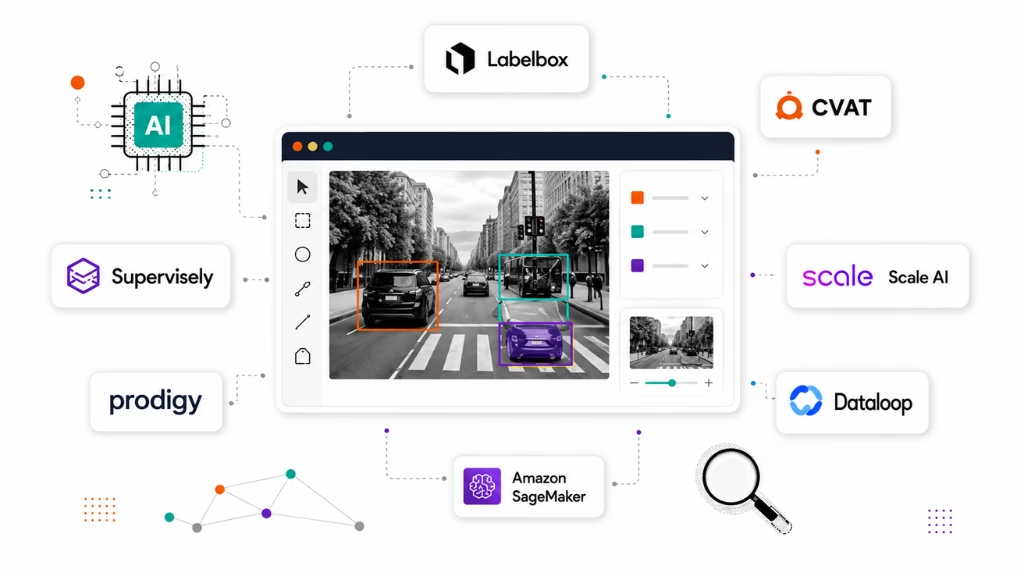
Choosing the right annotation tool is crucial for scale, quality, and compliance. Below, I have compared the top platforms you should consider for 2026.
| Tool | Data Types | Key 2026 Features | QA Modules | Compliance | Pricing |
| Labelbox | Image, Video, Text, 3D | LLM review, Model in the loop | Yes | GDPR, AI Act | Tiered |
| CVAT | Image, Video | AI-assisted control points | Yes | Open Source | Free |
| Supervisely | 3D, Image | AR/VR support, Edge sync | Yes | ISO 27001 | Custom |
| Prodigy | Text, Image | Active learning workflow | Yes | SOC2 | License |
| Scale AI | Multi-modal | Pipeline automation | Yes | Data Privacy | By quote |
| Dataloop | Image, Video | Real-time QA, AI workflows | Yes | HIPAA ready | Tiered |
| Amazon SageMaker | Image, Text | Integrated cloud pipelines | Yes | AWS controls | Usage |
When picking a tool, evaluate:
- Modalities covered (image, 3D, audio, etc)
- Quality assurance integration and automation
- Native compliance (GDPR/AI Act/sector standards)
- Team collaboration and workflow oversight
- Cost structure and support contracts
No one tool is “the best” for every team. Match features to your specific workflow and compliance needs.
Use Cases of Data Annotation in AI (2026)
AI data annotation sits behind some of the most trusted industry use cases I’ve worked on. Here are a few examples.
- Autonomous Vehicles: Image and video annotation for lane marking detection and object tracking. Annotation quality directly impacts safety.
- Healthcare: Medical image annotation (e.g., marking tumors in scans) and structuring patient text records for diagnostics. Must meet regulatory quality standards.
- Retail: Video and image annotation for foot traffic analytics, shelf stock detection, and sentiment analysis in customer feedback.
- Security: Audio and video annotation to flag anomalies or potential incidents in surveillance footage; audio tagging for keyword monitoring.
Each industry faces domain-specific challenges: privacy in healthcare, speed at scale in retail, or accuracy in automotive. The annotation process must flex to meet these needs.
How to Train and Certify Data Annotators Effectively
Certifying annotators is now standard practice. In my experience, training programs cut errors and boost trust in your data.
A practical training and certification framework includes:
- Onboarding with detailed guideline walkthroughs
- Hands-on practice sets with immediate feedback
- Skills assessment and error logging
- Ongoing education on new edge cases and project updates
- Periodic recertification exams or walkthroughs
Here is a sample skills checklist:
- Understands annotation guidelines 100%
- Accurately labels data in test runs
- Meets or exceeds accuracy benchmark (usually 95%+)
- Follows data privacy and security requirements
Offers both in-house and third-party certifications for higher-risk or regulated industries.
Why Choose Riseup Labs for Reliable AI Data Annotation?
Getting annotation right takes cross-functional skill. Riseup Labs blends proven workflows, domain-trained annotators, and strong QA for demanding projects. If your team needs to scale annotation, handle compliance, or reduce project slip, expert support like this can make the difference.
Frequently Asked Questions About the AI Data Annotation Process
What are the steps in the AI data annotation process?
The steps are: define goals, create annotation guidelines, prepare data, select tools, train annotators, execute annotation, conduct quality review, and iterate based on feedback.
How do you ensure accuracy and quality in data annotation for AI?
Use clear guidelines, annotator training, multi-level review, automated QA tools, and regular performance audits to maintain high annotation quality.
What roles are involved in an AI data annotation project?
Core roles include annotator, validator, reviewer, and team lead or project manager. Sometimes, domain experts contribute to improve annotation precision.
What are the common types of data annotation in AI?
Major types are image annotation, text annotation, audio annotation, video annotation, and 3D annotation, depending on project goals.
Which tools are most used for AI data annotation in 2026?
Leading tools are Labelbox, CVAT, Supervisely, Prodigy, Scale AI, Dataloop, and Amazon SageMaker, each supporting various data types and workflows.
How are annotation guidelines created and enforced?
Guidelines are written documents detailing task rules and examples. Enforcement comes through training, reviews, and aligning on updates as projects evolve.
What is the importance of quality control in data annotation?
Quality control prevents errors that could harm model accuracy, ensures consistency, and helps meet compliance or safety standards in sensitive industries.
How are annotators trained for AI data annotation?
Annotators are trained through guideline walkthroughs, sample tasks, skills assessments, feedback loops, and sometimes formal certification.
What mistakes should be avoided in data annotation projects?
Avoid unclear guidelines, tool mismatch, lack of QA, poor team communication, and skipping annotator training.
Can annotation be automated, or does it require manual input?
Some annotation can be automated using AI tools, but manual review and correction are still needed for accuracy and handling complex or ambiguous cases.
Conclusion
In my experience, the AI data annotation process now decides if your machine learning model can be trusted in production. A repeatable, structured workflow with strong guidelines, trained annotators, clear QA, and the right tools is no longer optional. These steps cut errors, reduce bias, and accelerate time-to-value.
Riseup Labs and services like it can simplify this entire chain—bringing expert teams, up-to-date tools, and regulatory know-how to your workflow. That is why I stress that smart annotation is not just a tech problem, but an ongoing operational priority.
If you aim for robust, testable AI outcomes, the investment in a solid annotation process is paid back many times over. Teams who make annotation a core discipline will lead as AI development keeps evolving.
This page was last edited on 3 August 2026, at 12:35 pm

Start a conversation with our team to solve complex challenges and move forward with confidence.