WordPress maintenance and support is the ongoing process of keeping your website secure, fast, updated, and running smoothly. It includes WordPress core updates, backups, security monitoring, bug fixes, performance optimization, and technical support to prevent issues, protect your business, and ensure your website always performs at its best.
In our 15-year journey, we have noticed many businesses come to us when their WordPress website suddenly starts having problems. Some noticed their pages took several seconds to load, which’s why the bounce rate is too high. A few of them noticed contact forms or buttons are not working properly. Even some WordPress users face security warnings that can damage customer trust. In most cases, the reason is simple: the website was not maintained properly.
The good news is that you can easily prevent most of these problems with regular WordPress maintenance and support. Regular maintenance keeps your website updated, secure, fast, and stable. It also helps find small issues early, before they turn into bigger and more expensive problems.
In this guide, we are going to take a deep dive into maintaining a WordPress website to keep it updated, secure, and fast, and to monitor it to provide a better user experience.
Let’s protect your data and ensure your site supports your marketing and sales goals.
What Is WordPress Maintenance and Support
WordPress maintenance and support are routine care that helps to keep your website healthy. They help your WordPress website stay secure, updated, fast, and working well for the best customer experience.
WordPress Maintenance vs WordPress Support
Maintenance prevents upcoming problems or issues from arising on your website. And support fixes issues and helps improve your website when your business needs changes.
| WordPress Maintenance | WordPress Support |
| Focuses on preventing website problems. | Focuses on fixing and improving the website. |
| Includes WordPress core, plugin, and theme updates. | Includes bug fixes and troubleshooting. |
| Creates and checks regular backups. | Adds new pages, features, or functionality. |
| Monitors website security and uptime. | Fixes broken forms, layouts, or integrations. |
| Improves speed and overall performance. | Provides technical help whenever you need it. |
| Done on a regular schedule. | Provided when changes or issues arise. |
Why Business Websites Need Both (Maintenance + Support)
As we already mentioned, maintenance keeps your website healthy by preventing common problems before they happen. And support helps when you need fixes, updates, new features, or technical help.
If you focus only on one side like maintenance, there might be existing issues that are ruining your site’s performance. On the other hand, if you focus only on support, endless new issues will arise. That’s why you need both of them to keep your website secure, reliable, and ready to support your business goals.
Why WordPress Maintenance Matters for Business Websites
Your website is one of the most valuable assets of your running business. It helps you attract visitors, generate leads, and build customer trust. If you don’t do regular maintenance, small plugin vulnerabilities turn into security threats. That’s why keeping your WordPress website healthy is essential for long-term business success. Here are some core reasons why you should take care of your WP website:
Security and Malware Protection
A report found that almost 97% of vulnerabilities were found in WordPress plugins among 5948 cases. An outdated WordPress core, plugin, or theme can make your website an easy target for hackers. Regular updates, security scans, and backups help protect your website, customer data, and business reputation.
Website Speed and User Experience
In this AI-first world, website speed is very important for user experience and AI visibility. Claudefare found that 53% of mobile users abandon when a website takes more than 3 sencods loading time. Also, a slower website negatively impacts your SEO performance.
If you maintain and check your website speed, uptime, and fix performance issues, it will help to create a smoother experience for every visitor.
Uptime and Business Continuity
Your website should be available whenever customers need it. Website downtime can lead to lost leads, missed sales, and unhappy visitors. To keep everything smooth and ensure 100% uptime, you need to check and monitor it regularly. Ongoing maintenance helps to detect issues early and keeps your website running with fewer interruptions.
Lead Forms, Tracking, and Conversions
A broken contact form or incorrect tracking code can cost your business valuable leads without you even noticing. Regular maintenance checks forms, analytics, and conversion tracking to make sure every inquiry and customer action is recorded correctly.
SEO Health and Technical Performance
Search engines prefer websites that are secure, fast, and free of technical problems. Regular maintenance helps fix broken links, update important files, improve page speed, and resolve technical issues that can affect your search rankings.
What Happens If You Don’t Maintain Your WordPress Website
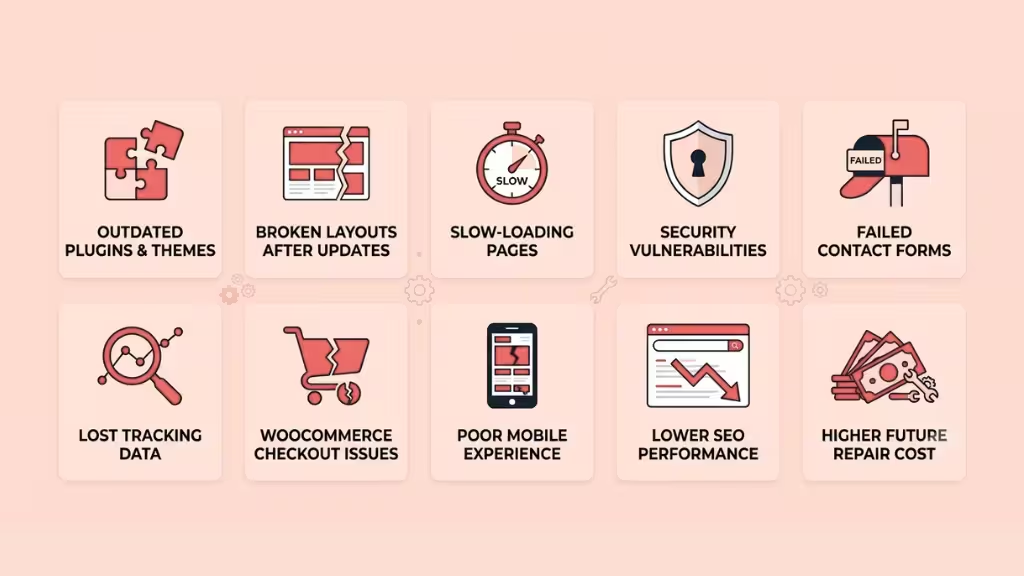
If you don’t maintain your WordPress website, small problems can quickly become serious. Outdated plugins and themes may cause security risks, slow-loading pages, broken features, or website errors. These issues can frustrate visitors and reduce customer trust.
Over time, your website may lose search rankings, generate fewer leads, and require costly repairs. Regular maintenance helps prevent these problems before they affect your business. It keeps your website secure, reliable, and ready to support your daily operations and future growth.
Outdated Plugins and Themes
Old plugins and themes can create serious problems for your website. They may stop working with the latest WordPress version. They can also open security gaps. Regular updates help your site stay safe, stable, and compatible.
Broken Layouts After Updates
Sometimes updates can change how your pages look or work. A section may break. A button may stop working. Your menu may not display correctly. Proper testing after updates helps protect your design and user experience.
Slow-Loading Pages
A slow website can make visitors leave quickly. Large images, unused plugins, messy code, and database issues can reduce speed. Regular maintenance helps clean and optimize your site so pages load faster.
Security Vulnerabilities
Hackers often look for weak or outdated WordPress websites. If your site has old plugins, weak passwords, or no security monitoring, it becomes risky. Maintenance helps close security gaps and protect your business data.
Failed Contact Forms
Your contact forms may stop working without warning. You may lose leads, support requests, or customer messages. Regular checks make sure forms send emails correctly, and every important inquiry reaches your team.
Lost Tracking Data
Analytics and tracking tools can break after updates or theme changes. When this happens, you may lose important data about visitors, leads, and conversions. Maintenance helps confirm that tracking codes and events work properly.
WooCommerce Checkout Issues
For WooCommerce stores, checkout problems can directly hurt sales. A broken payment gateway, shipping error, or cart issue can stop customers from buying. Regular testing helps keep the buying process smooth and reliable.
Poor Mobile Experience
Many visitors use mobile devices to browse websites. If your site is not maintained, pages may load slowly or look broken on smaller screens. Regular checks help keep your website clean, responsive, and easy to use.
Lower SEO Performance
Search engines prefer websites that are fast, secure, and technically healthy. Broken links, slow pages, errors, and poor mobile performance can hurt rankings. Regular maintenance helps keep your SEO foundation strong.
Higher Future Repair Cost
Ignoring small website issues can make them worse over time. A simple plugin conflict may turn into a major site problem. Regular maintenance helps fix issues early, saving time, money, and stress later.
WordPress Maintenance Checklist for Business Websites
A WordPress maintenance checklist helps you manage your website in a simple way. It shows what to check daily, weekly, monthly, and quarterly. This keeps your site secure, fast, updated, and ready to support your business.
Daily Checks
Daily checks help you catch urgent issues quickly. Check if your website is live and loading properly. Review security alerts, form submissions, and WooCommerce orders if you run an online store. This helps prevent lost leads, sales, and customer trust.
Weekly Checks
Weekly checks focus on stability and small fixes. Review plugin and theme updates. Check backups, security scans, broken forms, and page speed. Look for errors on important pages. Fixing these issues weekly keeps your site healthy and reduces bigger risks.
Monthly Checks
Monthly checks help improve long-term performance. Update WordPress core, plugins, and themes safely. Clean the database, test backups, review analytics, fix broken links, and check SEO issues. You can also review speed, mobile experience, and conversion tracking.
Quarterly Checks
Quarterly checks give you a deeper view of your website health. Review technical SEO, accessibility, hosting performance, plugin quality, user experience, and key landing pages. This helps you find hidden problems and plan bigger improvements before they affect business growth.
WordPress Maintenance for Different Types of Business Websites
Different business websites have different needs. A B2B website may focus on leads. A WooCommerce store may focus on sales. A membership website may focus on user access. WordPress maintenance should match how your website supports your business.
B2B WordPress Websites
B2B websites depend on trust, speed, and lead generation. Regular maintenance keeps service pages, contact forms, landing pages, and tracking tools working properly. It also helps improve technical SEO, so potential clients can find your business online.
WooCommerce Stores
WooCommerce websites need extra care because every issue can affect sales. You need to check product pages, carts, checkout, payment gateways, shipping settings, and coupons. Regular maintenance helps keep the buying process smooth, secure, and reliable.
Membership and Course Websites
Membership and course websites must protect user access and paid content. Maintenance helps keep login systems, payment flows, course pages, subscriptions, and user roles working correctly. It also reduces errors that can block students or members from accessing content.
Marketing-Led Companies
Marketing teams often need fast website changes. They may launch landing pages, update forms, add tracking pixels, or test campaigns. Regular WordPress support helps them move faster without waiting too long for technical fixes or page updates.
Multi-Location Service Businesses
Multi-location websites need accurate service pages, location pages, maps, contact details, and local SEO elements. Maintenance helps keep business information updated and pages working well. This supports local visibility and helps customers contact the right branch.
Startups and Scaleups
Startups and scaleups need flexible websites that can grow quickly. They often test new pages, offers, tools, and integrations. WordPress maintenance and support help them stay fast, stable, and ready for growth without hiring a full in-house team.
How Much Does WordPress Maintenance and Support Cost
The cost of WordPress maintenance and support depends on your website’s size, features, and support needs. A simple business website usually costs less to maintain than a large WooCommerce store or a custom-built website. The more work required each month, the higher the maintenance cost.
Factors That Affect WordPress Maintenance Cost
Several factors influence the cost of WordPress maintenance and support, including:
- Website Size: Larger websites with more pages and features usually take more time to maintain.
- Plugin Complexity: Websites with many plugins or custom plugins often need extra testing and updates.
- WooCommerce Functionality: Online stores require regular checks for products, payments, checkout, shipping, and customer accounts.
- Traffic Level: High-traffic websites need stronger security, better performance, and closer monitoring.
- Security Risk: Websites handling customer data or payments often require advanced security and frequent monitoring.
- Number of Monthly Updates: Websites that need frequent content, design, or feature updates require more ongoing support.
- Extra Development: If your site needs more custom features, integrations, bug fixes, and landing page development, it can increase maintenance costs.
- Emergency Support or SLA Needs: Businesses that need fast response times or 24/7 support usually choose higher-level maintenance plans.
Common WordPress Maintenance Pricing Models
WordPress maintenance providers use different pricing models based on the level of support they offer. Here are the most common options:
- Hourly Support: You only pay for the work completed. This is suitable for businesses that need occasional updates or fixes.
- Monthly Maintenance Plan: You pay a fixed monthly fee for regular maintenance, monitoring, updates, backups, and ongoing support.
- Fixed Maintenance Package: These plans include a predefined list of services at a fixed price. They work well for businesses with consistent maintenance needs.
- Custom Support Plan: Businesses with larger or more complex websites can choose a custom plan based on their specific requirements and support hours.
- Emergency Support: Some providers offer one-time emergency assistance for website crashes, security incidents, or urgent technical issues.
What Should Be Included in a Good Monthly Plan?
A good WordPress maintenance plan should do more than install updates. It should help keep your website secure, fast, and running without problems. Look for a plan that includes:
- WordPress core, plugin, and theme updates.
- Automatic and tested website backups.
- Security monitoring and malware scanning.
- Website uptime monitoring.
- Speed and performance optimization.
- Bug fixes and technical troubleshooting.
- Regular website health checks.
- Contact form and functionality testing.
- Basic technical SEO maintenance.
- Monthly maintenance reports and expert support.
In-House WordPress Maintenance Team vs Hiring a WordPress Support Partner
You can manage WordPress maintenance with an in-house team or hire a support partner. Both options can work. The right choice depends on your budget, website complexity, update needs, and how fast you need technical support.
| Comparison Point | In-House WordPress Maintenance Team | WordPress Support Partner |
| Cost | Higher fixed cost for salary, tools, and training. | More flexible monthly or custom pricing. |
| Expertise | Depends on the skills of your internal team. | Gives access to WordPress experts and developers. |
| Scalability | Harder to scale quickly. | Easier to scale support when needed. |
| Availability | Limited by team working hours. | Can offer broader support coverage. |
| Tools and Process | You need to manage tools and workflows. | Usually includes proven tools and maintenance processes. |
| Best For | Large companies with ongoing internal website needs. | Businesses that need expert help without hiring full-time staff. |
How to Choose the Right WordPress Maintenance and Support Partner
Choosing the right partner is important. They will help protect your website, fix problems, and support your business growth. Look for a team that understands WordPress, security, performance, development, and your marketing needs.
WordPress Technical Expertise
Your support partner should have a deep understanding of WordPress. They should know how to manage core updates, plugins, themes, hosting, databases, PHP versions, and common website errors. Strong technical knowledge helps them fix problems faster and avoid risky mistakes.
Development Capability
A good partner should do more than basic updates. They should help with bug fixes, custom features, landing pages, WooCommerce changes, forms, integrations, and layout improvements. This gives your business ongoing technical support without hiring a full-time developer.
Clear Monthly Scope
Your WordPress maintenance plan provided by the service provider should clearly explain what is included and what is not. Check the support hours, update frequency, response time, reports, and extra service costs. A clear scope helps you avoid confusion and makes it easier to manage expectations.
Security and Backup Process
Ask how they protect your website. A reliable partner should provide regular backups, malware scans, security monitoring, update checks, and restore support. This helps protect your website from attacks, data loss, and unexpected technical failures.
Marketing Team Collaboration
Your WordPress partner should also support your marketing team. They should help update landing pages, fix forms, add tracking codes, improve page speed, and support campaigns. This keeps your website ready for leads, conversions, and business growth.
How Riseup Labs Supports WordPress Business Websites

Riseup Labs helps businesses keep their WordPress websites secure, updated, fast, and ready for growth. Our team works like your ongoing WordPress support partner, so you do not need to hire a full in-house team.
We support WordPress updates, bug fixes, security checks, backups, speed optimization, WooCommerce improvements, landing pages, forms, integrations, technical SEO, analytics tracking, and ongoing website changes.
Whether you run a B2B website, WooCommerce store, membership site, or marketing-focused business website, Riseup Labs helps you keep everything stable, functional, and aligned with your business goals.
Conclusion
Your WordPress website is more than just an online presence. It helps you attract visitors, generate leads, and grow your business. Without regular maintenance, small issues can turn into costly problems that affect your website’s security, speed, and performance. A simple maintenance routine helps keep your website reliable, secure, and ready for future growth.
If managing your WordPress website feels time-consuming, you don’t have to do it alone. Riseup Labs provides reliable WordPress maintenance and support to keep your website updated, secure, and performing at its best. Explore our WordPress Maintenance and Support services to see how we can help your business stay ahead.
FAQs
How Much Does WordPress Maintenance Cost?
WordPress maintenance cost is not the same for every website. It depends on your site size, plugins, features, and support needs. A small business site may need a basic plan. A busy store or custom site may need more support.
Can WordPress Maintenance Improve Website Speed?
Yes. Maintenance can make your website faster. It helps remove extra files, clean the database, update plugins, optimize images, and fix slow-loading issues. A faster site gives visitors a smoother experience.
Is WordPress Maintenance Necessary for Small Business Websites?
Yes. Small business websites also need care. Even a simple website can face plugin errors, security risks, slow speed, or broken forms. Regular maintenance keeps the site safe, stable, and ready for customers.
What is the Difference Between WordPress Maintenance and WordPress Development?
WordPress maintenance keeps your website running smoothly. It includes updates, backups, security checks, and fixes. WordPress development is different. It means building new pages, features, designs, or custom functions.
When should I hire a WordPress maintenance company?
Hire a WordPress maintenance company when your website affects your leads, sales, or customer trust. It is also helpful if you do not have a WordPress expert on your team or need regular technical support.
This page was last edited on 24 July 2026, at 4:42 pm

Start a conversation with our team to solve complex challenges and move forward with confidence.