

You searched “how much does it cost to build an Android app” and got answers ranging from $5,000 to $500,000. That range is useless. We’ve been there too.
In this guide, we break down the honest way real cost ranges, what actually drives your bill, hidden fees most people miss, and how to build smarter without blowing your budget.
TL;DR
- Simple Android apps cost $20,000–$50,000 (US agencies) or $10,000–$25,000 (offshore)
- Mid-level apps run $60,000–$150,000; complex apps hit $150,000–$300,000+
- Android often costs more than iOS due to device fragmentation and extra testing
- App complexity, design, backend, and developer location are the four biggest cost drivers
- Annual maintenance = 15–25% of your original development cost
- Google charges a one-time $25 Play Store fee — far cheaper than Apple’s $99/year
- Cross-platform (Flutter/React Native) can cut costs by 30–50% vs. building native twice
- AI features add $10,000–$50,000 but can give you a real competitive edge
- Always budget for hidden costs: hosting, APIs, push notifications, and marketing
Why Android App Development Cost Actually Varies So Much
No two apps are the same. A to-do list app and a telemedicine platform are both “Android apps,” but they’re worlds apart in cost.
According to Statista, Android holds approximately 72% of the global mobile OS market share as of 2026, covering nearly 3.9 billion active users worldwide. That reach is exactly why building for Android is still one of the smartest investments a business can make.
But that massive, fragmented device ecosystem is also why android app development costs vary so much. Android runs on thousands of different phones from Samsung, Xiaomi, OnePlus, Google Pixel, and hundreds of other manufacturers. Each one has different screen sizes, hardware specs, and OS versions. That complexity isn’t free to handle.
Android App Development Cost: Quick Overview
Before we get into specifics, here’s what businesses realistically pay in 2026:
| App Type | US Agency Cost | Offshore Cost |
|---|---|---|
| Simple App | $20,000 – $50,000 | $10,000 – $25,000 |
| Mid-Level App | $60,000 – $150,000 | $30,000 – $80,000 |
| Complex App | $150,000 – $300,000+ | $80,000 – $180,000 |
| Enterprise App | $300,000+ | $150,000+ |
A well-scoped Android app typically falls between $30,000 and $150,000, depending on complexity. Where you hire makes the single biggest difference.
Factors That Influence Android App Development Cost
The cost to build an Android app isn’t one-size-fits-all. A simple utility app will cost far less than a feature-packed fintech, healthcare, or on-demand app that needs secure backends, APIs, and compliance. Every feature, platform, and developer location adds up—know the factors before you start.
1. App Complexity and Number of Screens
The more screens and features your app has, the more it costs — it’s that simple. We generally split apps into three tiers:
Simple App:
- 6–10 unique screens
- Basic UI/UX with limited elements
- Core functionality only (content display, basic auth)
Medium App:
- 11–25 unique screens
- Custom UI/UX, in-app messaging, search, or payment processing
- Advanced database integration
Complex App:
- 25–45+ unique screens
- Complex backend systems, real-time features, multiple API integrations
- AI/ML components, multi-user roles, compliance requirements
2. App Type and Purpose
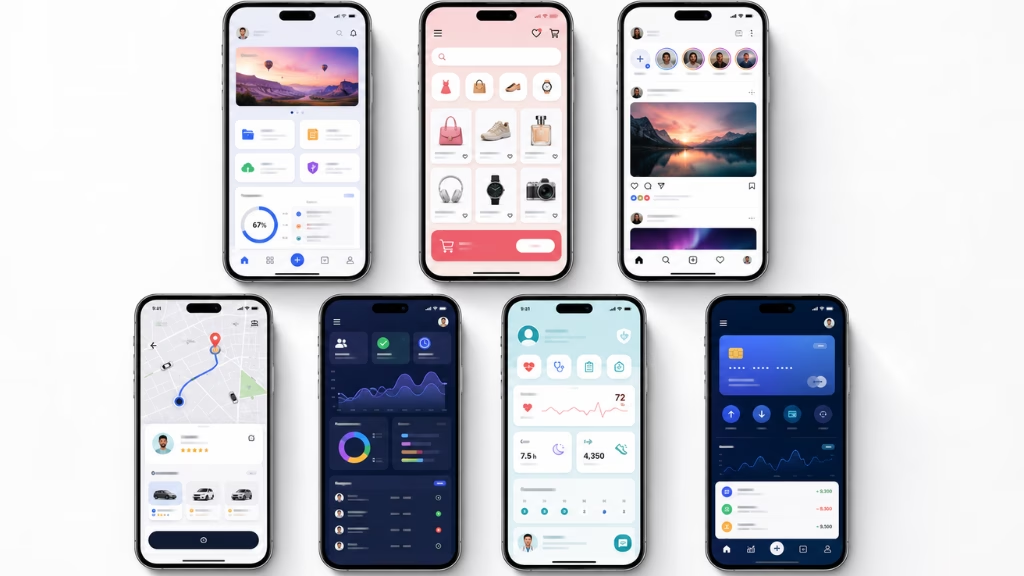
The type of app you’re building directly shapes the cost. Here are the most common categories we work with:
- Content/Utility apps — Lowest cost; display-only functionality
- E-commerce apps — Moderate-high cost; backend, payments, inventory
- Social/Community apps — High cost; real-time feeds, notifications, profiles
- On-demand apps — High cost; geolocation, real-time tracking, ratings, payments
- Enterprise apps — Highest cost; system integrations, compliance, role management
- Healthcare apps — High cost; HIPAA compliance adds significant overhead
- Fintech apps — Very high cost; PCI DSS, security layers, banking integrations
3. App Platform and Technology Stack
One of the biggest decisions you’ll make is native vs. cross-platform.
Native Android (Kotlin/Java) gives you the best performance and full access to Android device features. But if you also need iOS, you’re essentially paying for two separate apps — roughly 1.7x–2.2x the cost of one.
Cross-Platform (Flutter or React Native) uses one codebase for both Android and iOS. It cuts total cost by 30–50% and still delivers excellent quality for most business apps. For most projects in 2026, this is the smarter call.
| Development Approach | Cost Implication |
|---|---|
| Native Android only | Full cost, best performance |
| Native iOS + Android | 1.7x–2.2x single-platform cost |
| Cross-Platform (Flutter/React Native) | 30–50% less than two native builds |
4. Developer Location and Hourly Rates
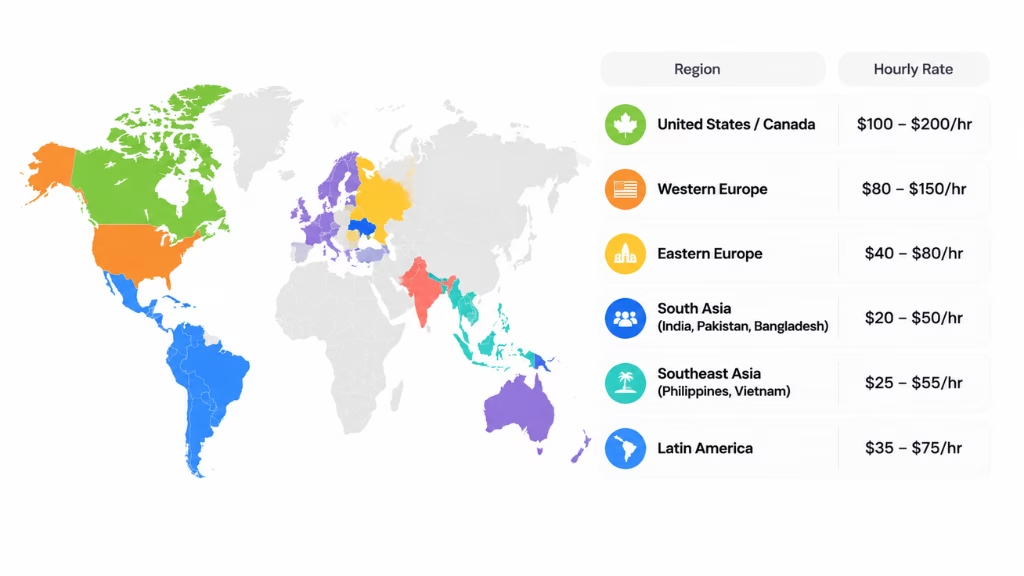
Where your team is based is the single biggest lever on cost. The same app scope can cost two to three times more, depending on the region you hire from.
US and Canadian developers typically charge $100–$200/hr. Western Europe runs slightly lower at $80–$150/hr. If you move to Eastern Europe — Poland, Romania, Ukraine — you’re looking at $40–$80/hr with genuinely strong technical talent.
South Asian teams in India, Pakistan, and Bangladesh charge $20–$50/hr. Southeast Asia (Philippines, Vietnam) falls between $25–$55/hr. Latin American teams sit around $35–$75/hr and have the added advantage of overlapping US time zones.
The key with offshore teams isn’t just cost — it’s choosing a team with a proven portfolio, real US client experience, and clear communication processes. Cheap doesn’t mean low quality. Some of the best Android teams in the world charge $40/hr.
5. UI/UX Design Quality
A basic template-driven design is the cheapest option. A fully custom design with branded animations, smooth micro-interactions, and platform-optimized polish costs significantly more — but it directly impacts user retention.
We’ve seen design choices alone shift project costs by $10,000–$40,000. Don’t skimp entirely, but don’t gold-plate it for version one either.
Android App Development Cost Breakdown by Phase
Planning your android app development budget doesn’t have to be a guessing game. Each phase from discovery and design to development and testing impacts costs differently. Knowing where your money goes helps you plan smarter, avoid surprises, and build an app that delivers value without breaking the bank.
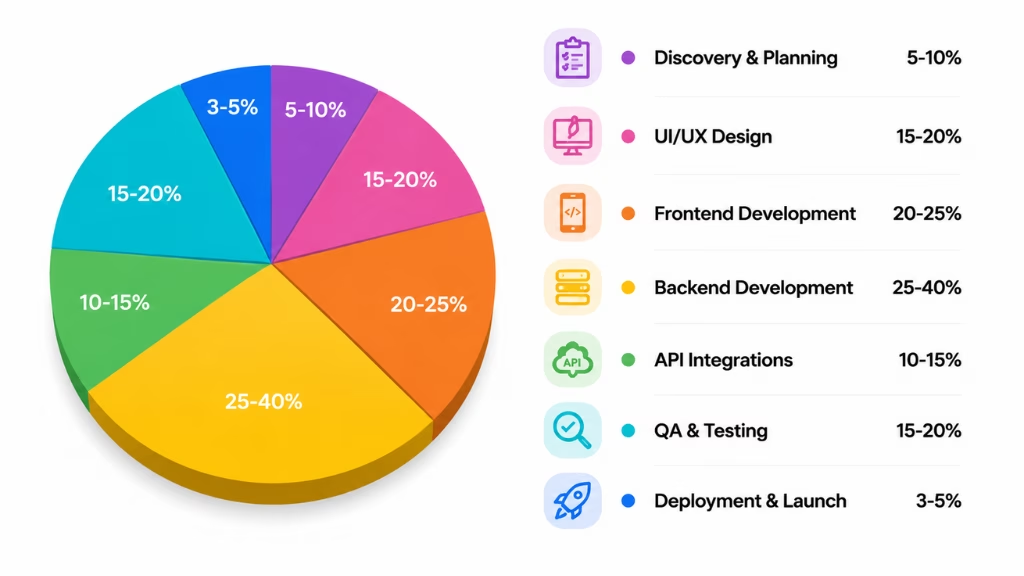
Here’s roughly how the total budget gets distributed across development phases:
| Phase | % of Total Budget |
|---|---|
| Discovery & Planning | 5–10% |
| UI/UX Design | 15–20% |
| Frontend Development | 20–25% |
| Backend Development | 25–40% |
| API Integrations | 10–15% |
| QA & Testing | 15–20% |
| Deployment & Launch | 3–5% |
Notice that backend is often the heaviest line item for complex apps — it can be 40–60% of total cost for apps with real-time processing, complex databases, and scalability requirements.
Android also spends more on QA than iOS — typically 15–20% of total budget — because of device fragmentation. More devices to test, more edge cases to catch.
Planning and Discovery
This phase covers market research, user requirement gathering, feature scoping, and creating a Product Requirements Document (PRD). It sounds like overhead, but skipping this phase is the #1 reason projects go over budget.
UI/UX Design
Good design drives retention. This phase covers wireframes, visual design, interaction design, and prototyping. Custom animations and advanced interactive elements add cost but can define the product experience.
Frontend Development
This is the visible layer — building the UI, optimizing for multiple screen sizes, handling navigation, and ensuring smooth performance across Android versions. Custom animations and multi-device responsiveness are the main cost drivers here.
Backend Development
The backend is the invisible engine of your app — user authentication, databases, APIs, cloud infrastructure, and business logic. For complex apps, this is the most expensive phase. Real-time features, scalable architecture, and security layers all add cost.
API Integration
Connecting your app to third-party services — payment gateways, Google Maps, social logins, analytics, push notifications — adds real cost per integration. We typically see each API integration adding $1,000–$6,000, depending on complexity.
QA and Testing
Testing on Android is more demanding than iOS because of the device fragmentation problem. Functional testing, performance testing, security testing, and user acceptance testing (UAT) are all essential. Skipping or cutting testing is the fastest way to launch a broken app.
Android App Development Cost by Industry
Different industries have different baseline requirements. Here’s a realistic picture:
| Industry | Cost Range |
|---|---|
| Healthcare (HIPAA compliant) | $100,000 – $300,000+ |
| Fintech / Banking | $120,000 – $350,000+ |
| E-commerce | $50,000 – $150,000 |
| On-Demand Services | $80,000 – $200,000 |
| Social Networking | $80,000 – $200,000 |
| Enterprise / B2B | $100,000 – $400,000+ |
| Education / EdTech | $40,000 – $120,000 |
| Basic Utility / Content | $20,000 – $60,000 |
These are guides, not guarantees. Two apps in the same industry can cost very different amounts based on features, quality bar, and team location.
Why Android Sometimes Costs More Than iOS
This surprises a lot of people. Android phones are cheaper to buy, so Android apps must be cheaper to build — right?
Not exactly.
iOS runs on a small, controlled set of iPhones. Android runs on thousands of different devices from hundreds of manufacturers. Each has different screen sizes, hardware specs, and OS customizations. Samsung adds their own UI skin. Xiaomi does too. Each one can create unique bugs.
On top of that, Android users are spread across many years of OS releases. iOS users are typically on the latest version within months of release. An Android app may need to support versions from 5+ years ago to reach a broad audience.
The result: Android testing typically takes 15–25% more time than iOS for a comparable app. That extra QA effort is real cost.
This is one of the biggest reasons cross-platform development with Flutter has become so popular — one codebase, one testing overhead (roughly), two platforms covered.
Android App Development Feature-Level Cost Breakdown
If you’re curious about Android app development pricing, it helps to look at costs feature by feature. Things like login systems, push notifications, payment options, or analytics all add up differently.
Knowing what each feature might cost lets you plan smarter, prioritize what matters most, and avoid surprises down the road while building your app.
Core Features (Most Apps Need These)
| Feature | Estimated Cost |
|---|---|
| User Authentication (email, Google sign-in) | $1,500 – $4,000 |
| User Profiles & Settings | $2,000 – $5,000 |
| Push Notifications | $1,500 – $4,000 |
| In-App Messaging | $4,000 – $10,000 |
| Search Functionality | $3,000 – $8,000 |
| Payment Processing | $5,000 – $15,000 |
| Analytics & Tracking | $1,500 – $4,000 |
| Offline Mode (basic) | $3,000 – $8,000 |
These core features together usually account for $25,000–$65,000 of your total cost.
Advanced Features That Add Real Cost
These separate competitive apps from average ones — and they’re where costs grow fast:
- AI Personalization & Recommendations — Adds $8,000 – $25,000
- Voice Features — Adds $5,000 – $15,000
- Augmented Reality (AR) — Adds $15,000 – $50,000
- Real-Time Geolocation Tracking — Adds $5,000 – $15,000
- Live Video Streaming — Adds $10,000 – $30,000
- Wearable/IoT Integration — Adds $5,000 – $20,000
- Admin Dashboard & Reporting — Adds $8,000 – $20,000
- Multi-Language Support — Adds $5,000 – $15,000
- Full Offline Mode with Sync — Adds $5,000 – $15,000
Don’t try to build all of these in version one. Pick what your business model actually requires.
How AI Is Changing Android App Costs in 2026
AI has fundamentally reshaped what’s expected in a modern Android app — and what’s possible at a given budget.
Features that would have cost hundreds of thousands of dollars five years ago are now accessible via APIs from Google, OpenAI, Anthropic, and others. Adding AI doesn’t require building a model from scratch anymore.
Expect to add $10,000–$50,000 on top of your base app cost for meaningful AI integration, depending on complexity.
Where AI genuinely adds value in Android apps:
- Smart product or content recommendations based on behavior
- AI-powered search and discovery
- Predictive features that anticipate user needs
- Content generation and summarization
- Chatbots and intelligent support flows
Where AI doesn’t belong:
- Replacing core human-centered features
- Solving problems that don’t need it
- Adding it just because it’s trending
The smartest teams use AI which removes real friction. Not as a feature checkbox.
Mandatory Google Fees You Can’t Skip
Beyond development, there are fees you have to pay Google to publish and operate on the Play Store.
Google Play Console Registration: $25 (one-time). Unlike Apple’s $99/year, Google charges a single $25 registration fee. After that, your apps stay live with no annual cost. A huge advantage for lean budgets.
Google’s Revenue Commission: 15–30% Google takes a cut from apps selling digital goods or subscriptions through Google Play:
- Standard rate: 30%
- Small businesses earning under $1M/year: 15%
- Subscriptions after the first year of continuous subscription: 15%
For apps selling physical goods or services, Google takes no commission. You use Stripe, PayPal, or similar, which charge their own rates (typically ~2.9% + $0.30 per transaction).
Build these into your business model from day one.
Android App Hidden Costs After Launch
This is the section most guides skip — and why so many app owners get caught off guard.
Ongoing Monthly Costs to Budget For:
| Cost Category | Estimated Monthly Cost |
|---|---|
| Cloud Hosting (AWS/GCP/Firebase) | $200 – $2,500+/month |
| Push Notification Services | $0 – $500/month |
| Mapping APIs (Google Maps) | $200 – $1,500+/month |
| Payment Processing (Stripe, etc.) | ~2.9% + $0.30/transaction |
| Analytics (Mixpanel, Amplitude) | $0 – $500+/month |
| SMS/Communication APIs | Variable by volume |
Annual Maintenance: Plan for 15–25% of your original android app development cost per year. Android OS updates annually. Devices change. Bugs appear. Security patches are non-negotiable.
Marketing and User Acquisition: This is the one that shocks most first-time app owners. Marketing and launch can cost 20–30% of your development budget — sometimes more. App store optimization (ASO), paid ads, influencer marketing, PR — none of it is free.
If you build it, they won’t just come. Budget for this from day one.
Strategies to Reduce Android App Development Cost
We help clients cut costs without cutting quality. Here’s how:
- Build an MVP first — Launch with only your core features. Get real user feedback before spending money on extras nobody asked for.
- Choose cross-platform — If you need iOS and Android, Flutter or React Native saves 30–50% vs. building two native apps.
- Use third-party APIs and pre-built solutions — Don’t build a payment system from scratch. Stripe, Firebase, Auth0, and Google Maps all exist. Use them.
- Work with experienced offshore teams — Lower hourly rates don’t mean lower quality. The best teams in Poland, India, and Vietnam are world-class.
- Define your Android version support range — Supporting back 7 years is expensive. Use your analytics data (or Google’s distribution stats) to set a realistic floor.
- Keep your senior-to-junior team ratio high — A small, senior team of 3–5 people almost always outperforms a large junior team in speed and cost efficiency.
- Build with testing in mind from day one — Catching bugs in development costs a fraction of catching them in production.
- Plan maintenance from the start — Apps that aren’t maintained become exponentially more expensive to fix later.
Frequently Asked Questions
How much does it cost to develop an Android app in 2026?
Android app development costs $20,000–$300,000+ depending on complexity. Simple apps land between $20,000–$50,000 with US agencies, or $10,000–$25,000 with offshore teams. Mid-level apps run $60,000–$150,000. Complex apps hit $150,000–$300,000 or more.
How long does Android app development take?
Simple apps: 1–3 months. Mid-level apps: 4–7 months. Complex apps: 8–14 months or longer. Timeline depends heavily on scope clarity and team size.
Should I build native Android or use Flutter/React Native?
For most businesses in 2026, cross-platform is the right call if you need both Android and iOS. Native Android makes sense if you only need Android, or if your app demands maximum performance.
What is the cheapest way to build an Android app?
An MVP with limited features, built with cross-platform tools, by an experienced offshore team — this combination can cut total costs by 50–60% vs. a US agency with a full-feature scope.
Do I need to pay Google every year?
No. Google charges a one-time $25 registration fee. Apple charges $99/year. After your initial Google payment, your apps stay live at no annual cost.
Does Google take 30% of my revenue?
Only on digital goods and subscriptions sold through Google Play. Small businesses under $1M/year qualify for 15%. For physical goods and services, Google takes no commission.
What ongoing costs should I plan for after launch?
Budget 15–25% of your original development cost per year for maintenance. Add cloud hosting, APIs, payment processing, analytics, and marketing costs on top of that.
Final Word
If you’ve made it this far, you now have a more complete picture of Android app development costs than most development teams will give you in a first meeting.
The short version: your Android app will cost what you decide to build. Start lean, validate fast, and scale what works. The biggest mistakes we see aren’t about budget — they’re about building the wrong thing at the wrong scope.
Build smart, not just big.
This page was last edited on 9 July 2026, at 11:10 am

Start a conversation with our team to solve complex challenges and move forward with confidence.










