
Zapier is best for quick, beginner-friendly automations, but it gets expensive at scale. Make is stronger for visual, multi-step workflows at a lower cost, while n8n fits technical teams needing self-hosting, custom code, and advanced AI workflows. Power Automate is best for Microsoft 365-heavy businesses and regulated industries needing compliance.
If you’ve started looking into workflow automation in 2026, you’ve almost certainly hit a wall of comparison articles that rehash the same surface-level points. This guide is different. It’s built from real-world implementation experience across all four platforms — covering not just features and pricing, but the hidden costs, the compliance gaps, the AI integrations, and the migration pain that most posts skip entirely.
All four tools — Zapier, Make, n8n, and Microsoft Power Automate — can connect your apps and automate repetitive tasks. But they’re built for fundamentally different users. Picking the wrong one costs you months of rework. Here’s how to pick right.
Quick Verdict
If you’re in a hurry, here’s the one-line answer for each team type:
| Platform | Best For |
|---|---|
| Zapier | Non-technical teams who need quick automations with popular apps. You’re paying a premium for simplicity — and that’s often the right trade. |
| Make | Cost-conscious teams that need complex visual workflows — multiple branches, data transformations, conditional logic — without a developer. |
| n8n | Technical teams needing complex workflows with custom code, on a budget, with full data ownership. The deepest AI integration of the four. |
| Power Automate | Companies already deep in Microsoft 365. Also the only real choice for HIPAA/ISO-regulated industries where compliance isn’t optional. |
The honest take: Most businesses end up using two of these tools. A common architecture runs Zapier or Make for lightweight team-managed automations, with n8n handling high-volume backend processes — or Power Automate covering all Microsoft triggers while another platform handles everything else.
Zapier: The Accessible Standard
Founded: 2011 | Integrations: 8,000+ | Hosting: Cloud-only
What It Is
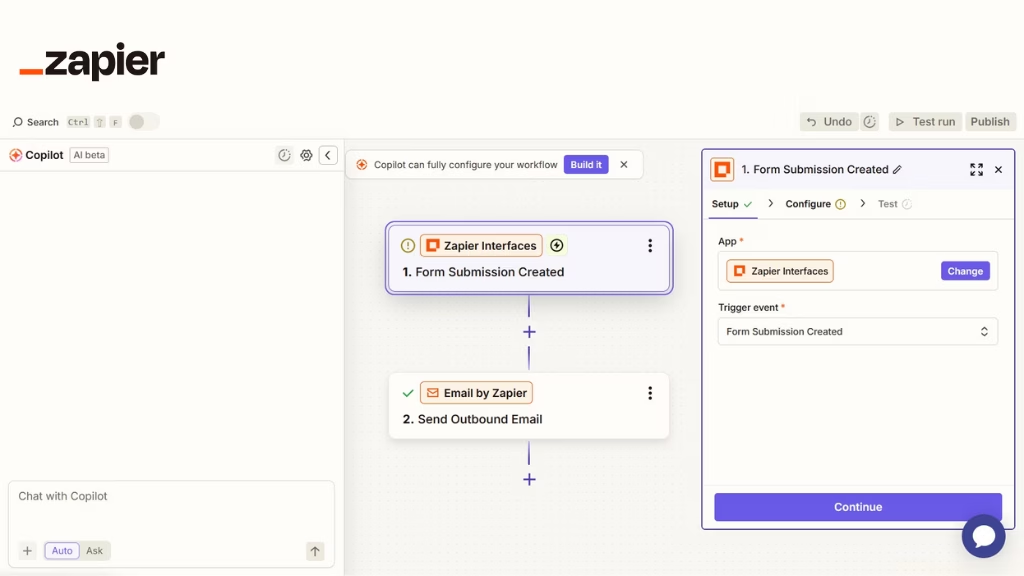
Zapier is the most widely adopted automation platform on the planet. Its linear Zap model — trigger → action → action — is the least intimidating starting point in the market. A non-technical marketer or ops manager can build meaningful automations in an afternoon with zero prior experience. It was purpose-built as the “glue layer” between SaaS products, and that’s still its strongest use case.
Strengths
- Largest integration library — 8,000+ apps, all maintained
- Genuinely intuitive UI — fastest time-to-first-automation
- Managed uptime, error handling, and retry logic built in
- Extensive template library for common use cases
- Zapier Agents for autonomous multi-step task execution (2025+)
- 99.9% uptime SLA on paid plans
- Best-in-class customer support and documentation
Weaknesses
- Per-task pricing escalates fast — very expensive at volume
- Multi-branch logic and loops are clunky workarounds
- Complex data transformations require code steps (paid tiers only)
- No self-hosting — data flows through Zapier’s servers
- Free tier (100 tasks/month) is barely usable in production
- Locked-in architecture makes migration painful
- Webhooks only on paid plans
Powered by Riseup Labs automation experts
Looking to automate workflows for your business?
Pricing
| Plan | Price | Includes |
|---|---|---|
| Free | $0/mo | 100 tasks/mo · 5 Zaps |
| Starter | $29.99/mo | 750 tasks |
| Professional | $73.50/mo | 2,000 tasks |
| Team | $103.50/mo | 50,000 tasks |
Real cost reality check: A 5-step workflow running 50 times a day burns through ~7,500 tasks/month. That immediately puts you in the Professional tier at $73.50/month minimum — before you’ve even built your second automation.
Best For
Small to medium businesses needing fast setup with popular SaaS tools. Non-technical teams where time-to-automation matters more than per-task cost. Low-to-moderate automation volumes. Businesses using niche apps that only Zapier supports.
Note: Annual billing typically reduces costs by ~30%.
Make: The Visual Builder’s Choice
Formerly: Integromat | Integrations: 2,000+ | Hosting: Cloud-only
What It Is
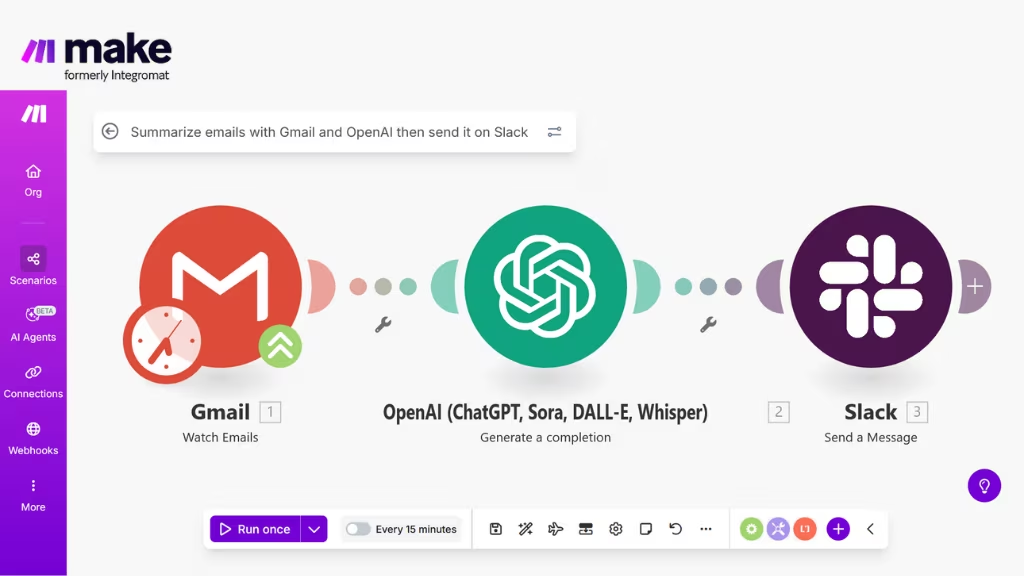
Make (formerly Integromat) sits precisely between Zapier’s simplicity and n8n’s developer-first power. Its canvas-based scenario builder shows your entire workflow as a visual flowchart — you see every branch, every data path, and every potential failure point at a glance. For teams that have outgrown Zapier’s linear model but can’t justify dedicated developer time, Make is the sweet spot.
Strengths
- Most visually intuitive builder for complex, multi-branch workflows
- Strong data transformation — JSON, arrays, aggregators, iterators
- Dramatically cheaper than Zapier for multi-step workflows
- Routers, filters, and error handlers built in as visual nodes
- Maia AI assistant generates scenarios from plain English
- Scenario versioning and rollback
- Real-time execution logs with visual step highlighting
Weaknesses
- No self-hosting — data flows through Make’s servers
- Steeper learning curve than Zapier for first-time users
- Slower execution speed vs n8n for latency-sensitive workflows
- 2,000 integrations vs Zapier’s 8,000 — gaps with niche tools
- No native code execution (must call external APIs)
- Limited AI-native features compared to n8n
Pricing
| Plan | Price | Includes |
|---|---|---|
| Free | $0/mo | 1,000 ops/mo |
| Core | $10.59/mo | 10,000 ops |
| Pro | $18.82/mo | 10,000 ops + priority execution |
| Teams | $34.12/mo | Collaboration features |
The pricing advantage is real: The same 5-workflow scenario that costs $73–100/month on Zapier runs comfortably inside Make’s Core plan at $10.59/month. That’s a 6–9× cost difference for identical output.
Best For
Teams that want more power than Zapier without developer overhead. Multi-branch workflows with conditional logic and data transformations. Budget-conscious teams replacing Zapier at moderate volume. Visual thinkers who want to see the full data flow at once.
n8n: The Developer’s Choice
Type: Open-source | Self-hostable: Yes | Native nodes: 400+
What It Is
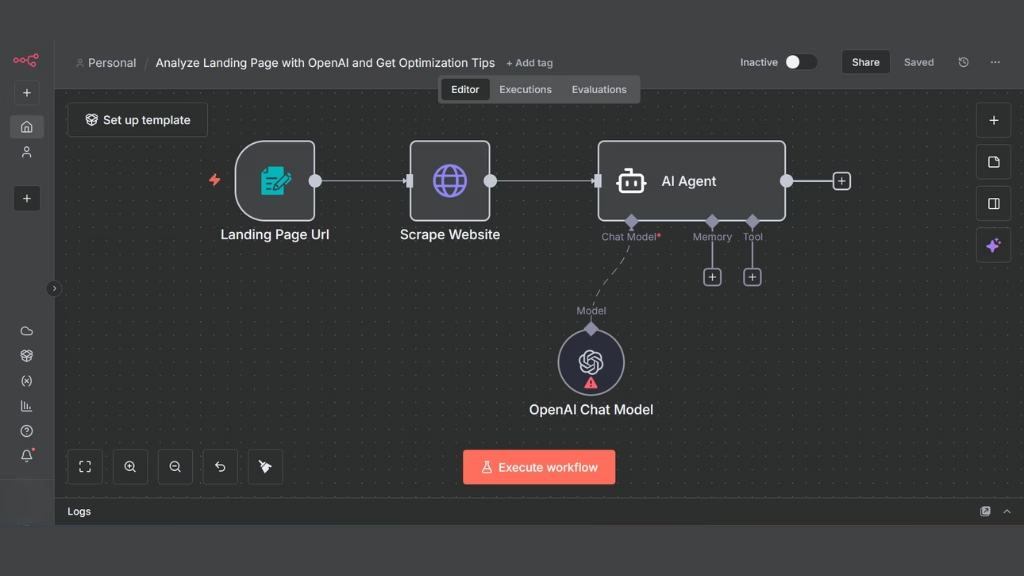
n8n (pronounced “n-eight-n”) is an open-source workflow automation platform that has grown rapidly into the serious alternative for technical teams. Self-host it on your own infrastructure for unlimited executions at near-zero cost, or use their managed cloud. Version 2.0 shipped a dramatic overhaul of AI capabilities, including 70+ AI nodes and native LangChain integration — making it the most AI-native of the four platforms by a significant margin.
Strengths
- Self-hosted = unlimited executions, ~$10–20/mo infrastructure cost only
- Full data residency — data never leaves your servers
- Native JavaScript and Python code nodes in every workflow
- 70+ AI nodes with native LangChain and LLM integrations
- Multi-branch logic, loops, and sub-workflows all handled elegantly
- HTTP request nodes for any API without a native integration
- Active open-source community, rapid release cadence
- Best choice for custom AI agent architectures
Weaknesses
- Self-hosting requires DevOps: SSL, OAuth, backups, updates
- Not suitable for non-technical users without developer support
- 400 native integrations vs Zapier’s 8,000+
- Error handling and monitoring requires manual configuration
- Cloud version more expensive per-execution than self-hosted
- Hidden time cost if you’re not already technical (~$200–500/mo equivalent)
Pricing
| Plan | Price | Includes |
|---|---|---|
| Self-hosted (Community) | Free | Unlimited workflows + executions |
| Infrastructure (VPS) | $5–20/mo | Your cost to run the server |
| Cloud Starter | $20/mo | 2,500 executions |
| Cloud Pro | $50/mo | 10,000 executions |
| Enterprise | Custom | SSO, SLA, audit logs |
The hidden cost nobody mentions: If you’re not already technical, the true cost of self-hosted n8n is $200–500/month equivalent in time spent on infrastructure, debugging, and maintenance. The platform savings evaporate quickly. Self-hosting only makes sense if you have (or can hire) someone comfortable with Docker and server management.
Best For
Technical teams comfortable with DevOps. Companies running high automation volumes where per-task pricing is prohibitive. Healthcare, legal, and financial organizations requiring on-premises data control. Any use case requiring AI agent workflows with custom LLM logic. Developers who need code execution inside workflows.
Microsoft Power Automate: The Enterprise Default
Formerly: Microsoft Flow | Connectors: 1,000+ | Compliance: HIPAA, ISO 27001, SOC 2, GDPR
What It Is
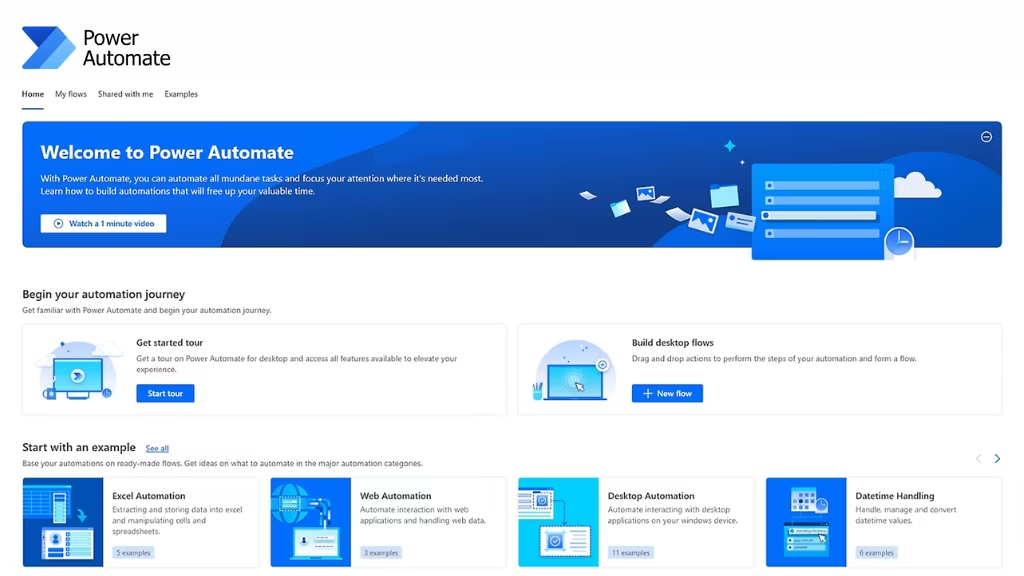
Power Automate (formerly Flow) is Microsoft’s automation platform, deeply integrated with every piece of the Microsoft 365 ecosystem. If your company runs on Teams, SharePoint, Outlook, Dynamics, or Azure, Power Automate has a home in your stack that no other tool can match. For many M365 Business and Enterprise subscribers, a functional tier is already included in their existing licence — at zero additional cost.
It also holds the only compliance stack in this comparison that satisfies HIPAA, ISO 27001, SOC 2 Type II, and GDPR simultaneously, making it the sole viable option for regulated industries where data governance is non-negotiable.
Strengths
- Unmatched Microsoft 365 integration — SharePoint, Teams, Dynamics, Excel
- Often included in existing M365 licences at no extra cost
- HIPAA, SOC 2, ISO 27001, GDPR compliance built in
- Enterprise governance — DLP policies, audit logs, access controls
- Power Automate Desktop for RPA (legacy desktop and browser automation)
- Copilot Studio for AI-powered chatbot and agent workflows
- Azure AI services integration (OpenAI, Cognitive Services)
- Built-in approval workflows with human-in-the-loop steps
Weaknesses
- Notoriously complex Microsoft licensing structure
- Premium connectors add significant per-user cost
- Steep learning curve — poor UX relative to Zapier or Make
- Complex flows can be slow (seconds vs milliseconds)
- Connectors for non-Microsoft apps are often less robust
- Heavily cloud-dependent — no true self-hosting option
- Performance degrades on high-frequency user-facing workflows
Pricing
| Plan | Price | Includes |
|---|---|---|
| Included | $0 | With M365 Business plans (standard connectors) |
| Per User | $15/user/mo | Premium connectors |
| Per Flow | $100/mo | 5 flows minimum |
| RPA (Attended) | $40/user/mo | Desktop automation |
| RPA (Unattended) | $150/user/mo | Bot-driven desktop automation |
Check before you buy: If your company has Microsoft 365 Business Basic, Standard, E3, or E5 subscriptions, Power Automate standard flows are likely already available. Many companies discover it’s included in a licence they already pay for.
Best For
Companies already on Microsoft 365. Regulated industries (healthcare, legal, finance) where HIPAA or ISO 27001 is required. Any automation heavily involving SharePoint, Teams, Dynamics, or Outlook. Enterprises needing RPA for legacy desktop systems. IT teams that require centralized governance and DLP controls.
Zapier vs Make vs n8n vs Microsoft Power Automate: Pricing Comparison
Prices current as of June 2026, billed annually.
| Zapier | Make | n8n | Power Automate | |
|---|---|---|---|---|
| Free tier | 100 tasks/mo | 1,000 ops/mo | Unlimited (self-hosted) | Included in M365 |
| Entry paid | $29.99/mo · 750 tasks | $10.59/mo · 10,000 ops | $20/mo · 2,500 execs | $15/user/mo |
| Mid tier | $73.50/mo · 2,000 tasks | $18.82/mo · 10,000 ops | $50/mo · 10,000 execs | $100/mo per flow |
| Enterprise | Custom | Custom | Custom + SSO | Negotiated via Microsoft |
| Self-hosting | ✗ | ✗ | ✓ Free, unlimited | ✗ |
| 5 workflows · 50 runs/day (real cost) | $50–100/mo | $9–16/mo | $5–20/mo (self-hosted) | $0–15/mo (if on M365) |
Why do Make and n8n appear so much cheaper? Because they count usage differently. A Zapier “task” = one action step — a 5-step Zap running once = 5 tasks. A Make “operation” works similarly but is priced much lower per unit. An n8n “execution” = one full workflow run regardless of how many nodes it contains — a 20-node workflow running 1,000 times = 1,000 executions, not 20,000. This counting difference is the biggest driver of the apparent cost gap.
Zapier vs Make vs n8n vs Microsoft Power Automate: Full Feature Comparison
| Feature | Zapier | Make | n8n | Power Automate |
|---|---|---|---|---|
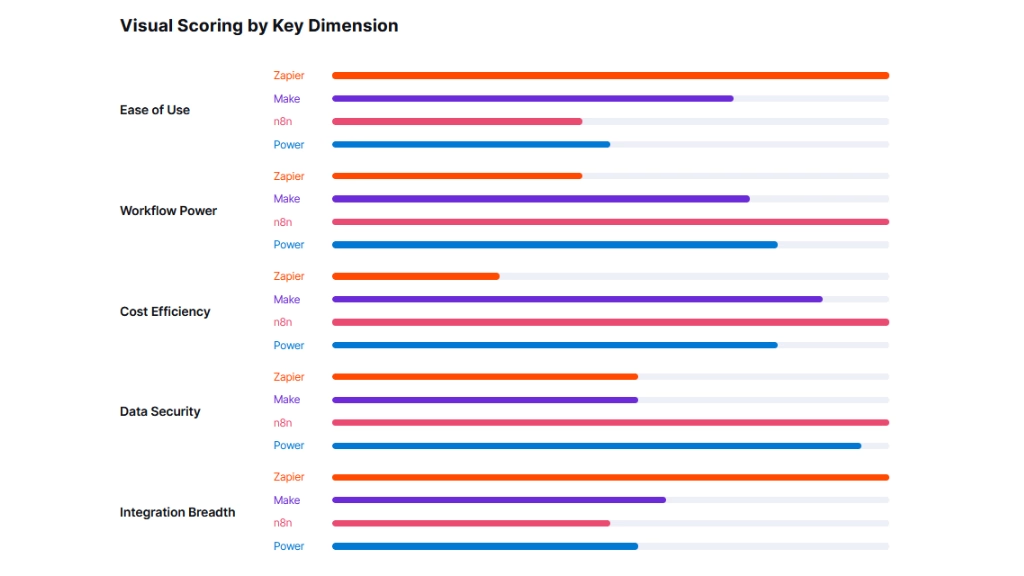
| Ease of use | ★★★★★ Easiest | ★★★★☆ Moderate | ★★★☆☆ Developer | ★★★☆☆ Steep |
| Integration count | 8,000+ | 2,000+ | 400+ nodes + HTTP | 1,000+ connectors |
| Visual workflow builder | Linear only | ✓ Canvas-based | Node-based | Flow designer |
| Custom code execution | Code step (paid) | ✗ | ✓ JS + Python native | Expressions only |
| Self-hosting | ✗ | ✗ | ✓ Docker | ✗ |
| HIPAA / ISO 27001 | SOC 2 only | SOC 2 only | You control it | ✓ Both certified |
| RPA / Desktop automation | ✗ | ✗ | ✗ | ✓ Power Automate Desktop |
| AI / LLM native nodes | Zapier Agents | Maia AI + OpenAI | ✓ 70+ AI nodes | Copilot Studio + Azure AI |
| Webhooks | Paid plans only | ✓ All paid plans | ✓ All plans incl. free | ✓ Available |
| Error handling | Auto-retry + alerts | Visual error routes | Manual config required | Azure Monitor integration |
| Multi-user collaboration | Team plan | Teams plan | Enterprise plan | ✓ Built into M365 |
| Approval workflows | Limited | Limited | ✗ | ✓ Native approval steps |
| Scenario / flow versioning | ✗ | ✓ | ✓ | ✓ |
| Sub-workflows / child flows | Limited | ✓ | ✓ Sub-workflows | ✓ Child flows |
| Execution speed | Fast | Moderate | Fast (self-hosted) | Variable (can be slow) |
| Data residency control | ✗ | ✗ | ✓ Self-hosted | ✓ Azure region selection |
| Portable export format | ✗ | JSON | JSON | ✗ |
AI Features: How Each Platform Handles LLMs in 2026
Every platform added AI capabilities in the past 18 months. Here’s what that actually means in practice.
Zapier AI
- Zapier Agents — autonomous multi-step task execution
- OpenAI, Anthropic, and Gemini integrations via pre-built actions
- AI-powered Zap builder from plain English descriptions
- Limited to pre-built AI action types
- No custom agent architecture
Make AI
- Maia — AI assistant that builds scenarios from a text description
- OpenAI, Anthropic, and Mistral API modules
- Strong data transformation capability for building LLM pipelines
- HTTP modules for calling any AI API
- No native LangChain or agent orchestration
n8n AI (strongest)
- 70+ AI nodes — most AI-native platform of the four by far
- Native LangChain integration for agent chains and RAG pipelines
- Vector store nodes (Pinecone, Qdrant, Weaviate, etc.)
- Memory nodes for stateful multi-turn AI conversations
- Custom JS/Python inside AI pipelines
- Self-hosted = full support for private/local LLM deployments (Ollama, LM Studio)
Power Automate AI
- Copilot Studio — build AI chatbots and agents within M365
- Azure OpenAI Service native integration
- AI Builder — document processing, OCR, form extraction, prediction models
- Microsoft 365 Copilot as a trigger or action target
- Tightly coupled to the Azure AI ecosystem
Verdict on AI: If you’re building custom AI agents, RAG pipelines, or LangChain-powered workflows, n8n is the clear leader. Power Automate is strongest for AI within the Microsoft ecosystem (Copilot, Azure OpenAI). Zapier and Make are competent for basic LLM API calls but lack the depth for production AI systems.
Is “Just Code It with AI” an Alternative?
In 2026, tools like Claude Code and Cursor can generate working automation code from plain English in minutes. So are these platforms becoming obsolete?
No — but the calculus has shifted. Custom code is cheaper to run and more flexible, but someone has to maintain it. When an API changes, an OAuth token expires, or something breaks at 2am Saturday, a platform handles it for you. Custom code requires a developer on call. For non-technical businesses, the platform fee is effectively the maintenance fee. For businesses with a developer on staff, custom code plus n8n for orchestration is increasingly the most powerful and cost-effective architecture.
Decision Guide: Which One Is Right for You?
Choose Zapier when…
- Your team is non-technical
- You need fast setup with mainstream SaaS apps
- Automation volume is low to moderate
- You use niche apps only Zapier supports
- Speed to value matters more than cost per task
- You need 1–2 simple automations, not a full system
Choose Make when…
- You need complex logic without a developer
- You’re outgrowing Zapier’s cost
- Multi-branch workflows with conditional logic are common
- Visual data flow matters to your team
- Data transformations are part of your workflow
- Budget is a genuine constraint
Choose n8n when…
- You have a developer on the team (or can hire one)
- High volume makes per-task pricing prohibitive
- You need custom code execution inside workflows
- Data residency is a compliance or security requirement
- You’re building AI agent architectures
- You want to fully own your automation stack
Choose Power Automate when…
- Your company runs on Microsoft 365
- HIPAA, ISO 27001, or GDPR is non-negotiable
- Your workflows are heavily tied to SharePoint, Teams, Dynamics, or Outlook
- You need RPA for legacy desktop systems
- IT requires centralized governance and audit logs
- You may already be paying for it through your M365 licence
By Industry:
| Industry | Recommended | Reason |
|---|---|---|
| Healthcare / Dental | Power Automate | HIPAA compliance is mandatory |
| Legal / Law Firms | Power Automate | Compliance + Microsoft ecosystem alignment |
| Financial Services | Power Automate or n8n | Data residency + SOC 2 requirements |
| E-commerce / Retail | Make | Best value for multi-step order/CRM workflows |
| Marketing Agencies | Make or Zapier | Breadth of SaaS integrations, visual clarity |
| SaaS / Tech Startups | n8n | Developer-friendly, low cost, deep AI integration |
| Real Estate | Make or Zapier | CRM/lead automation without compliance overhead |
| Restaurant / Local Business | Make | Best value for booking, reminders, review workflows |
| Enterprise (non-Microsoft) | n8n + Make | Custom logic + visual builder hybrid approach |
| Enterprise (Microsoft-first) | Power Automate | Already licensed, deepest M365 integration |
When to Use Multiple Platforms
Real-world automation architectures often use more than one tool — and that’s not a failure of planning, it’s a sign of a mature strategy.
A common pattern: Make or Zapier handles lightweight, team-managed automations (where non-technical staff build their own), while n8n handles complex, high-volume backend processes that need custom logic and data control.
Power Automate frequently coexists with Make or n8n in Microsoft-heavy organisations: Power Automate handles every Microsoft trigger (new Teams message, SharePoint file, Outlook email), while the other platform manages all non-Microsoft integrations.
Migration Guide: What Switching Actually Costs
Platform logic doesn’t transfer between tools. What transfers is your understanding of the workflow. Every migration is a rebuild, not a copy-paste — plan accordingly.
| Zapier → Make | Most common migration. Relatively straightforward because Make has Zapier import tooling for some scenarios. Expect 1–2 hours per workflow, including testing. Budget 2–3 days for 10 workflows. |
| Zapier → n8n | Requires a full manual rebuild. Zapier logic maps well to n8n nodes, but self-hosting can add 1 extra day for Docker/VPS setup. Good chance to consolidate multiple Zaps into cleaner workflows. |
| Make → n8n | Manual rebuild required. Make scenarios map naturally to n8n’s node architecture. Use the rebuild to add custom JS logic where Make had limitations. No import tooling exists. |
| Power Automate → Others | Usually the most painful migration. Microsoft-specific connectors like SharePoint, Teams, and Dynamics often have no direct equivalent. Keep M365-native flows in Power Automate and only migrate non-Microsoft workflows. |
| n8n Cloud → Self-hosted | n8n exports workflows as JSON, so you can import directly into self-hosted n8n. Credentials need to be re-entered. Expect 2–4 hours of setup per environment, plus extra testing for complex workflows. |
Most common mistake: Choosing a platform based on a free trial, then migrating 6 months later when costs or limitations become clear. A day spent on structured evaluation now saves weeks of migration later.
The Bottom Line
There is no universal winner.
The right answer depends on your team’s technical maturity, your data sensitivity requirements, your automation volume, your budget, and the tools you already use.
The mistake to avoid is choosing a platform based on name recognition or a free trial. Zapier is famous. n8n is exciting. Make is underrated. Power Automate is the default. None of those things make any of them right for your specific situation.
Do a structured evaluation: identify your top five workflows, estimate monthly execution volume, check whether you have a developer on the team, and confirm your compliance requirements. Those four data points will narrow the field to one or two candidates far more reliably than any comparison article.
And if after all this you’re still unsure — start with Make. For the majority of small and mid-size teams without specific compliance requirements or developer resources, it provides the best balance of power, visual clarity, and cost across the widest range of use cases.
Frequently Asked Questions
What’s the core difference between all four platforms?
Zapier is the most accessible — 8,000+ integrations, no-code, beginner-friendly, but expensive at scale. Make sits in the middle — visual canvas builder, better data handling than Zapier, dramatically cheaper, still no-code. n8n is developer-first — self-hostable, unlimited executions, custom JS/Python code, 70+ AI nodes, lowest long-term cost for technical teams. Power Automate is the Microsoft ecosystem play — deepest SharePoint/Teams/Dynamics integration, HIPAA and ISO 27001 compliant, often already included in M365 licences.
Is n8n really free?
The self-hosted Community Edition is free and open-source with no per-task pricing and unlimited workflows. You pay only for your infrastructure — typically $5–20/month on a VPS. But self-hosting requires someone comfortable with Docker, SSL certificates, OAuth app configuration, backups, and updates. If you’re not already technical, the hidden time cost can exceed $200–500/month equivalent. It’s only genuinely free if you have (or can hire) the technical skills to manage it.
Which platform is best for HIPAA compliance?
Power Automate is the only platform in this comparison with built-in HIPAA certification as part of its standard enterprise offering. n8n self-hosted can be HIPAA-compliant if you configure your own infrastructure correctly, but compliance responsibility falls entirely on you. Zapier and Make are SOC 2 Type II certified but do not offer HIPAA Business Associate Agreements in standard plans.
Which platform has the best AI integration in 2026?
n8n leads by a meaningful margin. It has 70+ AI nodes, native LangChain integration, vector store nodes, memory nodes for stateful conversations, and the ability to run custom Python/JS inside AI pipelines. It also supports private LLM deployments on self-hosted infrastructure. Power Automate is strongest for Microsoft-specific AI (Azure OpenAI, Copilot Studio, AI Builder). Zapier and Make support basic LLM API calls but lack the architecture for complex AI agent systems.
Can I use multiple automation platforms simultaneously?
Yes — and many mature organisations do. A common architecture: Zapier or Make handles lightweight, user-managed automations; n8n handles complex, high-volume backend processes needing custom logic; Power Automate manages all Microsoft-specific triggers. The overhead of maintaining two platforms is real, but at a certain scale the savings and capability gains justify it.
How do Zapier tasks, Make operations, and n8n executions compare?
They count differently. A Zapier “task” = one action step — a 5-step Zap running once = 5 tasks. A Make “operation” works similarly but is priced much lower per unit. An n8n “execution” = one full workflow run regardless of how many nodes it contains — a 20-node workflow running 1,000 times = 1,000 executions, not 20,000. This is the biggest reason n8n and Make appear dramatically cheaper for complex, multi-step workflows.
Which platform is easiest to migrate away from?
n8n is the easiest — workflows are stored as portable JSON files you can export, version-control, and move between instances. Make offers scenario export and some import tooling for Zapier users. Zapier is moderately sticky — its linear structure is simple to rebuild elsewhere, but there’s no native export format. Power Automate is the hardest to leave, because flows relying on Microsoft-specific connectors have no equivalent on other platforms.
Is Power Automate free with Microsoft 365?
Standard flows (using standard connectors) are included in most Microsoft 365 Business Basic, Standard, E3, and E5 subscriptions at no additional cost. Premium connectors — for Salesforce, Adobe Sign, SAP, and many third-party SaaS tools — require the per-user plan at $15/user/month or the per-flow plan at $100/month. Power Automate Desktop (RPA) is free for Windows 10/11 users but requires additional licensing for attended and unattended bots at scale.
This page was last edited on 29 June 2026, at 1:09 pm

Start a conversation with our team to solve complex challenges and move forward with confidence.










