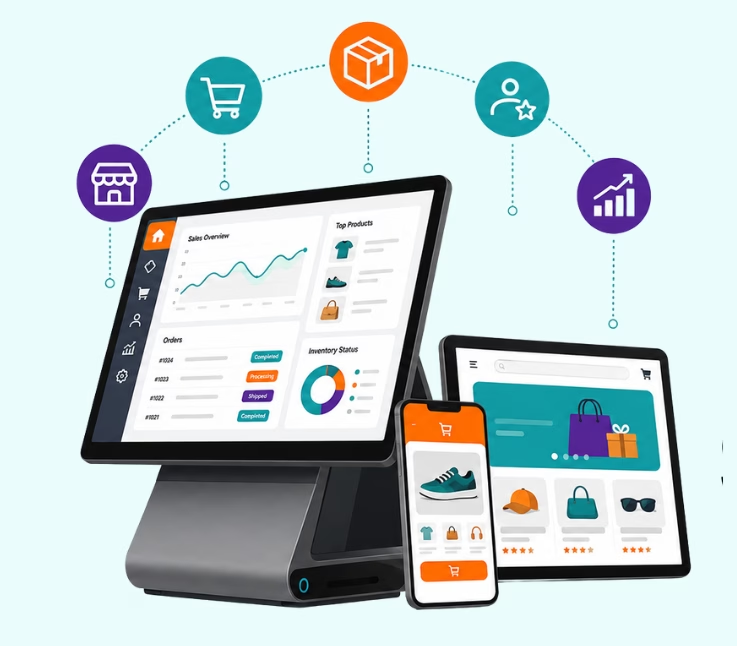
Building retail software involves identifying business needs, planning system requirements, choosing the right technology, designing the solution, developing the software, testing it, and launching it. A well-planned process helps create a scalable system that improves operations and customer experiences.
Retail has changed a lot in recent years. Customers expect fast checkouts, accurate inventory updates, and personalised offers that actually match their needs. Meeting these expectations is difficult with generic, off-the-shelf software. That is why more retailers are choosing retail software development that fits their own workflows instead of adjusting their business around someone else’s system.
This guide explains how to build retail software the right way. We’ll keep things simple and avoid unnecessary technical terms. You’ll learn what custom retail software is, which solutions businesses usually build, how the development process works, what it costs, and the common mistakes to avoid.
We’ll also share practical insights from real retail software projects, because experience often teaches lessons that theory cannot.
What Is Retail Software Development?
Retail software development is the process of creating software that helps retail businesses run their daily operations more smoothly. Think of it as building digital tools that help stores manage products, sales, customers, payments, and business decisions.
For example, a retail software system can help a store track inventory, process payments at checkout, manage customer loyalty programs, analyze sales trends, and even recommend products to shoppers. Instead of using separate tools for each task, custom retail software connects everything into one system that matches how a specific business works.
Custom Retail Software vs. Off-the-Shelf Tools
Before choosing a retail software solution, businesses need to understand the difference between ready-made tools and software built specifically for their needs. While off-the-shelf software can be a good starting point, custom retail software offers more flexibility and control as businesses grow.
| Off-the-Shelf Software | Custom Retail Software |
|---|---|
| Ready-made solution with quick setup | Built around your business needs |
| Lower upfront cost | Higher initial investment |
| Limited customization options | Fully customizable features and workflows |
| May require businesses to adjust processes | Adapts to existing business workflows |
| Limited integrations and scalability | Easy integration and future expansion |
| Less control over data and features | Greater control over data and functionality |
Before we get into the process, let’s look at why retail software is becoming such an important investment.
The Retail Software Market Right Now
Retail technology is no longer a small part of the industry. It has become a major factor in how retailers compete, improve operations, and serve customers.
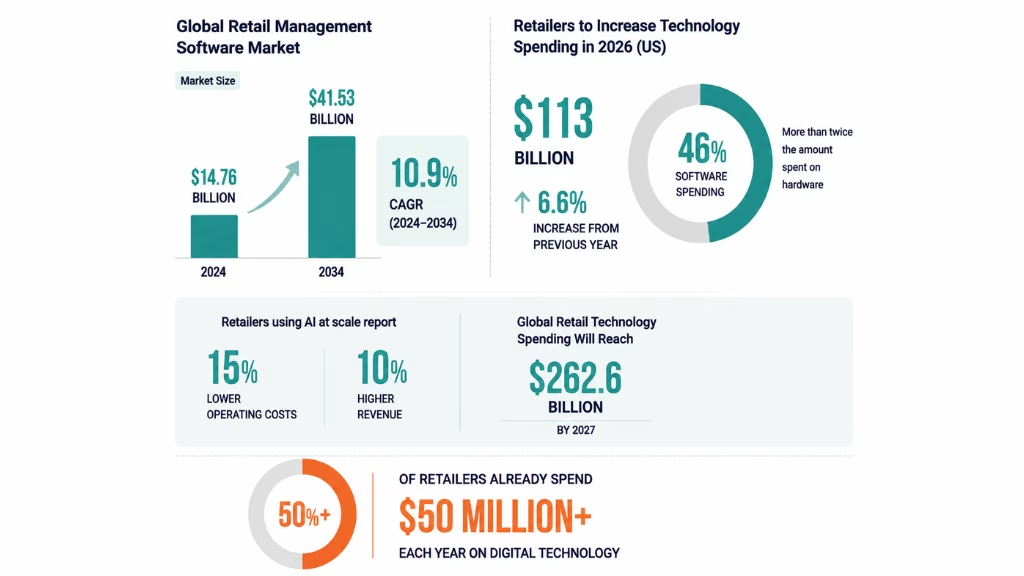
The global retail management software market was valued at around $14.76 billion in 2024. It is expected to reach $41.53 billion by 2034, growing at about 10.9% each year.
Forrester’s 2026 US retail technology forecast shows that retailers are expected to increase technology spending to $113 billion in 2026. This is a 6.6% increase from the previous year. Software now makes up 46% of this spending, which is more than twice the amount spent on hardware.
McKinsey research shows that retailers using AI at scale report around 15% lower operating costs and 10% higher revenue.
Gartner predicts global retail technology spending will reach $262.6 billion by 2027.
A KPMG survey found that more than half of retailers already spend $50 million or more each year on digital technology.
These numbers show a clear trend: retailers investing in the right software are gaining an advantage. Businesses that delay digital transformation risk falling behind competitors.
Types of Retail Software You Can Build
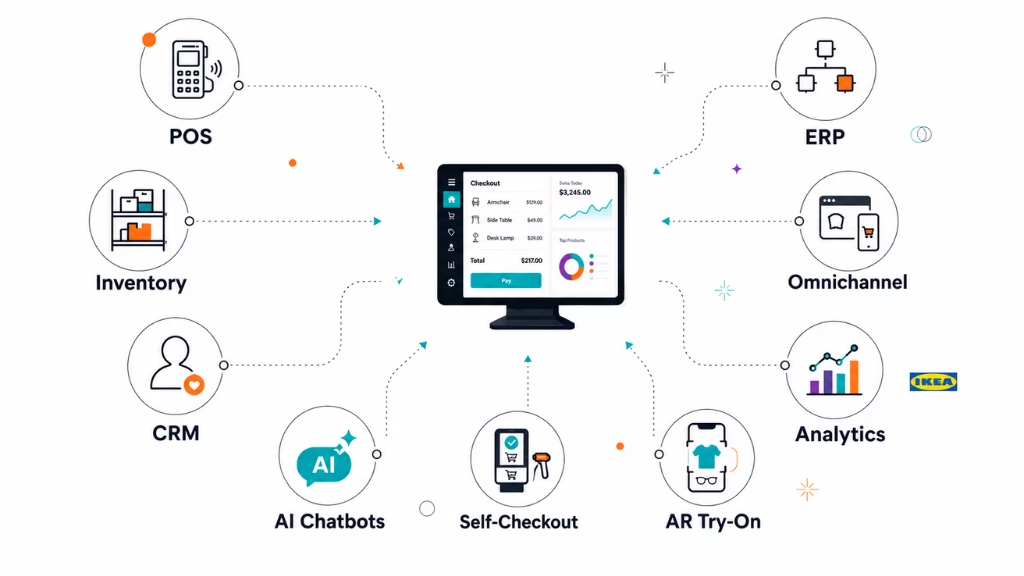
Not every retailer needs every solution listed below. The right choice depends on business size, goals, and customer needs. These are some of the most common tools built through retail application development projects.
1. Point of Sale (POS) Software
A POS system is where every transaction happens, so speed and reliability are critical. Even a few seconds of delay during checkout can affect the customer experience.
Retailers often choose custom POS software when they need special features, such as hardware integration, loyalty scanners, unique payment flows, or custom reporting that standard systems cannot provide.
2. Inventory Management Software
Inventory management software helps retailers track stock levels in real time. It prevents stockouts and reduces over-ordering.
Some businesses also use IoT sensors to monitor product conditions, shelf levels, or storage environments. This is especially useful for grocery stores and retailers selling products with short shelf lives.
3. Customer Relationship Management (CRM)
A CRM system stores customer information, purchase history, and shopping behavior. This helps retailers create more relevant offers instead of sending the same promotions to everyone.
A strong CRM can also connect with loyalty programs, allowing businesses to recognize returning customers and provide better experiences.
4. Enterprise Resource Planning (ERP)
An ERP system connects important business operations, including finance, inventory, and supply chain management.
Because ERP projects are usually large, many retailers introduce them step by step. They may start with inventory and finance before adding CRM, warehouse management, or other features later.
5. Omnichannel Retail Platforms
Customers move between websites, mobile apps, and physical stores without thinking about it. An omnichannel platform connects these channels so the experience stays consistent.
For example, customers can use an online coupon in a physical store without any extra steps. This creates a smoother shopping experience across every platform.
Real-world retail platforms often combine eCommerce, inventory, order management, and customer experience tools.
For example, Riseup Labs developed solutions such as Red Grocer, an online grocery platform designed to simplify digital shopping experiences, and worked on retail order processing solutions for businesses managing large-scale customer interactions.
6. Retail Analytics and Demand Forecasting
Retail analytics software collects data from your POS system, supply chain, and online store to help predict customer demand and improve decisions.
It can help retailers understand which products sell best, when demand increases, and how pricing changes affect sales. However, accurate predictions depend on clean and reliable data. Many businesses need to fix their data quality issues before they can fully benefit from analytics.
For example, IKEA uses AI-powered recommendation tools to improve product suggestions. This helps customers find relevant products while increasing engagement and sales.
7. AI Chatbots and Recommendation Engines
AI chatbots help customers with common questions, such as checking order status, tracking deliveries, or understanding return policies.
Recommendation engines suggest products based on customer behaviour, previous purchases, and browsing activity. These tools create more personalised shopping experiences while reducing pressure on customer support teams.
8. AI-Powered Self-Checkout and Retail Automation
Retail automation software now includes advanced self-checkout systems that use technologies like computer vision to reduce errors and prevent theft.
These systems work best when connected directly with POS and inventory databases. This allows every transaction to update stock levels automatically and keeps business data accurate.
9. Augmented Reality (AR) Virtual Try-On
AR virtual try-on allows customers to see how products may look before purchasing. Shoppers can try clothing, glasses, makeup, and other products using their smartphone cameras.
This improves customer confidence, reduces product returns, and creates a better online shopping experience. It is becoming especially popular in fashion and beauty retail.
In-Demand Retail Software Solutions at a Glance
When planning a retail software project, most businesses focus on solutions that improve operations, customer experience, and decision-making.
Common retail software solutions include:
- Retail technology strategy and consulting to create a clear development roadmap
- Custom retail software designed for specific business needs
- Retail web and mobile applications for customers and employees
- Legacy system modernisation to connect older tools with modern platforms
- Customer engagement and personalisation solutions
- Inventory and supply chain management systems
- Payment and transaction processing solutions
- Retail analytics and business intelligence dashboards
- Loyalty program management platforms
How to Build Retail Software: Step-by-Step Process
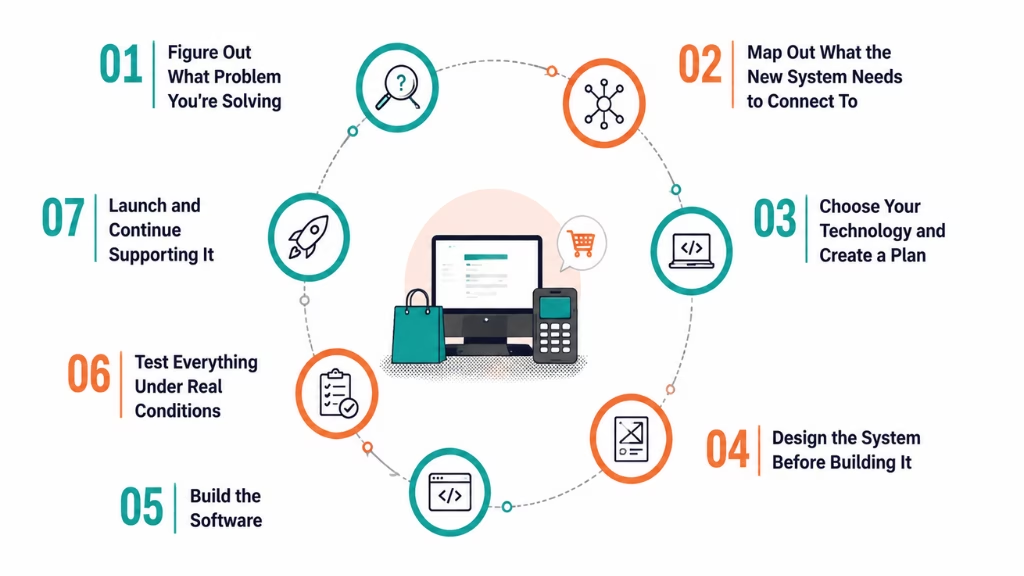
Building retail software requires careful planning, the right technology choices, and continuous testing. Rushing through the process often leads to higher costs and poor results.
Below are the key steps for building retail software, based on how successful projects are usually managed.
Step 1: Figure Out What Problem You’re Solving
Before development starts, clearly define the problem your software needs to solve.
Are customers facing slow checkout experiences? Are inventory issues causing lost sales? Are your online and physical stores using disconnected systems?
Talk with the people who use these systems every day, such as store managers, cashiers, and operations teams. Their feedback helps identify real problems that need solving. Create a clear document that explains your goals, challenges, and expected outcomes. This becomes the foundation for the entire project.
The Impact: Many software projects fail because teams start building before understanding the actual problem. Clear requirements prevent unnecessary features and wasted resources.
Step 2: Map Out What the New System Needs to Connect To
Retail software rarely works alone. It usually needs to connect with other systems, including:
- Payment processors
- Existing ERP platforms
- Supplier systems
- Marketing tools
- Customer databases
Identify what information needs to move between these systems and how often updates should happen.
The Impact: Integrations are one of the biggest challenges in software projects. Planning them early helps avoid expensive changes later.
Step 3: Choose Your Technology and Create a Plan
At this stage, you select the technology stack, including programming languages, frameworks, databases, and cloud platforms.
You also define:
- Project timeline
- Budget expectations
- Security requirements
- Scalability needs
- Future expansion plans
A good technology plan should prepare for both normal operations and unexpected situations, such as traffic spikes or security threats.
The Impact: Choosing unsuitable technologies can create performance issues and force expensive rebuilding later.
Step 4: Design the System Before Building It
Before writing code, designers create wireframes and prototypes that show how the software will work. These early designs allow teams to test user flows and identify problems before development begins.
For example, a confusing checkout process can be fixed during the design stage instead of after months of coding.
The Impact: Early testing saves time, reduces costs, and creates a better user experience.
Step 5: Build the Software
This is where developers turn designs into a working product. Most teams use short development cycles called sprints, which usually last one to two weeks. After each sprint, teams review progress and make improvements. This approach allows businesses to see working features early and adjust requirements when needed.
The Impact: Regular reviews help catch issues early instead of discovering major problems near launch.
Step 6: Test Everything Under Real Conditions
Testing ensures the software works correctly before customers and employees start using it.
Common testing methods include:
- Unit testing: Checks whether individual parts of the software work correctly
- Integration testing: Ensures different systems communicate properly
- Performance testing: Checks how the software handles heavy traffic
- User testing: Collects feedback from real users
A retail system must handle busy periods, such as holiday sales, without slowing down or crashing.
The Impact: Testing helps prevent failures during important business moments when downtime can directly affect revenue.
Step 7: Launch and Continue Supporting It
Launching the software is only the beginning. After release, teams need to monitor performance, fix issues, improve security, and add new features. Retail businesses change over time, so software must also continue improving. Regular updates keep the system reliable and useful as business needs grow.
The Impact: Software that is not maintained can become outdated and create security or performance problems.
Together, these seven steps create the complete retail software development lifecycle. Understanding each stage helps businesses set realistic expectations and make better decisions when choosing a development partner.
Expert insight: In our experience working on retail projects, businesses that skip proper requirement gathering often face expensive rework later. Spending extra time planning at the beginning can prevent months of unnecessary changes after launch.
Recommended Technology Stack for Retail Software
Choosing the right technology is one of the most important decisions when building retail software. The right stack helps your system stay secure, reliable, and ready to grow as your business expands.
A typical modern retail software stack includes:
| Layer | Common Choices | Why It’s Used |
| Backend | Java, .NET, Node.js, Python | Handles business logic, data processing, and system connections |
| Frontend (web) | React, Angular, Vue | Creates the interfaces customers and employees use |
| Mobile | Swift and Kotlin (native), Flutter or React Native (cross-platform) | Builds mobile apps for shoppers and staff |
| Database | PostgreSQL, MongoDB, MS SQL | Stores product, customer, order, and business data |
| Cloud hosting | AWS, Azure, Google Cloud | Keeps systems reliable and helps them scale during busy periods |
| AI and machine learning | TensorFlow, PyTorch | Supports personalisation, forecasting, and fraud detection features |
There is no single technology stack that works for every retail business. The best choice depends on your goals, budget, existing systems, development team, and expected user traffic.
Common Challenges (and How to Solve Them)
Building software for retail businesses comes with several challenges. Understanding these problems early can help you avoid costly mistakes.
Old systems that don’t connect with new technology
Many retailers still use older systems that were not designed to work with modern software.
Before development begins, review your current systems and identify what needs to be updated or connected. A phased migration is usually safer than replacing everything at once.
Data stored in separate systems
Customer data, inventory details, and sales information are often spread across different platforms. This makes it difficult to get a complete view of the business.
Solving this usually requires connecting systems, creating consistent data standards, and improving data quality.
Personalisation without affecting customer trust
Personalised experiences require customer data. However, businesses must handle this information carefully.
Create clear privacy policies and follow data protection rules from the beginning. Security should be part of development, not something added later.
Following security and compliance requirements
Retail businesses handle sensitive information, including payment and customer data.
Standards like GDPR and PCI DSS should be considered during development. Adding compliance after launch is usually more expensive and complicated.
Handling sudden traffic increases
Retail websites and applications often experience large traffic spikes during sales events, holidays, or promotions.
Features like cloud scaling, load balancing, and performance testing help systems stay stable during high-demand periods.
Other important practices include:
- Training employees before full deployment
- Running a small pilot before a complete rollout
- Creating simple data import and export options
- Planning future updates from the beginning
These steps make adoption easier and reduce problems after launch.
How Much Does Retail Software Development Cost?
The retail software development cost depends on the project’s size, features, integrations, and complexity.
Here is a general estimate:
| Project Type | Typical Cost Range | Typical Timeline |
| MVP (one core feature, such as basic POS or inventory software) | $25,000 – $75,000 | 3 – 5 months |
| Mid-size platform (CRM + inventory + basic analytics) | $75,000 – $180,000 | 5 – 9 months |
| Enterprise-grade omnichannel system | $180,000 – $350,000+ | 9 – 18 months |
Several factors affect the final cost, including:
- Number of integrations required
- Complexity of business rules
- Technology choices
- Amount of custom design work
- Security and compliance requirements
Experienced development teams usually focus on return on investment (ROI), not just the initial cost. Well-built retail software can create value through automation, improved customer experiences, and better decision-making.
How to Choose the Right Retail Software Development Company
Choosing the right partner is one of the most important decisions in a retail software project.
A good development company should offer more than coding skills. Look for these qualities when comparing retail software development services:
- Choose a company with real retail projects and measurable results.
- The team should understand POS, ERP, AI, IoT, cloud, and modern retail technologies.
- Look for regular updates, defined milestones, and transparent communication.
- Check certifications instead of relying only on claims.
- Software requires updates, maintenance, and improvements after release.
Here is how different types of providers usually compare:
| What to Look For | Small Freelance Teams | Large IT Consultancies | Riseup Labs |
| Retail-specific project history | Limited, depends on experience | Broad but often general | 15+ years of experience with POS, inventory, eCommerce, and CRM solutions |
| Certifications | Rarely formal | Usually available | ISO 9001 & 27001 certified, SOC 2 Type II and PCI DSS compliant |
| Global delivery experience | Usually limited | Global but less flexible | 700+ completed projects across 30+ countries |
| Client base | Mostly small businesses | Enterprise-focused | 300+ clients, from startups to global enterprises |
| Communication style | Can vary widely | Often slower due to multiple layers | Direct access to dedicated teams with agile updates |
| Pricing flexibility | Lower cost but higher risk | Higher cost | Flexible solutions from MVPs to enterprise platforms |
Why Businesses Choose Riseup Labs for Retail Software Development
Riseup Labs has been building software solutions since 2009, with retail technology being one of its key areas of expertise. The company has delivered 700+ projects for 300+ clients across more than 30 countries, working with startups, growing businesses, and large enterprises.
The company’s experience is supported by industry certifications, including ISO 9001 and ISO 27001, along with SOC 2 Type II and PCI DSS compliance. These certifications are especially important for retailers handling customer information and payment data.
For retail businesses, Riseup Labs develops solutions that connect different parts of the shopping experience. These include:
- Custom eCommerce platforms
- AI-powered personalisation tools
- Centralised inventory management systems
- Real-time analytics dashboards
- Customer loyalty platforms
- POS software with hardware integration and CRM features
Modern retail platforms usually combine multiple systems, including online stores, inventory management, order processing, and customer experience tools.
For example, Riseup Labs developed solutions such as Red Grocer, an online grocery platform designed to simplify digital shopping experiences, and worked on retail order processing solutions for businesses managing large-scale customer interactions.
Expert insight: From our experience working with retailers of different sizes, successful software projects usually begin with one focused first release. Businesses that try to build every feature at once often struggle with changing requirements and delays. Starting small and improving based on real customer feedback usually creates stronger results.
When comparing retail software development companies, focus on specific retail experience instead of general software portfolios. A company that understands retail challenges, such as checkout speed, inventory accuracy, and customer engagement, can make a major difference after launch.
Retail Software Trends Worth Watching
Understanding future trends helps businesses build software that stays useful for years. The following retail software trends are shaping the future of retail technology solutions:
- AI-driven personalization is becoming a standard feature. Retailers use AI to improve recommendations, understand customer behavior, and create better shopping experiences.
- IoT-based inventory tracking is growing quickly, especially in grocery and industries where product conditions need close monitoring.
- Agentic AI is expanding beyond basic chatbots. Retailers are exploring AI agents that can complete tasks like adjusting prices, managing inventory, and automating routine decisions.
- Higher technology investment is making digital transformation a requirement rather than an advantage. Retailers are investing more in software, automation, and customer experience tools.
- Composable and API-first systems are replacing large, fixed platforms. Businesses can now connect specialized tools and replace individual components without rebuilding the entire system.
You can learn more about current retail technology spending trends in Forrester’s 2026 US Tech Forecast for retail, which explains where retailers are directing their technology investments.
Bringing It All Together
Building custom software for retail stores requires planning, the right technology choices, and a clear development strategy. However, it does not have to be overwhelming.
Start by identifying the main problem your business needs to solve. Choose the right solutions, whether that includes POS systems, inventory management, CRM, analytics, or automation tools.
Follow a structured development process and work with a partner that understands retail operations. The best software solutions are built to grow with your business, improve efficiency, and create better customer experiences.
Businesses that treat retail business software solutions as a long-term investment often see better results. With the right approach, retail software automation tools can reduce manual work, improve accuracy, and help businesses make smarter decisions.
Frequently Asked Questions
What is retail software development?
Retail software development is the process of creating digital tools, such as POS systems, inventory management platforms, CRMs, and online stores, based on a retailer’s specific business needs. Unlike standard software, custom solutions are designed around the company’s workflow and goals.
How long does it take to build custom retail software?
The timeline depends on the project size and complexity. A basic MVP usually takes around 3 to 5 months, while a full enterprise platform with multiple integrations can take 9 to 18 months.
Is custom retail software worth the cost compared to off-the-shelf tools?
For many growing and established retailers, custom software provides more value over time. Off-the-shelf tools may be cheaper at first, but they often have limitations when businesses need unique workflows, advanced integrations, or better scalability. Custom software requires a larger upfront investment but can improve efficiency, customer experience, and decision-making in the long run.
What retail automation tools are most useful for small businesses?
Small retailers often benefit from inventory tracking systems, automatic reorder alerts, simple AI recommendations, and easy-to-use self-checkout solutions. These tools improve efficiency without requiring a full enterprise system.
What should I look for in a retail software development company?
Look for a company with proven retail experience, a clear development process, strong security practices, and reliable post-launch support. Ask for specific retail projects instead of only reviewing general software experience.
Can old retail systems be connected to new custom software?
Yes. Most legacy systems can be connected with modern software through integrations and gradual modernisation. A technical review should be completed first to create a safe migration plan without disrupting daily operations.
This page was last edited on 2 September 2026, at 12:56 pm

Start a conversation with our team to solve complex challenges and move forward with confidence.