
Quick Answer: It usually takes 2 to 4 months to develop a simple app, 4 to 8 months for a medium app, and 9 to 18+ months for a complex app. The timeline depends on features, design, platforms, integrations, testing, compliance, and team experience.
App development timelines are confusing because most answers start with “it depends.” That is true, but it is not very useful when you need to plan a budget, hire a team, or set a launch date.
A basic app can be built in a few months. A business app with login, payments, APIs, notifications, and an admin panel takes longer. A complex app with real-time features, compliance, AI, or heavy integrations may take a year or more.
So, how long does it take to develop an app? In most cases, a simple app takes 2 to 4 months, a medium-complexity app takes 4 to 8 months, and a complex or enterprise app takes 9 to 18+ months. Several current app development guides show similar ranges, with standard projects often falling between 3 and 9 months.
This guide breaks down the timeline by app complexity, development phase, app type, and build method so you can estimate your project more realistically.
How Long Does It Take to Develop an App?
The average app development timeline depends mainly on complexity.
| App Complexity | Typical Timeline | Common Features |
|---|---|---|
| Simple App | 2 to 4 months | Basic screens, simple forms, limited backend |
| Medium App | 4 to 8 months | Login, APIs, payments, notifications, admin panel |
| Complex App | 9 to 18 months | Real-time features, dashboards, multiple user roles |
| AI or Data-Driven App | 12 to 20+ months | AI models, analytics, data pipelines, advanced security |
These ranges are useful for planning, but they are not fixed rules. A focused MVP with clear requirements can launch faster, while unclear scope, complex integrations, or compliance needs can extend the timeline.
The biggest thing to remember is this: app development is not just coding. The full timeline includes planning, design, development, testing, deployment, and post-launch fixes.
App Development Timeline by Phase
Most app projects move through five main phases.
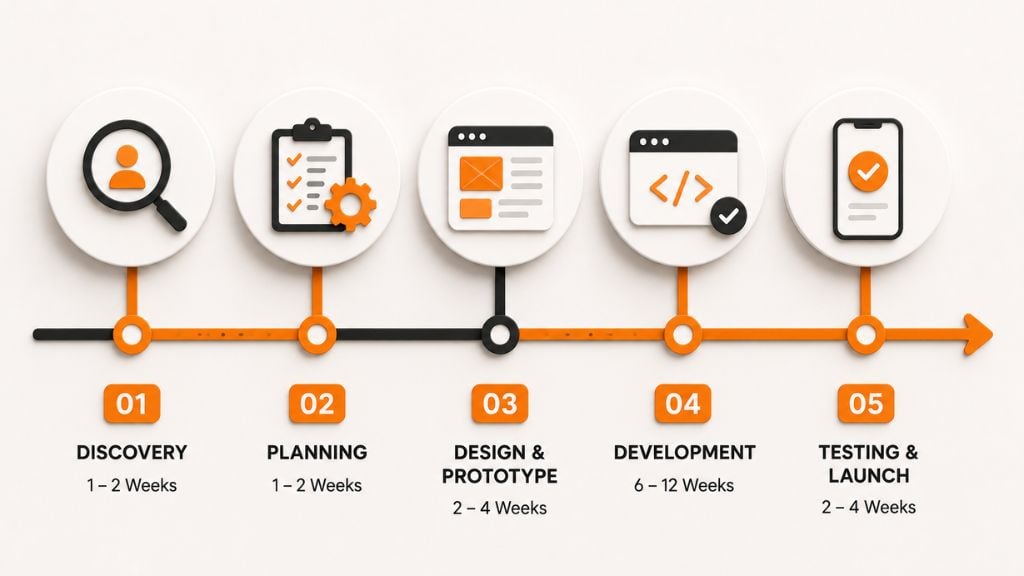
Clutch describes a typical mobile app timeline as 20 to 40 weeks, including research, specifications, development, testing, deployment, and post-launch work.
1. Planning and Discovery: 1 to 2 Weeks
Planning defines what the app should do, who it is for, and how it will be built.
This phase includes:
- Business goals
- User research
- Feature planning
- Competitor review
- Platform choice
- Technical requirements
- Budget planning
- Project roadmap
Poor planning usually creates delays later. If the team does not agree on scope, features, and priorities early, development becomes full of rework.
2. UI/UX Design: 3 to 6 Weeks
Design turns the idea into screens, flows, and clickable prototypes.
This phase includes:
- Wireframes
- User journeys
- App screens
- Design system
- Clickable prototype
- Developer handoff
A simple app may only need a few screens. A marketplace, healthcare app, or SaaS platform may need dozens of screens for onboarding, dashboards, accounts, payments, settings, and admin workflows.
Good design saves time because developers know exactly what to build.
3. Development: 6 to 12 weeks
Development is usually the longest phase.
It includes:
- Frontend development
- Backend development
- Database setup
- User authentication
- Admin panel
- API integrations
- Payment setup
- Push notifications
- Real-time features
- Security controls
- Analytics setup
Most delays happen here because hidden technical work appears during the build. Backend logic, integrations, and edge cases often take longer than expected.
4. Testing and QA: 3 to 6 Weeks
Testing checks whether the app works properly before launch.
QA includes:
- Functional testing
- Device testing
- Usability testing
- Performance testing
- Security testing
- API testing
- Payment testing
- Bug fixes
Do not skip QA to launch faster. A buggy app can hurt user trust and cost more to fix after release.
5. Deployment and Launch: 1 to 2 Weeks
Deployment is the final release step.
For mobile apps, this includes:
- App Store submission
- Google Play submission
- App descriptions
- Screenshots
- Privacy policy review
- Production server setup
- Final release testing
Web apps can often launch faster than mobile apps because they do not need app store approval.
How App Complexity Affects Development Time
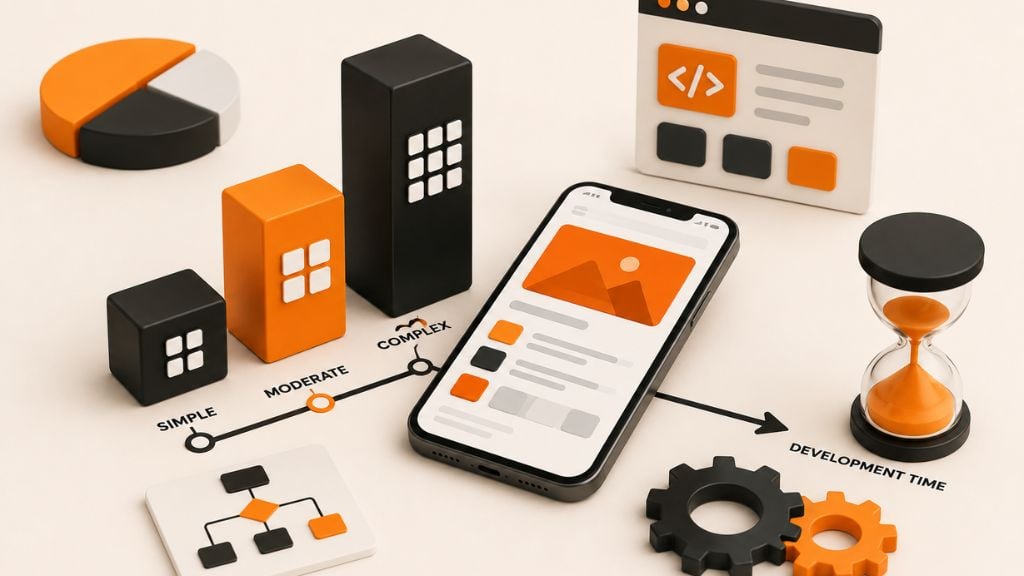
App complexity is the biggest timeline driver.
| Complexity Level | Timeline | Example Features |
|---|---|---|
| Simple | 2 to 4 months | Basic UI, simple forms, static content |
| Medium | 4 to 8 months | Accounts, payments, APIs, notifications |
| Complex | 9 to 18 months | Real-time sync, dashboards, complex permissions |
| Enterprise or AI-Driven | 12 to 20+ months | AI, compliance, advanced analytics, heavy integrations |
Simple apps often take 2 to 4 months, while complex enterprise apps can require 6 to 12 months or more depending on scope and platform strategy.
Simple App Timeline
A simple app usually takes 2 to 4 months.
Examples include:
- Calculator app
- Basic booking app
- Simple content app
- Event app
- Basic internal tool
- Simple directory app
These apps are faster because they have fewer screens, fewer user roles, and limited backend work.
Medium App Timeline
A medium app usually takes 4 to 8 months.
Examples include:
- Ecommerce app
- Fitness tracking app
- Customer portal
- Appointment booking app
- Delivery tracking app
- Marketplace MVP
These apps often need user login, payment gateways, push notifications, APIs, admin dashboards, and database management.
Complex App Timeline
A complex app usually takes 9 to 18 months or more.
Examples include:
- Social networking app
- Fintech app
- Telehealth app
- Multi-vendor marketplace
- Logistics platform
- SaaS product
- Real-time collaboration tool
Complex apps take longer because they need stronger architecture, more testing, better security, scalability planning, and more integrations.
AI or Data-Driven App Timeline
AI apps often take 12 to 20+ months, especially when they need custom models, data pipelines, analytics, or advanced security.
AI apps may require:
- Data preparation
- Model selection
- Model testing
- API integration
- Human review workflows
- Monitoring
- Security checks
- Performance tuning
If the app only uses an existing AI API, the timeline may be shorter. If it needs custom model training, it can take much longer.
App Development Timeline by App Type
Different app types take different amounts of time because their features, risks, and integrations are different.
| App Type | MVP Timeline | Full App Timeline | Main Timeline Drivers |
|---|---|---|---|
| Ecommerce App | 2 to 3 months | 4 to 7 months | Payments, inventory, checkout |
| Healthcare App | 3 to 5 months | 6 to 12+ months | Security, compliance, integrations |
| Social App | 2 to 4 months | 6 to 10 months | Feeds, chat, media, scaling |
| Marketplace App | 3 to 5 months | 6 to 12+ months | Buyer and seller flows, payments |
| Fintech App | 4 to 6 months | 9 to 18+ months | Compliance, KYC, security |
| AI App | 4 to 6 months | 12 to 20+ months | Data, AI logic, testing |
| Internal Business App | 1 to 3 months | 3 to 6 months | Workflows, permissions, integrations |
App Development Timeline by Build Method
The development method also affects the schedule.
| Development Method | MVP Timeline | Full App Timeline | Best For |
|---|---|---|---|
| Native Development | 4 to 8 months | 9 to 18+ months | High-performance mobile apps |
| Cross-Platform Development | 3 to 6 months | 6 to 12 months | iOS and Android with shared code |
| No-Code or Low-Code | 1 to 4 weeks | 2 to 4 months | Prototypes and simple internal tools |
| AI App Builders | 1 to 4 weeks | 2 to 4 months | Basic MVPs and workflow apps |
Native Development
Native development means building separately for iOS and Android.
It gives the best platform control, but it usually takes longer because each platform needs separate development and testing.
Cross-Platform Development
Cross-platform development uses one codebase for iOS and Android.
Frameworks like Flutter and React Native can reduce time for many business apps, especially when the app does not need deep native performance.
No-Code or Low-Code Development
No-code and low-code tools can help launch simple apps or prototypes quickly.
They are useful for:
- Internal tools
- MVPs
- Dashboards
- Workflow apps
- Proof-of-concept products
But they may not work well for complex apps that need custom features, high scalability, or advanced security.
Main Factors That Affect App Development Time
The timeline depends on more than the number of screens. Two apps can look similar on the surface but take very different amounts of time to build because of backend logic, integrations, security needs, and how clearly the scope is defined.
Feature Scope
Feature scope is one of the biggest timeline drivers. A simple app with basic screens and forms can move quickly, but every added feature creates extra work for design, development, testing, and bug fixing.
Features like user login, payments, chat, search filters, push notifications, location tracking, admin dashboards, analytics, AI features, and offline mode all add time. Some may look small to users, but they often require backend logic, database changes, permissions, and QA.
That is why a focused MVP is usually the better starting point. Launch the features users need most, then add the rest after you have feedback.
Platform Choice
The platform you choose also affects the timeline. A web app can often launch faster than a mobile app because it does not need app store approval. A single-platform mobile app is usually faster than building separate native apps for both iOS and Android.
Cross-platform development can reduce time when the product fits that approach. It allows one codebase to support both iOS and Android, which can be useful for MVPs and many business apps. But if the app needs heavy device performance, advanced native features, or platform-specific behavior, native development may still take longer but deliver better results.
Backend Complexity
Backend work is often underestimated because users do not see it directly. But it is where much of the app’s logic lives.
Apps take longer when they need user accounts, role-based access, real-time updates, payment logic, data encryption, reporting, admin controls, or third-party APIs. Even a simple-looking feature like “user dashboard” may require database design, permissions, analytics, and secure data handling.
A strong backend takes time, but it prevents bigger problems later. Weak backend planning often leads to slow performance, bugs, and expensive rebuilds.
Integrations
Integrations can add weeks to the project, especially when the external system has poor documentation, approval requirements, or unstable APIs.
Common integrations include payment gateways, CRMs, maps, email tools, SMS tools, ERPs, calendars, analytics platforms, and customer support systems. Each one needs setup, testing, error handling, and sometimes security review.
For example, adding a payment gateway is not just about adding a checkout button. The team also needs to handle payment status, failed transactions, refunds, receipts, and user notifications.
Compliance And Security
Apps in healthcare, fintech, insurance, education, and enterprise environments usually need more time for security and compliance planning.
Requirements such as HIPAA, GDPR, PCI DSS, encryption, audit logs, access controls, security testing, and privacy documentation can add weeks or even months to the timeline. These steps are not optional when sensitive user data is involved.
It is better to plan compliance early than to rebuild the app later because security was treated as an afterthought.
Team Experience
Team experience can speed up or slow down development. An experienced team knows how to prioritize features, estimate risks, structure the backend, test integrations, and avoid common mistakes.
A typical app team may include a product manager, UI/UX designer, frontend developer, backend developer, mobile developer, QA tester, DevOps engineer, and project manager. Smaller apps may not need every role full time, but complex apps usually need specialist support.
The right team does not just write code faster. It reduces rework, catches risks early, and keeps the project moving.
Scope Changes
Scope changes are one of the most common reasons app timelines expand. Adding features mid-project, changing approved designs, adding new user roles, switching platforms, reworking integrations, or changing payment and security requirements can all delay launch.
Some changes are necessary, but they should not happen casually. Every new request should be reviewed for its impact on design, development, testing, budget, and launch date.
A clear MVP scope helps keep the project focused. It also gives the team a better chance of launching on time without sacrificing quality.
How to Estimate Your App Development Timeline
Use this process to create a more realistic estimate:
- Define the app goal
Be clear about the main problem the app solves. - List every feature
Include user features, admin features, backend work, integrations, and reporting. - Separate MVP from later features
Keep version one focused. - Rate each feature by complexity
Mark each feature as simple, medium, or complex. - Identify integrations
List APIs, payments, CRMs, databases, or external tools. - Check compliance needs
Review privacy, security, and industry requirements. - Choose the build method
Decide between native, cross-platform, no-code, low-code, or hybrid development. - Estimate each phase
Add time for planning, design, development, QA, and launch. - Add buffer time
Include time for bugs, feedback, app store review, and small changes. - Validate with the development team
Ask developers, designers, and QA to review the timeline before finalizing it.
A timeline with no buffer is usually too optimistic.
How To Reduce App Development Time Without Losing Quality
Reducing app development time means keeping the first version focused, not rushing the work.
1. Build A Core MVP
Start with only the features needed to test the main idea. Keep advanced features for later versions.
2. Use Ready-Made Tools
Use proven tools for login, payments, maps, chat, notifications, and analytics instead of building everything from scratch.
3. Choose The Right Build Method
Use cross-platform development for faster iOS and Android builds. Use native development only when the app needs strong device performance.
4. Lock The First-Version Scope
Decide what belongs in version one before coding starts. This helps avoid scope creep and unnecessary rework.
5. Test During Development
Run QA during each sprint instead of waiting until the end. This helps catch bugs earlier and keeps launch smoother.
Common Reasons App Development Takes Longer Than Expected
| Delay Reason | How It Affects Timeline |
|---|---|
| Unclear Requirements | Causes rework and confusion |
| Scope Creep | Adds new design, coding, and testing work |
| Slow Feedback | Delays approvals and development progress |
| Complex Integrations | Requires setup, testing, and error handling |
| Weak Backend Planning | Creates performance and rebuild issues |
| Underestimated QA | Leaves too many bugs before launch |
| Compliance Needs | Adds security, privacy, and documentation work |
| App Store Review | Can delay mobile app launch |
Final Thoughts
So, how long does it take to develop an app? For most projects, the realistic answer is 2 to 4 months for a simple app, 4 to 8 months for a medium app, and 9 to 18+ months for a complex app.
The timeline depends on features, design, platform choice, backend complexity, integrations, compliance, QA, and team experience.
If you want to launch faster, do not start by cutting testing or rushing the build. Start by narrowing the MVP, clarifying requirements, choosing the right development method, and building only what users need first.
A clear app timeline helps you budget better, reduce delays, and move from idea to launch with fewer surprises.
FAQs About App Development Timelines
How long does it take to develop an app on average?
Most standard business apps take 4 to 8 months to develop. A simple app may take 2 to 4 months, while a complex app with advanced features, integrations, or compliance needs can take 9 to 18 months or more.
Can an app be developed in one month?
Yes, but only if it is a simple prototype, no-code app, internal tool, or MVP with very limited features. A full custom mobile app usually takes longer because planning, design, development, testing, and launch all take time.
How long does it take to build an MVP app?
A simple MVP can take 4 to 8 weeks. A more advanced MVP may take 2 to 3 months. Complex MVPs with payments, user roles, or integrations can take longer.
What is the longest phase of app development?
Development is usually the longest phase. It often takes 2 to 6+ months because the team builds the frontend, backend, database, integrations, admin tools, and core app logic.
Does app design affect the timeline?
Yes. Simple designs are faster to build. Complex designs with custom animations, dashboards, many screens, and unusual user flows take longer to design, test, and develop.
Does building for iOS and Android take longer?
Yes, especially with native development. Building separate iOS and Android apps takes more time than building one platform. Cross-platform development can reduce the timeline for many projects.
How long does app testing take?
Testing usually takes 3 to 6 weeks, but complex apps may need more time. Apps with payments, user roles, sensitive data, or third-party integrations need deeper QA before launch.
What factors delay app development the most?
The biggest delays usually come from unclear scope, changing requirements, difficult integrations, slow feedback, underestimated backend work, compliance needs, and weak testing planning.
Can no-code tools reduce app development time?
Yes. No-code and low-code tools can reduce timelines for simple apps, prototypes, and internal tools. They may not work well for complex apps that need custom features, scalability, or advanced security.
How can I speed up app development?
Start with an MVP, define scope clearly, choose the right development method, reuse proven components, automate testing where possible, and avoid unnecessary custom features in version one.
This page was last edited on 9 July 2026, at 11:10 am

Start a conversation with our team to solve complex challenges and move forward with confidence.










