
Only 39% of respondents in a 2025 global AI survey reported an enterprise-level impact on operating profits from AI.
That’s a concerning reality for businesses investing heavily in AI to reduce costs, automate operations, and boost productivity.
But what if your AI investment creates more problems than it solves?
You’ve spent thousands on AI tools, only to discover that your systems can’t support them, your data is unreliable, and employees aren’t prepared to use them.
The result? Rising costs, disrupted workflows, and disappointing returns.
Often, the problem starts before implementation. Businesses overlook critical readiness requirements.
So, how can you avoid these costly mistakes?
An AI readiness checklist helps you identify potential problems before committing your budget.
This guide covers eight critical areas to check, how to identify readiness gaps, and practical steps to prepare your business for successful AI implementation.
What Could Go Wrong If Your Business Skips AI Readiness Checks?
One thing I’ve learned about AI adoption is that investing in the right technology doesn’t always mean your business is ready to use it. Even a powerful AI solution can fail to deliver results when your data, systems, or employees aren’t prepared.
Take an AI-powered customer support chatbot, for example. You invest in it to reduce costs and improve response times. But your CRM contains outdated customer information. The chatbot starts giving incorrect answers. Customers become frustrated, and your support team spends more time fixing mistakes.
Instead of saving money, you’ve created another operational problem.
This is why I believe an AI readiness checklist is essential before making major AI investments.
Without checking your business readiness, you could face:
- Wasted AI investments: You spend money on AI tools without clear business goals or measurable Return on Investment (ROI).
- Unreliable AI results: Poor data quality and accessibility lead to inaccurate responses and unreliable business insights.
- Unexpected integration costs: Your existing CRM, ERP, or legacy systems may need expensive upgrades or custom integrations.
- Operational disruptions: You automate inefficient workflows and end up increasing errors instead of improving productivity.
- Low employee adoption: Your employees lack the AI skills or training needed to use the technology effectively.
- Security and compliance risks: Weak AI governance and data protection measures put sensitive business information at risk.
- Failed AI deployment: Your Proof of Concept (PoC) performs well during testing but struggles with real workloads and business requirements.
From my perspective, the biggest mistake isn’t investing in AI. It’s committing your budget before understanding what your business needs to make AI work.
That’s where an AI readiness checklist can help. It allows you to evaluate your business strategy, data, technology, workforce, and implementation readiness.
More importantly, it helps you identify potential problems early, prioritize necessary improvements, and make AI investment decisions with greater confidence.
“AI success isn’t about who invests first or spends the most. It’s about who builds the right foundation. Businesses that identify their readiness gaps before investing are better positioned to avoid costly failures, make smarter decisions, and turn AI into a lasting competitive advantage.”

40-Point AI Readiness Checklist to Avoid Costly Business Mistakes
Before investing in Artificial Intelligence (AI), I recommend looking beyond what the technology promises. The real question is whether your business has the right goals, data, systems, and people to make it work.
A powerful AI tool cannot guarantee better results if your organization isn’t prepared to use it.
That’s why I’ve organized this AI readiness checklist around eight common business risks. Each area will help you check a critical requirement, identify potential problems, and understand what to improve before implementation.
How to use this checklist: Review each question with your leadership, IT, and operations teams. Check the box only when you can confidently answer “Yes” and have evidence to support it. Leave it unchecked if the requirement needs improvement.
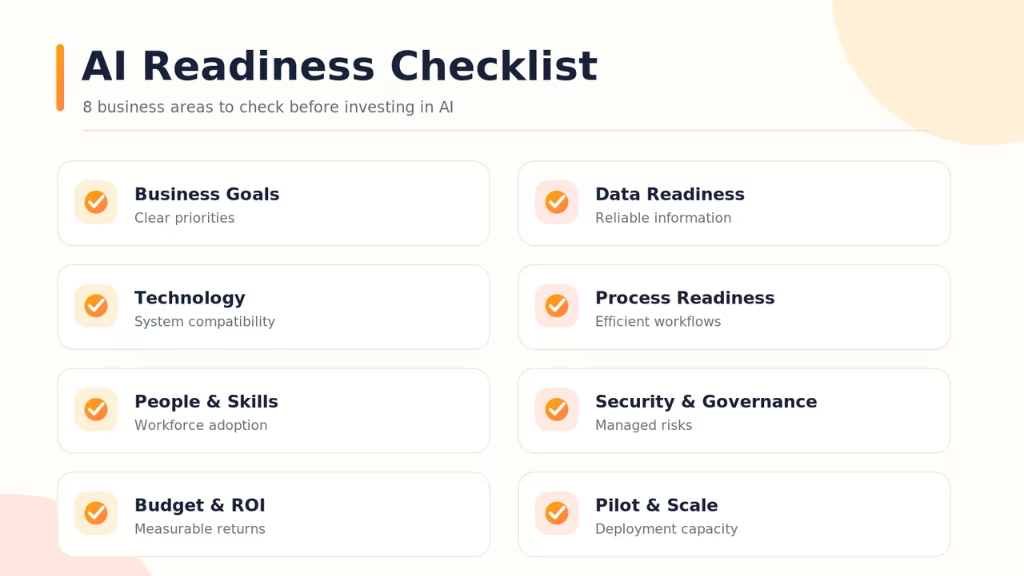
1. Avoid Investing in AI Without Clear Business Goals
One mistake I would caution any business owner against is investing in AI without knowing exactly what problem it needs to solve.
Let’s say you run a SaaS company and want to introduce an AI chatbot to reduce customer support costs. But you haven’t measured your current support expenses or identified which inquiries take the most time.
How would you know whether the chatbot actually saves money?
Without clear goals, your AI investment can become an expensive experiment. You may end up automating tasks that have little impact on revenue, productivity, or customer experience.
Business Strategy and Leadership Checklist:
- Have you identified the specific business problems you want AI to solve?
- Do you know which problems cost your business the most time or money?
- Have you defined measurable business goals and success metrics?
- Does your leadership team agree on AI investment priorities?
- Have you assigned someone to oversee AI performance and business outcomes?
What I recommend:
Start with AI use case identification. List your biggest operational challenges and estimate their financial impact.
For example, if customer support costs are rising, measure your cost per ticket, average handling time, and resolution rate. Then set a realistic improvement target.
Your AI strategy should support your business goals, not the other way around. Leadership commitment is also important. Someone needs to own the results after implementation.
My takeaway: Before choosing an AI solution, make sure you can explain what business problem it will solve and how you’ll measure success.
2. Prevent AI Failures Caused by Poor Business Data
I consider data quality one of the most important areas to check before implementing AI. Even advanced machine learning (ML) and generative AI systems can produce unreliable results when they depend on inaccurate or outdated information.
Take an e-commerce business using an AI assistant to answer questions about orders and refunds.
If its CRM contains outdated customer records, the assistant may provide incorrect information. Customers become frustrated. Support agents then spend more time correcting mistakes.
Instead of improving efficiency, the AI tool creates more work.
Business Strategy and Leadership Checklist:
- Is your business data accurate, complete, and regularly updated?
- Can authorized AI systems access the information they need?
- Is important business data consistent across departments and platforms?
- Have you defined data ownership and governance responsibilities?
- Is your available data suitable for the AI application you plan to implement?
What I recommend:
Before introducing AI, review the data your selected application will use. Look for duplicate records, missing information, outdated documents, and inconsistent formats. Check whether your CRM, ERP, databases, and other business applications contain reliable information.
You don’t need to clean every piece of data across your organization. Start with the information that directly affects your AI use case.
I also recommend establishing clear data governance rules. Decide who can access, update, and manage important business information.
My takeaway: Fix critical data problems first. Reliable AI results depend on reliable business information.
3. Avoid Expensive AI Integration and Infrastructure Problems
Before selecting an AI platform, I recommend checking whether it can work with your existing technology. Many businesses already depend on CRM platforms, ERP systems, cloud applications, and custom software.
If a new AI solution cannot connect with these systems, implementation may require additional development, integration, or infrastructure upgrades. Consider a multinational company that wants AI-powered sales analytics across regional offices.
Each office uses different software. Some rely on legacy systems, while others use modern cloud platforms. Without checking compatibility, the company could face unexpected development costs and delayed implementation.
Technology and Infrastructure Readiness Checklist:
- Can your existing CRM, ERP, and business software integrate with AI solutions?
- Are suitable APIs, connectors, or integration methods available?
- Can your current IT infrastructure support the planned AI workloads?
- Have you identified potential integration challenges and additional costs?
- Can your systems support increased AI usage as your business grows?
What I recommend:
Ask your technical team to conduct a feasibility assessment. Review your software architecture, integration capabilities, cloud infrastructure, and processing requirements. Identify which systems the AI application needs to access.
If you use legacy software, explore whether APIs, middleware, or custom integrations can connect it with the new AI solution. Replacing existing systems should not be your first assumption.
I would also recommend estimating infrastructure and integration costs before approving the project budget.
My takeaway: Check technical compatibility before investing. It can help you avoid expensive surprises during implementation.
4. Stop Automating Processes That Are Already Inefficient
I wouldn’t recommend automating a business process simply because it takes too much time. First, you need to understand why the process is inefficient. If the existing workflow contains unnecessary steps, unclear responsibilities, or frequent errors, AI automation may make those problems worse.
For example, consider a BPO company that wants to automate customer ticket routing. Its support teams use different ticket categories. Escalation procedures are unclear, and agents follow inconsistent workflows.
Introducing AI without fixing these issues may lead to incorrect ticket routing and delayed customer resolutions.
Business Process and Automation Checklist:
- Have you identified repetitive tasks that consume significant employee time?
- Are the business processes you want to automate clearly documented?
- Have you identified workflow bottlenecks, errors, and unnecessary steps?
- Do you know which tasks require human judgment or approval?
- Can you measure current process performance before introducing automation?
What I recommend:
Start by mapping the workflow you want to automate. Identify every important step. Look for delays, duplicate activities, and manual errors. Then determine which problems can be solved through process improvements.
For example, standardizing support ticket categories may improve routing accuracy before AI is introduced. I also recommend separating routine tasks from those requiring human judgment.
Not every process needs AI. Some problems can be solved through better workflow design or conventional business process automation.
My takeaway: Improve your processes before automating them. AI should reduce operational problems, not accelerate them.
5. Reduce Employee Resistance and Low AI Adoption
One area I would never overlook is employee preparedness. Your AI system may perform well during testing. But that doesn’t mean employees will use it effectively.
Some team members may lack AI skills. Others may not understand how the technology fits into their daily responsibilities. Consider a mid-sized company introducing an AI-powered HR assistant.
The tool can answer routine employee questions. However, employees receive little training and continue contacting HR staff.
The company pays for automation without achieving the expected reduction in workload.
Workforce and AI Adoption Checklist:
- Do employees understand why your business is adopting AI?
- Have you identified employee AI literacy and technical skill gaps?
- Do you have a training plan for employees who will use AI?
- Are responsibilities between employees and AI systems clearly defined?
- Is your leadership team prepared to manage changes in daily workflows?
What I recommend:
Create a practical workforce training and change management plan. Explain how AI will support employees rather than simply introducing new software. Provide training based on job responsibilities.
For example, customer support agents may need to learn how to review AI-generated responses. IT teams may need additional training in monitoring and troubleshooting. I also recommend involving employees during pilot testing. Their feedback can reveal problems that technical tests may miss.
After implementation, monitor actual usage. Check whether employees are using the AI tool and whether it improves their work.
My takeaway: AI adoption depends on people as much as technology. Prepare your employees before expecting productivity gains.
6. Protect Your Business from AI Security and Compliance Risks
Before connecting AI to your business systems, I strongly recommend reviewing its security and privacy implications. AI applications may access customer records, financial information, internal documents, or confidential business data. Without proper controls, this information could be exposed or used inappropriately.
For example, a financial services company introduces an AI assistant to retrieve customer account details. If the system lacks effective access controls, unauthorized users could receive sensitive information. The consequences may include financial losses, regulatory issues, and damaged customer trust.
AI Governance, Security, and Compliance Checklist:
- Have you identified the sensitive information your AI application may access?
- Are data security, privacy, and access controls established?
- Have you identified the regulatory requirements affecting your AI use case?
- Are human oversight and accountability procedures clearly defined?
- Have you assessed security risks involving AI vendors and third-party integrations?
What I recommend:
Conduct an AI risk assessment before implementation. Identify what information your AI system will process. Determine who should have access to it. Establish clear policies for data handling, monitoring, and human oversight.
For structured risk management, I recommend reviewing the NIST AI Risk Management Framework. You can also consider ISO/IEC 42001 when developing an organizational AI management system.
These frameworks can support AI governance. However, your compliance responsibilities will depend on your industry, location, and use case.
My takeaway: Protect your business data before giving AI access to sensitive systems. Security should be a core readiness requirement.
7. Avoid AI Budget Overruns and Uncertain ROI
I always recommend looking beyond the initial price of an AI solution. The purchase or development cost is only one part of the investment. Your business may also need to pay for infrastructure, data preparation, system integration, API usage, employee training, and ongoing maintenance. These expenses can increase as AI usage grows.
For example, a SaaS company introduces an AI customer support solution with an affordable subscription. But after deployment, it needs additional integrations and monitoring. API costs also increase with customer usage. The actual spending becomes much higher than expected.
AI Budget and ROI Checklist:
- Have you established a realistic budget for AI implementation?
- Have you estimated development, integration, and infrastructure costs?
- Does your budget include training, maintenance, and ongoing usage?
- Have you defined measurable financial or operational benefits?
- Have you considered potential budget overruns and financial risks?
What I recommend:
Estimate the Total Cost of Ownership (TCO) before approving your AI investment. Include both initial and ongoing expenses. Then compare these costs with the expected business benefits.
For example, if AI automation could save 300 employee hours per month, determine the financial value of that time. Would it reduce overtime? Help your team handle more work? Or delay the need for additional hiring?
These details matter when estimating Return on Investment (ROI). According to the Corporate Finance Institute (CFI), you can use this formula:
ROI (%) = [(Total Financial Benefits − Total AI Investment Costs) ÷ Total AI Investment Costs] × 100
Use realistic assumptions and measurable business data.
I wouldn’t treat estimated time savings as guaranteed financial returns. The actual value depends on how your business uses the recovered capacity.
My takeaway: Understand the full financial commitment before investing. A clear ROI plan helps you make better AI investment decisions.
8. Prevent AI Pilots from Failing During Business-Wide Deployment
I’ve noticed that AI readiness discussions often focus on whether a tool works during testing. But there’s another important question: Will it still work when your entire business starts using it?
A proof of concept may perform well with limited data and a small number of users. However, production environments introduce larger workloads, more complex workflows, and higher performance expectations.
Consider an enterprise testing an AI-powered customer support system with 500 conversations. The pilot performs well.
But after expansion, the system must handle thousands of requests across different languages, customer groups, and service channels. Without proper planning, response times may increase. Accuracy may decline, and operating costs may rise.
AI Implementation and Scalability Checklist:
- Have you selected an AI use case with clear and measurable business value?
- Have you defined success criteria for a Proof of Concept (PoC)?
- Can you test the solution using realistic business data and workloads?
- Are monitoring, human oversight, and technical support procedures ready?
- Do you have the resources and infrastructure required to scale the solution?
What I recommend:
Test your AI solution under realistic business conditions before expanding deployment. Evaluate response accuracy, processing speed, integration performance, security, and operating costs.
For an AI-powered customer experience platform, I recommend measuring resolution rates, escalation frequency, average response time, and customer satisfaction. These AI performance metrics can help you evaluate whether your solution delivers measurable business value.
Once critical requirements are satisfied, develop a phased AI adoption roadmap. A structured approach to operationalizing AI after the pilot phase can help you manage production deployment, monitor performance, and control risks.
My takeaway: A successful pilot is only the beginning. Your business also needs the infrastructure, processes, and people to support AI at scale.
Free AI Assessment
Ready to Make AI Work for Your Business?
Discover AI opportunities to reduce costs, improve efficiency, and drive measurable business growth.
Get Your Free AssessmentWhat Does Your AI Readiness Checklist Reveal About Your Business?
Completing an AI readiness checklist is only the first step. The real value comes from understanding what your answers mean for your business.
You may have clear AI goals but lack reliable data. Your technology might be ready, but your employees may need additional training.
These gaps can affect your AI implementation costs, operational efficiency, and expected Return on Investment (ROI).
Before approving any major AI investment, review your checklist results. Focus on three things: what’s missing, which problems matter most, and whether your business is ready to proceed.

Identify Readiness Gaps That Could Cost Your Business
Start by reviewing every checklist item you couldn’t confidently mark as complete. These are potential AI readiness gaps that need further attention.
For example, you might discover that your CRM and ERP systems cannot exchange data with your planned AI solution. This could require additional integration work and increase implementation costs.
Other common gaps include:
- Unclear AI goals: Your business lacks measurable objectives or a defined AI strategy.
- Poor data readiness: Inaccurate records, disconnected systems, or weak data governance could affect AI performance.
- Limited technical capabilities: Your existing IT infrastructure may not support the intended AI application.
- Workforce skill gaps: Employees may lack the AI literacy or training needed to use new tools.
- Security weaknesses: Missing AI governance or data privacy controls could create operational and compliance risks.
- Financial uncertainty: Your business cannot clearly estimate implementation costs or expected ROI.
To make these findings actionable, create a simple gap register. Record each unmet requirement, its potential business impact, and the person responsible for resolving it.
For instance, if your customer data is outdated, assign the issue to your data or IT team. Identify what needs correction before integrating an AI-powered customer support system.
This turns your checklist findings into specific business problems you can address.
Prioritize AI Readiness Gaps Based on Business Impact
Not every readiness gap deserves the same attention.
A missing employee training session may be relatively easy to address. However, a serious data security issue could prevent your business from safely deploying AI.
That’s why it’s important to prioritize readiness gaps based on business impact and risk, rather than trying to fix everything at once.
Use these four factors:
| Evaluation Factor | What Your Business Should Consider |
|---|---|
| Financial Impact | Could this gap increase costs or reduce expected ROI? |
| Operational Impact | Could it disrupt workflows, productivity, or customer service? |
| Security and Compliance | Could it expose sensitive information or create regulatory risks? |
| Implementation Dependency | Must this issue be resolved before AI deployment can proceed? |
For example, suppose your business wants to introduce Generative AI into customer support.
Your assessment reveals three problems: outdated customer records, limited employee training, and missing access controls.
The security issue should take priority if it creates an immediate risk of unauthorized data access. Next, address the customer records needed for accurate AI responses. Employee training can begin alongside these improvements.
The exact priority depends on your intended AI use case and the consequences of each gap.
By fixing critical implementation blockers first, your business can reduce risks and focus resources on improvements that support long-term business value.
Determine Whether Your Business Is Ready for AI Implementation
Once you’ve identified and prioritized the gaps, you need to make a decision: Should your business move forward with AI, or address more requirements first?
Use these three practical readiness categories to determine your next step.
| Readiness Status | What It Means for Your Business | Recommended Action |
|---|---|---|
| Ready for a Pilot | Your business meets the critical requirements for the selected AI use case. | Begin a controlled Proof of Concept (PoC) with measurable success criteria. |
| Partially Ready | Your business has some essential capabilities, but important gaps remain. | Address priority gaps before committing to larger investments. |
| Not Ready for Deployment | Critical issues exist in areas such as data security, infrastructure, or operational controls. | Resolve major blockers before production implementation. |
These categories are practical decision guides, not a standardized AI maturity assessment.
For example, a startup may be ready to test an AI assistant for internal tasks. However, a multinational corporation planning to automate sensitive financial operations may need stronger governance, integration testing, and human oversight.
Your AI readiness depends on the specific application and its business risks. You don’t need perfect organizational readiness to begin a low-risk experiment. You do need suitable safeguards before introducing AI into critical operations.
If your business needs a deeper evaluation, a structured AI readiness assessment can help examine organizational capabilities in greater detail.
Remember, AI readiness isn’t about how many boxes you’ve checked. It’s about whether your business can address the remaining risks and turn AI investments into safe, reliable, and measurable results.
How to Fix AI Readiness Gaps Before They Become Costly
Identifying problems through your AI readiness checklist is only the beginning. The real challenge is fixing them before they increase costs, delay implementation, or affect business performance.
You don’t need to address every weakness at once. Start with the issues that pose the greatest risk to your AI investment. Here’s how to turn your readiness gaps into practical improvements.
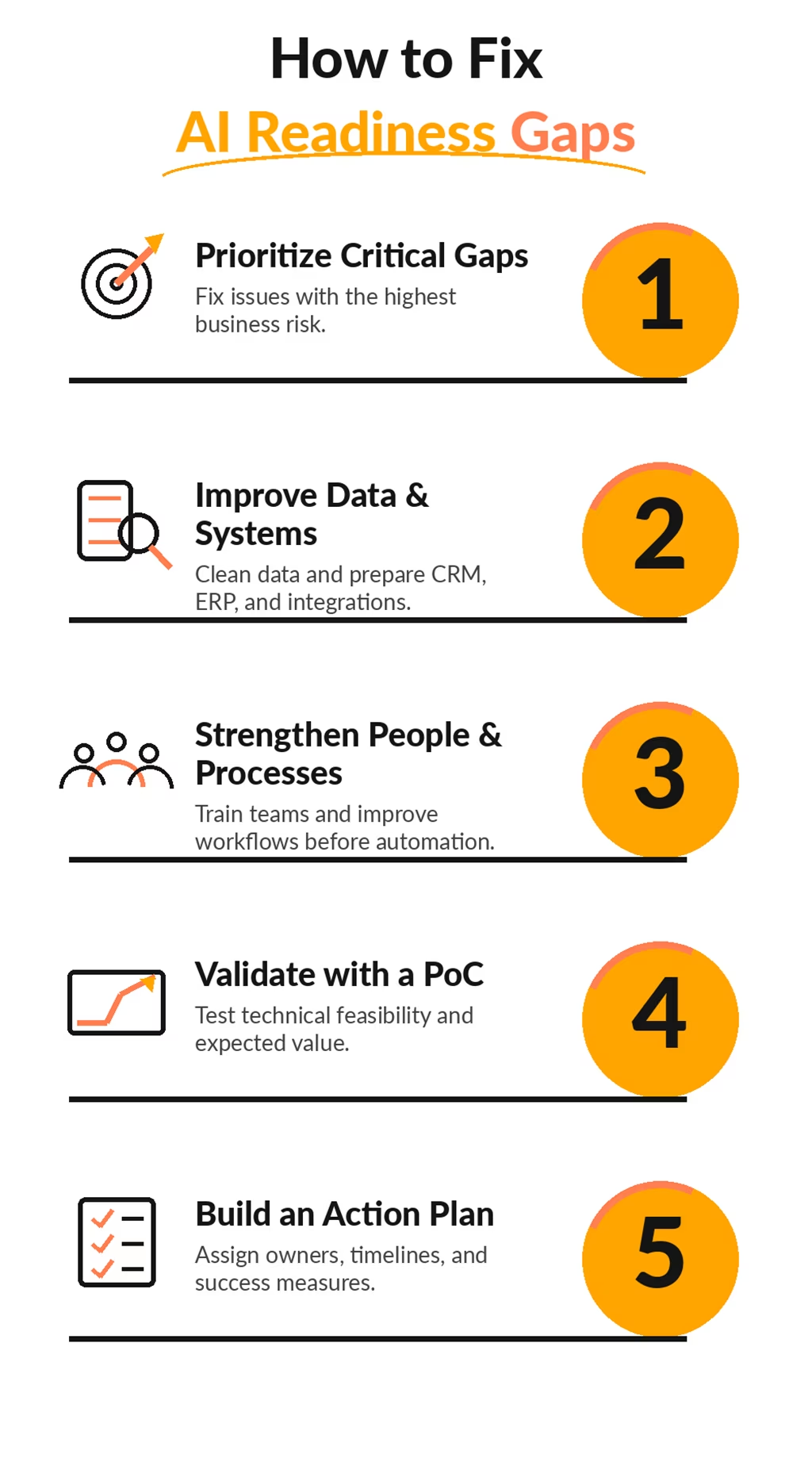
1. Fix Critical Readiness Gaps Before Investing Further
Focus on problems that could prevent your AI project from succeeding. These may include unclear business goals, unreliable data, or security weaknesses. Evaluate each issue based on its financial impact and operational risk. Then assign responsibilities and set clear deadlines. This helps you address critical problems before spending more on AI.
2. Prepare Your Data and Systems for AI Integration
Start by correcting inaccurate records, removing duplicate data, and improving data accessibility. Check whether your existing CRM, ERP, and other business applications can connect with AI solutions. If integration is difficult, conduct a technical feasibility assessment before making expensive upgrades. Proper data governance and technology integration can reduce implementation delays and unexpected costs.
3. Improve Employee Skills and Business Processes
Review your existing workflows before introducing AI automation. Remove unnecessary steps and clarify responsibilities. At the same time, identify employee AI literacy gaps and provide relevant workforce training. For example, a BPO company introducing AI-powered customer support should prepare agents to review AI responses and handle complex inquiries. This improves AI adoption readiness and reduces operational disruptions.
4. Validate AI Performance Before Large-Scale Deployment
Test your AI solution through a controlled Proof of Concept (PoC) before expanding implementation. Use realistic business data and workflows. Measure performance against clear KPIs such as accuracy, processing time, operational costs, and customer satisfaction. This helps you identify technical problems early and evaluate whether the solution can deliver the expected Return on Investment (ROI).
5. Create an Actionable AI Readiness Improvement Plan
Turn your checklist findings into a practical AI adoption roadmap. For each unresolved gap, define the corrective action, responsible team, required budget, and completion deadline. Establish measurable criteria to confirm when the issue is resolved. Review progress regularly and update your implementation plan as needed. This keeps your AI investment aligned with business priorities.
When Should Your Business Seek Expert Help to Close AI Readiness Gaps?
Your AI readiness checklist may reveal challenges that your internal team lacks the expertise or resources to resolve. These may include poor data quality, legacy system integration, limited AI skills, or complex automation requirements.
For example, your business may plan to introduce AI-powered customer support. However, disconnected CRM systems, outdated customer records, and inefficient workflows could make implementation difficult.
In such situations, an experienced AI technology partner can help assess technical feasibility, identify critical readiness gaps, and reduce implementation risks.
Businesses facing complex technical or operational challenges may also benefit from AI digital transformation services. These services can support system evaluation, workflow improvement, AI integration planning, and the development of a practical implementation roadmap.
The goal is to resolve critical readiness gaps before they lead to costly implementation problems.
Ready to Take Your AI Plans Further?
Talk to our team about your implementation challenges and business priorities.
Contact Our ExpertsFinal Thoughts
Investing in AI can create new opportunities for business growth. But without proper preparation, it can also lead to unexpected costs, operational challenges, and disappointing results.
An AI readiness checklist helps you identify these risks before making major investments. It gives you a clearer picture of your business goals, data quality, technology infrastructure, workforce capabilities, and implementation readiness.
You don’t need to address every weakness at once. Start with the gaps that pose the greatest risk to your business. Focus on practical improvements and measurable outcomes.
The key to successful AI adoption isn’t how quickly you invest. It’s how well you prepare your business to turn that investment into real value.
Frequently Asked Questions
Find answers to common questions about AI readiness, implementation risks, and what your business should check before investing in AI.
How do you know if your business is ready for AI?
Your business is ready to explore AI implementation when it has a clear business objective, suitable data, compatible technology, prepared stakeholders, manageable risks, and an implementation budget. Completing an AI readiness checklist helps identify which requirements are satisfied and which need improvement before deployment.
Can your business adopt AI without replacing existing software?
Yes. Many AI solutions can work with existing business applications through APIs, connectors, or custom integrations. However, compatibility depends on your current software architecture, security requirements, and intended AI use case. A technical readiness review helps determine whether integration, modernization, or replacement is necessary.
What happens if you implement AI before your business is ready?
Implementing AI without adequate preparation may lead to inaccurate outputs, integration problems, low employee adoption, higher operational costs, and security risks. These issues can delay implementation and reduce the expected return on investment. Identifying critical readiness gaps beforehand helps reduce preventable risks.
How much should your business budget for AI implementation?
AI implementation costs vary depending on project complexity, infrastructure, data requirements, software integration, and ongoing operational needs. A small AI pilot may require substantially fewer resources than a custom enterprise deployment. Businesses should estimate total cost of ownership, including development, infrastructure, training, maintenance, and monitoring, before committing to an investment.
Can small and medium-sized businesses use an AI readiness checklist?
Yes. An AI readiness checklist is useful for organizations of all sizes. Small and medium-sized businesses can use it to evaluate their existing systems, identify suitable operational processes, assess employee capabilities, and avoid unnecessary expenses. The depth of assessment should reflect the complexity and risk of the proposed AI application.
What if your business lacks in-house AI expertise?
A business can begin by identifying its intended AI use cases and evaluating its current data, workflows, and technology infrastructure. It can then determine which capabilities are missing. Depending on the complexity of the project, external AI consultants, development specialists, or digital transformation partners may help with technical evaluation, integration, implementation, and workforce preparation.
How can you minimize financial risks before investing in AI?
Start with a clearly defined business problem and measurable success criteria. Evaluate data and technical readiness, estimate total ownership costs, and conduct a limited proof of concept before scaling. Monitor financial and operational outcomes against established baselines. This approach helps organizations identify problems before committing to larger investments.
When should you seek professional help with AI implementation?
Consider professional support when your AI readiness checklist identifies complex integration problems, limited internal expertise, fragmented business data, significant governance requirements, or challenges moving from pilot testing to production. An experienced technology partner can help assess these requirements and develop an implementation approach aligned with your operational and financial priorities.
This page was last edited on 18 November 2026, at 6:01 pm

Start a conversation with our team to solve complex challenges and move forward with confidence.