
Distributed teams are now the norm in digital product development, but traditional outsourcing models often introduce headaches—misaligned time zones, communication breakdowns, and unclear workflows. Digital leaders need reliable ways to scale design capacity without sacrificing quality or speed.
This practical playbook delivers actionable strategies, proven frameworks, and real-world insights for leveraging nearshore UI/UX design services. Whether you’re exploring new sourcing models or ready to optimize existing partnerships, you’ll find expert guidance on workflows, tools, vendor selection, and overcoming common challenges.
By the end, you’ll be empowered to confidently evaluate, adopt, and optimize nearshore UI/UX collaboration—driving your product from vision to value, faster.
What Is Nearshore UI/UX Design?
Nearshore UI/UX design is the practice of outsourcing user interface and user experience design services to teams in geographically proximate countries, maximizing time zone alignment, cultural fit, and cost efficiency.
Unlike offshore or onshore models, nearshore UI/UX services sit between local in-house design and distant outsourcing. This approach covers the full spectrum of digital products, including websites, mobile apps, and enterprise software.
Key aspects of nearshore UI/UX design:
- “Nearshore” means working with teams in nearby countries (e.g., US firms collaborating with Latin America; UK firms with Eastern Europe).
- UI/UX covers the end-to-end design of interfaces and experiences users interact with.
- Primary benefits include overlapping working hours, easier collaboration, cultural synergy, and lower costs than hiring domestically—while avoiding many pitfalls of far-off offshore vendors.
Nearshore UI/UX design enables digital teams to scale quickly, maintain quality standards, and improve product outcomes without the complexities of extreme outsourcing distances.
How Does Nearshore UI/UX Compare to Offshore and Onshore?
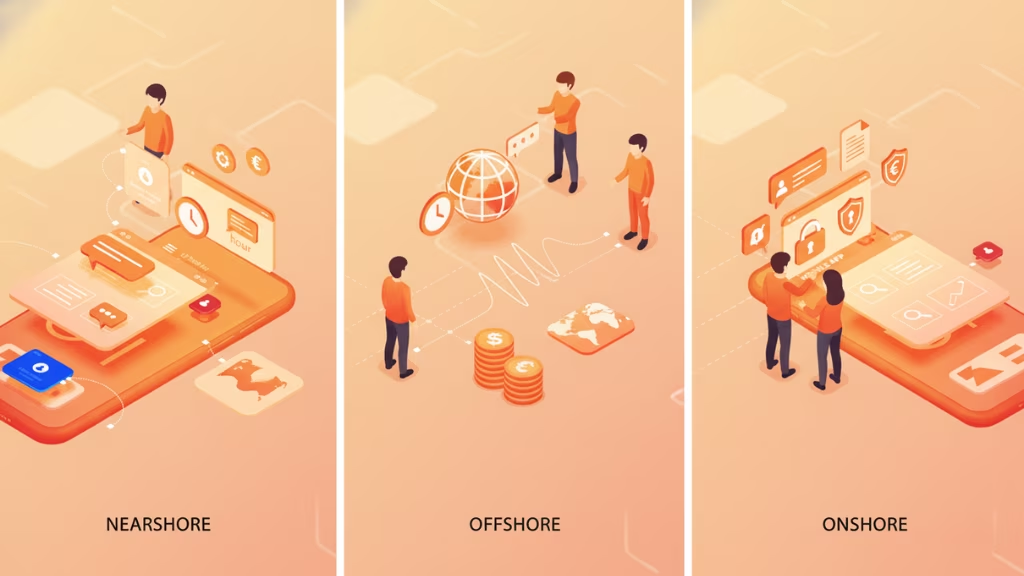
Nearshore UI/UX design offers a strategic balance between cost, collaboration, and quality compared to onshore (local) and offshore (distant) models.
Here’s a quick comparison:
| Aspect | Nearshore | Offshore | Onshore |
| Time Zone | Close or overlapping hours | Major differences; less overlap | Complete alignment |
| Cultural Fit | High regional/cultural affinity | Often significant differences | Shared culture/language |
| Communication | Easier real-time collaboration | Delays, potential misalignment | Seamless; no language barrier |
| Cost | Moderate savings (20-40% typical) | Maximum savings (30-60%) | Highest cost |
| Talent Access | Specialized, vetted talent pools | Large pools, may need more vetting | Local, but limited availability |
| Delivery Speed | Faster than offshore; shorter feedback loops | Can slow due to distance | Fastest, but at higher cost |
| Best For | Balanced cost, culture, and speed | Cost-driven, large-scale needs | High-touch or regulated projects |
When to choose each:
- Nearshore: When you need cost savings, close collaboration, and fast iteration—without the friction of major time zone or cultural gaps.
- Offshore: When lowest cost is the top priority and you can accommodate time/culture differences.
- Onshore: When requirements demand absolute alignment, security, or regulatory compliance, and budget allows.
What Are the Business Benefits of Nearshore UI/UX Design Teams?
Nearshore UI/UX design teams deliver measurable business value through faster delivery, cost savings, and innovation gains.
Top benefits of nearshore UI/UX:
- Accelerated delivery cycles: Overlapping work hours enable faster feedback, fewer delays, and rapid iteration.
- Significant cost efficiencies: Nearshore rates are typically 20–40% lower than onshore, freeing up budget for broader digital initiatives.
- Access to specialized talent: Tap diverse skill sets and deep expertise, often unavailable or unaffordable locally.
- Scalability and flexibility: Easily adjust team size, bringing in resources as product needs evolve.
- Improved communication and cultural fit: Fewer misunderstandings, smoother collaboration, and shared business context.
- Enhanced quality and innovation: Diverse perspectives support richer ideation and better user outcomes.
According to recent industry benchmarks (Statista), companies leveraging nearshore models often see product time-to-market improve by 25–35% and reduce design-related spend without downgrading quality.
What Is the Typical Nearshore UI/UX Workflow?
A typical nearshore UI/UX project follows a structured, collaborative workflow that aligns global resources with your local product vision.
Standard nearshore UI/UX workflow steps:
- Project Initiation
- Define the brief, scope, timelines, and success criteria.
- Select team members (in-house and nearshore).
- Discovery & Research
- Conduct user interviews, personas, and competitive analysis.
- Establish design goals and user requirements.
- Design Sprints & Prototyping
- Rapid iteration cycles using Figma, Sketch, or Adobe XD.
- Regular feedback loops and standups.
- Collaboration & Milestones
- Sync points: weekly demos, sprint reviews, async updates.
- Joint documentation in shared tools.
- Usability Testing & Iteration
- Remote user testing across regions as needed.
- Incorporate feedback and refine designs.
- Handover & Implementation
- Package assets, design systems, and specs for development.
- Ongoing support during build and launch.
Process Flowchart:
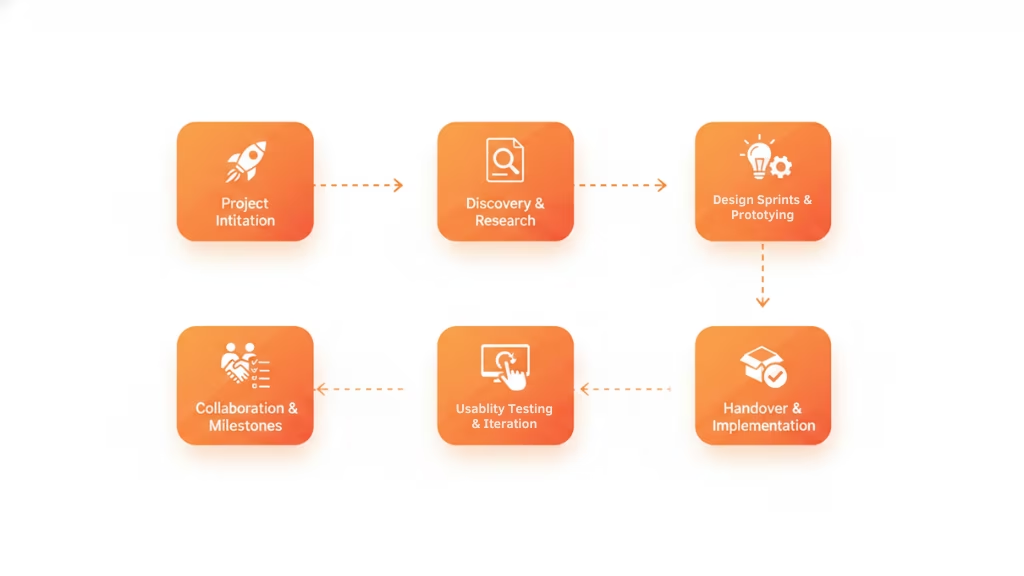
This workflow emphasizes transparency, accountability, and frequent check-ins, which are crucial for remote and distributed teams.
Which Tools & Best Practices Drive Successful Remote UI/UX Collaboration?
Top-performing nearshore UI/UX teams rely on a modern tool stack and clear collaboration routines to work seamlessly across borders.
Essential design and collaboration tools:
- Design:
Figma, Sketch, Adobe XD – for collaborative design and prototyping. - Project Management:
Jira, Trello, Asana – to manage tasks, sprints, and progress. - Communication:
Slack, Zoom, Loom – for real-time chats, video calls, and async updates. - Whiteboarding & Ideation:
Miro, FigJam – to brainstorm, map user flows, and co-create solutions.
Remote collaboration best practices:
- Schedule regular standups and sprint reviews for continuous alignment.
- Use clear feedback loops—threaded comments, annotated mockups, and shared documentation.
- Embrace async updates to accommodate minor time zone differences.
- Ensure all work is logged, versioned, and easy to access (via Notion, Confluence, or Google Workspace).
- Maintain a culture of openness—raise blockers early and invite diverse input on design decisions.
This approach ensures transparency, accountability, and a high quality of work, regardless of physical distance.
How Do Nearshore UI/UX Teams Overcome Language & Cultural Barriers?
High-performing nearshore UI/UX teams prioritize cultural synergy and clear communication to deliver user experiences that resonate worldwide.
Strategies to mitigate language and cultural barriers:
- Invest in cultural alignment: Conduct cross-cultural training and foster empathy within mixed teams.
- Handle multilingual research smartly: Use bilingual facilitators or translators for user interviews and usability tests.
- Apply proven translation/localization practices: Ensure all UI elements, help text, and microcopy are adapted for the target user’s language.
- Recruit native-speaking user testers: Target authentic feedback by including testers who represent real end users.
- Encourage regular, open dialogue: Schedule frequent retrospectives to surface and resolve miscommunications.
“Effective cross-border design is about more than just language—it’s about understanding context, habits, and user motivations. Integrating diverse perspectives early in the process drives better outcomes.”
— Based on best practices in NN/g and academic research
A real-world example: A SaaS company working with a nearshore partner in Eastern Europe conducted remote user testing by enlisting local end users and leveraging bilingual moderators. This not only surfaced cultural nuances but also improved conversion rates by 18% after key UI adjustments.
What Are the Main Challenges of Nearshore UI/UX Design—and How to Overcome Them?
While nearshore UI/UX design offers distinct advantages, it comes with specific challenges that leaders must proactively address.
Common challenges and mitigation strategies:
- Cultural and language misunderstandings
- Solution: Provide clear briefs, encourage over-communication, and use visual documentation.
- Time zone slips or scheduling conflicts
- Solution: Set up central collaboration windows, leverage async tools, and document meeting notes.
- Security and intellectual property risks
- Solution: Use robust NDAs, secure platforms, and conduct regular security reviews.
- Authentic user testing in diverse languages/cultures
- Solution: Partner with local research agencies or native-speaking testers in the target region.
- Maintaining quality and process discipline
- Solution: Define quality gates, run regular peer reviews, and use third-party audits if needed.
Creating clear contracts, setting expectations, and fostering a culture of openness are foundational to minimizing risk and ensuring project success.
How Do I Select the Right Nearshore UI/UX Vendor?
Selecting the right nearshore UI/UX partner is critical—impacting everything from product quality to speed to market.
Step-by-step vendor selection process:
- Define your project scope and needs
- Clarify features, timeline, platforms, and desired outcomes.
- Pre-vet vendors
- Assess experience, relevant portfolios, and references in similar domains.
- Evaluate technical and design capabilities
- Understand their toolchain, design process, and collaboration style.
- Check communication protocols
- Ensure language fluency, proactive reporting, and regular syncs are standard.
- Verify security and compliance
- Confirm NDAs, data protection measures, and jurisdiction for IP.
- Request references and case studies
- Speak with past clients and review outcome benchmarks.
- Establish milestones and success metrics
- Map progress and hold both sides accountable.
A clear, methodical approach reduces risk and boosts confidence in your partnership decision.
Real-World Success Stories: Mini Case Studies of Nearshore UI/UX Projects
Concrete outcomes speak louder than promises—here are real examples of nearshore UI/UX teams driving product impact.
Case Study 1: Launch Acceleration for a SaaS Platform
A US-based software company partnered with a Latin American nearshore design agency to revamp its onboarding flow. With real-time collaboration and design sprints enabled by overlapping time zones, the product launched 30% ahead of schedule. Post-launch analytics showed a 15% increase in user retention.
Case Study 2: Cross-Cultural User Research for a Fintech App
A UK fintech engaged an Eastern European UI/UX partner to conduct remote user interviews in multiple languages. By recruiting local evaluators and adapting research protocols, the team identified friction unique to certain user groups—improving conversion rates by 12% with targeted design changes.
Client Testimonial:
“Working with a nearshore team gave us the benefits of a close partnership—fast turnaround, shared context, and a real sense of joint ownership. It was a game changer for our product roadmap.”
Conclusion
Nearshore UI/UX design empowers digital product teams to deliver faster, control costs, and tap into world-class design talent—without the friction of traditional outsourcing. By following the frameworks, best practices, and vendor evaluation checklists in this guide, you’ll be prepared to launch and scale cross-border design partnerships with confidence.
Key Takeaways
- Nearshore UI/UX design offers the optimal mix of cost savings, speed, and cultural fit for digital teams.
- Real-time collaboration and specialized tools enable remote teams to deliver quality outcomes.
- Overcoming language and cultural barriers requires proactive planning and the right talent.
- A structured vendor selection process reduces risk and boosts ROI.
- Successful nearshore projects consistently yield faster launches and better user experiences.
Frequently Asked Questions
What is nearshore UI/UX design?
Nearshore UI/UX design is outsourcing user interface and experience design to teams in nearby countries, balancing cultural alignment and cost efficiency.
How does nearshore UI/UX compare with offshore options?
Nearshore provides better time zone overlap and cultural fit than offshore, enabling clearer communication and faster iteration.
What business benefits can I expect from nearshore UI/UX teams?
Benefits include accelerated project delivery, significant cost savings, and access to specialized talent not always available locally.
Which tools do nearshore UI/UX teams use?
Tools like Figma, Sketch, Adobe XD (design), Jira and Asana (project management), Slack, and Zoom (communication) are standard.
How do teams handle user research in different languages?
Leading nearshore teams use bilingual moderators or native-speaking testers to ensure authentic user insights and meaningful results.
What are the main collaboration challenges with nearshore vendors?
Challenges include time zone coordination, cultural nuances, and IP security—solved with structured processes and open communication.
Are nearshore UI/UX services more affordable than hiring in-house?
Yes, they often cost 20–40% less than onshore teams while providing more reliable collaboration than offshore-only models.
How should I select a nearshore UI/UX provider?
Define your needs, assess portfolios, vet communication protocols, ensure security, and request references before making a decision.
What is the standard workflow for nearshore UI/UX projects?
From project kickoff to user research, design iteration, and final handoff, nearshore workflows mirror top global best practices.
How do I ensure quality and data security with a nearshore partner?
Establish strong contracts, require NDAs, monitor compliance, and run regular audits to safeguard your project.
This page was last edited on 2 June 2026, at 12:37 pm

Start a conversation with our team to solve complex challenges and move forward with confidence.










