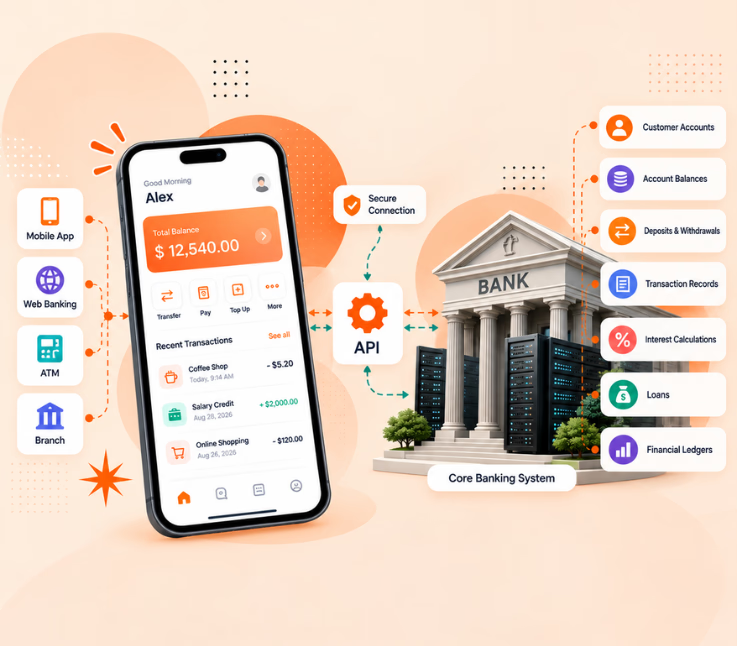
You tap “Send.” A moment later, your friend’s phone buzzes. It feels like nothing happened. But in that moment, your request crossed an encrypted connection, got checked against your balance and limits, was approved, written into an official ledger, and routed to another bank.
So, how does banking software work behind that simple tap? If you’ve tried to find out, you’ve probably hit a wall of jargon: core banking, middleware, ledgers, rails, settlement. This guide skips the fog and shows what is actually happening behind the screen.
The short answer: Banking software is a stack of connected systems. A core system keeps the official record of every account and balance. Apps and websites send requests to it through APIs. Security and compliance tools check each request, and payment networks move money between banks. Every transaction is validated, recorded and confirmed.
Whether you’re a student, a fintech founder, a product manager or a developer joining a bank, the rest of this guide unpacks that answer one layer at a time. First, why it matters:
What is banking software?
Banking software is the set of programs a bank uses to open accounts, move money, lend, protect data and report to regulators. The key word is set. There is no single “banking program.”
Think of a city. The ledger is city hall’s records. Payment networks are the roads between cities. Apps and ATMs are the front doors. Security and compliance are the police and the auditors. You need all of them, and they must talk to each other. In practice the software falls into five groups:
- Core banking: accounts, balances, interest, loans and the general ledger.
- Digital channels: mobile apps, internet banking, ATM and branch software.
- Payments: transfers, cards, bill pay and links to external networks.
- Risk and compliance: identity checks (KYC), anti-money-laundering (AML) monitoring and audit trails.
- Customer and lending tools: CRM, loan origination and personal finance features.
What are the layers inside banking software?
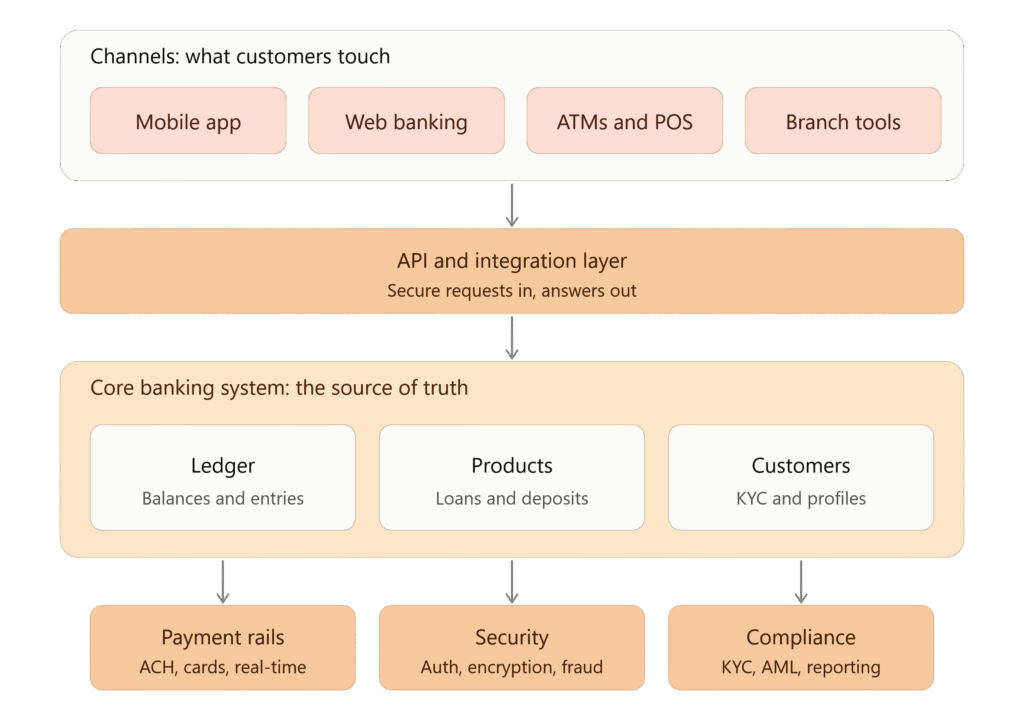
Three things to notice. First, your banking app doesn’t hold your money, and it doesn’t even know your balance. It asks the core, the only place the official number lives. Second, the API layer is the translator that lets many channels talk to one core. Third, security and compliance touch every request, which is why they sit beneath the core and not off to the side.
What happens when you send money, step by step?
Follow one transfer: you send $100 to a friend at another bank.
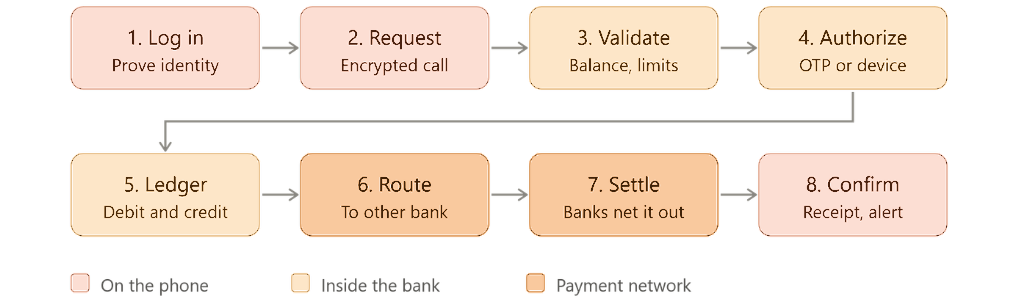
The step that matters most is the ledger update. Core systems use double-entry bookkeeping: every transaction has two sides, so the books always balance.
| Account | Entry | Amount |
|---|---|---|
| Your account | Debit | −$100 |
| Your friend’s account (or the settlement account, if they’re at another bank) | Credit | +$100 |
If either side fails, the whole transaction is rolled back. That all-or-nothing rule is why money almost never “vanishes” mid-transfer.
Why Do Some Transfers Take Days?
Because some payment systems are still built to move money in batches, not instantly.
Instead of settling every transaction the moment it is sent, the system groups payments together and processes them at scheduled times. In the US, for example, Same Day ACH runs through three processing windows each business day.
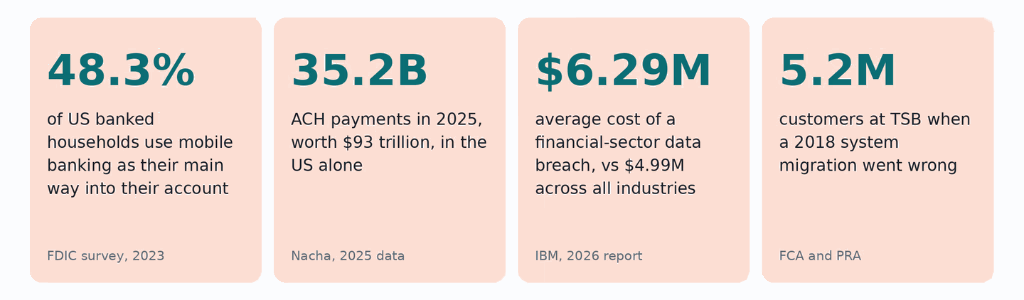
That model still makes sense at scale. The ACH Network processed 35.2 billion payments worth $93 trillion in 2025, including 1.4 billion Same Day ACH payments.
Batch processing keeps costs lower and makes settlement and reconciliation easier to manage across enormous volumes. Real-time payment systems take a different approach: each payment is processed individually, but that requires banks and payment networks to stay available around the clock.
So when a transfer takes longer than expected, it is often not because the app is slow. It is because the payment rail behind it works on a schedule.
What Is a Core Banking System, and How Do Apps Connect to It?
A core banking system is the part of the bank that keeps the financial record straight.
It manages things like account balances, deposits, fees, interest, loans, transaction history, and ledger entries. Mobile apps, websites, ATMs, and branch systems all rely on that same underlying data, which is why your balance should stay consistent no matter where you check it.
Common core banking platforms include Temenos, Infosys Finacle, Oracle FLEXCUBE, Fiserv, and FIS, while newer cloud-native options include Mambu, Thought Machine, and 10x Banking. These are examples, not endorsements.
The app does not usually connect directly to the core. It talks to it through APIs.
A simple way to picture it:
The app asks. The API carries the request. The core does the banking work.
If you open your app and check your balance, the app sends a request through an API. The backend retrieves the approved account data from the core system and sends the answer back.
That separation is useful because banks can improve the app, add new digital features, or connect external services without constantly changing the system that holds the actual financial records.
Main Components of Banking Software
Banking software works because different components have different responsibilities.
| Component | Main Role |
|---|---|
| User interface | Allows customers or employees to interact with banking services |
| API layer | Transfers information between applications and banking systems |
| Authentication system | Confirms user identity and controls access |
| Core banking system | Manages accounts, balances, transactions, and core financial operations |
| Database | Stores banking and customer information |
| Payment system | Supports payments and money transfers |
| Fraud detection system | Identifies potentially suspicious activity |
| Card management system | Handles cards, limits, status, and related operations |
| Notification system | Sends transaction alerts and other messages |
| Analytics system | Helps institutions understand financial and operational data |
In practice, banking architecture may contain many more services depending on the size and complexity of the institution.
Why has mobile become the main channel?
Customers have already shown where they prefer to bank. In the FDIC’s 2023 survey, 48.3% of banked US households said mobile banking was their main way to access their account, compared with just 5.7% in 2013. In just ten years, mobile use grew almost ninefold, while teller use dropped by more than half.
A local snapshot: Bangladesh. The same shift is easy to see here. In October 2025 alone, mobile financial services processed 678.63 million transactions worth Tk 1.58 trillion. And across 2024, transaction value reached Tk 17.37 lakh crore, up 28.42% from 2023, according to Bangladesh Bank data.
At that point, mobile is not just another banking channel. It is where a huge part of everyday banking is already happening.
How Does Banking Software Stay Secure?
Banks do not depend on a single security measure. They use several layers, so if one control fails, there are others in place to protect the account, transaction, and customer data.
- Encryption keeps sensitive data protected while it is stored or moving between systems.
- Multi-factor authentication uses things like OTPs, trusted devices, or biometrics to verify the person logging in.
- Role-based access limits employees to the systems and information they actually need.
- Fraud monitoring looks for unusual transaction amounts, locations, devices, or behavior.
- Audit logs and security standards such as ISO 27001 and, where applicable, PCI DSS help organizations track activity and maintain consistent security controls.
And there is a good reason for all these layers. According to IBM’s 2026 Cost of a Data Breach findings, the average financial-sector breach cost reached $6.29 million, up from $5.56 million the previous year. AI-driven attacks added roughly another $1 million per incident. Financial organizations also took around 165 days on average to identify a breach.
For anyone building banking software, the message is pretty clear: security cannot be something you add before launch. It needs to be considered from the first registration screen through login, transaction approval, API access, and device management.
Why Do So Many Banks Still Run Old Systems?
Because replacing a bank’s core system is one of the riskiest changes it can make.
The core is tied to almost everything: accounts, payments, loans, reporting, branches, apps, and internal operations. It also has to stay available while millions of customers keep using the bank.
TSB is a good example of what can go wrong. In April 2018, the bank moved customers to a new IT platform. The migration disrupted all branches and affected a significant share of its 5.2 million customers. Normal service was not fully restored until December, and regulators later issued a £48.65 million fine. TSB also paid £32.7 million in customer redress, while the bank put the overall cost of the incident at around £330 million.
That does not mean banks should avoid modernization. It means the change has to be planned, tested, and controlled carefully.
| Approach | What it means | Best when | Main risk |
|---|---|---|---|
| Replace the core | Move everything to a new banking platform | The existing system is reaching end of life | High migration and cutover risk |
| Wrap it with APIs | Keep the core and add modern APIs and digital channels around it | You need new customer-facing services quickly | Legacy limitations still remain underneath |
| Build alongside it | Run a new system or product line next to the old one | You want to modernize gradually | Two environments must be managed at once |
For many banks, the middle option is the most practical: keep the core stable, then modernize the layers around it first, especially the APIs, mobile apps, and digital services customers actually use.
What Should You Decide Before Building a Mobile Banking App?
Before development starts, a few decisions need to be clear. They will shape everything from the architecture and timeline to security and cost.
- How much should the first version do? Will it focus on essentials such as balances, transaction history, transfers, and alerts, or include more advanced features such as spending insights, biometrics, QR-based cardless withdrawals, and voice navigation?
- How will it connect to the core banking system? Check which APIs already exist and whether middleware will be needed to connect older systems with the new app.
- Where will extra verification be required? Registration, new-device setup, transaction approval, PIN changes, and account recovery may all need different levels of authentication.
- Which rules apply to the product? Security, privacy, payment, and banking requirements depend on the market in which the app will operate.
- What happens after the first release? Decide whether to launch with a focused set of features and expand over time or build a broader product from the start. Also clarify who owns the source code and who will maintain the app after launch.
This is also where experience with banking products matters. Riseup Labs, for example, builds mobile banking apps across basic, advanced, and more feature-rich scopes, with two-factor verification built into areas such as registration and transaction approval. Its published estimate puts a basic banking app at roughly 3–6 months, although the actual timeline will depend heavily on features, integrations, and testing.
The Takeaway
Banking software works because each layer does one job well. The core keeps the truth. APIs translate. Security and compliance check everything. Payment networks carry the money. And the mobile app makes all of it feel like one tap.
Planning the customer-facing layer?
Explore Riseup Labs’ mobile banking app development services, or talk to the team about the right feature tier for your bank, credit union or fintech.
Frequently asked questions
What is banking software in simple terms?
The technology a bank uses to manage accounts, process payments, protect data and serve customers through apps, websites, ATMs and branches.
What is the most important part of banking software?
The core banking system, because it holds the official record of every account and transaction.
How is banking software different from a banking app?
The app is one channel. Banking software is the full stack behind it: core, APIs, payments, security and compliance.
What technology is banking software built on?
It varies. Many established banks still run mainframes and COBOL in the core, with Java or .NET services and relational databases around them. Newer platforms are cloud-native and API-first.
Is online and mobile banking safe?
Well-built systems layer encryption, multi-factor authentication, monitoring and audits. Safety also depends on implementation, maintenance and your own habits, such as never sharing OTPs.
How long does it take to build a mobile banking app?
It depends on scope, integrations and compliance. Riseup Labs says a basic app takes about 3-6 months; advanced apps take longer.
This page was last edited on 8 October 2026, at 10:44 am

Start a conversation with our team to solve complex challenges and move forward with confidence.