Flutter is faster for MVPs and rich UIs across mobile and web. Kotlin Multiplatform fits Android-heavy teams or those needing shared business logic, especially with the stable Compose Multiplatform in 2026.
Choosing the right cross-platform framework in 2026 is make or break for startups and tech leaders. The landscape has changed fast—older advice risks wasting time, money, and talent.
I have seen teams struggle through costly migrations because they picked a stack based on 2024 trends. Today, both Flutter and Kotlin have evolved with new features, mature tools, and stronger communities.
In this guide, you will see exactly how Flutter and Kotlin compare now, practical ways to match tech to your goals, and what pitfalls to avoid so you can launch with confidence.
Why Does Choosing Between Flutter and Kotlin Matter in 2026?
The decision between Flutter and Kotlin Multiplatform shapes your hiring, development speed, and future costs.
New updates in 2026, like Compose Multiplatform reaching production stability and Dart’s better async features, have reset the app development field. Teams that choose well build faster and future-proof. The wrong choice can lock you into technical debt or force a rewrite.
Here’s what is at stake in 2026:
- Your ability to hire the right developers
- How fast your team can release updates
- If your app can run well on all target devices
- How long your product can last before needing a rebuild
Most older guides miss key shifts in platform support, tooling, and industry adoption. This guide gives you the real, current risks and rewards to help you avoid pitfalls and waste.
Flutter vs Kotlin: At-a-Glance Comparison Table
The table below gives a clear, up-to-date look at how Flutter (Dart) and Kotlin Multiplatform compare on the main factors that matter in 2026.
| Aspect | Flutter (Dart) | Kotlin (Multiplatform) |
|---|---|---|
| Platforms | Android, iOS, Web | Android, iOS, Desktop, Web |
| UI Approach | Widget-based (Skia) | Native (Compose/SwiftUI) |
| Performance | Near native | Native (Android), Hybrid (Others) |
| Learning Curve | Moderate | Steeper, but native-feeling |
| Best Use Cases | Rapid MVPs, rich UI | Existing Android, shared logic |
In my experience, this table helps teams quickly see where each framework fits — whether speed to prototype, UI depth, or code reuse is your main driver.
How Do Flutter and Kotlin Stack Up?
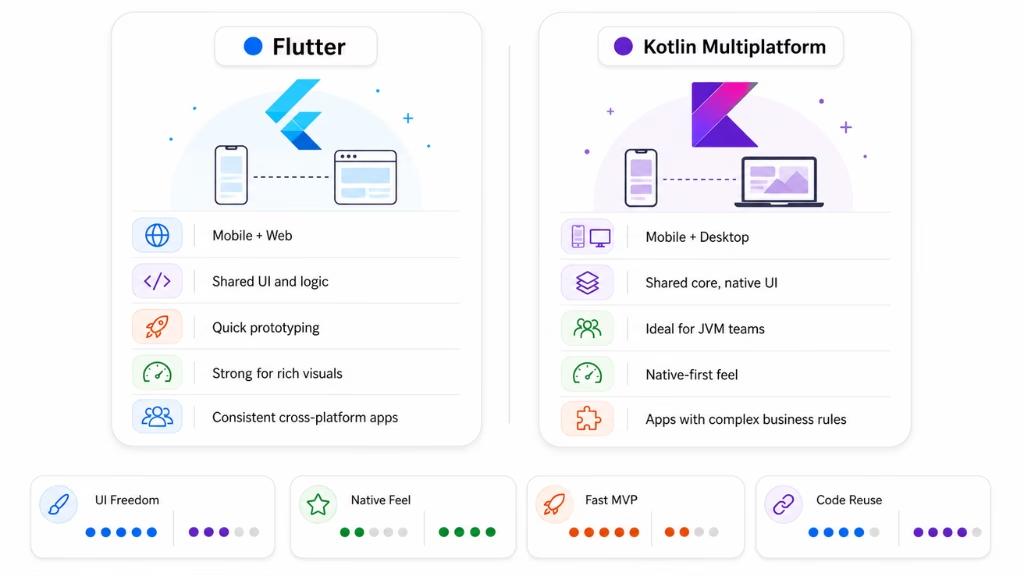
Flutter and Kotlin Multiplatform each offer unique strengths. Below, I break down the technical differences as I have seen them play out in real projects and developer feedback. This should help you select the right tool for your use case.
Platform Support & Code Sharing
| Attribute | Flutter | Kotlin Multiplatform |
|---|---|---|
| Supported Platforms | Android, iOS, Web | Android, iOS, Web, Desktop |
| Code Sharing Model | Write-once UI & logic | Business logic shared, UI native |
| Maturity | Stable for mobile/web | Compose Multiplatform stable |
| Used by | Toyota, eBay, Alibaba | Netflix, Philips, Quizlet |
Flutter lets you create one UI for all platforms. Kotlin shares only the business logic and uses native UI for each platform. In practice, I have found Flutter better for uniform experience, while Kotlin fits teams keeping close to the platform look and feel.
UI Frameworks & Rendering Engines
The way each framework handles UI is core to developer productivity and user experience. Here’s what you need to know about the current engines and frameworks.
- Flutter uses a widget-based system powered by Skia or Impeller (since 2025). It renders all UI elements independently, enabling highly custom layouts and advanced animations. Hot reload works fast for UI tweaks.
- Kotlin Multiplatform uses Compose Multiplatform, which brings Jetpack Compose’s declarative approach to Android and other platforms. On iOS, it maps to native SwiftUI controls. Animations are smoother than before but custom effects need extra effort.
For teams aiming for a truly custom, cross-platform UI, Flutter is often faster. For native feel, especially on Android or mixed desktop/mobile apps, Compose Multiplatform now matches most needs.
Development Experience & Tooling
A strong developer experience reduces bugs and speeds up delivery. Let’s look at what helps and what slows teams down in each framework as of 2026.
- Flutter:
- Supported IDEs: Android Studio, VS Code, IntelliJ
- Fast hot reload, live preview, and advanced debugging tools
- Many UI libraries and templates
- Dart language is easier for web/mobile devs but less common in the market
- Kotlin Multiplatform:
- Best in IntelliJ IDEA, now stable in Android Studio
- Compose live edit and preview, good debugging, but toolkit is newer
- Java/Android devs pick up Kotlin quicker
- Slightly longer setup for multiplatform projects, but business logic can be shared across back end (JVM) too
In my POV, Flutter offers easier onboarding for new teams and faster prototyping. Kotlin Multiplatform is better when you already have Android code or JVM expertise.
Performance & Optimization
Performance is a dealbreaker for user satisfaction. Both Flutter and Kotlin perform well, but hardware access and optimization differ.
- Flutter uses Ahead-of-Time (AOT) compilation. UI runs close to native speed thanks to Skia/Impeller. Startup times are short. App size has improved since 2025, but is still higher than native on some platforms.
- Kotlin Multiplatform: On Android, pure native performance. On iOS/web/desktop, performance is good but can lag behind pure native if doing complex UI or animations. Compose Multiplatform has made gains, but real-world FPS can drop when pushing advanced graphics.
If raw device speed matters most, Kotlin on Android wins. For rich UI across all platforms, Flutter closes the gap.
Learning Curve & Community Support
How easily your team can skill up and get help affects delivery. I have seen teams stall because they underestimated the ramp-up.
- Flutter:
- Moderate learning curve; strong docs and courses
- Large global community, plenty of reusable code
- Stack Overflow and GitHub activity remains high in 2026
- Maintained by Google, predictable update cycle
- Kotlin Multiplatform:
- Steeper learning curve for multiplatform setup and Compose
- Huge Android/Java developer base
- JetBrains and Google officially back it; faster release pace this year
- Community catching up for cross-platform (latest surveys show steady growth)
Teams with Android roots prefer Kotlin. Startups or diverse teams may find Flutter’s ecosystem easier to tap into.
Pros and Cons: Flutter vs Kotlin Side-by-Side
Below is an updated pros and cons table drawing on the latest industry experience and feature updates for 2026.
| Aspect | Flutter (Dart) | Kotlin (Multiplatform) |
|---|---|---|
| Pros | – Fast to prototype – Unified UI – Strong hot reload – Broad device reach | – Native UI on all platforms – Share business logic – Best for teams with Android/JVM experience – Leverages existing codebases |
| Cons | – Larger app size (especially on iOS) – Less native look/feel per platform – Dart less familiar | – Steeper setup – Custom UI harder off-Android – Compose still newer for iOS/web – Slower prototyping |
In my experience, the real issue teams face is choosing based on habit instead of matching tech to business goals. Use this table as a reality check.
Real-World Use Cases and Success Stories
Real company examples show where Flutter and Kotlin Multiplatform work best in production.
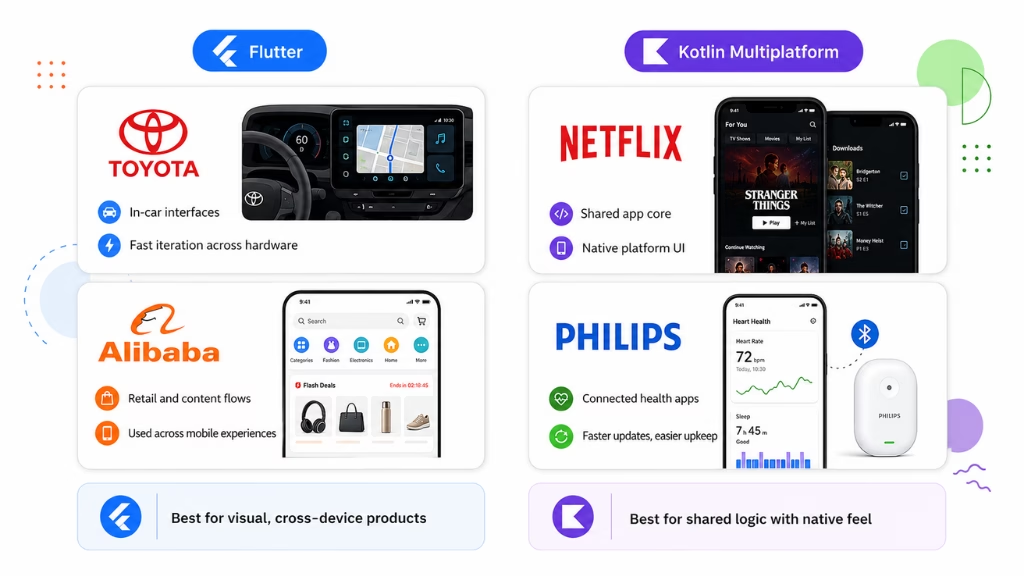
Flutter: Toyota uses Flutter for next-generation infotainment systems, including a custom embedder, automotive plugins, and cross-hardware development. Flutter’s official showcase says Toyota can now turn feedback into working code within a single day, and the system is tied to 2026 Toyota RAV4 and 2026 Lexus ES rollouts.
Alibaba has also invested in Flutter through its AliFlutter initiative, applying Flutter across e-commerce business details, shopping guide channels, feed streams, gamified interactions, and internationalized services. The stronger verified claim is Flutter adoption across Alibaba’s mobile ecosystem—not “updated e-commerce micro-frontends.”
Kotlin Multiplatform: Netflix uses Kotlin Multiplatform in its Android and iOS Studio apps to share platform-agnostic business logic while keeping platform-specific UI and APIs native. The verified example is Netflix Studio/Prodicle apps—not Netflix player logic.
Philips uses Kotlin Multiplatform for a connectivity SDK supporting Android and iOS apps for connected personal-health and smart-home-care products. Philips reported that KMP helped the team ship features faster, improve maintainability, and increase collaboration between Android and iOS developers.
Why these choices? Flutter fits visual-heavy, hardware-diverse, and fast-iteration products. Kotlin Multiplatform fits apps where teams want shared business logic, native UI, and less duplicated Android/iOS code.
Note: Do not cite a “Stack Overflow Developer Survey 2026” adoption stat yet. As of July 2026, Stack Overflow says the 2026 survey is live and results will be shared in a few months; the latest published report is the 2025 Developer Survey.
Migration Paths & Future Adoption Trends
Many teams in 2026 are modernizing old apps or moving from native to cross-platform. Choosing the right migration path avoids hidden delays and spiraling costs.
Migrating to Flutter:
- Audit existing app code and UI
- Identify core features and dependencies
- Rewrite UI in Flutter; connect platform features using plugins
- Validate business logic and test across platforms
Migrating to Kotlin Multiplatform:
- List business logic used on more than one platform
- Extract and refactor this logic into shared Kotlin modules
- Build native UI shells with Compose (Android, desktop) or SwiftUI (iOS)
- Gradually shift more logic as platform support matures
Compose Multiplatform has reached stable production support this year, according to JetBrains. Most enterprise teams report smooth launches and better hiring options for multiplatform projects.
Recent developer surveys show both Flutter and Kotlin remain strong in projected skills demand for 2027. The choice is now about your codebase, team skills, and update pipeline—not fear of technology obsolescence.
How to Decide: When to Choose Flutter or Kotlin in 2026?
Choosing the right framework is easier if you map your scenario to tech fit. Use the guide below to match your needs.
Decision Table:
| Scenario / Factor | Better With Flutter | Better With Kotlin Multiplatform |
|---|---|---|
| Need to launch fast | ✓ | |
| Visual-rich custom UI | ✓ | |
| Existing Android team/code | ✓ | |
| Native look/feel on all OS | ✓ | |
| Share backend or web logic | ✓ | |
| Limited team experience | ✓ |
In my experience, startups or teams building unique, UI-driven apps should choose Flutter for its speed and flexibility. Enterprises or companies needing tight Android/iOS integration and business logic reuse are better off with Kotlin Multiplatform.
Common Mistakes and Key Considerations When Choosing Between Flutter and Kotlin
The mistake I see often is teams ignoring their developers’ existing skills or underestimating migration complexity. That risks blown budgets and missed deadlines.
- Failing to check team strengths before deciding
- Underestimating time/cost to migrate legacy code
- Using outdated comparison data—2026 tooling and support are different now
- Ignoring platform update cycles (some features reach one ecosystem first)
Doing a pilot sprint in both frameworks often saves months down the road.
Why Partner with Riseup Labs for Cross-Platform App Success?
Building or migrating in 2026 needs more than just the right framework—it takes real expertise guiding the process.
Riseup Labs brings hands-on experience with both Flutter and Kotlin Multiplatform, supporting startups and enterprise teams across many sectors. Our team helps avoid costly mistakes, accelerates migration, and keeps your product ready for the next wave of technology shifts.
If you want clarity and faster results, talk to us about your app challenge today.
Conclusion
The decision between Flutter and Kotlin in 2026 shapes team output, budget, and future updates. There is no one-size-fits-all—each platform fits unique scenarios.
A better approach is to run a quick technical benchmark on your app’s real needs. I advise testing core features in both frameworks with your team. Check onboarding speed, performance, and fit with your hiring plans.
Riseup Labs stands ready to guide you through this decision—from pilots to scaling production. The teams winning in 2026 use the latest tools and pair them with experts who have solved these challenges before.
Looking ahead, combining AI-driven tools with hands-on framework expertise is how leading companies stay on top of cross-platform development.
FAQs: Flutter vs Kotlin 2026
What are the main differences between Flutter and Kotlin?
Flutter uses Dart and a single UI codebase. Kotlin Multiplatform shares business logic but uses native UI for each platform.
Is Flutter better than Kotlin for cross-platform development?
Flutter offers faster prototyping and unified UI. Kotlin fits Android-heavy teams or those prioritizing native experiences.
Which is easier for beginners: Flutter or Kotlin?
Flutter is easier for beginners due to its documentation, learning resources, and faster setup.
Can you use Kotlin for iOS apps in 2026?
Yes, Kotlin Multiplatform supports iOS through shared business logic and native SwiftUI for the UI layer.
What is Compose Multiplatform, and how does it compare to Flutter?
Compose Multiplatform offers declarative native UI across Android, desktop, and now stable for iOS. Flutter uses its own widget engine for full cross-platform UI.
When should you choose Flutter over Kotlin?
Choose Flutter for rapid MVPs, visually rich apps, or if you want one UI codebase for all platforms.
Which has better performance: Flutter or Kotlin?
Kotlin delivers true native performance on Android. Flutter provides near-native speed on all supported platforms.
Is Flutter or Kotlin more in demand among employers in 2026?
Both are popular, but Flutter maintains a larger global developer base, and Kotlin’s demand leads in Android-focused roles.
What are the pros and cons of using Flutter vs Kotlin for startups?
Flutter speeds up MVPs and cross-platform launches. Kotlin reduces bugs for Android-centric stacks but may slow prototyping.
How does the learning curve compare for Flutter vs Kotlin?
Flutter’s learning curve is moderate with strong support. Kotlin’s is steeper for multiplatform but easier for Android/Java devs.
This page was last edited on 9 July 2026, at 11:10 am

Start a conversation with our team to solve complex challenges and move forward with confidence.