
It was Friday afternoon. The product manager of Riseup Labs came to me and said, “We are going to launch a city-wide promotion on Monday. Can our ride-request system handle 5,000 people booking at once?“
Behind that question are real people. A rider standing in the rain, watching a spinner. A driver who never sees the request. A support team taking angry calls on Monday morning. Load testing protects them before launch, not after.
You know k6. You know how to write a script. But you also know what a good answer really needs:
- Validating product requirements and what “at the same time” actually means.
- Finding the user journeys that matter (login, search, request, accept).
- Designing a realistic load scenario, not just a flood of identical calls.
- Writing the k6 script, including authentication and tokens.
- Creating several load profiles (normal, peak, spike).
- Running the tests and reading hundreds of lines of output.
- Spotting where performance breaks down.
- Writing a report developers can act on.
Each step is manageable. Together, they take days. Much of that time goes into repetitive work: boilerplate code, translating requirements into numbers, and turning raw metrics into readable findings.
This is one area where AI-assisted code generation can reduce repetitive engineering work.
This is where an AI assistant such as Claude helps. It does not generate load or run your tests. It helps you think through the scenario, draft the script, read the results, and prepare the performance testing report. Grafana k6 will still run the load tests. And you still make the decisions.
Let’s explore how to use Claude AI for k6 load testing to make the process more efficient, faster, and more reliable.
What is Grafana k6?
Grafana k6 is an open-source load testing tool that developers can use alongside other software development tools. It helps developers test website and app performance under heavy traffic. With k6 load testing, you can measure speed, find bottlenecks, and check system stability. You can also combine k6 performance testing with AI for easier test creation and analysis.
What is AI-assisted Load Testing?
AI-assisted load testing means using an AI assistant to support the human work around a load test, while a dedicated tool generates the actual traffic. There are three clear roles:
| Role | Who | What is Does |
| Decision-maker | QA engineer | Defines goals, reviews every script, runs tests, validates findings, signs off |
| Intelligence layer | Claude | Reads requirements, suggests scenarios, drafts k6 scripts, interprets results, drafts reports |
| Execution engine | Grafana k6 | Simulates users, sends real requests, measures response times and errors |
Load testing means checking how a system behaves when many users use it at once. k6 is an open-source tool that does this using scripts written in JavaScript.
Why combine them? k6 is excellent at producing precise, repeatable load, but it only does what the script says. Claude is good at language, patterns, and explanation, but it cannot measure anything by itself. The QA engineer connects the two, applying the technical judgment expected of a quality assurance engineer.
The engineer brings what no tool has: context. You know the product manager’s real worry, which release broke things last time, and which developer to call when the ride service slows down. Claude works best when you treat it as a thinking partner in a conversation, not a machine you feed commands to. Let’s explore our AI-driven workflow that helps us complete this project.
8-Step Workflow for k6 Load Testing with AI
The workflow has eight stages and one loop. Claude helps at almost every stage, but only k6 touches the system under test. These stages fit into a broader QA process, with human review and validation at key checkpoints.
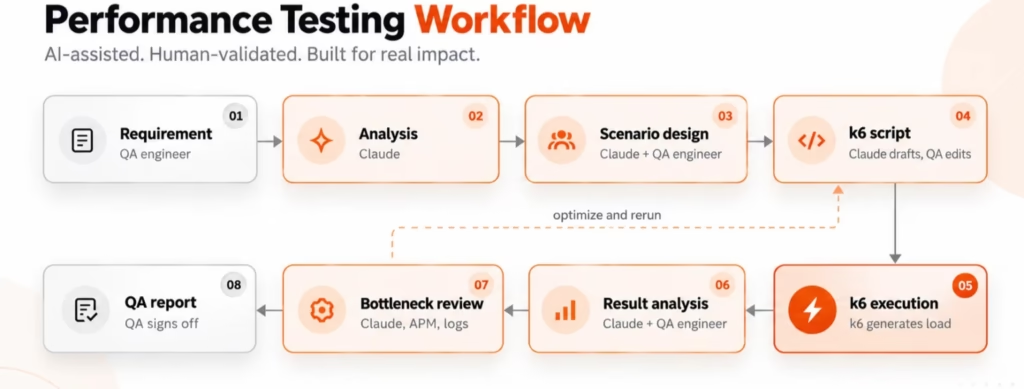
The dashed loop is where most of the value comes from: each run teaches you something, and the next test gets better
| Stage | QA Engineer Provides | Claude Does | k6 Does | Output |
| Requirement | Business goal, SLAs, API docs | Asks clarifying questions | Nothing | Clear, testable goal |
| Analysis | Traffic data, user journeys | Converts goal into VUs, rates, durations | Nothing | Load model |
| Scenario Design | Review and corrections | Proposes positive, negative, and peak scenarios | Nothing | Scenario list |
| k6 Script | Endpoints, auth details, test data | Drafts script, checks, thresholds | Validates syntax on a dry run | Reviewed script.js |
| Execution | Test environment, approval | Nothing during the run | Generates load, records metrics | Raw results (summary, JSON) |
| Result Analysis | k6 output, context | Explains metrics, flags anomalies | Nothing | Findings in plain language |
| Bottleneck Review | Server metrics, logs, APM data | Suggests likely causes to investigate | Nothing | Hypotheses to confirm |
| Report | Final sign-off | Drafts the report | Nothing | QA performance report |
1. Requirements of Performance Testing with AI
Business requirements are rarely written in testing terms. Understanding the software development life cycle also helps teams translate business needs into testable goals. Take this one:
“The application should support 5,000 simultaneous ride requests. Around 400 drivers should accept the requests, and the remaining requests should stay pending or be rejected.”
A good prompt to Claude looks like this:
“Act as a performance test designer. Convert this requirement into a k6 load model. List your assumptions separately and ask me about anything unclear.”
Claude’s first useful output is usually questions, not code. For example: Does “simultaneous” mean 5,000 requests in one second, or 5,000 riders active over several minutes? What response time is acceptable? Is a “rejected” request a success or an error? Once you answer, Claude can propose a model like this:
| Term | Simple Meaning | Value for This Example |
| Virtual user (VU) | A simulated user running the script in a loop | 5,000 rider VUs + 400 driver VUs |
| Concurrent users | Users active at the same moment | Up to 5,400 |
| Request rate | Requests sent per second | Peak of about 250 ride requests/s (assumption: 5,000 requests over ~20 s) |
| Ramp-up | Gradually increasing load | 0 → 5,000 riders over 5 minutes |
| Steady state | Holding the target load | 10 minutes at peak |
| Ramp-down | Gradually reducing load | 5,000 → 0 over 2 minutes |
| User behavior | What each user does, with pauses | Login, search, request ride, poll status |
| API dependencies | Calls that need data from earlier calls | Ride ID from create is needed to accept |
| Success criteria | Pass/fail rules | p95 < 800 ms, errors < 1%, no unexpected 5xx |
The numbers in the table are assumptions for illustration. Your real values should come from product owners, SLAs, or production traffic data. Claude makes the translation faster; it does not know your business targets.
A simple habit helps: for every number, ask “who is this?” 5,000 VUs are 5,000 riders. A 60- second polling limit is a person deciding whether to give up and book a taxi. Thinking this way leads to better scenarios than thinking only in requests per second.
2. Generate k6 Scripts with Claude AI
Once the load model is agreed, Claude can draft the script. This is one practical example of AI applications in software development. Claude can draft the script. Give Claude the API endpoints, request bodies, and authentication details from your API documentation (an OpenAPI file or a few sample curl commands work well). Here is a small, realistic example:
import http from 'k6/http';
import { check, sleep } from 'k6';
import { SharedArray } from 'k6/data';
const BASE_URL = __ENV.BASE_URL || 'https://staging.example.com';
// Test data loaded once and shared by all VUs
const riders = new SharedArray('riders', () =>
JSON.parse(open('./riders.json')));
export const options = {
  stages: [
    { duration: '2m', target: 500 },   // ramp-up
    { duration: '5m', target: 500 },   // steady load
    { duration: '1m', target: 0 },     // ramp-down
  ],
  thresholds: {
    http_req_failed: ['rate<0.01'],           // under 1% errors
    http_req_duration: ['p(95)<800'],         // 95% under 800 ms
    'http_req_duration{name:create_ride}': ['p(95)<1000'],
  },
};
export default function () {
  const rider = riders[(__VU - 1) % riders.length];
  // 1. Login and get a token
  const login = http.post(`${BASE_URL}/api/auth/login`,
    JSON.stringify({ phone: rider.phone, password: rider.password }),
    { headers: { 'Content-Type': 'application/json' }, tags: { name: 'login' } });
  check(login, { 'login 200': (r) => r.status === 200 });
  const token = login.json('accessToken');
  const auth = { headers: {
    'Content-Type': 'application/json',
    Authorization: `Bearer ${token}`,
  } };
  sleep
(1); // think time: a real user pauses
  // 2. Create a ride request
  const ride = http.post(`${BASE_URL}/api/rides`,
    JSON.stringify({ pickup: rider.pickup, dropoff: rider.dropoff }),
    { ...auth, tags: { name: 'create_ride' } });
  check(ride, {
    'ride created': (r) => r.status === 201,
    'ride has id': (r) => !!r.json('rideId'),
  });
  sleep(Math.random() * 3 + 2);
}
What the important parts do:
– __ENV.BASE_URL: an environment variable, so the same script runs against staging or another environment without edits. Run with k6 run -e BASE_URL=https://… script.js.
– SharedArray: loads test data once, so each VU uses a different rider instead of the same account 5,000 times.
– stages: the load profile. Here, ramp to 500 VUs, hold, then ramp down.
– thresholds: pass/fail rules. If p95 goes over 800 ms or errors exceed 1%, k6 marks the test as failed.
– check: verifies each response, like an assertion. A failed check does not stop the test; it is counted.
– login.json(‘accessToken’): correlation. The token from one response is reused in the next request’s Authorization header.
– tags: { name: … }: labels each request so results can be broken down per API.
– sleep: think time, which makes pacing closer to real users.
Claude is also useful for the fiddly parts: token refresh logic, custom headers, CSV or JSON data files, and splitting riders and drivers into separate scenarios (covered below). Always check the generated endpoints and field names against the real API; Claude may guess names like accessToken if you do not provide a sample response.
3. Create Different Load Profiles
One script can support many test types by changing only the stages or scenarios. Ask Claude: “Give me smoke, load, stress, spike, and soak profiles for this script, based on a target of 5,000 riders.”
| Test type | Question it answers | Example profile | When to use it |
| Smoke | Does the script work at all? | 1–5 VUs for 1 minute | After every script change |
| Baseline | What is normal performance? | 10% of target load for 10 minutes | Before bigger tests, to have a reference |
| Load | Does it meet targets at expected peak? | Ramp to 5,000, hold 10–15 minutes | Before a release or campaign |
| Stress | Where does it break, and how? | Step up to 7,500–10,000 | Capacity planning |
| Spike | Can it survive a sudden surge? | 200 → 5,000 in 30 seconds | Flash sales, rush hour, push notifications |
| Soak (endurance) | Does it degrade over time? | 60–70% of target for 2–8 hours | Finding memory leaks, connection exhaustion |
For example, a spike profile in k6:
stages: [
{ duration: '1m', target: 200 },    // normal traffic
{ duration: '30s', target: 5000 },  // sudden spike
{ duration: '3m', target: 5000 },   // hold the spike
{ duration: '1m', target: 200 },    // recovery
],
Always run the smoke test first. It is cheap and catches broken scripts before you spend an hour on a large run. This is a common practice in quality assurance testing because it helps catch script errors before larger test runs.
4. Prepare Realistic Loading Scenarios with Positive, Negative & Mixed Behavior
Real traffic is messy. Users mistype passwords, tokens expire, apps retry, and people tap “Request ride” twice. If your test only sends perfect requests, it measures a system nobody actually uses.
Claude is good at brainstorming these cases. Ask: “What realistic failure and edge-case traffic should be mixed into this ride-request load test?”
| Scenario | Example | Why it matters under load |
| Invalid requests | Pickup outside service area | Validation should be fast and cheap |
| Authentication failures | Wrong password (about 2% of logins) | Auth services often slow down under failed-login load |
| Expired tokens | Token used after expiry, then refreshed | Tests refresh logic and retry storms |
| Missing parameters | No dropoff field | Should return 400 quickly, not 500 |
| Duplicate requests | Same ride submitted twice in 1 s | Checks idempotency and double-booking |
| Behavior mix | 70% book, 20% browse, 10% cancel | Different APIs get different pressure |
| Peak traffic | Friday 6 pm volume | Sustained high load |
| Sudden spikes | Promo push notification | Autoscaling and queue behavior |
For negative cases, tell k6 which status codes are expected. Otherwise, a correct 401 counts as a failure:
http.post(url, body, {
responseCallback: http.expectedStatuses(401),
tags: { name: 'login_invalid' },
});
Keep negative traffic a realistic minority. A test that is 50% errors tells you little about normal capacity.
5. API Dependency and Correlation for k6 Load Testing
Correlation means taking a value from one response and using it in a later request. Without it, a script sends hard-coded IDs that quickly become invalid.
In the ride-sharing flow, each step depends on the one before:
| Step | API | Needs | Produces |
| 1. Login | POST /auth/login | Credentials | accessToken |
| 2. Search | GET /drivers/nearby | Token, location | Driver availability |
| 3. Create request | POST /rides | Token, pickup, dropoff | rideId |
| 4. Accept request | POST /rides/{rideId}/accept | Driver token, rideId | Status ACCEPTED |
| 5. Complete request | POST /rides/{rideId}/complete | Driver token, rideId | Status COMPLETED |
Paste the API docs or a few recorded requests into Claude and ask: “Identify the dependencies between these APIs and write a k6 flow that passes the values correctly.” A simplified result:
const ride = http.post(`${BASE_URL}/api/rides`, body, riderAuth);
const rideId = ride.json('rideId');
if (!check(ride, { 'ride id returned': () => !!rideId })) {
return; // stop this iteration; later steps would fail anyway
}
const accept = http.post(`BASEURL/api/rides/{rideId}/accept`, null,
{ ...driverAuth, tags: { name: 'accept_ride' } });
check(accept, { 'accepted': (r) => r.json('status') === 'ACCEPTED' });
Note the name tag. Without it, every /rides/123/accept URL is recorded as a separate metric, which makes results hard to read.
In a real system, riders and drivers are different users. Accepting usually happens in a separate driver scenario that picks up pending rides, not in the rider’s script. Claude can suggest this split, but you need to confirm how your system actually assigns rides.
6. Run the Performance Load Testing with k6
Claude prepares the test. k6 runs it. The run happens on your machine, a CI runner, or a dedicated load generator:
# Quick smoke check
k6 run --vus 2 --duration 30s script.js
# Full run against staging, saving a JSON summary for analysis
k6 run -e BASE_URL=https://staging.example.com \
--summary-export=summary.json script.js
During execution, k6 starts the VUs according to your stages, runs the default function in a loop for each VU, and records every request: timing, status, and tags. It evaluates thresholds and prints a live progress bar. At the end, it prints an end-of-test summary and exits with a non-zero code if any threshold failed, which is useful for failing a CI pipeline. This also makes k6 useful for teams building automated testing workflows into their development processes.
Two practical rules. First, watch the load generator itself: if its CPU is maxed out, your results measure the test machine, not the application. Second, run against an environment you are authorized to load, and tell the owning teams before a large run.
7. Analyze k6 Results with Claude AI
This is where Claude saves the most time. Raw k6 output is dense, and the important signal is often in the relationship between numbers, not in any single one.
First, the key metrics in plain words:
| Metric | What it means |
| Average response time | The mean; easily hidden by a few very slow requests |
| p95 / p99 | 95% / 99% of requests were faster than this. Better reflects user experience |
| Error rate ( http_req_failed ) | Share of requests that failed |
| Throughput ( http_reqs ) | Requests per second the system actually handled |
| Checks | Share of your assertions that passed |
| Thresholds | Your pass/fail rules; marked ✓ or ✗ |
Here is a shortened example summary from a load run:
✗ http_req_duration..........: avg=612ms  med=340ms  p(95)=2.41s  p(99)=4.87s
{ name:login }...........: avg=180ms  p(95)=310ms
{ name:create_ride }.....: avg=1.34s  p(95)=3.92s
{ name:ride_status }.....: avg=210ms  p(95)=420ms
✗ http_req_failed............: 3.80%
http_reqs..................: 412,380   458/s
✗ checks.....................: 95.10%
✗ ride created: 91% — ✓ 102,410 / ✗ 10,120
vus_max....................: 5000
Prompt: “Analyze these k6 results for a ride-request load test. Separate what the data shows from what it might suggest. Do not state root causes as facts.”
A good Claude response reads like this:
What the data shows: Two thresholds failed: p95 duration (2.41 s vs 800 ms) and error rate (3.8% vs 1%). The slowness is concentrated in create_ride, with p95 at 3.92 s. Login and ride status stay under 450 ms at p95. About 9% of ride creations failed their check.
What it may indicate: Because only create_ride is slow, the problem is likely specific to ride creation rather than the network or the whole platform. A possible bottleneck is a write-heavy step, such as a database insert, a lock on driver matching, or a downstream pricing call. The gap between median (340 ms) and p99 (4.87 s) suggests some requests are waiting in a queue.
Recommended next steps: Check which status codes the failures returned (timeouts vs 5xx vs 429). Compare with database and APM metrics for the same time window. Further investigation is recommended before assigning a cause. When errors point to a production issue, AI-assisted incident response can also help teams organize the investigation.
This is the right tone. Claude points to where to look. It does not claim to know why, because k6 data alone cannot prove it. This evidence-first approach is important in AI-driven root cause analysis, where possible causes must be verified against actual system data.
You can also ask Claude to translate metrics into user impact: “A p95 of 3.92 s means 1 in 20 riders waits almost 4 seconds just for the booking to register. A 9% failed check means roughly 1 in 11 riders sees an error at the worst possible moment.” Stakeholders act on sentences like these much faster than on percentiles.
Tip: add –summary-export or handleSummary() output, the test profile, and the test time window to your prompt. More context gives better analysis.
8. Identify Potential Bottlenecks
k6 measures the system from the outside, like a customer. It sees that a request was slow, not why. Claude can map symptoms to likely areas to investigate, and you confirm them with backend data.
| Symptom in k6 results | Possible area to investigate | Evidence needed to confirm |
| One API much slower than others | Slow code path or database query | APM traces, slow-query log |
| Latency climbs steadily with load | Database or CPU saturation | DB metrics, CPU per service |
| Sudden timeouts at a VU level | Connection pool limit | Pool usage, “waiting for connection” logs |
| Many 429 responses | Rate limiting | Gateway config and logs |
| 401s rising mid-test | Auth service or token expiry | Auth service logs, token TTL |
| Slow only when a third party is called | External API dependency | Outbound call timings in APM |
| Latency grows over hours (soak) | Memory leak, resource exhaustion | Memory trend, GC logs |
| High latency on every API equally | Network or load generator limits | Generator CPU, network latency |
The important point: neither k6 nor Claude can always prove the root cause. You usually need application logs, database monitoring, an APM tool (application performance monitoring, which traces requests inside your services), CPU and memory metrics, and infrastructure dashboards. These monitoring signals also support ongoing IT infrastructure optimization.
A useful workflow is to export those metrics for the same time window and give Claude both sets. It can then line up “p95 jumped at 14:32” with “DB connections hit 100/100 at 14:31”. That is a much stronger hypothesis, but an engineer should still verify it.
Bottleneck conversations can feel like blame. Share hypotheses as questions (“Could the pool limit explain this?”), invite the service owner to look at the data with you, and credit the people who find the fix. A good performance culture is a team solving a puzzle together.
9. AI-Assisted Load Test Optimization
The first test is rarely the right test. Optimization is a loop: run, analyze, find a weakness in the test or the system, change one thing, run again, and compare.
Ask Claude to review your script as well as your results: “Here is my k6 script and the results. What in the test itself might make these results unrealistic?” Typical suggestions:
- Improve test data: all 5,000 riders using the same pickup point can create unrealistic hotspots. Spread locations across the city.
- Adjust load patterns: use an arrival-rate executor when the requirement is “requests per second” rather than “users”.
- Improve correlation: stop the iteration when a required ID is missing instead of sending broken follow-up calls.
- Add thresholds per API: a global p95 can hide one slow endpoint.
- Add missing scenarios: cancellations, status polling, token refresh.
- Make behavior realistic: add random think time instead of fixed sleep(1).
- Separate user types: riders and drivers as different scenarios with their own load.
For example, separating user types with k6 scenarios:
export const options = {
scenarios: {
riders: {
executor: 'ramping-arrival-rate',
exec: 'riderFlow',
startRate: 10, timeUnit: '1s',
preAllocatedVUs: 1000, maxVUs: 5000,
stages: [{ duration: '5m', target: 250 }, { duration: '10m', target:
250 }],
},
drivers: {
executor: 'constant-vus',
exec: 'driverFlow',
vus: 400, duration: '15m',
},
},
};
When you compare runs, give Claude both summaries and say what changed. Change one variable at a time; otherwise, nobody can tell which change caused the difference.
10. Generate a QA Performance Report using Claude
Developers and managers do not want to read k6 console output. Give Claude the summary, the test plan, and your notes, and ask for a report in a fixed structure. Keep a template so every report looks the same.
Performance Test Report: <feature / release>
| No. | Report Section | Description |
| 1 | Test objective | What question this test answers |
| 2 | Environment | Env name, version, instance sizes, data volume |
| 3 | Test duration | Start/end time (with time zone) |
| 4 | Virtual users | Peak VUs and arrival rate |
| 5 | Load profile | Stages or scenarios used |
| 6 | APIs tested | Endpoint list and traffic mix |
| 7 | Response times | Avg, median, p95, p99 per API |
| 8 | Error rate | Overall and per API, by status code |
| 9 | Throughput | Requests per second achieved |
| 10 | Threshold results | Pass/fail table |
| 11 | Failed scenarios | What failed and how often |
| 12 | Potential bottlenecks | Hypotheses + evidence + confidence |
| 13 | Recommendations | Next actions with owners |
| 14 | Limitations | What this test did NOT cover |
| 15 | Final observations | Go / no-go recommendation from QA |
Two sections deserve extra care. Potential bottlenecks should label confidence (“confirmed by APM trace” vs “suspected”). Limitations should be honest: for example, staging has half the database capacity of production, or payment was mocked. Claude drafts; the QA engineer checks every number against the raw output before sending.
A concise management summary can also inform AI-powered executive dashboards, provided the numbers are verified. Write for the reader. Ask Claude for two versions if needed: a one-paragraph summary for managers (“Are we ready for Monday?”) and the detailed version for developers (“Which query, which endpoint, what evidence?”). Start with the impact on users, then the numbers.
How We Used k6 and Claude to Test 5,000 Simultaneous Ride Requests
This example ties the earlier sections together. All numbers are illustrative.
Step 1. Requirement: The QA engineer shares: “Handle 5,000 simultaneous ride requests. About 400 drivers accept; the rest stay pending or are rejected. Target: p95 under 1 s for ride creation.”
Step 2. Claude analyzes the requirement: Claude asks three questions: How fast do the 5,000 requests arrive? What does “rejected” return (HTTP 409? a status field)? Is matching synchronous or queued? The team answers: peak arrival of about 250 requests/s, rejection returns 200 with status: NO_DRIVER, matching is asynchronous. Asynchronous request handling is also a common pattern in event-driven Node.js applications.
Step 3: Claude designs user behavior:
Riders (5,000): login → search nearby drivers → create ride → poll status every 3 s for up to 60 s. 5% cancel while pending.
Drivers (400): login → poll pending rides → accept one → complete after a short delay → repeat.
Negative mix: 2% bad logins, 1% duplicate ride submissions.
Step 4. Claude generates the k6 script:
Two scenarios (as in section 12), per-API tags, correlation of rideId, and thresholds: create_ride p95 < 1 s, errors < 1%. The QA engineer fixes two wrong field names and runs a smoke test with 5 VUs.
Step 5. k6 executes the test: Ramp over 5 minutes, hold for 10 minutes, on staging, with the backend team watching dashboards.
Step 6. Results are collected: The summary matches section 10: create_ride p95 3.92 s, error rate 3.8%, two thresholds failed. APM and database metrics are exported for the same window.
Step 7. Claude analyzes results: It notes that only create_ride degrades, starting when arrivals pass about 180/s. In the APM export, it notices database connection usage reaching the pool maximum at the same time, and many failures are timeouts.
Step 8. Potential bottlenecks are identified: Claude’s wording: “A likely bottleneck is the database connection pool used by the ride service. This is a hypothesis supported by timing correlation, not a confirmed cause.” The developer checks traces and confirms that ride creation waits on connections, and that one query lacks an index.
Step 9. The test is optimized: The team adds the index and raises the pool size. The QA engineer asks Claude to also improve the test: spread pickup locations, add a ride_status threshold, and prepare a separate spike scenario. Run 2 uses the same load profile for a fair comparison.
| Metric | Run 1 | Run 2 | Target |
| create_ride p95 | 3.92 s | 740 ms | < 1 s |
| create_ride p99 | 6.10 s | 1.35 s | Tracked, no target |
| Error rate | 3.8% | 0.4% | < 1% |
| Throughput | 458 req/s | 612 req/s | Tracked |
| Thresholds passed | 1 of 3 | 3 of 3 | All |
Step 10. Final QA performance report: Claude drafts the report using section 13
template. The QA engineer adds one limitation: staging has smaller database instances
than production, so the result shows the fix works but does not prove production
capacity. The recommendation is a go, with a spike test scheduled before the promotion.
Comparison: Before and After Using AI for Load Testing
The difference is not that work disappears. It moves from typing and translating toward reviewing and deciding.
Traditional vs. AI-Assisted Performance Testing Workflow
| Activity | Traditional Workflow | AI-Assisted Workflow |
| Requirement analysis | Engineer converts business goals to numbers alone | Claude drafts a load model and asks clarifying questions; engineer confirms |
| Test design | Based on individual experience; edge cases easily missed | Claude proposes a scenario list; engineer prunes and adds |
| Script creation | Written from scratch or copied from old scripts | Claude drafts from API docs; engineer reviews and fixes |
| Test-data preparation | Manual CSV/JSON creation | Claude generates data generators or sample files |
| Scenario creation | Often only the happy path | Positive, negative, and mixed behavior suggested early |
| Result analysis | Engineer reads raw output line by line | Claude summarizes and flags anomalies; engineer validates |
| Reporting | Written manually, format varies | Drafted from a template; engineer checks the numbers |
| Test optimization | Depends on time and experience | Claude reviews script and results together and suggests changes |
How much time this saves depends on the team, the system, and the engineer’s k6 experience. Measure it on your own projects rather than relying on general claims.
Benefits of AI-Assisted Load Testing
- Faster test preparation: a first-draft script and load model in minutes instead of hours.
- Easier k6 scripting: engineers new to k6 or JavaScript get working patterns to learn from.
- Better scenario coverage: Claude can suggest negative and edge-case traffic that a quality assurance tester should still review.
- Faster result interpretation: a plain-language summary of dense metrics.
- Easier documentation: consistent reports with less manual writing.
- Better QA–developer collaboration: findings arrive with evidence and clear next steps.
- Faster iteration: comparing runs and adjusting scripts takes less effort.
- Less repetitive work: boilerplate, data files, and formatting are handled for you.
Limitations and Risks
AI-generated performance tests still need human review. Treat Claude’s output like a pull request from a capable new colleague: useful, fast, and in need of checking.
- It can misunderstand requirements. “5,000 simultaneous” can be read in several ways. Confirm the load model before writing code.
- It can generate incorrect scripts. Wrong endpoints, invented field names, or outdated k6 APIs. Always smoke test.
- It may make hidden assumptions. Think times, traffic mix, and data volumes are often guesses. Ask Claude to list them.
- It cannot see your infrastructure. It only knows what you give it. Root causes need logs, APM, and database metrics.
- Test data may be unrealistic. Too few accounts, identical locations, or an empty database give misleadingly good results.
- Production testing needs authorization and safeguards. Get approval, agree a time window, use test accounts, and have a stop plan. Never point a load test at a system you do not own or have permission to test.
- Results depend on the environment. Staging results do not automatically predict production.
- Sensitive data. Do not paste real customer data, secrets, or tokens into prompts. Follow your company’s policy on what can be shared with AI tools.
My Recommended Architecture for k6 Performance Testing
The architecture is the workflow from section 3, with clear human checkpoints. Business requirements go to Claude, which drafts the scenario design and the k6 script. k6 executes the test and produces results. Claude analyzes the results, together with monitoring data, and drafts the QA performance report.
The QA engineer is involved at four points:
- Before design: defines goals and confirms Claude’s load model and assumptions.
- Before execution: reviews the script, runs a smoke test, and gets approval for the
environment. - After execution: validates Claude’s analysis against raw data and backend metrics.
- Before publishing: checks every number in the report and makes the final go/no-go
call.
In practice, keep scripts in Git, run k6 from CI for repeatable baselines, and store summaries (JSON) so runs can be compared over time.
Why Human Expertise Still Matters in AI-Assisted Performance Testing?
Tools change quickly. The habits that make performance testing valuable are human ones:
Start from user journeys, not endpoints. Ask “what is the rider trying to do?” before “which API do we call?”
Stay curious, not just fast. When Claude gives an answer, ask why. Understanding the reasoning is how you grow as an engineer.
Review together. Walk through AI-drafted scripts with a teammate. Two people catch mistakes one person and one assistant miss.
Own the call. Claude can suggest; only a person can say “we are ready” and stand behind it.
Protect your time for judgment. Let Claude handle boilerplate so you have energy for the hard questions.
Share what you learn. Save good prompts, templates, and lessons in the team wiki so everyone benefits.
What’s Next for AI-Assisted Load and Performance Testing?
The natural next step is a performance-testing agent: an AI system that uses tools to carry out more of the loop itself, with humans approving key steps.
| Capability | Realistic today | Future direction |
| Read requirements, identify APIs | Yes, from docs or OpenAPI files you provide | Discover APIs from code and traffic automatically |
| Design scenarios, generate k6 scripts | Yes, with human review | Scripts that update when APIs change |
| Execute tests | Possible with agentic tools (e.g., running k6 in a terminal) under supervision | Scheduled, self-triggered runs with guardrails |
| Analyze results | Yes, from summaries and exported metrics | Live analysis during the run, with auto-stop |
| Compare historical runs | Yes, if you supply past results | Automatic regression detection across releases |
| Detect unusual behavior | Basic, from data provided | Combined with APM and logs for stronger correlation |
| Suggest additional tests | Yes | Prioritized by risk and recent code changes |
| Generate reports | Yes, from a template | Published to dashboards and tickets automatically |
Even in that future, humans should approve what is tested, where, and at what load. Generating traffic against real systems is an action with real consequences.
Conclusion
Load testing has always needed two things: a reliable engine to generate traffic, and an engineer who understands what the numbers mean. That does not change.
What changes is the work in between. Claude can turn a vague requirement into a load model, draft a k6 script, suggest scenarios you missed, explain a wall of metrics, and produce a clear report. The QA engineer reviews, decides, and stays accountable. k6 does what it does best. And the real winners are the people on the other side of the screen: riders who get a car, drivers who get the job, and teams who sleep well on launch night.
Start small: take one existing k6 test, give Claude the script and its last results, and ask what it would improve. You will quickly see where it helps and where it needs your judgment.
Let k6 do the load testing. Let Claude help us think, build, analyze, and improve the test.
FAQs
Which is the best tool for performance testing?
There is no single best performance testing tool for every project. Grafana k6 is a strong choice for API performance testing, JavaScript-based scripting, and CI/CD integration. Apache JMeter supports a wide range of testing scenarios, while Locust is ideal for Python developers. For AI-assisted performance testing, you can combine k6 with Claude to simplify test preparation, script development, and result analysis.
What are the four main types of load testing?
Four common types are:
Load Testing: Checks how an application performs under expected user traffic.
Stress Testing: Pushes the system beyond normal capacity to identify its limits.
Spike Testing: Measures how the application handles sudden traffic increases.
Soak Testing: Tests system stability over long periods to detect memory leaks and performance issues.
How to use Claude AI for QA testing?
You can use Claude AI for QA testing to analyze requirements, generate test cases, write automation scripts, and review test results. For performance testing with AI, Claude can help create k6 load testing scripts, design realistic user scenarios, analyze response times, and suggest possible bottlenecks. QA engineers should review and validate all AI-generated outputs.
What are some tools for Python load testing?
Locust is a popular Python-based load testing tool. It lets you write test scenarios in Python and simulate thousands of users. Other options include Molotov and Taurus. Locust is particularly useful for teams that prefer Python for writing automated performance tests.
This page was last edited on 22 October 2026, at 1:37 pm

Start a conversation with our team to solve complex challenges and move forward with confidence.