
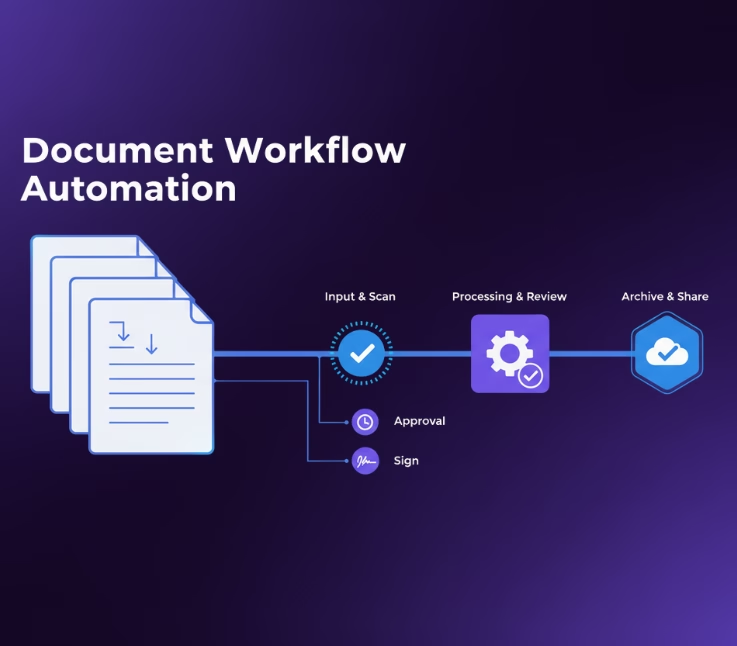
Document workflow automation uses software to automate how documents are created, reviewed, approved, and stored. It helps businesses reduce manual follow-ups, speed up processes, and maintain better control over important documents.
Most companies don’t have a document problem—they have a process problem.
Contracts, invoices, forms, and reports often move through emails, spreadsheets, and manual approvals. As document volume grows, these small delays add up. Employees spend more time searching for information, chasing approvals, and entering data instead of focusing on important work.
This is becoming a bigger challenge as businesses digitize their operations. McKinsey research shows that employees spend a significant amount of time searching for information and managing documents, which can reduce overall productivity.
Document workflow automation helps solve this by creating structured processes for documents. It can automatically route files, trigger approvals, extract information, and track every step from start to finish.
But successful automation is not just about buying software. The real value comes from finding the right processes to automate and designing workflows that match how teams actually work.
In this guide, we’ll explore how document workflow automation works, its benefits, common use cases, the role of AI, implementation challenges, and what businesses should consider before adopting a solution.
What Is Document Workflow Automation?
Document workflow automation is the process of using technology to manage the movement, review, approval, and storage of documents with minimal manual input. Instead of relying on paper forms or email chains, automated systems follow predefined rules that move documents through each stage from creation to completion, ensuring consistency, accuracy, and accountability.
For example, when a new contract is created, an automation platform can automatically send it to the right approvers, track changes, send reminders, and archive the final version once approved. Every step is recorded, creating a transparent, error-free process that saves time and reduces risk.
Why Does Document Workflow Automation Matter for Today’s Businesses?
In modern organizations, document automation isn’t just about convenience; it’s a competitive advantage. Manual document handling drains resources and introduces errors that can delay decisions and increase costs. Automated workflows, on the other hand, help teams collaborate faster, ensure compliance with regulations, and free up employees for more strategic work.
Businesses implementing document workflow automation often report:
- 60–80% lower processing costs,
- Up to 25% higher employee productivity, and
- 50% faster document turnaround times.
In short, automation allows companies to work smarter, scale faster, and maintain full control over their information, key traits of successful digital enterprises.
Core Elements of an Automated Document Workflow
Every successful document automation system is built on a few essential components that work together to digitize, route, secure, and optimize information flow across an organization.
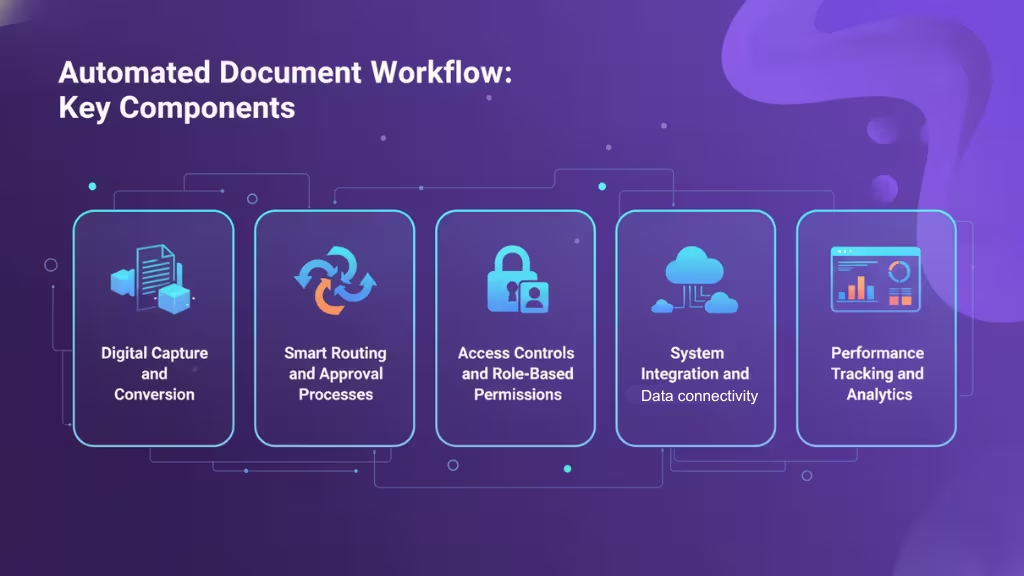
Digital Capture and Conversion
The first step in automation is turning physical or unstructured documents into machine-readable digital files. Technologies like scanning, optical character recognition (OCR), and data extraction tools capture information from paper forms, PDFs, or emails and convert it into standardized digital formats. This step ensures every document, whether a contract, invoice, or form, enters the workflow cleanly and accurately.
Smart Routing and Approval Processes
Once documents are digitized, automation platforms handle their movement across teams. Predefined logic determines who reviews or approves a document next, eliminating manual forwarding and delays. For example, a purchase order can automatically route to the finance manager once approved by the department head, with the system sending reminders or escalations if deadlines are missed.
Access Controls and Role-Based Permissions
Security and compliance depend on clear access management. Automation systems assign permissions based on user roles, ensuring that only authorized personnel can view, edit, or approve sensitive documents. This not only protects data integrity but also creates detailed audit trails for accountability.
System Integration and Data Connectivity
To truly streamline operations, document automation tools integrate with other enterprise systems such as CRM, ERP, and HR software. This integration eliminates redundant data entry and ensures consistent information across all platforms, for instance, pulling client data directly into contract templates or syncing invoice approvals with accounting systems.
Performance Tracking and Analytics
Finally, automation enables transparency through real-time dashboards and analytics. Teams can monitor processing times, approval rates, and workflow bottlenecks, gaining insights for continuous improvement. These analytics turn document management from a routine task into a measurable, data-driven process.
The Role of AI in Document Workflow Transformation
Artificial intelligence has taken document workflow automation to an entirely new level. Beyond simply digitizing or routing files, AI empowers systems to understand, analyze, and make decisions about documents, reducing manual review and improving accuracy dramatically.
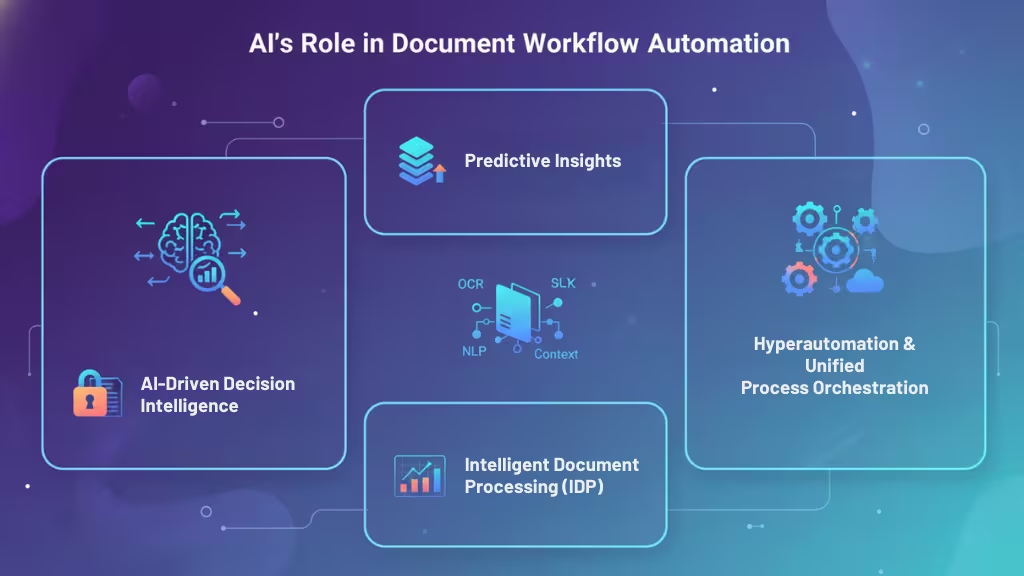
AI-Driven Decision Intelligence and Predictive Insights
AI-driven decision intelligence allows automation systems to go beyond fixed rules. By analyzing patterns in data and past workflows, AI can predict outcomes, detect anomalies, and suggest process improvements.
For instance, if certain approval stages consistently cause delays, the system can automatically reassign tasks or propose alternate routing to accelerate turnaround. These predictive insights make workflows not just faster but also smarter and more adaptive over time.
Intelligent Document Processing (IDP) and Contextual Automation
Intelligent Document Processing (IDP) integrates AI technologies such as OCR, Natural Language Processing (NLP), machine learning, and computer vision to extract, classify, and validate information automatically.
Unlike basic data extraction, IDP understands the context of a document. It can distinguish between an invoice and a contract, identify key fields like vendor names or due dates, and flag missing or inconsistent data for review.
This contextual awareness enables 90%+ accuracy rates, even with complex or unstructured documents, minimizing human input while improving quality control.
Hyperautomation and Unified Process Orchestration
Hyperautomation extends the power of AI by combining multiple automation technologies like robotic process automation (RPA), machine learning, and advanced analytics into a unified ecosystem. Rather than automating single tasks, hyperautomation connects entire processes end-to-end, from document intake to compliance reporting.
For example, a financial institution could automate the entire loan lifecycle: document intake, credit verification, approval routing, and final archiving, all within a single intelligent workflow.
Steps to Automate Document Workflows Successfully
Implementing document workflow automation isn’t just about choosing the right software it’s about redesigning processes to maximize efficiency and accuracy. Here’s a structured roadmap to help organizations transition smoothly from manual to automated workflows.
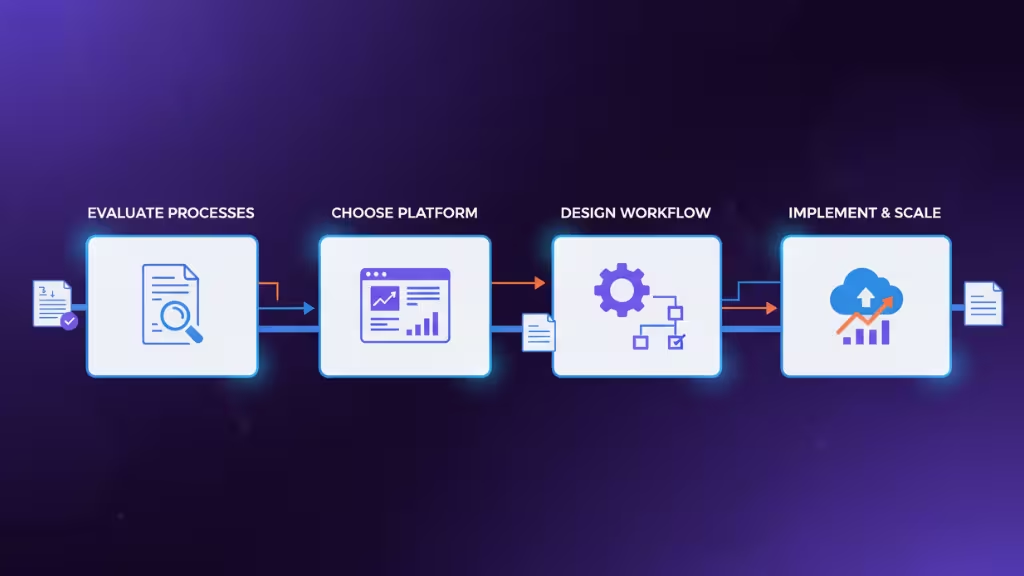
Evaluate Existing Processes and Identify Gaps
Start by mapping how documents currently move through your organization. Which steps are manual? Where do bottlenecks occur? Which tasks are repetitive and time-consuming?
A detailed process audit reveals inefficiencies and helps prioritize automation opportunities such as approval cycles, document creation, or data entry. The goal here is clarity: understanding what to automate and why before introducing new tools.
Select the Right Automation Platform
Once priorities are clear, the next step is choosing software that fits your organization’s needs. Key criteria include:
- Ease of use (intuitive, no-code interfaces)
- Integration capabilities (compatibility with CRM, ERP, or HR systems)
- Security and compliance features
- Scalability to grow with your operations
The best platforms automate the full document lifecycle from creation and routing to archiving and analytics while maintaining flexibility for customization.
Design and Configure Workflow Logic
Now it’s time to translate processes into automated rules. Define:
- Who creates or reviews each document
- Conditions for approvals or escalations
- Data fields that trigger actions (like sending notifications or generating reports)
This design phase also includes building digital forms and templates that standardize inputs, ensuring consistency and reducing data errors across departments.
Implement, Monitor, and Scale for Growth
Once the workflows are configured, start with a pilot rollout. Monitor key metrics like processing time, approval rates, and user satisfaction to identify issues early. Use built-in analytics to continuously refine rules and adapt to feedback.
As efficiency improves, scale the automation to cover more departments and document types, building toward an enterprise-wide digital ecosystem.
Common Implementation Challenges to Prepare For
While document workflow automation offers clear efficiency gains, the transition isn’t always smooth. Organizations often face a mix of technical, cultural, and operational hurdles during implementation. Recognizing these challenges early helps ensure a smoother rollout and higher adoption rates.
Integrating with Legacy Systems and Managing Technical Debt
Many companies still rely on older systems that weren’t designed to connect with modern automation tools. This creates integration challenges, data silos, inconsistent formats, and compatibility issues.
Bridging these gaps may require custom connectors or APIs. Addressing technical debt (outdated code, inefficient processes, or fragmented data) before automation begins ensures a stable foundation and prevents disruptions once workflows go live.
Driving Change and Encouraging User Adoption
Automation changes how people work, and that often sparks resistance. Employees may fear job displacement or feel overwhelmed by new technology. Successful adoption depends on clear communication and training.
Involving teams early, demonstrating how automation reduces their workload, and offering hands-on support helps build trust and ownership. When users see automation as an enabler rather than a replacement, adoption becomes much smoother.
Aligning Processes Across Teams and Departments
Different departments often have their own document handling habits and tools. Without coordination, automation can create fragmented workflows that don’t communicate effectively.
To avoid this, organizations need cross-departmental alignment, shared standards, clear roles, and unified data policies. This ensures that automated workflows move seamlessly across functions like HR, finance, and operations without bottlenecks or duplication.
Emerging Trends Shaping Document Workflow Automation
The landscape of document workflow automation is evolving rapidly. New technologies are pushing systems beyond simple process optimization to create intelligent, adaptive, and fully integrated ecosystems that drive business agility and innovation.
Artificial Intelligence–Enhanced Automation
AI continues to be the biggest force shaping automation. By combining machine learning, NLP, and predictive analytics, AI allows workflows to self-adjust based on context, predicting bottlenecks, automating approvals, and even detecting anomalies before they occur. This shift moves automation from reactive task execution to proactive decision-making.
No-Code and Low-Code Development Platforms
Low-code and no-code tools are democratizing automation. They allow business users, not just IT teams, to design and deploy document workflows through drag-and-drop interfaces. This trend accelerates implementation, reduces reliance on developers, and makes continuous improvement easier across departments.
Cloud-Native and SaaS-Based Solutions
Modern organizations are adopting cloud-based automation platforms for scalability, flexibility, and security. Cloud systems allow teams to access workflows anytime, from anywhere, while ensuring automatic updates, data redundancy, and real-time collaboration. The Automation-as-a-Service (AaaS) model also lowers upfront costs, making automation accessible to smaller businesses.
Mobile-First Workflow Optimization
With a more distributed workforce, mobile-friendly automation has become essential. Employees can now review, approve, or sign documents directly from smartphones or tablets. Mobile optimization keeps workflows moving even outside the office, improving responsiveness and productivity in fast-paced environments.
Seamless Integration Across Digital Tools
The future of workflow automation lies in interconnectivity. Automation platforms increasingly integrate with popular enterprise tools like Microsoft Teams, Salesforce, and Google Workspace. This unified environment allows data to flow effortlessly between systems, ensuring every stakeholder sees the same information, no matter which platform they use.
Selecting the Best Document Workflow Automation Solution
Choosing the right document automation tool can determine how successful your transformation will be. The ideal solution should not only automate workflows but also align with your organization’s structure, compliance needs, and growth plans.
Here are the most important factors to evaluate:
1. Ease of Use and Accessibility
Look for a platform with an intuitive interface that allows both technical and non-technical users to create and manage workflows. Low-code or no-code environments empower departments to build and adjust automation independently, reducing the burden on IT teams.
2. Integration Capabilities
Your automation tool should connect seamlessly with existing systems like CRM, ERP, HRM, and cloud storage platforms. Strong integration ensures smooth data exchange, eliminates duplicate entry, and keeps all systems synchronized, improving overall efficiency and accuracy.
3. Security and Compliance Features
Given that many workflows handle sensitive or regulated information, robust data protection is non-negotiable. Choose a tool that supports encryption, audit trails, access controls, and compliance with frameworks like GDPR, HIPAA, or industry-specific standards.
4. Scalability and Customization
As your organization grows, so should your automation capabilities. Opt for a platform that supports scalable architecture and allows for workflow customization, enabling you to adapt quickly to new business processes or regulatory changes.
5. Reporting and Analytics
A great solution should do more than move documents it should also help you measure performance. Built-in analytics let you monitor cycle times, approval rates, and process efficiency, helping identify bottlenecks and optimize future workflows.
6. Vendor Support and Training
Finally, consider the level of customer support, onboarding, and training provided. A reliable vendor should act as a partner, offering ongoing assistance, product updates, and resources to help your teams get the most value from automation.
Conclusion
Document workflow automation has become a cornerstone of modern digital operations. By replacing manual, paper-heavy processes with intelligent, rule-based workflows, organizations can work faster, smarter, and with greater accuracy.
Automation tools streamline every stage of the document lifecycle from creation and approval to storage and compliance while reducing costs and human error. When paired with AI and Intelligent Document Processing (IDP), these systems evolve into adaptive ecosystems that continuously learn and optimize performance.
Beyond efficiency, automation empowers employees to focus on strategy and innovation rather than repetitive tasks. As trends like hyperautomation, AI-driven decision-making, and no-code platforms continue to advance, document workflow automation will only become more powerful and more essential for businesses that want to stay competitive, compliant, and agile in the digital era.
Frequently Asked Questions (FAQ)
Who Benefits Most from Document Workflow Automation?
Any organization that handles large volumes of documents, such as contracts, invoices, or reports, benefits from automation. Industries like healthcare, finance, legal, government, and construction see the greatest gains in accuracy, compliance, and efficiency.
How Does a Document Automation System Work?
It digitizes, routes, and manages documents using predefined workflows. Automation tools capture data, send files to the right people for review or approval, and archive them automatically, ensuring consistency, speed, and transparency.
What Business Problems Does Document Workflow Automation Solve?
It eliminates manual data entry, reduces document errors, shortens approval times, and ensures compliance with regulatory standards. This leads to lower costs, higher productivity, and better collaboration across departments.
Is Document Workflow Automation Suitable for Small Businesses?
Absolutely. Modern cloud-based tools and no-code platforms make automation accessible and affordable for smaller teams. They can start with a single process like invoice approvals, and scale up as they grow.
Which Document Types Can Be Automated?
Almost any type, including contracts, invoices, forms, reports, purchase orders, onboarding documents, and compliance records. Automation works with both structured and unstructured document formats.
Will Automation Eliminate the Need for Human Oversight?
Not entirely. Automation handles repetitive, rule-based tasks, but humans remain essential for strategic decisions, complex reviews, and exception handling. The goal is to enhance, not replace, human expertise.
How Long Does Implementation Typically Take?
Implementation time depends on workflow complexity and system integration needs. Simple setups can go live in a few weeks, while enterprise-wide deployments may take several months with phased rollouts.
Is Document Automation Secure and Compliant?
Yes, provided you choose a platform with strong encryption, role-based access, and audit trails. Reputable tools are built to meet industry standards such as GDPR, HIPAA, or ISO 27001.
How Does Workflow Automation Differ from Document Generation?
Document generation creates documents automatically from templates or data inputs. Workflow automation, on the other hand, manages the entire document lifecycle from creation and routing to approval, storage, and compliance tracking.
This page was last edited on 24 September 2026, at 5:42 pm

Start a conversation with our team to solve complex challenges and move forward with confidence.










