

- What Is AI Workflow Automation?
- How Does AI Workflow Automation Work?
- Key Components and Technologies Behind AI Automation
- Benefits of AI Workflow Automation
- Real-World Use Cases of AI Workflow Automation
- How to Implement AI Workflow Automation
- How to Kickstart Your AI Automation Strategy
- Automate Intelligently with Riseup Labs
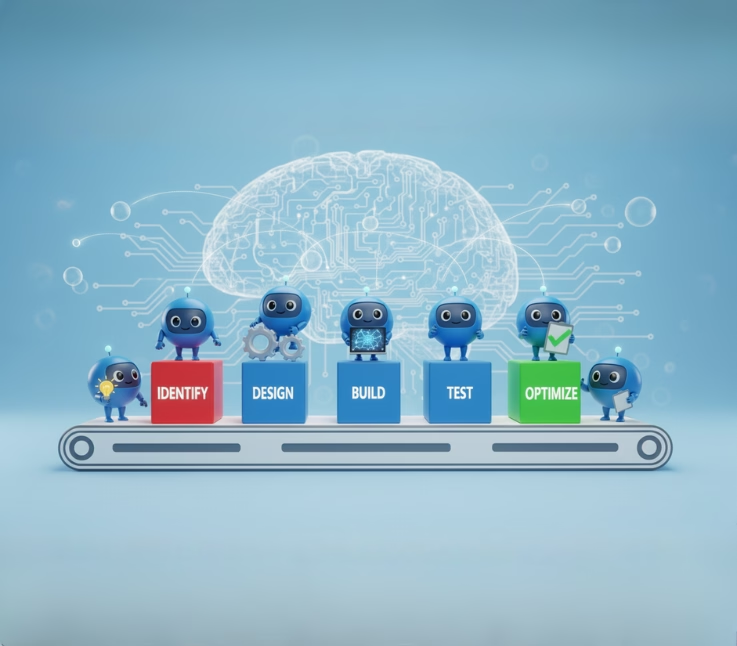
AI workflow automation is the use of artificial intelligence to orchestrate, optimize, and execute business workflows across systems, allowing organizations to automate decisions, not just tasks. By connecting AI models, data, and applications it enables workflows that adapt in real time and improve continuously.
Unlike traditional automation that follows fixed rules, AI workflow automation applies machine learning, natural language processing, and intelligent orchestration to handle complex, end-to-end processes. This makes it possible to automate judgment-driven work such as routing requests, analyzing documents, prioritizing actions, and triggering responses without constant human oversight.
For businesses, the impact is measurable: faster operations, lower costs, fewer errors, and the ability to scale without adding manual effort. AI workflow automation turns isolated tools and standalone AI models into self-running workflows that think, decide, and act across your organization.
In this guide, you’ll learn how AI workflow automation works, where it delivers the highest ROI, and how organizations use it to reduce manual work, accelerate decisions, and scale operations intelligently.
TL;DR
- AI workflow automation automates decisions, not just tasks
- It connects AI models, data, and systems into end-to-end workflows
- Unlike RPA, it adapts, learns, and handles exceptions
- Best for complex, cross-system business processes
What Is AI Workflow Automation?
AI workflow automation is the process of integrating artificial intelligence (AI) into automated workflows so that systems can not only perform tasks but also learn, adapt, and make intelligent decisions.
Unlike traditional automation, which simply follows pre-set rules, AI automation adds cognitive abilities. It allows software to interpret data, recognize patterns, and even make predictions to improve outcomes. In other words, these systems can think on their feet, analyzing information and constantly refining how they operate.
For example, imagine an automation that uses AI to summarize new emails in Gmail, then posts those summaries in Slack for your team. This type of workflow doesn’t just move data it understands, processes, and transforms it intelligently.
At its core, AI workflow automation unites two powerful forces:
- Automation technologies, which handle repetitive, structured tasks efficiently.
- Artificial intelligence introduces flexibility, reasoning, and creativity into those workflows.
Together, they create intelligent, self-improving systems that can manage complex processes with minimal human input. For businesses, this means faster execution, fewer errors, and the ability to scale operations intelligently.
AI Workflow Automation vs RPA
AI workflow automation and Robotic Process Automation (RPA) are often confused, but they serve very different roles in modern automation strategies.
RPA (Robotic Process Automation): RPA uses software bots to mimic human actions such as clicking, copying, and entering data. These bots follow predefined rules and work best in stable, structured environments.
Key Differences at a Glance:
| Question | AI Workflow Automation | RPA |
|---|---|---|
| What does it automate? | Entire workflows from start to finish | Single, repetitive tasks |
| Can it make decisions? | Yes, based on data and context | No, follows fixed rules |
| Does it learn or adapt? | Yes, improves over time | No, works the same every time |
| What kind of data can it handle? | Structured + unstructured (emails, PDFs, text) | Structured only (forms, tables) |
| How does it handle exceptions? | Handles them automatically | Requires human intervention |
| What happens if a process changes? | Adjusts with minimal updates | Breaks and needs reprogramming |
| Where is it used best? | Complex, cross-team business processes | Simple, high-volume tasks |
| Role in modern automation | Strategy and orchestration layer | Execution tool |
RPA automates tasks by following rules, while AI workflow automation automates entire business workflows by making decisions and adapting to change.
How Does AI Workflow Automation Work?
Think of a workflow as a sequence of steps, tasks, approvals, communications, or data movements that help you achieve a goal.
Now imagine if those steps could think for themselves: recognize what’s happening, make decisions, and adapt based on results. That’s what AI workflow automation does.
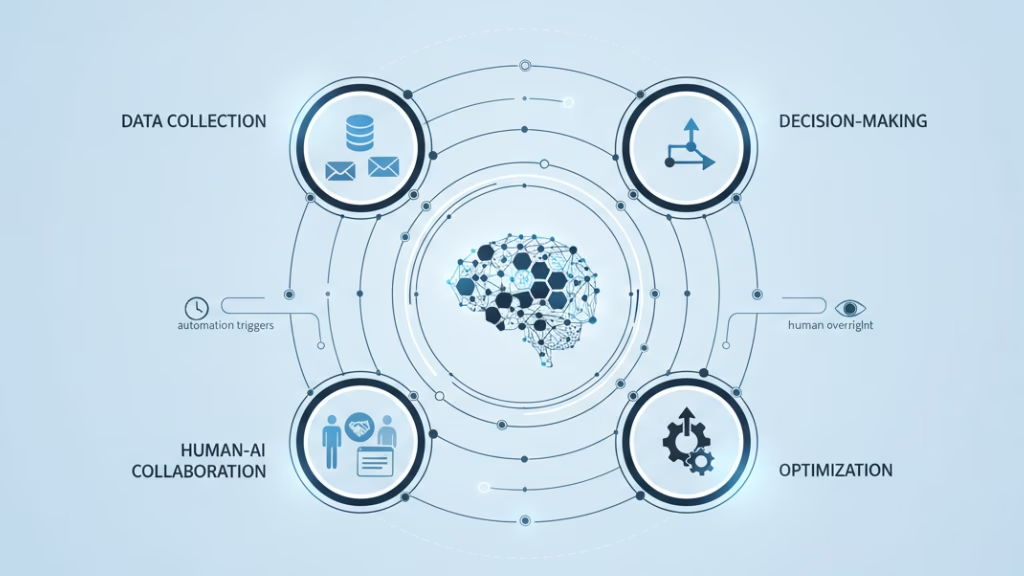
Instead of relying on humans to monitor every stage, AI acts as the brain of the workflow, analyzing data, predicting outcomes, and automating responses. AI workflow automation works in six steps:
- Data Collection and Context Building
- Workflow Mapping and Triggering
- Intelligent Decision-Making
- Continuous Feedback and Optimization
- Human-AI Collaboration
- Integration and Scaling
1. Data Collection and Context Building
Every AI workflow starts with data because AI learns from patterns, not instructions.
The system connects to various data sources across your organization:
- Databases (customer, sales, finance)
- CRMs and ERPs
- APIs from third-party tools
- Emails, chat logs, and documents
- IoT devices or sensors (in industrial contexts)
This data isn’t just collected, it’s contextualized. For example, an AI might learn that “invoices” in your email attachments usually go to accounting, while “quotes” should be reviewed by sales. It builds an understanding of your business language and flow.
2. Workflow Mapping and Triggering
Once data is flowing, automation platforms define the workflow’s structure or map. Each workflow has:
- Triggers (what starts it),
- Actions (what it does), and
- Conditions (when it does it).
AI helps by identifying triggers automatically. For instance:
- A new lead enters your CRM → trigger a welcome email sequence.
- An abnormal transaction appears → trigger a fraud review workflow.
Over time, AI learns which triggers lead to positive outcomes and fine-tunes them automatically.
3. Intelligent Decision-Making
Here’s where traditional automation ends and AI begins.
Using machine learning (ML) and predictive models, the system can:
- Score leads to predict who’s most likely to convert.
- Recommend routing paths for support tickets.
- Forecast inventory needs before shortages occur.
- Detect patterns that indicate potential risks or delays.
In this stage, AI isn’t just executing orders; it’s reasoning, analyzing outcomes, and making recommendations that improve workflow logic.
4. Continuous Feedback and Optimization
AI workflow automation systems are designed to learn continuously. They don’t stay static; they evolve with your data.
After each task or process cycle, the AI evaluates:
- What worked well?
- Where did bottlenecks occur?
- Did the prediction align with reality?
This feedback loop allows the system to adjust:
- Update decision models
- Re-route inefficient steps
- Improve future accuracy
It’s similar to how humans learn from experience, but faster, consistent, and data-backed.
5. Human-AI Collaboration
AI doesn’t replace humans; it amplifies them.
In complex workflows, AI handles routine or data-heavy work while humans focus on creativity, judgment, and strategic decisions. For example:
- AI drafts a customer response → a human review and personalizes it.
- AI predicts equipment failure → a technician verifies and schedules maintenance.
This collaborative automation model ensures accuracy, trust, and accountability while still leveraging AI’s speed and scale.
6. Integration and Scaling
The final piece is integration. Modern automation tools like Zapier, Make, or Pega connect AI models to dozens of apps, APIs, and systems. This means the same intelligence can be reused across departments:
- Marketing automation
- Finance reporting
- HR onboarding
- IT ticket routing
Once deployed, you can scale the same logic enterprise-wide, transforming isolated automations into a cohesive, intelligent ecosystem.
Key Components and Technologies Behind AI Automation
AI workflow automation relies on a blend of interconnected technologies that bring intelligence, adaptability, and precision to business operations. Together, they form the foundation for a self-learning automation ecosystem.
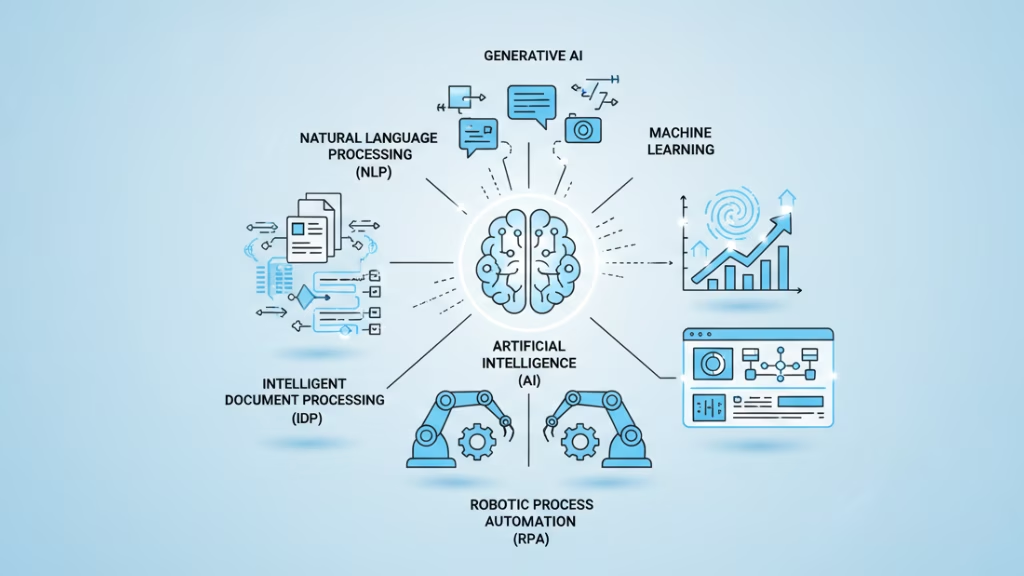
AI workflow automation typically combines:
- Robotic Process Automation (RPA)
- Artificial Intelligence (AI)
- Machine Learning (ML) and Deep Learning
- Natural Language Processing (NLP)
- Generative AI
- Intelligent Document Processing (IDP)
- Business Process Management (BPM)
1. Robotic Process Automation (RPA) – The Hands of Automation
RPA uses software bots to perform repetitive, rules-based tasks such as moving files, copying data, or filling forms. These bots interact directly with digital systems through the user interface or APIs, executing tasks quickly and without errors.
RPA is used for actions like extracting order data from emails, inputting it into ERP systems, or generating daily performance reports. It forms the execution layer in AI automation, performing consistent, high-volume work that AI systems can coordinate and optimize.
2. Artificial Intelligence (AI) – The Brain of Automation
AI introduces cognitive capabilities such as perception, reasoning, and decision-making into automation. It enables workflows to understand context, interpret data, and make smart choices rather than simply follow predefined rules.
AI-driven workflows can detect anomalies in financial transactions, reroute customer queries based on sentiment, or adjust production schedules in response to real-time data.
This intelligence transforms rigid automation into adaptive, insight-driven systems.
3. Machine Learning and Deep Learning – The Learning Engine
Machine learning and deep learning models continuously learn from data to improve predictions and decisions over time. By discovering hidden patterns and correlations, they enable automation systems to evolve and refine themselves after each interaction.
For instance, they can forecast equipment maintenance needs from IoT sensor data or predict which leads are most likely to convert.
This self-learning ability injects adaptability and foresight into automated workflows.
4. Natural Language Processing (NLP) – The Communication Layer
NLP allows automation systems to understand and respond to human language. It transforms unstructured text emails, chat messages, or documents into structured data that AI can process.
NLP powers capabilities such as auto-tagging support tickets by urgency, summarizing customer feedback, or extracting key insights from conversations.
It’s what enables smooth, human-to-AI communication within business operations.
5. Generative AI – The Creative Layer
Generative AI models create new content, text, images, code, or summaries based on learned patterns from massive datasets. In workflow automation, they act as creative assistants that produce contextually relevant outputs.
They can generate marketing copy from campaign briefs, draft email replies, or summarize analytical reports for executives. Generative AI brings creativity, personalization, and reasoning into automated processes.
6. Intelligent Document Processing (IDP) – The Understanding Layer
IDP uses optical character recognition (OCR), NLP, and machine learning to read and extract information from documents. It identifies document types, captures key data points, validates accuracy, and routes that data to the right system.
This enables workflows like automated invoice handling, contract analysis, or HR form processing, reducing manual data entry and ensuring compliance.
7. Business Process Management (BPM) – The Orchestration Layer
BPM defines, visualizes, and optimizes workflows across an organization. When integrated with AI, it becomes a dynamic system that monitors performance, detects bottlenecks, and makes real-time adjustments.
For example, BPM tools can reroute delayed tasks automatically or use AI analytics to suggest process redesigns.
It provides governance, scalability, and long-term process optimization, making automation sustainable.
How These Technologies Work Together
A modern AI workflow automation system brings these layers together:
- BPM sets the process architecture.
- AI, ML, and NLP provide intelligence and reasoning.
- RPA and IDP handle precise execution.
- Generative AI adds creativity and contextual communication.
These technologies interconnect through continuous feedback loops, enabling workflows that learn, adapt, and improve with every iteration.
Benefits of AI Workflow Automation
AI workflow automation delivers more than just time savings it fundamentally enhances how organizations operate, make decisions, and scale. By integrating intelligence into every stage of a process, businesses gain speed, accuracy, and adaptability across their workflows.
Here are the most impactful benefits:
1. Faster Operations and Productivity
AI-powered workflows automate repetitive, time-consuming tasks such as approvals, reporting, or data entry. This reduces process time from hours to minutes, helping teams complete complex tasks faster and with fewer resources.
2. Greater Accuracy and Compliance
Human errors, whether in data handling, documentation, or communication, can cost organizations time and money. AI minimizes these risks through automated validation, anomaly detection, and policy enforcement, ensuring that every step meets quality and compliance standards.
3. Improved Decision-Making
Machine learning models continuously analyze data, recognize trends, and make informed predictions. This empowers leaders and systems alike to make proactive, data-backed decisions rather than reactive corrections.
4. Enhanced Collaboration Between Teams
AI workflow automation connects siloed systems and departments through unified data pipelines. Teams can share insights, trigger cross-department actions, and maintain real-time visibility all without manual coordination.
5. Scalability Without Complexity
As your business grows, AI workflows can automatically adjust to increased volumes or changing demands. You can scale operations without hiring additional staff or adding new layers of management complexity.
6. Cost Efficiency and ROI
By automating high-volume, repetitive work and reducing delays, AI workflows directly lower operational costs. The return on investment often compounds as the system learns and optimizes itself over time.
7. Continuous Improvement
Unlike static automation, AI automation is dynamic; it learns from feedback, detects inefficiencies, and improves accuracy over time. This creates a cycle of ongoing optimization that keeps your business ahead of change.
Real-World Use Cases of AI Workflow Automation
AI workflow automation isn’t a future concept; it’s already transforming how businesses across industries operate today. By embedding intelligence into core processes, companies are eliminating bottlenecks, enhancing customer experiences, and accelerating decision-making.
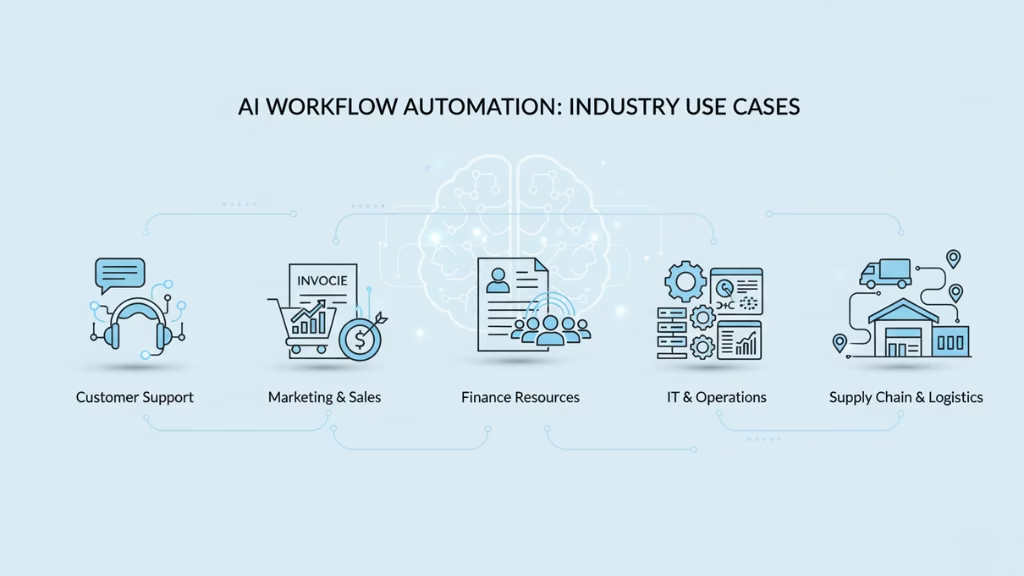
Here are some practical examples across different domains:
1. Customer Support and Service Automation
AI chatbots and NLP-driven ticketing systems automatically route inquiries, summarize support tickets, and even draft responses. This reduces human workload and ensures customers receive faster, more accurate assistance.
Example:
A telecom provider uses AI to categorize thousands of daily service requests. Routine issues are solved instantly through automated workflows, while complex cases are escalated to human agents.
2. Marketing and Sales Operations
AI automates repetitive marketing tasks like lead scoring, content recommendations, and email sequencing. It also predicts customer behavior, allowing teams to tailor campaigns in real time.
Example:
An eCommerce brand uses AI to trigger personalized offers based on a customer’s browsing history, automatically updating CRM records and ad campaigns.
3. Finance and Accounting
Automation platforms extract data from invoices, validate transactions, and reconcile accounts automatically.
Machine learning models detect anomalies that might indicate fraud or errors.
Example:
An enterprise finance team uses Intelligent Document Processing (IDP) to process thousands of invoices daily, cutting manual workload by 70% and improving data accuracy.
4. Human Resources (HR)
AI helps manage recruiting workflows, from scanning resumes to scheduling interviews and sending automated updates to candidates.
It can even analyze employee feedback to predict turnover risks.
Example:
A growing startup automates resume screening with NLP-based models, saving recruiters hundreds of hours while improving candidate matching accuracy.
5. IT and Operations Management
AI-driven monitoring systems detect performance anomalies, trigger alerts, and sometimes resolve issues autonomously. This helps IT teams maintain uptime and streamline system maintenance.
Example:
An operations team uses AI automation to monitor cloud performance metrics, automatically scaling resources when demand spikes, preventing downtime before it happens.
6. Supply Chain and Logistics
Predictive AI models forecast inventory needs, optimize routes, and automate procurement decisions based on real-time data.
Example:
A logistics company uses AI workflow automation to plan delivery routes dynamically, factoring in weather, traffic, and demand, reducing delivery time by 25%.
How to Implement AI Workflow Automation
Implementing AI workflow automation is a journey, not a single click or installation. Think of it like teaching your organization to think, decide, and act faster through a network of intelligent digital workers.
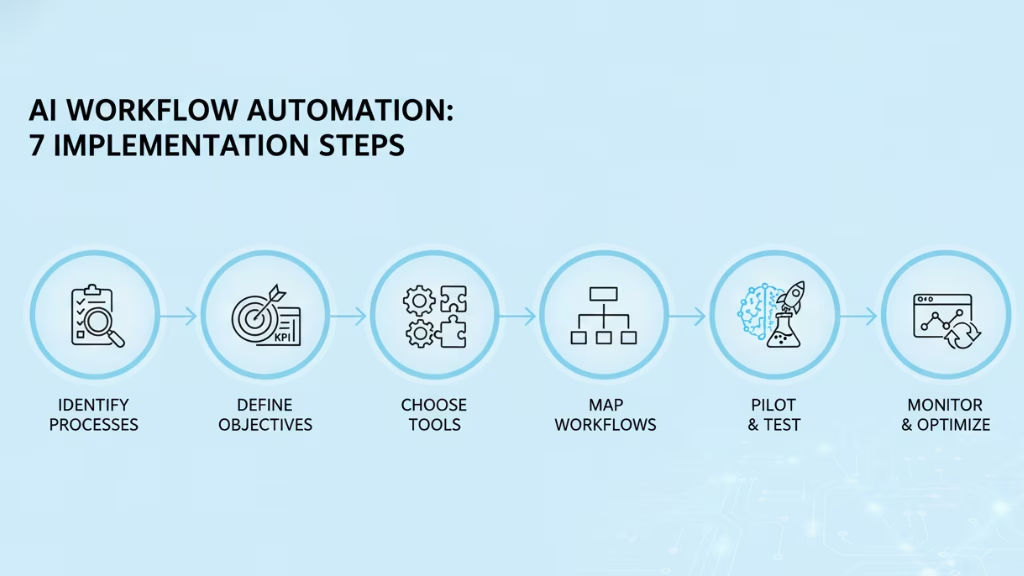
Here’s how you build that system, step by step.
Identify the Right Processes to Automate
Before jumping into tools or AI models, you must know what to automate.
Start by asking:
- Where does your team spend the most repetitive effort?
- Which processes rely heavily on data movement or manual updates?
- Where do delays or human errors cost time and money?
Common examples include:
- Manually processing customer support tickets
- Approving invoices or purchase orders
- Copying data between CRMs, spreadsheets, or emails
- Tracking employee onboarding tasks
Make a “Pain Point Map.” Write down every repetitive process, estimate how often it happens, and how long it takes. The ones with high frequency + high time cost are your best starting points.
Define Clear Objectives and Measurable Goals
Automation without direction can create chaos. So, decide what success means for your business.
Ask yourself:
- Do you want to reduce processing time by 40%?
- Improve accuracy and eliminate human errors?
- Enhance customer response times?
Define your KPIs (Key Performance Indicators) early. These goals will help you evaluate progress and justify investment later.
Example:
- “Reduce customer onboarding time from 2 hours to 20 minutes.”
- “Eliminate manual data entry in the finance team by 80%.”
Choose the Right Tools and Platforms
Now, pick the tools that fit your organization’s size, skill level, and complexity.
For startups or small teams:
Use no-code automation tools like:
- Make (formerly Integromat) – visual workflows + AI integrations
- Zapier – quick automation across 5,000+ apps
- n8n – self-hosted and developer-friendly
These tools let you build workflows visually, like drawing a mind map.
For medium to large enterprises:
Consider enterprise-grade platforms such as:
- Pega – AI-powered process automation with decisioning
- IBM Watson Orchestrate – advanced AI integration with hybrid cloud support
- UiPath or Automation Anywhere – strong in RPA and AI analytics
Choose platforms that integrate easily with your existing tools (CRM, ERP, database) and support AI plugins (for NLP, ML, or generative models).
Map and Redesign Your Workflows
Before automating, you must understand your existing process.
- Draw out each step from start to finish on a digital whiteboard (use tools like Miro or Lucidchart).
- Mark’s decision points where human judgment is required.
- Highlight pain areas: delays, errors, redundant approvals.
- Reimagine how AI could help:
- Could NLP classify documents automatically?
- Could a predictive model anticipate next steps?
- Could a chatbot replace manual customer communication?
Once mapped, simplify your workflow before adding AI. Automation amplifies what’s already there, so optimize first.
Think of your workflow as a recipe. If the recipe is messy, automation will just make a bigger mess faster. Clean up before you scale up.
Integrate AI Intelligence
Now comes the fun part: adding brains to your workflow.
Depending on your use case:
- Use Machine Learning to predict trends (like customer churn or fraud detection).
- Use Natural Language Processing (NLP) to understand and categorize messages, documents, or reviews.
- Use Generative AI (like GPT-based models) to draft emails, summarize text, or produce creative content.
- Use Computer Vision or IDP (Intelligent Document Processing) for document-heavy operations.
Example:
In a finance workflow, you might combine RPA for pulling data from PDFs + ML to detect invoice errors + NLP to summarize key information for the finance team.
When done right, each workflow becomes a mini AI ecosystem that continuously learns and improves.
Pilot Your Automation
Never automate everything at once. Start with a single, high-impact process, something small enough to test, but important enough to show measurable results.
During the pilot:
- Track performance (speed, cost, accuracy).
- Monitor how people interact with the system.
- Identify gaps where AI might need retraining or fine-tuning.
Once successful, expand to other processes using the same framework.
Treat your first automation like an experiment. You’re not just automating a process, you’re training your organization to think in terms of systems and data.
Train, Monitor, and Optimize Continuously
Automation is not a “set-and-forget” system; it’s alive and needs nurturing.
- Monitor performance dashboards weekly or monthly.
- Retrain AI models when data changes (for instance, new customer trends).
- Collect employee feedback sometimes, humans notice edge cases AI doesn’t.
- Continuously improve workflows by removing unnecessary steps or adding new integrations.
The best organizations evolve their AI workflows constantly, turning short-term wins into long-term transformation.
Build a Culture of Automation
Finally, the most successful AI transformations aren’t technical; they’re cultural. Encourage every department to look for automation opportunities. Train employees to work alongside AI tools and see them as partners, not replacements.
When your people understand and trust automation, innovation becomes second nature.
Implementing AI workflow automation isn’t just about improving operations; it’s about evolving how your organization thinks. It’s the bridge between human creativity and machine precision, and when both work together, you unlock exponential potential.
How to Kickstart Your AI Automation Strategy
Launching your AI automation strategy can feel complex, but it becomes manageable when you start small, move strategically, and scale intelligently. The key is to align automation with your business goals, not just your technology stack.
Here’s how to begin effectively:
1. Start with a Clear Vision
Before diving into tools or models, define why you’re automating. Do you want to reduce costs, speed up workflows, improve customer experiences, or enhance decision-making? Your strategy should be driven by business impact, not just technical curiosity.
2. Form a Cross-Functional Automation Team
Bring together experts from IT, operations, data science, and business departments. Automation affects every layer of your organization so your strategy must represent them all. This collaboration helps identify realistic goals and ensures alignment between data, AI models, and real-world workflows.
3. Audit Your Current Processes
Map existing workflows and identify pain points or inefficiencies. This will help determine where AI can provide the most measurable improvements, whether in speed, accuracy, or employee workload reduction.
4. Choose the Right Technology Partner
Select automation tools that match your needs, skill sets, and scalability goals. For startups, low-code platforms like Make or n8n are great for experimentation. For enterprises, systems like Pega or IBM’s AI Workflow Orchestration offer advanced governance and integration capabilities.
5. Start Small Then Scale
Begin with one or two pilot workflows. Once results are validated, expand gradually. This reduces risk, builds confidence, and helps refine best practices before full-scale deployment.
6. Establish Governance and Ethics
As you scale, ensure your AI workflows are transparent, explainable, and compliant with data regulations. This builds trust among users and stakeholders and protects against unintentional bias or security issues.
7. Measure and Communicate Impact
Track results continuously, time saved, costs reduced, error rates lowered, and satisfaction increased. Use data to communicate wins internally and externally, building momentum for broader automation adoption.
Automate Intelligently with Riseup Labs
At Riseup Labs, we help organizations build smarter, faster, and more adaptive workflows using AI, machine learning, and process automation technologies.
Whether you’re a startup looking to reduce manual work or an enterprise modernizing complex operations, our AI automation experts design solutions that align with your business goals and technical infrastructure.
Why Choose Riseup Labs for AI Workflow Automation
- We build automation tailored to your exact processes.
- Our team connects your existing tools, APIs, and platforms into unified AI-driven systems.
- Designed to grow with your business while maintaining enterprise-grade security and compliance.
- We help you get measurable results at every stage.
Let automation handle the busywork so your team can focus on creativity, innovation, and growth.
Conclusion
AI workflow automation allows organizations to automate decisions, not just tasks, connecting data, AI models, and systems into intelligent workflows that scale efficiently. When done right, it reduces manual effort, improves accuracy, and enables teams to focus on higher-value work.
At Riseup Labs, we help businesses design and implement AI-driven workflows tailored to their operations, technology stack, and growth goals. From identifying the right processes to building secure, scalable automation, our approach ensures AI delivers measurable results, not complexity.
If you’re ready to streamline operations and build smarter workflows, AI workflow automation with Riseup Labs provides a practical path to intelligent, sustainable automation.
FAQs About AI Workflow Automation
Here are some of the most common questions organizations and teams ask when exploring AI-powered workflow automation.
What exactly is AI workflow automation?
AI workflow automation uses artificial intelligence (like machine learning, NLP, or predictive analytics) to automate and optimize end-to-end business processes.
How is AI workflow automation different from traditional automation?
Traditional automation follows static, pre-programmed rules “if this, then that.” AI workflow automation, on the other hand, uses data-driven intelligence to adapt dynamically, handle exceptions, and make decisions autonomously.
What are some common tools used for AI workflow automation?
Popular platforms include n8n, Make.com, Pega, Zapier, IBM Watson Orchestrate, Workato, and Node-RED. Each offers different strengths from low-code interfaces for small teams to enterprise-scale orchestration for complex systems.
Which industries benefit most from AI workflow automation?
a. Finance: for fraud detection, invoice processing, and compliance.
b. Healthcare: for data integration, patient scheduling, and medical record analysis.
c. Retail & eCommerce: for personalized marketing and inventory management.
d. Manufacturing & Logistics: for predictive maintenance and route optimization.
e. Technology & IT: for system monitoring and intelligent incident response.
How difficult is it to implement AI workflow automation?
Implementation difficulty depends on your existing infrastructure. Modern low-code and no-code platforms make it easier than ever to get started, even without deep AI expertise. The key is to begin small, focus on measurable goals, and scale strategically.
What are the biggest challenges to watch for?
a. Integrating legacy systems.
b. Ensuring data quality and model accuracy.
c. Managing change within teams.
d. Maintaining transparency and governance in AI decisions.
How can my business get started?
Begin with a process audit to identify repetitive, time-consuming workflows. Choose an automation platform that integrates with your systems, test with pilot projects, and measure results.
Is AI workflow automation secure?
Yes, when implemented with the right data governance and security frameworks. Enterprise tools support encryption, access control, and compliance standards like GDPR and SOC 2 to protect sensitive information.
What tools are used for AI workflow automation?
AI workflow automation typically uses workflow orchestration platforms, AI and machine learning models, automation tools such as RPA, system APIs, and monitoring tools to manage execution, decisions, and governance across workflows.
Is AI workflow automation the same as workflow automation?
No. Workflow automation follows predefined rules, while AI workflow automation uses artificial intelligence to make decisions, handle exceptions, and adapt workflows based on data and context.
Can AI workflow automation work without RPA?
Yes. AI workflow automation can operate without RPA when systems are API-driven. RPA is typically used only when legacy systems lack integrations or require UI-based automation.
Does AI workflow automation require machine learning?
Not always. Some workflows use predefined AI models or rules, while others rely on machine learning for prediction, classification, or continuous improvement.
How accurate is AI workflow automation?
Accuracy depends on data quality, model selection, and governance. Well-designed workflows often achieve higher accuracy than manual processes by reducing human error and inconsistency.
This page was last edited on 28 December 2025, at 12:24 pm

Start a conversation with our team to solve complex challenges and move forward with confidence.










