
- Comparison of Top Workflow Automation Tools
- What Is Workflow Automation?
- How We Selected These Workflow Automation Tools
- 10 best AI Workflow Automation Tools in 2026
- Zapier
- Make (formerly Integromat)
- n8n
- Microsoft Power Automate
- Workato
- Tray.ai
- Pipedream
- Tines
- Apache Airflow
- Camunda / Flowable (BPM Engines)
- Choosing the Right Tool: The 2025 Buyer’s Framework
- Pricing & Total Cost of Ownership (TCO) Analysis
As AI models continue to evolve, so do the tools that harness their power. Everyone knows about ChatGPT, but behind the scenes, a new wave of AI workflow automation tools is transforming how teams operate.
While long-standing tools like Zapier and Make now embed AI features into their ecosystems, a new generation of AI-native workflow automation tools has emerged, built from the ground up to handle intelligent decision-making, data analysis, and creative tasks.
These next-generation platforms go far beyond simple “if-this-then-that” triggers. They can now summarize PDFs, generate reports, manage outreach, analyze content, or even act as digital teammates that autonomously complete multi-step processes.
To help you keep pace with this rapid evolution, we’ve curated the best workflow automation tools of 2026, including both proven leaders and cutting-edge AI-first platforms, so you can streamline your operations, boost productivity, and stay ahead of the automation curve.
Comparison of Top Workflow Automation Tools
| Tool | Best For | Hosting Type | Key Features |
|---|---|---|---|
| Zapier | SMBs, marketing, cross-app automations | Cloud | 8,000+ integrations, templates, multi-step flows |
| Make (Integromat) | Visual builders, marketing ops | Cloud | Visual scenario editor, deep data parsing |
| n8n | Developers, IT Ops, privacy-focused teams | Self-hosted / Cloud | Code + no-code hybrid, queue mode, self-hosting |
| Power Automate | Microsoft ecosystem, enterprises | Cloud / On-prem | Microsoft 365 integration, desktop flows, compliance |
| Workato | Enterprises, RevOps, data-heavy workflows | Cloud | Advanced governance, RBAC, multi-app sync |
| Tray.ai | Mid-size and enterprise IT teams | Cloud | Flexible API integration, error handling |
| Pipedream | Developers and startups | Cloud | Serverless functions, real-time triggers |
| Tines | Security & operations teams | Cloud | SOAR-style automation, event-driven |
| Airflow (Apache) | Data engineers | Self-hosted | DAG scheduling, batch jobs, Python extensibility |
| Camunda / Flowable | Enterprises needing BPM & human approval | Self-hosted / Hybrid | BPMN 2.0 process engine, human-in-loop |
What Is Workflow Automation?
Workflow automation is the process of using software to automatically execute routine tasks and connect different apps or systems based on predefined rules, reducing manual work, errors, and time spent on repetitive actions.
In simple terms, it means setting up a sequence of actions that run on their own once triggered. For example:
When a new lead fills out a form → add them to your CRM → send a welcome email → notify your sales team in Slack.
Modern workflow automation tools (like Zapier, Make, or n8n) make this possible without coding. In 2026, many of these tools will also include AI-driven features that can analyze data, make decisions, and personalize actions, making automation not just faster, but smarter.
How We Selected These Workflow Automation Tools
We picked these workflow automation tools by looking at what actually matters when a business wants to automate its work. Here’s the thought process behind our selection:
- Does the tool really help reduce manual work?
We chose tools that can automate tasks, connect apps, and handle multi-step workflows smoothly. - Can it grow with the business?
We included tools that work well for small teams but can also scale to large companies. - Is it easy to use?
If a tool is too hard to learn, teams won’t adopt it. We focused on tools with clean interfaces and simple setups. - Does it support AI or advanced automation?
Modern automation uses AI for smarter decisions, so we favored tools that already support these features. - Is it secure?
Because automation touches sensitive data, we made sure the tools follow strong security and compliance standards. - Is the company behind the tool reliable?
We looked at reputation, documentation, community support, and how actively the tool is updated. - What do real users say? (G2 & Capterra reviews)
We reviewed user feedback from G2 and Capterra to understand customer satisfaction, common issues, support quality, and real-world performance.
10 best AI Workflow Automation Tools in 2026
We’ve pinpointed ten leading platforms that are reshaping the way today’s enterprises operate. Here’s a quick look at what sets each one apart:
- Zapier
- Make (formerly Integromat)
- n8n
- Microsoft Power Automate
- Workato
- Tray.ai
- Pipedream
- Tines
- Apache Airflow
- Camunda / Flowable (BPM Engines)
1. Zapier
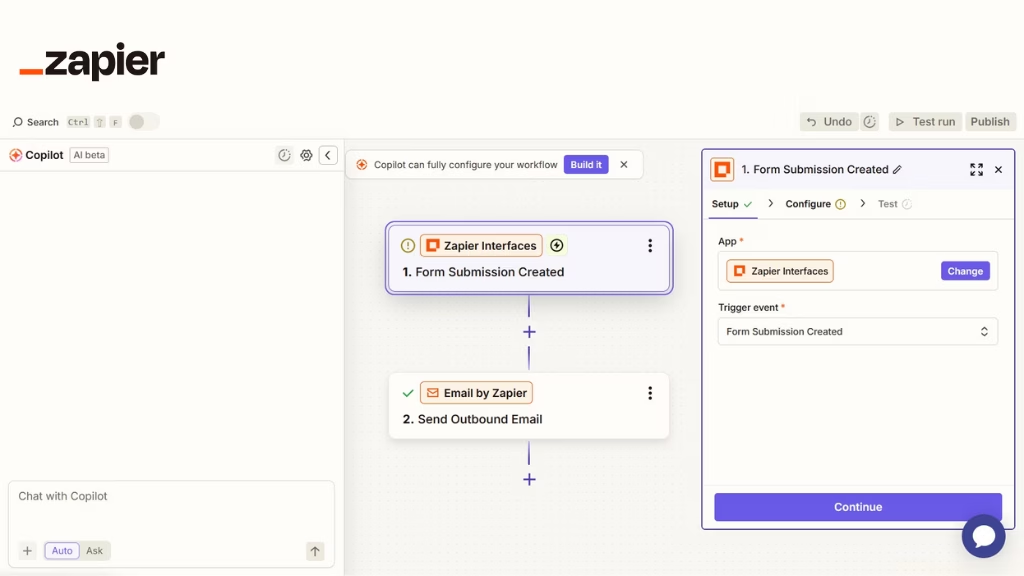
Zapier is one of the most popular no-code automation platforms, built for users who want to connect apps and automate tasks quickly. It offers thousands of integrations and a simple “trigger–action” workflow builder, making it ideal for small businesses, marketers, and non-technical teams.
While Zapier excels at quick, lightweight automations, it becomes costly and less efficient for large-scale enterprise workloads or high-volume data processing. Its strength lies in ease of use and speed, but not deep customization or governance.
Notable strengths
- Largest prebuilt connector library and templates; fastest time-to-first-value.
- Solid reliability for SMB volumes; good logging and replay for failed tasks.
- AI Actions/Copilot to describe flows in natural language.
Tradeoffs/limits
- Step/task quotas can get expensive at scale.
- Data handling is opinionated; complex transformations can be clunky.
- Governance (RBAC, environments) is lighter than enterprise iPaaS.
Best fit: SMB marketing, sales ops, and support teams need quick cross-app automation.
When it’s not ideal: You need strict data residency, on-prem access, or deep governance at scale.
Set up notes: Provision shared folders; enforce naming/versioning; monitor task consumption.
Zapier reviews
- G2: 4.5 out of 5 star rating (from +1674 user reviews)
- Capterra: 4.7 out of 5 star rating (from +3024 user reviews)
Zapier pricing
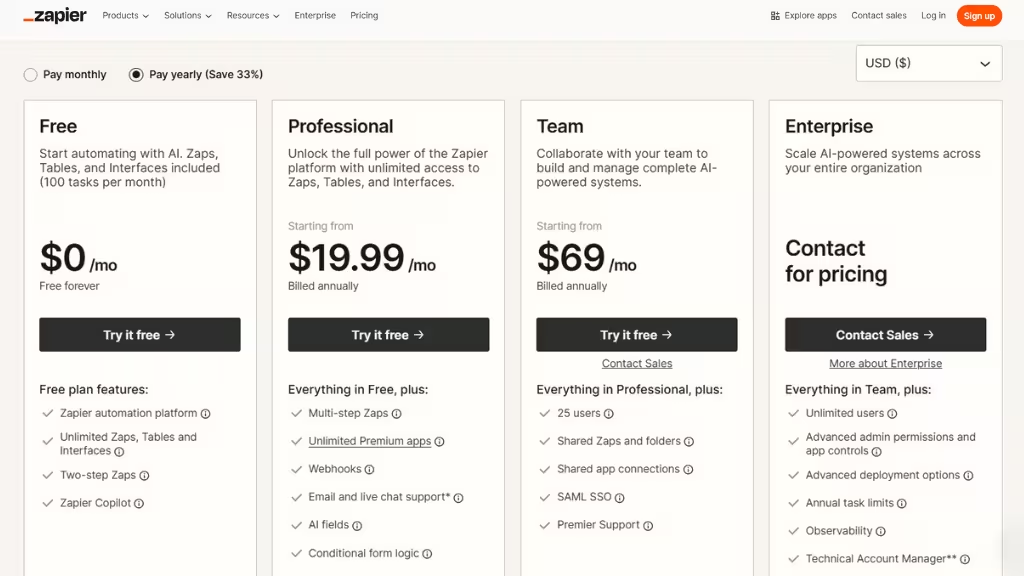
- Free: $0/month with unlimited Zaps, two-step Zaps
- Pro: $19.99/month with multi-step Zaps, unlimited premium apps, webhooks
- Team: $69/month with 25 users, shared Zaps and folders, SAML SSO
- Enterprise: Custom pricing with unlimited users, advanced admin permissions
2. Make (formerly Integromat)
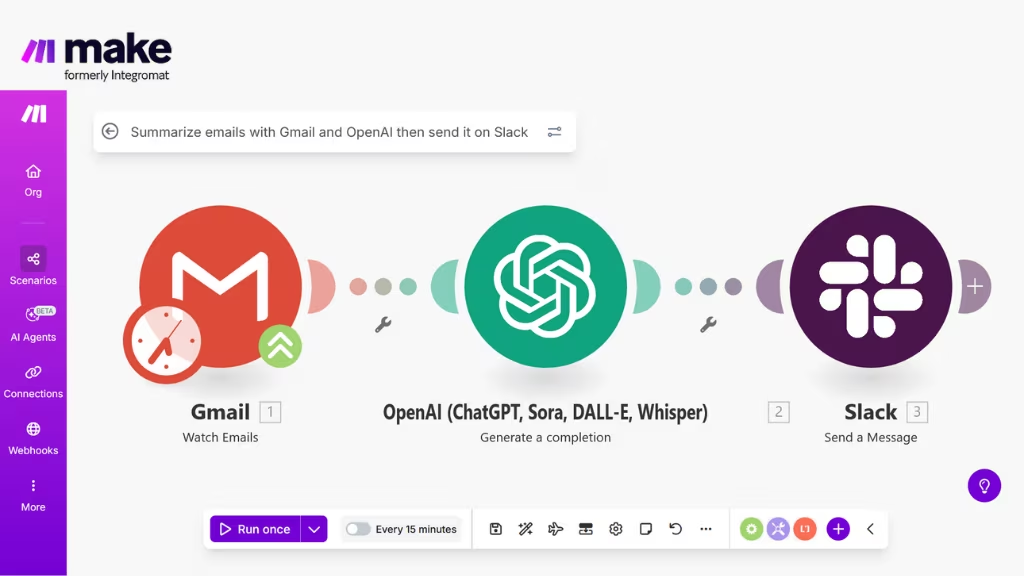
Make is a powerful visual automation tool designed for users who need more flexibility and complexity than Zapier can provide. It features an intuitive drag-and-drop interface for creating multi-step workflows, branching logic, and advanced data manipulation.
Make is especially popular with midsize teams and technical power users who want strong capabilities without writing code. It offers excellent value for money and handles complex logic well, though its governance and compliance controls are not as robust as enterprise platforms.
Notable strengths
- Fine-grained control over mappings and complex JSON.
- Excellent for multi-branch scenarios and bulk data operations.
- Visual debugger with detailed per-node execution history.
Tradeoffs/limits
- Steeper learning curve than Zapier; misconfigured iterators can spike usage.
- Enterprise governance exists, but is not as mature as Workato/Tray.
Best fit: Marketing ops, content ops, and analytics glue work need conditional logic.
When it’s not ideal: You require strict on-prem connectivity or self-hosting.
Setup notes: Standardize error handlers and rate-limit strategies; document routers/iterators.
Make reviews
- G2: 4.6 out of 5 star rating (from +265 user reviews)
- Capterra: 4.8 out of 5 star rating (from +406 user reviews)
Make pricing
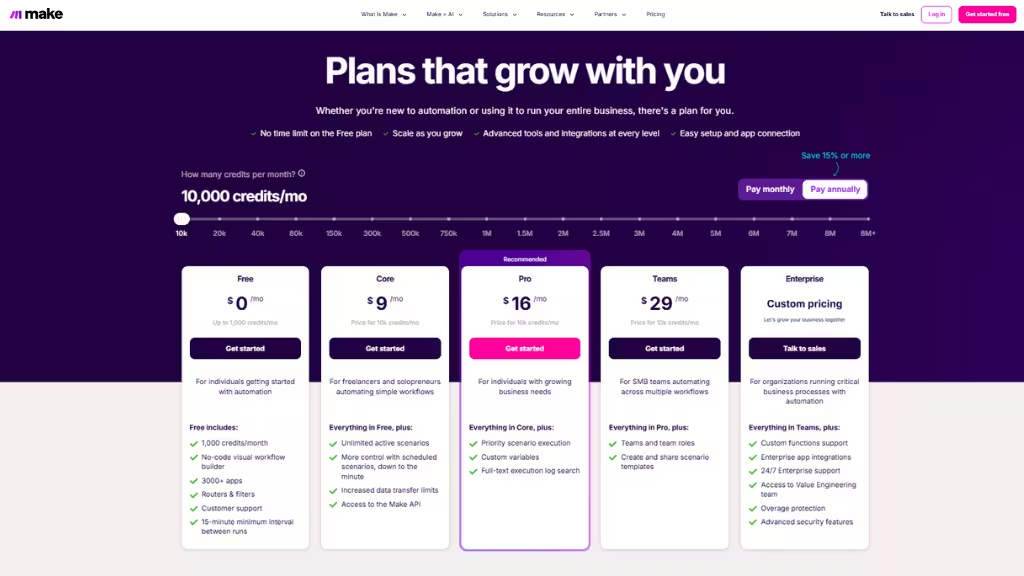
- Free: $0/month with 1,000 credits/month
- Core: $9/month with Unlimited active scenarios
- Pro: $16/month with Priority scenario execution
- Team: $29/month with Create and share scenario templates
- Enterprise: Custom pricing with Custom functions support
3. n8n
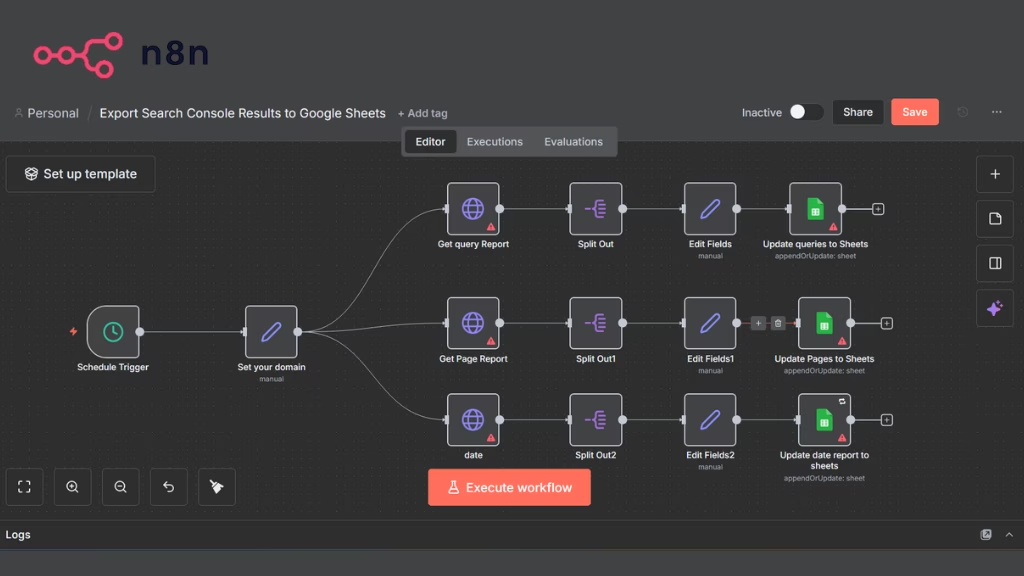
n8n is an open-source workflow automation platform that gives businesses full control over how and where their automations run. It can be self-hosted, making it a strong choice for companies prioritizing data privacy, security, and customization.
n8n allows both no-code and code-assisted automation, enabling teams to build highly customized workflows. Because it is open-source, it’s cost-effective at scale, but it requires technical skills and DevOps resources to deploy and maintain making it ideal for engineering-led teams.
Notable strengths
- Self-hosting = data sovereignty, private networking, custom secrets.
- Queue mode, concurrency, and retries for production-grade reliability.
- First-class HTTP/API work; mix no-code and JavaScript freely.
- Native AI nodes (OpenAI/Claude, embeddings, classification).
Tradeoffs/limits
- You own uptime, scaling, backups, and security hardening (if self-hosted).
- Less “instant app catalog” than Zapier; more hands-on.
Best fit: Dev/IT teams needing privacy, control, and extensibility at a sane cost.
When it’s not ideal: Non-technical teams without DevOps; regulated shops lacking ops bandwidth.
Setup notes: Run behind a reverse proxy with TLS, use external DB/Redis for scale, enable RBAC, audit logs, and environment separation (dev/stage/prod).
n8n reviews
- G2: 4.8 out of 5 star rating (from +178 user reviews)
- Capterra: 4.6 out of 5 star rating (from +41 user reviews)
n8n pricing
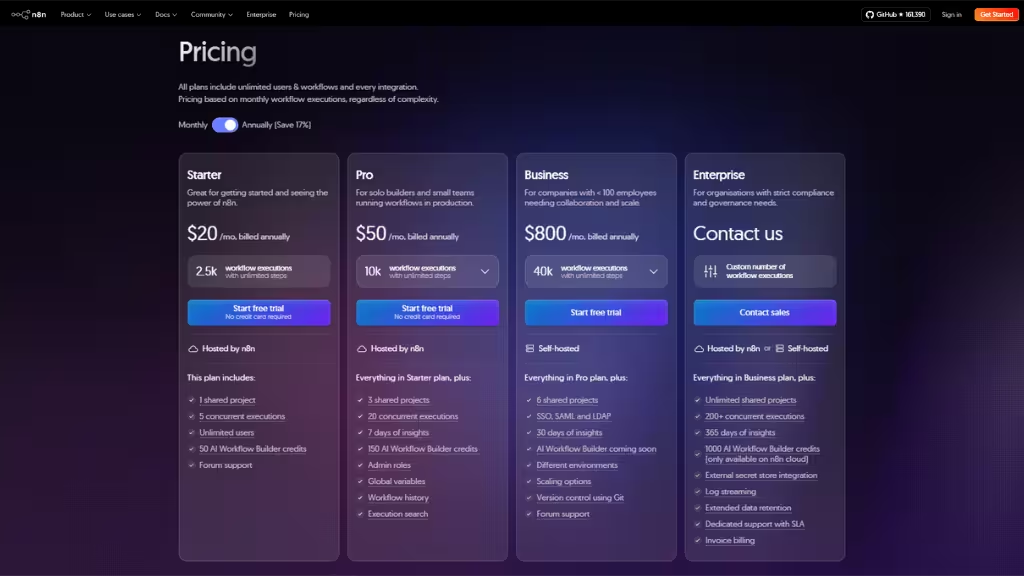
- Starter: $20/mo, billed annually with 2.5K workflow executions with unlimited steps
- Pro: $50/mo, billed annually, 10K workflow executions with unlimited steps
- Business: $800/mo, billed annually, 40K workflow executions with unlimited steps
- Enterprise: Custom number of workflow executions
4. Microsoft Power Automate
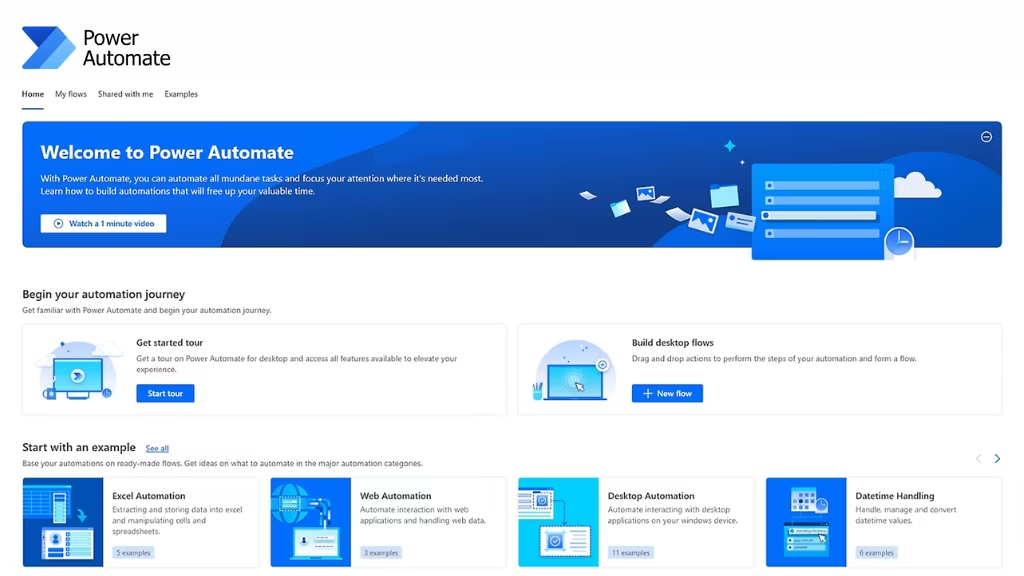
Power Automate is Microsoft’s automation platform built into the broader Microsoft Power Platform ecosystem. It integrates deeply with Office 365, Dynamics 365, SharePoint, Teams, and Azure, making it a natural fit for organizations already using Microsoft products. It supports low-code automation, robotic process automation (RPA), and AI capabilities.
While powerful within the Microsoft ecosystem, it can be more complex and less intuitive for users who rely heavily on non-Microsoft tools.
Notable strengths
- Best-in-class Microsoft 365 integration and on-prem data gateways.
- Enterprise security: Azure AD SSO, DLP, audit/compliance center.
- RPA + cloud workflows in one place.
Tradeoffs/limits
- Licensing can be complex (per user/flow/add-ons).
- Connectors outside Microsoft sometimes feel less polished.
Best fit: Microsoft-centric orgs, enterprise IT with compliance and audit needs.
When it’s not ideal: You’re not on M365/Dynamics and want neutral, cross-stack tooling.
Set up notes: Define DLP policies early; standardize Solutions for ALM; monitor flow runs via Power Platform Admin Center.
Microsoft Power Automate reviews
- G2: 4.3 out of 5 star rating (from +4 user reviews)
- Capterra: 4.4 out of 5 star rating (from +228 user reviews)
Microsoft Power Automate pricing
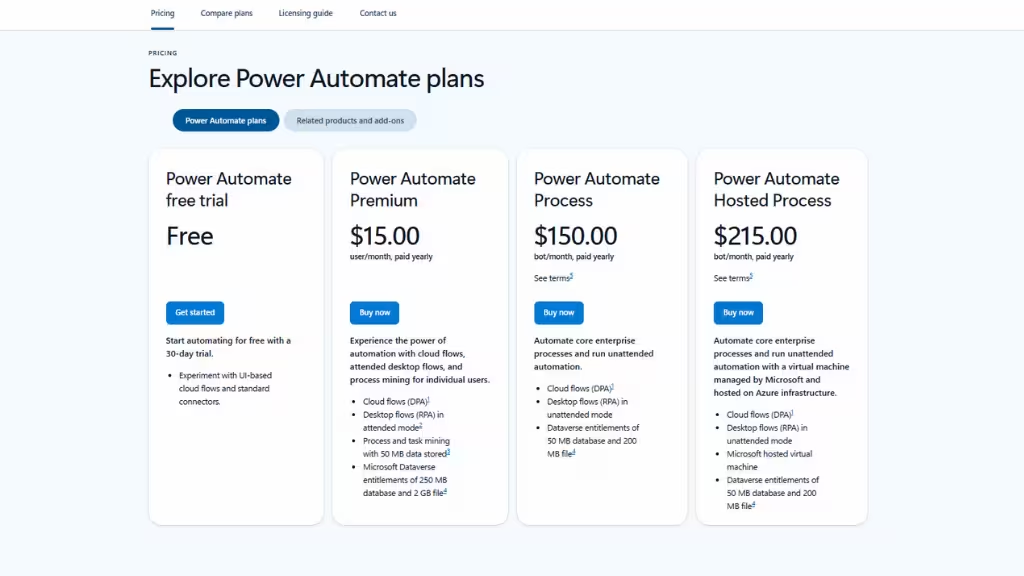
- Power Automate free trial: $0/monthconnectors.
- Power Automate Premium: $15/month
- Power Automate Process: $150/month
- Power Automate Hosted Process: $215/month
5. Workato
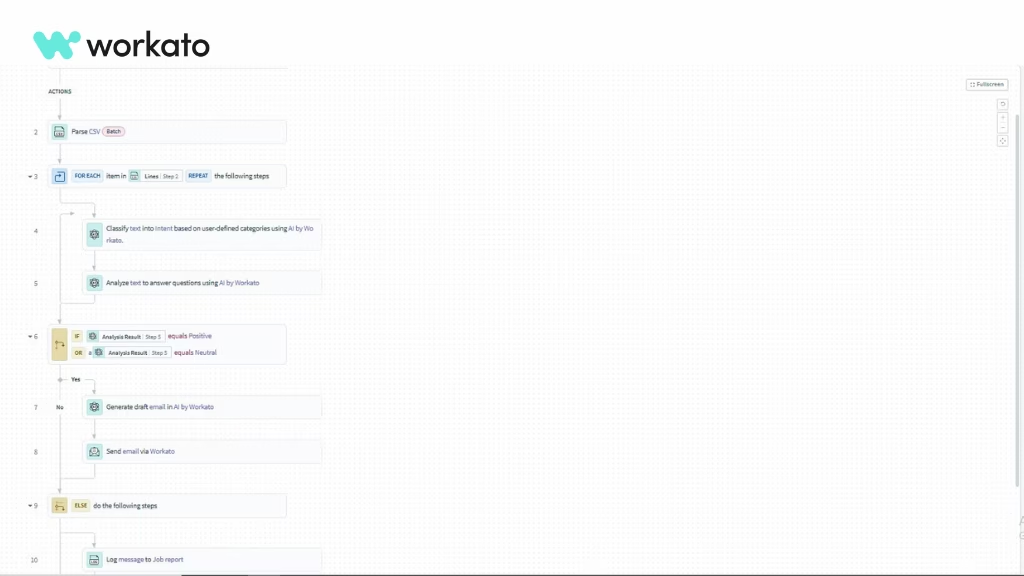
Workato is an enterprise automation platform designed for large organizations that require secure, scalable, and mission-critical workflows. It offers powerful integrations, advanced governance, strong API capabilities, and enterprise-grade compliance features.
Workato supports both business and technical users, though its pricing is significantly higher than most competitors. It’s best for organizations that need a unified automation layer across multiple departments and systems, with predictable high-volume performance.
Notable strengths
- Governance at scale: roles, approvals, change management, audit trails.
- Complex, multi-system orchestrations with robust error handling.
- AI-assisted building and recommended mappings.
Tradeoffs/limits
- Premium pricing requires enablement for non-technical users.
- Overkill for small teams or simple zaps.
Best fit: Enterprise RevOps, finance, and IT need cross-department automations with compliance.
When it’s not ideal: Early-stage teams; budgets under enterprise thresholds.
Setup notes: Establish environments (dev/test/prod), naming/versioning conventions, recipe ownership, and release process.
Workato reviews
- G2: 4.7 out of 5 star rating (from +662 user reviews)
- Capterra: 4.6 out of 5 star rating (from +85 user reviews)
Workato pricing
Workato uses a combination of workspace licensing and usage-based pricing:
- Workspace License
Gives access to core features: connectors, workflow building (“recipes”), user roles, and platform governance. - Usage-Based Billing
Costs scale with how many tasks your automations run. Each action inside a workflow counts as a task. - High-Volume Recipes (HVRs)
Designed for heavy workloads; replaces per-task charges with a predictable flat-rate model. - Optional Add-Ons
Additional fees may apply for features like on-premise agents, advanced governance tools, custom connectors, or higher concurrency.
6. Tray.ai
Tray.io is a low-code automation and integration platform aimed at mid-market and enterprise teams. It offers flexible workflow building, deep API integration capabilities, and strong scalability.
Tray.io is particularly well-suited for companies with complex integration needs across CRM, marketing, sales, and data systems. It requires more technical understanding than tools like Zapier or Make, but provides much more power and control in return.
Notable strengths
- Flexible for API-heavy use cases; good pagination, mapping, bulk ops.
- Solid enterprise features: RBAC, secrets, logging, and alerting.
- Scales to departmental and org-wide automation.
Tradeoffs/limits
- Learning curve for non-technical builders.
- Pricing scales with usage and enterprise features.
Best fit: Mid-market to enterprise teams with API-centric automation and custom workflows.
When it’s not ideal: You want click-simple, template-driven flows only.
Setup notes: Centralize connector reuse; implement global error/retry patterns and API backoff policies.
Tray.ai reviews
- G2: 4.5 out of 5 star rating (from +156 user reviews)
- Capterra: 4.9 out of 5 star rating (from +11 user reviews)
Tray.ai pricing
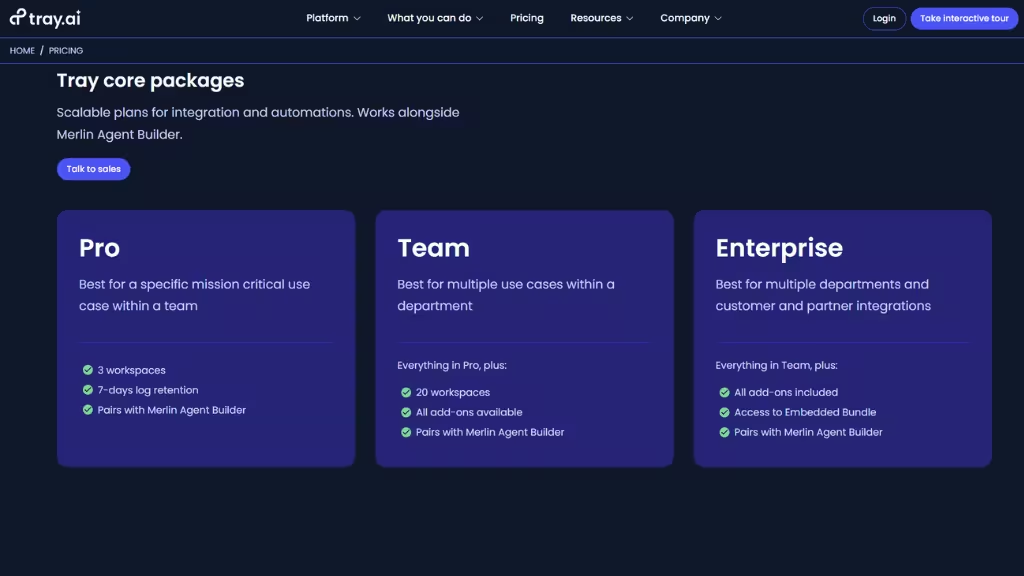
- Pro: 3 workspaces, 7-day log retention, Pairs with Merlin Agent Builder
- Team: 20 workspaces, all add-ons available, Pairs with Merlin Agent Builder
- Enterprise: All add-ons included, Access to Embedded Bundle, Pairs with Merlin Agent Builder
7. Pipedream
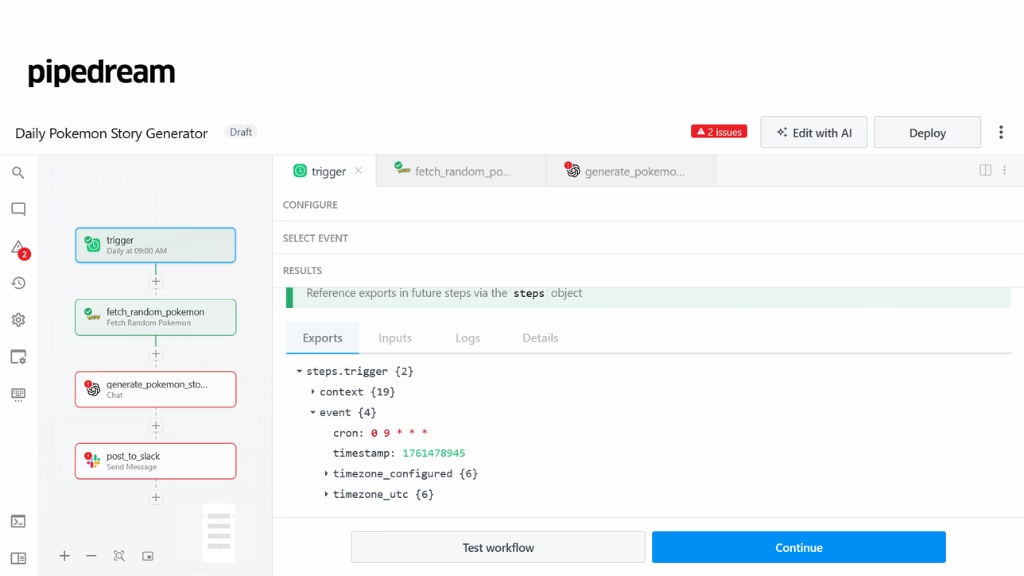
Pipedream is a developer-focused automation platform built for API-heavy workflows and custom integrations. It combines no-code triggers with full code steps, making it ideal for engineering teams that want to automate backend processes without managing infrastructure.
Pipedream is extremely fast for building custom logic and connecting APIs, but lacks some enterprise-level governance and non-technical usability found in other platforms.
Notable strengths
- Developer joy: write real code, use any package, fast prototyping.
- Great for webhooks, API aggregations, and custom micro-integrations.
- Generous free tier for tinkering and internal tools.
Tradeoffs/limits
- Code-centric: requires developer comfort and code reviews.
- Governance/compliance is lighter than full enterprise iPaaS.
Best fit: Startup engineers and platform teams building bespoke automations.
When it’s not ideal: Business users need a guardrail for no-code.
Set up notes: Treat workflows as code: linting, secrets management, and repo backups.
Pipedream reviews
- G2: 4.6 out of 5 star rating (from +16 user reviews)
- Capterra: 5 out of 5 star rating (from +5 user reviews)
Pipedream pricing
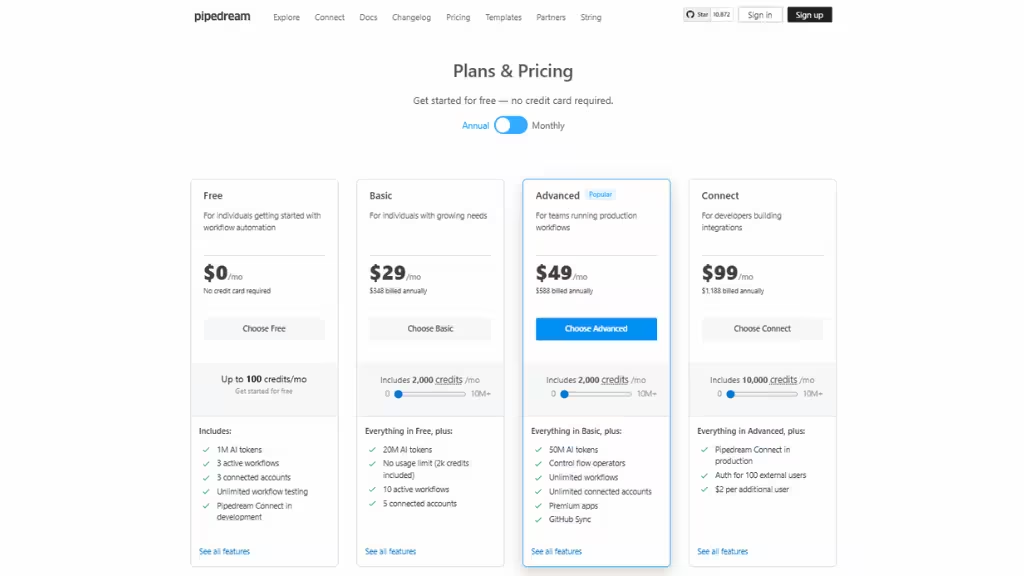
- Free: $0/month with 100 credits/month
- Basic: $29/month with 2000 credits/month and 20M AI tokens
- Advanced: $49/month with 2000 credits/month and 50M AI tokens
- Connect: $99/month with 10000 credits/month
8. Tines
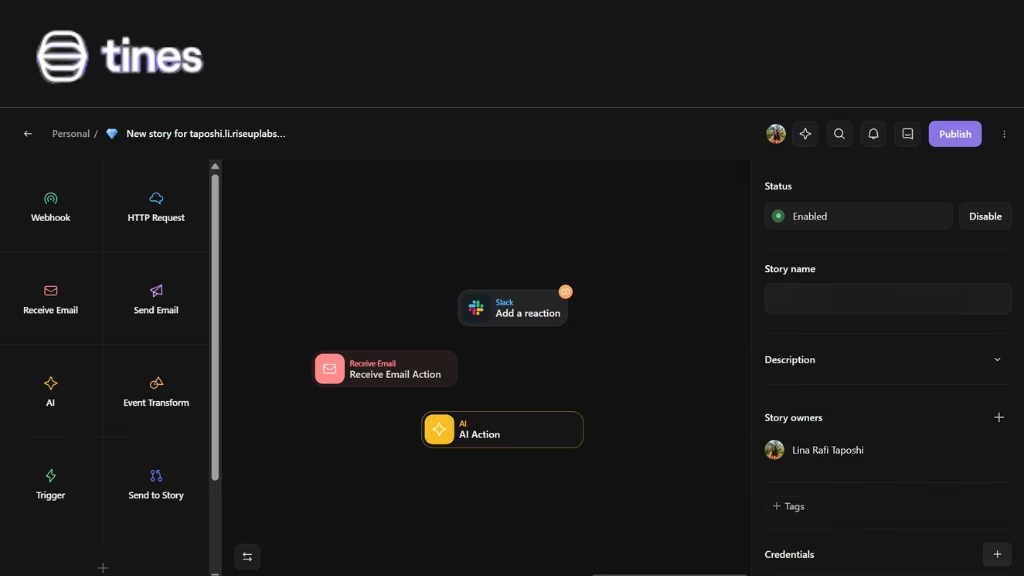
Tines is a security-focused automation platform used primarily by security operations (SecOps), DevSecOps, and IT teams. Instead of traditional “app connectors,” Tines uses powerful action blocks that work with any system via HTTP requests and APIs.
This makes it highly flexible and ideal for security workflows like incident response, alert triage, and digital forensics automation. It’s technical in nature and best for security-driven organizations.
Notable strengths
- Built for SecOps: least-privilege, auditability, secret hygiene.
- Powerful event routing, investigation playbooks, and auto-response.
- Stable under high-volume alerting.
Tradeoffs/limits
- Narrower focus (security/IT ops) vs broad business automation.
- Requires domain expertise to design reliable response flows.
Best fit: SOC, incident response, DevSecOps teams.
When it’s not ideal: General marketing/sales automation.
Setup notes: Define playbook libraries; simulate alerts; enforce approval gates for destructive actions.
Tines reviews
- G2: 4.8 out of 5 star rating (from +257 user reviews)
- Capterra: 4.9 out of 5 star rating (from +8 user reviews)
Tines pricing
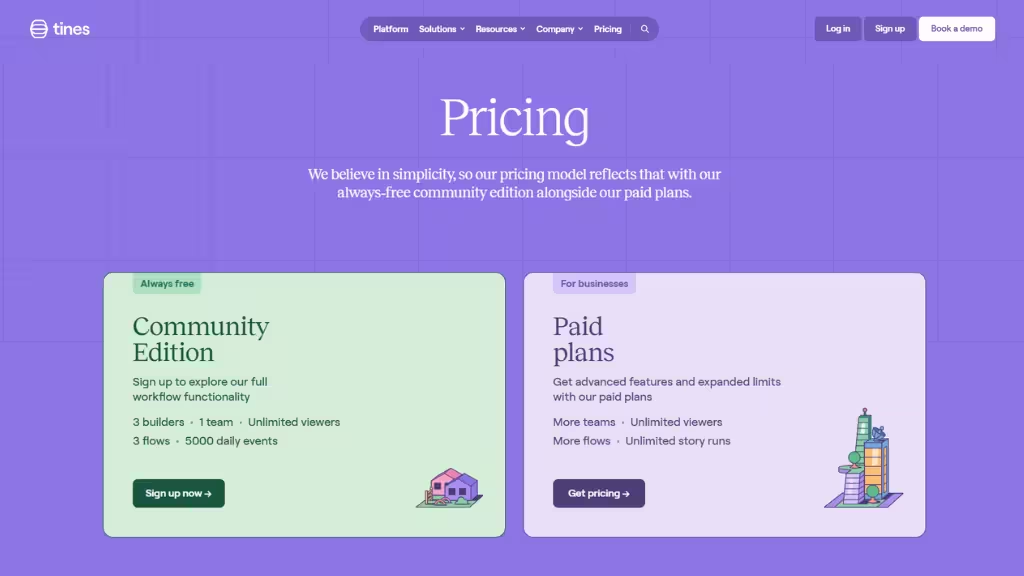
- Free: 3 builders, 1 team, Unlimited viewers, 3 flows, 5000 daily events
- Businesses: Custom Paid Plans (More teams, Unlimited viewers, More flows, Unlimited story runs)
9. Apache Airflow
Airflow is an open-source workflow orchestration platform widely used for data engineering and machine-learning pipelines. It allows teams to define workflows as code (Python), offering extremely high flexibility and control.
Airflow is great for scheduled, batch-processing workflows that involve data pipelines, ETL jobs, and complex dependencies. It’s not designed for everyday business automation, but it excels in data-heavy engineering environments.
Notable strengths
- Treat pipelines as code; version, test, and CI/CD them.
- Handles complex dependencies, retries, SLAs, and backfills.
- Huge ecosystem of providers for clouds and warehouses.
Tradeoffs/limits
- Not a business iPaaS; it’s for batch/data engineering.
- Operability burden (scheduler/webserver/executor, metadata DB, queues).
Best fit:Data engineering/analytics teams orchestrating ETL/ELT and ML jobs.
When it’s not ideal: Real-time, event-driven business automations or non-technical builders.
Setup notes: Use Celery/K8s executor, external DB/queue; implement DAG testing, code reviews, and lineage/metadata tracking.
Apache Airflow reviews
- G2: 4.4 out of 5 star rating (from +116 user reviews)
- Capterra: 4.6 out of 5 star rating (from +11 user reviews)
10. Camunda / Flowable (BPM Engines)
Camunda is a BPMN-based workflow and process orchestration platform built for enterprises with complex, long-running business processes. It supports human task workflows, decision modeling, microservices orchestration, and deep customization.
Camunda can be self-hosted or cloud-based, making it suitable for businesses requiring strict governance, scalability, and visibility across end-to-end processes. It is powerful but technical, best for architect-driven or engineering-heavy organizations.
Notable strengths
- Precise process modeling, SLAs, escalations, and auditability.
- Great for regulated, cross-department processes (KYC, claims, onboarding).
- Hybrid/hardening options for on-prem and private cloud.
Tradeoffs/limits
- Requires process modeling skills and dev integration.
- Heavier lift than no-code tools; slower to first result.
Best fit: Enterprises formalizing mission-critical, multi-actor processes.
When it’s not ideal: Quick, lightweight app-to-app automations.
Setup notes: Establish BPMN/DMN conventions; separate model design from implementation; implement CI/CD for process definitions; instrument ops dashboards.
Camunda reviews
- G2: 4.5 out of 5 star rating (from +318 user reviews)
- Capterra: 4.5 out of 5 star rating (from +15 user reviews)
Camunda pricing
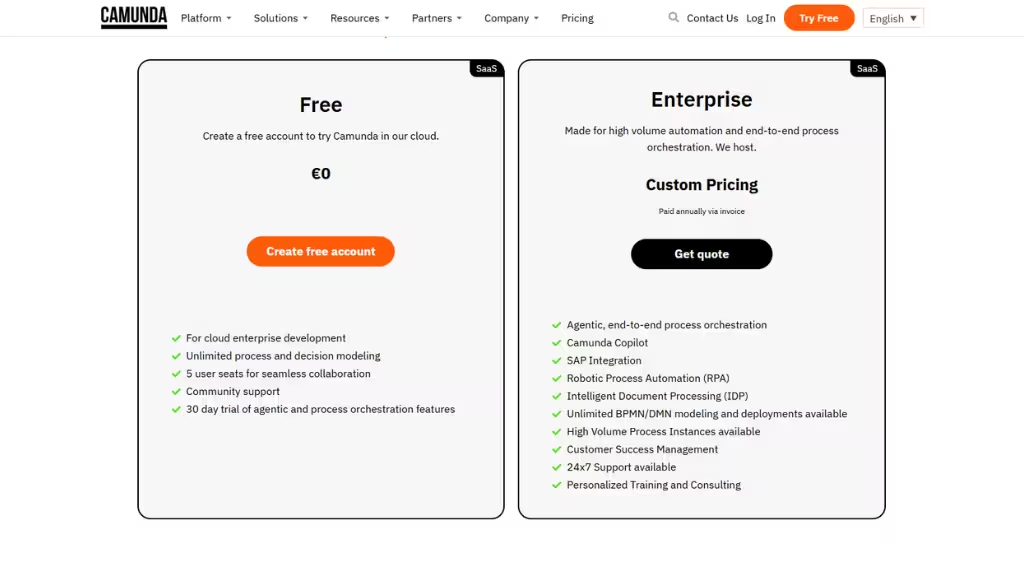
- Free: $0/month with 30 day trial of agentic and process orchestration features
- Enterprise: Custom pricing with Unlimited BPMN/DMN modeling and deployments available
Choosing the Right Tool: The 2025 Buyer’s Framework
The best workflow automation tools for you depend on your team’s goals, technical skills, data sensitivity, and growth stage. In 2025, buyers should evaluate tools based on AI readiness, hosting options, scalability, and governance, not just app integrations.
Visual Comparison of Top Workflow Automation Tools in 2025

No-Code vs. Self-Hosted: Which Path Fits You?
| Criteria | No-Code Tools (Zapier, Make) | Self-Hosted / Open-Source (n8n, Camunda) |
|---|---|---|
| Setup Time | Minutes | Hours or days |
| Maintenance | None (vendor-managed) | Requires DevOps support |
| Data Privacy | Limited control | Full control |
| Customization | Predefined modules | Code-level flexibility |
| Cost Model | Subscription-based | Free core, pay for hosting |
| Best For | SMBs, marketers, non-technical teams | Developers, IT, privacy-focused enterprises |
How to Evaluate AI Readiness and Future-Proof Your Choice
As AI becomes standard in 2025, your chosen workflow automation platform should:
- Support AI actions or copilots (e.g., text classification, summarization).
- Integrate easily with external LLMs or APIs (OpenAI, Anthropic, Claude).
- Allow AI-triggered decision nodes (for routing or scoring).
- Provide guardrails, human review, and audit logging.
A good test:
“Can this tool let an AI read a customer ticket, classify it, and trigger the right action automatically?
If not, it might be outdated within two years.

Hidden Costs and Scaling Factors
Before you commit, watch for:
- Task limits – many tools charge per run or step.
- API quotas – throttling can slow high-volume workflows.
- Overage fees – some vendors multiply costs quickly at scale.
- Compute limits – open-source tools may require upgraded hosting.
- Team licenses – collaboration often costs extra in enterprise plans.
Tip: Estimate the cost per 1,000 task executions to compare fairly across platforms.
Decision Checklist
Before shortlisting:
- Define the top 3 processes you want to automate.
- Identify who will build and maintain them.
- Evaluate integration coverage and hosting model.
- Score each tool (1–5) on the five pillars.
- Test two tools in parallel: one SaaS, one open-source.
The goal isn’t to find a “perfect” tool; it’s to find one that aligns with your automation maturity and growth plan.
Pricing & Total Cost of Ownership (TCO) Analysis
Workflow automation costs in 2026 depend on usage volume, hosting choice, and AI integration. Cloud tools like Zapier and Make use subscription tiers based on task runs, while self-hosted options like n8n or Airflow offer lower entry costs but require infrastructure management.
Workflow automation platforms follow three dominant pricing models in 2026:
| Model | Used By | Cost Driver | Example Tools |
|---|---|---|---|
| Subscription-based SaaS | SMBs, startups | # of tasks or operations per month | Zapier, Make |
| Enterprise licensing | Large organizations | # of users, workflows, or connectors | Workato, Tray.ai, Power Automate |
| Self-hosted / open-source | Developers, IT teams | Server costs + maintenance | n8n, Airflow, Camunda |
Each model carries distinct trade-offs between cost, control, and scalability.
Example Pricing Scenarios
| Scenario | Tool(s) | Approx Cost |
|---|---|---|
| Small Business / Startup | Zapier or Make.com | ~US $10–50/month |
| Mid-Sized Team / RevOps | Power Automate or Workato | ~US $500–1,500/month (or more) |
| Developer / Technical Team (Self-Hosted) | n8n self-hosted or managed | ~US $20–60/month + infra/maintenance |
1. Small Business / Startup (SaaS)
- Tool: Zapier Starter or Make Pro
- Workflows: 20 active zaps / 10,000 tasks per month
- Pros: Instant setup, minimal technical skill needed
- Cons: Hard task limits; upgrades required as usage grows
2. Mid-Sized Team / RevOps
- Tool: Power Automate or Workato
- Workflows: 50–100 automated flows across CRM, ERP, and billing
- Pros: Enterprise-grade governance, API-level data management
- Cons: Pricing by user and workflow can scale sharply
3. Developer / Technical Team (Self-Hosted)
- Tool: n8n (self-hosted) or Airflow
- Hosting: VPS on DigitalOcean, AWS, or internal server
- Pros: No task limits, full privacy control, customizable nodes
- Cons: Setup complexity, requires maintenance and security oversight
Hidden Costs to Watch Out For
Even “low-cost” automation can grow expensive if usage scales fast. Consider:
- Task or operation limits: Hidden in fine print (Zapier caps by plan).
- Overage fees: Tools may charge per 1,000 extra tasks.
- Integration throttling: Some APIs limit daily calls, causing delays.
- Team collaboration costs: Enterprise tiers often charge per seat.
- AI usage fees: LLM-based automations (like GPT nodes) add compute or token costs.
- Hosting and backups: Self-hosted solutions require VPS, monitoring, and SSL management.
Total Cost of Ownership (TCO) Framework
To make apples-to-apples comparisons, calculate TCO using this simple formula:
TCO = (Base Plan Cost + Overages + Add-ons + Hosting Fees + Maintenance Labor) ÷ Monthly Workflow Volume
For example:
A $20/month Zapier plan running 50,000 tasks + overages may cost $60/month, whereas a $10 VPS hosting n8n for unlimited runs could stay under $20/month (plus admin time).
When Self-Hosting Saves Money and When It Doesn’t
- Saves Money:
- Continuous or high-volume workflows
- Developer-managed environments
- Strong data privacy requirements
- Costs More Over Time:
- When uptime, backups, and scaling need dedicated engineers
- When business users lack DevOps support
- When vendor-managed SLA and support are critical
If you automate a few thousand tasks monthly → SaaS (Zapier, Make) is best.
If you run automation as infrastructure → self-host (n8n, Airflow) saves more long-term.
If you need enterprise-grade compliance → Workato or Power Automate justify the higher cost.
The smartest teams blend both worlds using SaaS tools for lightweight workflows and open-source solutions for high-volume backend automation.
In Conclusion
As enterprises evaluate workflow automation tools in 2026, success lies not just in selecting individual solutions but in adopting a cohesive strategy that unifies them. An operating system approach to automation enables teams to innovate with their preferred tools while maintaining enterprise-grade governance, scalability, and integration.
Organizations that embrace this philosophy can rapidly deploy AI and data workflows, adapt to technological shifts with agility, and maintain their competitive edge in an increasingly automated world.
FAQs: Workflow Automation Tools
These frequently asked questions address how to choose, implement, and scale the best workflow automation tools in 2026. Each answer is concise, factual, and optimized for featured snippets and voice search.
What are the best workflow automation tools in 2026?
The top workflow automation tools in 2026 include Zapier, Make, n8n, Power Automate, Workato, Tray.ai, Pipedream, Tines, Airflow, and Camunda. Your choice depends on whether you prioritize ease of use, enterprise governance, or developer control.
What’s the difference between workflow automation, RPA, and BPM?
1. Workflow automation connects modern cloud apps (e.g., Zapier, Make).
2. RPA (Robotic Process Automation) automates desktop or legacy tasks (e.g., UiPath).
3. BPM (Business Process Management) models and govern complex enterprise processes (e.g., Camunda).
Which automation tools support AI or “agentic” features?
a. Zapier AI Actions for natural-language prompts.
b. Make Copilot for scenario generation.
c. n8n AI Nodes for integrating LLMs like OpenAI or Claude.
d. Workato Copilot and Power Automate AI Builder for enterprise-grade automation.
Can I self-host my workflow automation tool?
Yes. n8n, Camunda, Airflow, and Flowable all support self-hosting. Self-hosting provides more control, privacy, and flexibility, though it requires setup and maintenance. Many organizations combine cloud tools for marketing and self-hosted tools for IT or compliance workflows.
How much do workflow automation tools cost?
a. SaaS Tools (Zapier, Make): $10–$50/month, depending on task volume.
b. Enterprise Tools (Workato, Power Automate): $500+/month, often per user or workflow.
c. Self-Hosted Tools (n8n, Airflow): Free software but $10–$50/month for server hosting.
How can AI improve my workflows?
1. Classifying or enriching data (e.g., scoring leads)
2. Generating or summarizing text automatically
3. Making routing or prioritization decisions
4. Detecting anomalies or errors in processes
Are workflow automation tools secure?
Yes, reputable platforms include encryption, SSO, and RBAC (role-based access control). Enterprise-grade tools like Workato and Power Automate are SOC 2 and ISO certified. For sensitive data, consider self-hosted options like n8n or Camunda to maintain full data control.
How do I calculate ROI for workflow automation?
ROI = (Hours Saved × Hourly Rate × Frequency) – Tool Cost
Example: Automating a 15-minute daily task saves ~75 hours/year. At $30/hour, that’s $2,250 saved, even though a $50/month tool yields a strong ROI.
What’s the fastest way to start automating?
1. Identify one repetitive, low-risk process.
2. Choose a no-code tool like Zapier or Make.
3. Connect two or three apps.
4. Test and refine the flow.
What’s next for workflow automation after 2025?
Expect agentic AI, predictive triggers, and cross-platform orchestration. Workflows will become more autonomous, interoperable, and context-aware, blending AI reasoning with human oversight for reliability and compliance.
What makes a workflow automation tool “enterprise-grade”?
Enterprise tools must provide scalability, security, governance, compliance (SOC 2, HIPAA, GDPR), role-based access, audit logs, and strong API integration support.
Are AI agents replacing traditional workflow automation?
Not fully. AI enhances automation (routing, predictions, data extraction), but structured workflows are still required for reliability and compliance.
What’s the best workflow automation software for large enterprises?
For complex, scalable enterprise needs: Workato, Tray.io, Microsoft Power Automate, Camunda, and Apache Airflow. For simpler, departmental automation: Zapier, Make, n8n, Pipedream.
Zapier vs Make, which is better in 2026?
Zapier → Simpler, but more expensive at scale
Make → Powerful, visual, cost-efficient, great for complex flows
n8n vs Pipedream: Which should developers choose?
n8n → Full control, open-source, self-hosting
Pipedream → Faster for writing custom code + API-heavy automations
Is Pipedream good for enterprise workflow automation?
Pipedream is strong for engineering teams but weaker for enterprises needing advanced governance, role controls, and audit trails.
What is the most powerful workflow automation tool in 2026?
Workato for enterprise, Make.com for SMBs, n8n for developers.
Which workflow automation tool is best for AI automation?
Make, Workato, and Pipedream for AI integrations; n8n for AI custom logic.
Which is better for enterprise automation: Zapier, Make.com, n8n, Pipedream, or Workato?
For true enterprise automation, Workato is the strongest choice followed by Make.com for mid-size teams and n8n for engineering-led organizations that need self-hosting and full control.
This page was last edited on 10 December 2025, at 12:01 pm
Contact Us Now

Contact Us Now
Start a conversation with our team to solve complex challenges and move forward with confidence.


