
The top UX design trends for 2026 are: AI as a design collaborator, agentic AI, real-time personalization, AI-powered accessibility, multimodal interfaces, micro-interactions, data visualization dashboards, Glassmorphism 2.0, and nostalgia-driven UI.
UX in 2026 looks very different from just a year ago. Teams are under pressure to keep up with rapid changes. AI tools are now part of everyday workflows, accessibility expectations are stronger, and users expect digital products to feel faster, smarter, and easier to use.
The real challenge is balancing innovation with usability. New visual styles like Glassmorphism can make interfaces feel fresh, but design teams still need to prioritize clarity, accessibility, performance, and inclusive experiences.
This guide gives you a practical roadmap to the top UX design trends shaping 2026. You will learn what is changing, why it matters, and how design, product, and leadership teams can adapt with confidence.
Why the Top UX Design Trends of 2026 Matter
Understanding the leading UX design trends of 2026 is critical. These trends shape how digital products serve people, guide compliance, and drive user trust. Each trend is rooted in real-world needs—from the influence of AI to global accessibility rules.
For businesses and teams, knowing which UX trends matter means better resource focus, stronger user loyalty, and higher ROI. Ignoring these changes risks sinking resources into fading tools and approaches. Smart adoption helps product leaders, designers, and engineers create more usable, ethical, and competitive experiences.
What Are The Top UX Design Trends For 2026?
The top UX design trends for 2026 focus on smarter, more adaptive, and more inclusive digital experiences. AI is shaping how teams design, test, personalize, and improve products, while accessibility and usability remain central to good UX.
Key trends include:
- AI As A Design Collaborator: AI helps designers generate ideas, summarize research, create layouts, and speed up repetitive work.
- Agentic AI: AI systems are starting to complete tasks for users, making trust, control, and transparency more important.
- Real-Time Personalization: Products adapt content, recommendations, and journeys based on user behavior and preferences.
- AI-Powered Accessibility: AI tools help detect accessibility issues and improve usability for more users.
- Multimodal Interfaces: UX now includes voice, touch, gesture, chat, and spatial interactions.
- Micro-Interactions And Motion Design: Small animations and feedback moments make products feel smoother and easier to use.
- Data Visualization Dashboards: Clear dashboards help users understand complex information quickly.
- Glassmorphism 2.0: Soft blur, depth, and transparent layers are returning with better readability and contrast.
- Nostalgia-Driven UI: Retro-inspired design elements create familiarity, emotion, and brand personality when used carefully.
These trends matter because they help teams create digital products that feel more useful, accessible, and relevant to modern users..
How is the UX Landscape Changing in 2026?
In 2026, UX is shaped by new technology, regulations, and survey-backed shifts in how teams work. Over 93% of UX designers now use AI-enhanced tools. Gartner expects AI-powered design systems to be standard in 68% of enterprises this year.
Accessibility is now a major product priority. WebAIM’s latest analysis found that 94.8% of home pages still had detected WCAG failures, showing why teams need better design tools, workflows, and accessibility training.
Teams face challenges like staff upskilling and tool overload, but the opportunity is clear: adopting future-facing UX trends directly influences product reach, user trust, and long-term success.
Deep Dive—The Leading UX Design Trends for 2026
This section unpacks each trend: what it is, why it matters, how to implement it, and pitfalls to watch. I see too many teams experiment without clear frameworks—here’s how to get real value.
AI as a Design Collaborator: From Tool to Teammate
In 2026, AI is not just an assistant—it’s an active design partner. Generative AI handles wireframes, content, and fast prototyping. Figma AI, Adobe Sensei, and Uizard are now core to many workflows.
Teams use AI to automate tedious tasks, suggest layouts, and test usability at scale. For example, last year our dev team cut prototype cycles by 40% with Figma AI’s built-in suggestions.
Agentic AI: Designing for Intelligent, Autonomous User Agents
Agentic AI means AI that takes purposeful actions for the user. Think: a digital agent that books, orders, or analyzes—without constant user prompts.
The challenge lies in designing interfaces that support trust, transparency, and user control. In my POV, the mistake I see often is teams giving up too much autonomy, losing traceability.
Principles include:
- Clear user permissions for autonomous actions
- Explainable actions and decision logs
- Easy overrides or pause functions
Example: A travel site’s agentic AI can book trips based on user habits, but always asks for confirmation before purchase. This balances convenience with user control.
Real-Time Personalization: Crafting Unique Journeys at Scale
Personalization in 2026 means dynamic content, offers, and journeys, updated in real-time. Systems adapt using live behavioral data, location, and device context. This isn’t just “recommended for you”—it’s real-time, context-aware adaptation.
Privacy and security matter more than ever. GDPR, CCPA, and new APAC standards mean users must know what data fuels their experience.
I have seen success using platforms like Dynamic Yield and Optimizely, which allow granular personalization while respecting user consent.
Case Study: In one B2B SaaS project, personalizing dashboards based on job roles improved engagement by 25%.
AI-Powered Accessibility: Making Inclusion Effortless
AI accessibility tools such as Stark AI, Axe AI, and Microsoft Accessibility Insights are now standard in product teams. These platforms run audits, flag real accessibility issues, and even auto-suggest fixes.
The Applause 2026 report found that 78% of organizations use AI to improve digital accessibility in their websites and applications. Even so, a mistake I see is over-reliance on automation. Manual review is still crucial because automated tools can miss context, usability barriers, and real assistive technology issues.
Accessibility Tool Comparison Table (2026):
| Tool | Auto-Audit | Auto-Fix | Designer Integration | WCAG 3.0 Compliance |
|---|---|---|---|---|
| Stark AI | Yes | Yes | Figma, Sketch | Yes |
| Axe AI | Yes | Partial | Web, Chrome | Yes |
| MS Accessibility Insights | Yes | No | VS Code, Web | Yes |
Checklist for AI Accessibility:
- Run automated audits during design, staging, and pre-release.
- Always include manual screen reader testing.
- Document changes for compliance logs.
Multimodal Interfaces: Blending Touch, Voice, and Beyond
Multimodal UX blends input methods: touch, voice, gesture, keyboard, and even spatial controls. In 2026, users expect apps to fluidly handle switching between these modes.
For example, a banking app lets users check balances via voice on mobile, but shift to touch or mouse in a browser. A fallback strategy—like always having on-screen controls—is critical.
Testing frameworks like Google’s Accessibility Scanner and device simulators help teams see how users interact across modes.
Micro-Interactions & Motion: Bringing Interfaces to Life
Motion design and micro-interactions give digital products emotional warmth and feedback. In my experience, subtle animations—think button pulses or card lifts—lower friction and increase user confidence.
In 2026, Protopie and Lottie remain popular tools for creating and sharing motion design. The real issue is motion sensitivity: always offer animation toggles or reduced motion modes, so experiences are inclusive.
Data Visualization Dashboards: Storytelling with Numbers
People want actionable insights, not raw data dumps. Modern UX uses data visualization dashboards to guide users in decision-making.
Interactive dashboards now let users filter, drill down, and personalize what they see. Tools like Tableau, Power BI, and Chart.js focus on clarity, accessibility, and interactivity.
The mistake I see often is overcomplicating with too many chart types; clarity first, flash second.
Glassmorphism 2.0: Style with Substance (and Accessibility)
Glassmorphism—soft frosted-glass overlays, blurred layers—is back. Apple’s design shifts in the past year have inspired brands to bring it to web, mobile, and desktop products.
But this style risks low contrast and poor accessibility. Apple mitigates by providing high-contrast toggles. A better approach is:
- Use strong background blur and contrast
- Offer standard and “solid” UI modes
- Test every state for WCAG compliance
Nostalgia-Driven Design: Emotion in a Digital Age
Brands tap into nostalgia with retro elements—pixel fonts, bold gradients, familiar button shapes. This triggers emotions and trust.
Examples: Microsoft’s Teams now uses “retro chat” themes. In my experience, it works when paired with modern usability; too much throwback leads to user confusion.
Balance is key: keep retro elements as accents, not the core structure.
Which UX Trends Are Fading in 2026? (And Why)
- Flat Design Fatigue: Pure minimalism without depth or feedback now feels dated and less usable.
- Generic Dark Mode Everywhere: Users want dark modes that are custom and accessible, not just inverted colors.
- Neumorphism Overload: Heavy use of soft shadows and “plastic” buttons is falling out, due to accessibility issues and clarity.
Expert panels from Lyssna and Slate note that accessibility and usability concerns are driving this change. Phase out legacy patterns by auditing UIs for clarity, contrast, and feedback, and transition in stages toward modern, accessible standards.
What Are the Biggest Barriers to Adopting New UX Trends? How to Overcome Them
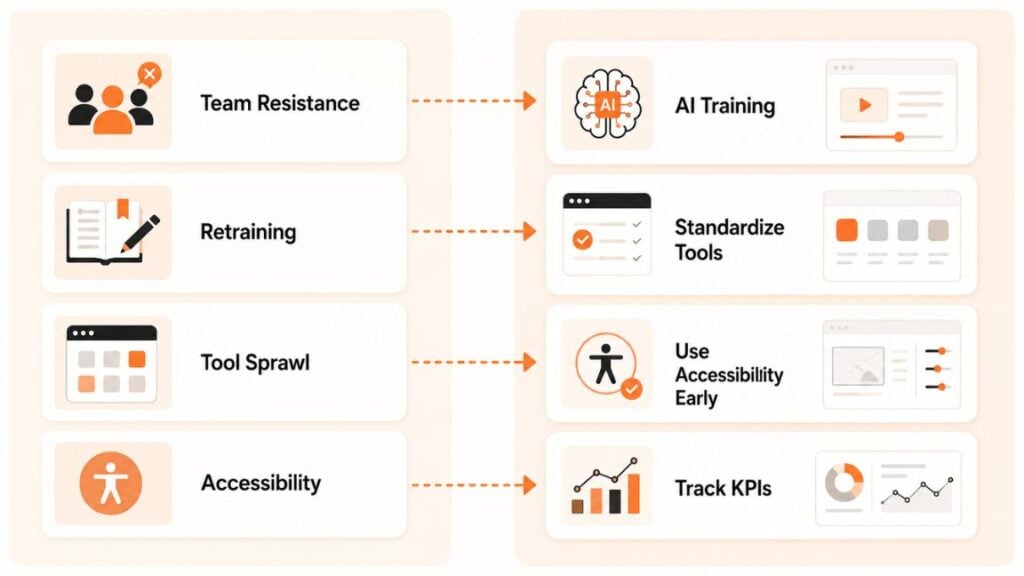
Adopting new UX trends can be tough for many teams. The most common barriers I have seen in projects include:
- Team resistance to new AI workflows or design methods
- Need for retraining and upskilling—especially for agentic AI and personalization
- Tool sprawl—too many platforms to manage
- Accessibility compliance at scale
A better approach:
- Assess team skills and run short, focused AI training.
- Standardize your toolset and phase out redundant platforms.
- Use AI accessibility tools early in the process.
- Track adoption with clear KPIs (e.g., time-to-prototype, compliance scores).
Adoption Barriers Checklist
| Barrier | Solution |
|---|---|
| Team resistance | Run demos, share wins, peer-led training |
| Too many tools | Consolidate to 2-3 core platforms |
| Upskilling needed | Leverage short course or vendor onboarding |
| Accessibility at scale | Set up routine auto-audits and reviews |
How Do You Validate and Measure New UX Trends?
I have seen many teams launch “trendy” features without proof of value. The real issue is a lack of validation. Here’s my practical framework for measuring effectiveness:
1. Prototype and Test
- Use AI tools to build rapid prototypes.
- Run user tests using platforms like UserTesting or Lyssna.
2. Set Key Metrics
- Accessibility: % of compliant screens (WCAG 3.0)
- Engagement: Time spent per feature, click rates
- Satisfaction: NPS, CSAT, and qualitative feedback
3. Track Iterations
- Use the “UX Trends Validation Matrix” to log updates, fixes, and learning.
- Compare data across releases.
Sample “UX Trend Validation Matrix” Table:
| Trend | Prototype Built | User Test Passed | Accessibility Check | Business Uptake | Next Steps |
|---|---|---|---|---|---|
| AI Collaboration | Yes | Yes | Yes | High | Roll out wider |
| Agentic AI | Yes | No | Yes | Low | Revise flows |
I recommend reviewing results monthly and refining approaches. This supports measurable, iterative improvement.
How to Stay Ahead: A Roadmap for Teams and Leaders
To keep pace with UX evolution in 2026, teams need systems, not just inspiration. Review trends annually, audit your processes, and support training for both AI and accessibility.
Key Next Steps:
- Run a yearly trend review and update sessions.
- Invest in AI and accessibility skill development.
- Join UX communities like UX Collective or attend key events for live learning.
The future of UX design will not wait for slow adopters. Proactive, data-driven teams turn trends into real competitive advantages.
Frequently Asked Questions (FAQ) on UX Trends 2026
What are the top UX design trends for 2026?
AI as a design collaborator, agentic AI, real-time personalization, AI-powered accessibility, multimodal interfaces, micro-interactions, data visualization dashboards, Glassmorphism 2.0, and nostalgia-driven UI.
How is AI changing the future of UX design?
AI automates tasks, suggests creative options, personalizes experiences, and audits accessibility, allowing teams to build better products faster and with fewer errors.
What is agentic AI, and how does it impact user experience?
Agentic AI acts on behalf of users, not just with them. It boosts convenience but must be designed for control, transparency, and ethics.
Are glassmorphism and nostalgia returning to UI design?
Yes, both trends are resurging in 2026, with glassmorphism offering style and nostalgia-driven UI boosting emotional connection—if balanced with modern standards.
Which UX trends are fading out in 2026?
Flat design, generic dark modes, and overused neumorphism are fading due to usability and accessibility concerns.
How can I ensure my designs are accessible with these new trends?
Use AI-powered accessibility audit tools, follow WCAG guidelines, provide manual testing, and always offer alternative modes for key UI elements.
What tools help with real-time personalization in UX?
Platforms like Dynamic Yield, Optimizely, and Adobe Target enable real-time, privacy-aware personalization in both web and app products.
How do I validate generative or AI-driven UIs effectively?
Use prototypes, run targeted user tests, set clear success metrics, and use a validation matrix to iterate quickly and improve your results.
What are common pitfalls when implementing these trends?
Over-reliance on automation, poor accessibility checks, ignoring privacy rules, and chasing style at the cost of usability.
How do UX teams balance ethics with AI-driven design?
Teams should design for control, transparency, clarity of data use, and always offer user opt-outs or overrides wherever autonomous AI works.
This page was last edited on 24 July 2026, at 6:35 pm

Start a conversation with our team to solve complex challenges and move forward with confidence.










