Hiring the right mobile app designer can make or break your app’s success in today’s crowded digital marketplace. With hundreds of platforms available in 2026, selecting where to find top-tier design talent is more challenging—and critical—than ever before. A poor platform choice can lead to mismatched skills, communication hurdles, or even IP risks.
This guide offers a detailed, expert-vetted comparison of the best sites to hire a mobile app designer, along with a step-by-step hiring blueprint to help you avoid costly mistakes. Whether you need a freelance UI/UX specialist or a full-service agency, you’ll discover clear answers, actionable advice, and tools to streamline your search.
Quick Comparison Table: The Best Sites to Hire a Mobile App Designer in 2026
For fast answers, here’s a side-by-side comparison of the leading platforms to hire mobile app designers—highlighting talent types, vetting levels, pricing, and more.
| Platform | Talent Type | Vetting | Avg. Rates | Pros | Cons | Best For |
| Upwork | Freelancers | Profile + reviews | $25–$100/hr | Huge talent pool, feedback system, dispute resolution | Self-managed hiring, variable vetting | Most project types |
| Fiverr | Freelancers | Badges + reviews | $10–$80/hr | Quick hires, low entry cost, tiered packages | Varying skill levels, DIY screening | Small/fixed tasks |
| Toptal | Vetted Freelancers | Multi-stage screening | $70+/hr | Top 3% designers, hands-off matching, trial period | Higher cost, limited for tight budgets | Complex/critical work |
| Behance | Portfolios | User-curated | Varies | Visual talent search, full portfolios, direct contact | No built-in contracts/payment protection | Visual-first projects |
| Contra | Freelancers | Light vetting + reviews | $20–$70/hr | No commissions for freelancers, modern UI | Smaller talent base, newer platform | Early-stage/startups |
How Do I Choose the Best Platform to Hire an App Designer?
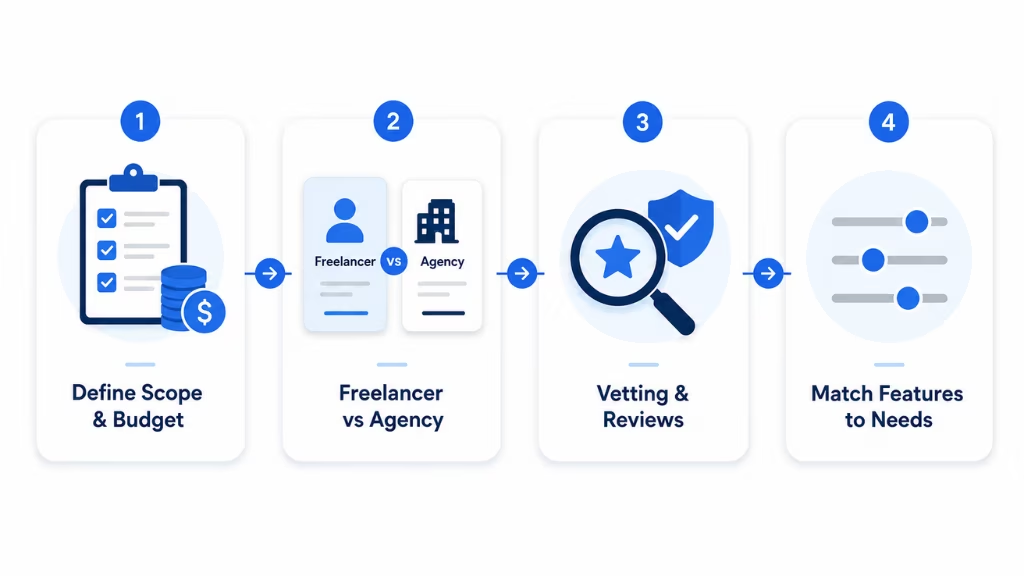
Choosing the best platform to hire a mobile app designer depends on your project size, budget, timeline, and risk tolerance. Assess your priorities—such as level of vetting, project complexity, and need for ongoing support—before picking a platform.
Follow these steps to select the right hiring site:
- Define Project Scope & Budget:
- Small, fixed-scope projects or MVPs may suit Fiverr, Contra, or Upwork.
- Large, high-stakes initiatives with strict deadlines often warrant agencies or expert-vetted platforms like Toptal.
- Decide Between Freelance Marketplaces and Design Agencies:
- Freelancers offer flexibility and lower costs, but require more hands-on management.
- Agencies provide managed teams with established workflows, ideal for enterprise or ongoing needs.
- Prioritize Vetting and Reviews:
- Look for platforms with transparent reviews, proven portfolios, and structured vetting processes.
- Match Platform Features to Needs:
- Evaluate payment protection, IP security, and support options.
By aligning your goals with platform strengths, you’ll minimize risks and optimize outcomes.
Freelance Marketplaces vs. App Design Agencies: Which is Right for You?
Freelance marketplaces and app design agencies offer distinct advantages based on project size, budget, and required oversight.
| Criteria | Freelance Marketplaces | App Design Agencies |
| Cost | Typically lower | Higher, covers full team |
| Flexibility | High (scale up/down easily) | Lower, but more stable teams |
| Management | Self-managed | Agency-led, handled for you |
| Vetting | Varies by platform | Agency-certified teams |
| Best For | MVPs, small/medium projects | Enterprise, complex apps |
Choose a freelancer if:
- You have a well-defined scope, clear milestones, and want cost efficiency.
Choose an agency if:
- You need end-to-end support, robust process, or a guaranteed delivery timeline.
Key Factors: Vetting, Reviews, and Portfolios—What Really Matters?
Evaluating designers and teams requires more than just glancing at portfolios. Vetting processes, authentic client reviews, and relevant past work are essential for a successful hire.
- Designer Reviews & Repeat Clients: Reliable platforms (Upwork, Fiverr) display client feedback, ratings, and repeat hire rates. Consistent high ratings and long-term clients are positive signals.
- What to Look For in a Portfolio:
- UI/UX expertise (screens, flows, prototypes)
- Relevant experience (industry/app type)
- Use of modern tools (Figma, Adobe XD)
- Interactive or animated mockups (demonstrates capability)
- Understanding Vetting:
- Toptal screens for communication, technical, and design skills rigorously.
- Upwork and Fiverr use badges, skill tests, and client feedback.
- Behance relies on public portfolios and peer recommendations.
Tip: Always request a live app example or interactive prototype when possible before making your final decision.
Top Platforms to Hire a Mobile App Designer in 2026
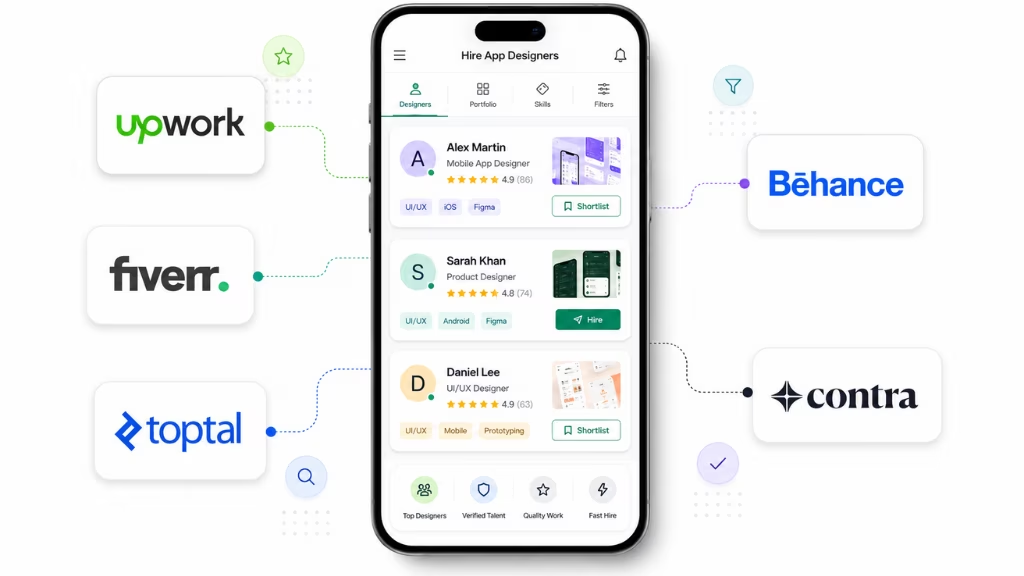
Explore detailed breakdowns of the best platforms to hire a mobile app designer, so you can find the right fit for your needs and budget.
Upwork
Upwork is the largest freelance marketplace, connecting businesses to a global pool of app designers with varied skills, rates, and languages.
Designer Types: Freelance UI/UX specialists, mobile/web designers, prototyping experts.
Pricing: $25–$100/hr, or fixed-price projects.
Vetting Process: Client reviews, portfolio samples, optional talent badges, Upwork “Talent Scout” for extra vetting.
Workflow:
- Post a job or search for freelance app designers.
- Review proposals, interviews, and portfolios.
- Hire, manage milestones, and pay securely via escrow.
Pros: Large talent pool, feedback-driven selection, built-in milestones and payment protection.
Cons: Self-managed vetting/interviewing, quality varies.
Best For: Medium to large projects, project managers who want control.
“We rely on Upwork for specialized UI/UX talent; the review system and milestone payments help mitigate risk.” — Senior Product Manager, SaaS Startup
Fiverr
Fiverr streamlines hiring for specific mobile app design tasks through gig-based packages, enabling quick access to designers with transparent pricing.
Designer Types: Freelance UI designers, logo/prototype creators, niche specialists.
Pricing: $10–$80/hr or fixed-price tiers (Basic/Standard/Premium).
Vetting Process: Badges for “Pro Verified” or high-rated sellers, client reviews, portfolio samples.
Workflow:
- Search/filter by skill, budget, turnaround.
- Purchase a gig or request a custom offer.
- Direct message for clarifications; automatic payment escrow.
Pros: Fast, affordable hires; package clarity; strong for quick tasks.
Cons: Varying skill depth; requires DIY screening for complex projects.
Best For: One-off or standardized tasks, rapid MVP/feature design.
Trend: In 2026, Fiverr’s Pro program has expanded, offering more “vetted designer” options for buyers seeking higher reliability.
Toptal
Toptal is a premium freelance network, claiming to curate the top 3% of mobile app designers through rigorous, multi-stage vetting.
Designer Types: Elite UI/UX app designers, strategists, experienced in cross-platform and enterprise solutions.
Pricing: Starting at $70/hr and up; premium, but includes hands-on curation.
Vetting Process: Language/communication assessment, portfolio review, live design challenges, and ongoing client feedback.
Workflow:
- Submit your project; Toptal matches you with pre-vetted designers.
- Interview matches, start trial period.
- Hire only if satisfied—no risk trial.
Pros: Top-quality, risk-mitigated hiring, hands-off curation.
Cons: Higher cost; not ideal for every budget.
Best For: Complex apps, mission-critical projects, enterprise needs.
“Toptal delivered designers who hit the ground running—quality vetting takes the guesswork out of hiring.” — CTO, FinTech Firm
Behance
Behance is Adobe’s leading design portfolio site, allowing direct discovery and contact of mobile app designers worldwide.
Designer Types: Visual app designers, UI/UX specialists, illustrators.
Pricing: Varies—designers typically set rates off-platform; negotiate directly.
Vetting Process: Open portfolio view, appreciations/endorsements by peers, project history for transparency.
Workflow:
- Search portfolios by skills, location, or style.
- Message designers directly for proposals or rates.
- Negotiate contracts/files independently (off-platform).
Pros: Full access to real portfolios, top creative talent.
Cons: No built-in payment or contract protection; manual negotiation.
Best For: Visual-heavy app projects, brand- or style-conscious teams.
Tip: Reference past live app projects in your outreach to validate relevant experience.
Contra
Contra is an emerging, commission-free freelance marketplace focused on modern creative/tech talent, especially for startups and small teams.
Designer Types: UI/UX mobile designers, product designers, cross-platform specialists.
Pricing: $20–$70/hr, commission-free to freelancers.
Vetting Process: Portfolio links, user reviews, talent “Verified” status for selected pros.
Workflow:
- Search curated designers by skill or explore featured professionals.
- Invite to collaborate and negotiate terms within the platform.
- Built-in contracts and payments.
Pros: No extra fees, easy collaboration, transparent relationships.
Cons: Smaller talent pool, newer feature set.
Best For: Startups, early-stage MVPs, teams on a budget seeking direct designer connection.
What Are the Exact Steps to Hire a Mobile App Designer Online?
Hiring a mobile app designer online involves five essential steps, from project prep to onboarding. Following this blueprint minimizes risk and ensures a smoother, more efficient process.
Step 1: Prepare Your Project Brief
– Define your app’s goals, features, target users, and success criteria.
– Include needed platforms (iOS, Android), timeline, and budget.
– Reference styles or apps you admire; list required deliverables.
Step 2: Shortlist Designers
– Research platforms and filter by skills, ratings, and portfolios.
– Gather 3–5 strong candidates whose past work matches your needs.
Step 3: Vetting & Interviews
– Review portfolios for relevant UI/UX experience.
– Ask about workflow, preferred tools (Figma, Adobe XD), and communication.
– Request a paid test project or ask situational questions to gauge skills.
Step 4: NDAs and IP Protection
– Use a Non-Disclosure Agreement (NDA) before sharing sensitive app concepts.
– Clearly define IP ownership in your contract.
Step 5: Confirm Contract & Onboarding
– Set milestones, timelines, and payment terms.
– Align on feedback cycles and set up onboarding calls.
By following these steps, you’ll boost your chances of a productive, secure working relationship with your mobile app designer.
How Much Does It Cost to Hire a Mobile App Designer?
Hiring a mobile app designer can cost anywhere from $10/hr on entry-level platforms to $100+/hr for expert-vetted talent in 2026. Final price depends on scope, experience, and location.
Marketplace Rate Ranges:
- Fiverr: $10–$80/hr (gig packages start lower for basic assets)
- Upwork: $25–$100/hr (most common band for experienced designers)
- Toptal: $70/hr and up (pre-vetted, premium market)
- Behance/Contra: Freelancers set independent rates; direct negotiation.
What Impacts Cost?
- Experience level: Senior designers or those with a niche (e.g., health, fintech apps) demand higher rates.
- Complexity: Multi-platform, interactive, or branded experiences increase cost.
- Location: Designers in North America/Western Europe tend to charge more.
- Payment model: Fixed-price for defined deliverables; hourly for ongoing or evolving projects.
Sample Budget Scenarios:
- Simple MVP screens (2–3): $300–$800 total
- Full-featured app (UI/UX, prototypes): $5,000–$15,000+
- Enterprise/complex UX (with research, design systems): $20,000+
Choosing the right payment model comes down to project clarity and iteration needs—hourly for evolving specs, fixed for well-defined briefs.
What Should I Prepare Before Hiring an App Designer?
Before you reach out to any designer or agency, get organized to ensure a smoother, faster hiring journey. Use this checklist to cover all must-have details:
Essential Prep Checklist:
- Clear app concept (purpose, goals, what makes it unique)
- User personas and primary target audience
- Required platforms: iOS, Android, both
- Feature list and basic wireframes or mood boards (optional, but helpful)
- Budget and timeline
- Example apps/styles you like (links or screenshots)
- NDA/IP protection preferences (template ready if sharing confidential info)
- Communication plan (emails, weekly check-ins, feedback cycles)
- Payment preferences (milestones, hourly, fixed price)
How Can I Protect My App Idea and Design IP When Hiring Remotely?
Protecting your app idea and design intellectual property (IP) is crucial when working with remote designers or agencies. Use legal agreements, secure platforms, and proper handoff protocols to minimize risks.
Key Protection Steps:
- NDAs (Non-Disclosure Agreements):
Have designers sign an NDA before sharing sensitive concepts or materials. This agreement outlines confidentiality and prohibits disclosure. - Platform Protections:
Use platforms with built-in contract and escrow features (Upwork, Fiverr, Contra), which help enforce payment and IP agreements. - IP Ownership:
Explicitly state in your contract that all design assets, prototypes, and related IP are transferred to your ownership upon payment. - Design Handoffs:
Request source files (Figma, Adobe XD) and document ownership transfer at project completion.
For standard NDA templates or IP guidance, reference resources like NOLO or Upcounsel, or consult with a legal professional in your country.
Frequently Asked Questions: Hiring a Mobile App Designer
What are the top sites to hire a mobile app designer in 2026?
The top sites are Upwork, Fiverr, Toptal, Behance, and Contra. Each caters to different needs, from quick freelance gigs to elite, vetted design talent.
How do I compare freelance platforms for hiring app designers?
Assess platforms by vetting processes, user reviews, pricing models, payment protection, and fit for your project’s complexity and budget.
What should I include in my project brief when hiring a designer?
Detail your app’s goals, target users, desired features, budget, timeline, preferred platforms (iOS/Android), and any style references. The clearer your brief, the better the results.
How are designers vetted on platforms like Upwork, Fiverr, or Toptal?
Toptal uses rigorous, multi-stage vetting (portfolio review, live tests). Upwork and Fiverr rely on client reviews, skills badges, and, on occasion, talent-specific programs.
Should I choose a freelance mobile app designer or an agency?
Freelancers are ideal for lower budgets, shorter or flexible projects. Agencies fit enterprise-scale or high-complexity work where managed teams add value.
What’s the average cost to hire a mobile app designer online?
Expect rates from $10–$100+/hr, depending on platform, designer expertise, and project scope. Premium, vetted platforms will cost more but can reduce mis-hire risk.
How do I evaluate a designer’s portfolio?
Look for projects similar to yours, well-structured UI/UX flows, client outcomes, and versatility. User reviews and repeat clients add credibility.
What legal agreements should I use to protect my app idea?
At minimum, use an NDA before sharing confidential details. Also, ensure your contract clearly states IP transfer terms for all final design assets.
Final Tips & Mistakes to Avoid When Hiring App Designers
Avoiding common pitfalls can save time, money, and future headaches when hiring for your app design project.
- Under-Scoping Requirements:
Incomplete briefs lead to mismatched expectations and costly revisions. - Ignoring Red Flags:
Poor communication or missed deadlines early on are warning signs; trust your instincts. - Skipping Trial Projects or References:
A small paid test or speaking with past clients helps assess fit before a big commitment. - Neglecting Legal/IP Setup:
Always use NDAs and IP ownership clauses to protect your investment. - Pro Tip:
Veteran hiring managers recommend setting up weekly checkpoints and using collaborative tools (like Figma or Notion) for transparency and feedback.
“The most expensive design mistake is rework—overprepare, overcommunicate, and always validate with a short paid trial.” — Product Design Lead, B2B SaaS
This page was last edited on 9 July 2026, at 11:10 am

Start a conversation with our team to solve complex challenges and move forward with confidence.