- What Is an AI App?
- How Long Does It Take to Build an AI App? (Quick Answer)
- AI App Development Timeline by Project Scope
- Key Factors That Affect AI App Development Time
- AI App Development Phases and Estimated Duration
- Timeline Examples for Common AI App Use Cases
- How Timelines Differ Based on Project Goals
- When Custom AI Development Becomes Necessary
- Common Reasons AI App Projects Get Delayed
- Final Thoughts
- Frequently Asked Questions
If you are planning to build an AI app, one of the first questions you will likely ask is how long does it take to build an AI app. It is an important question, because timelines affect everything from budget and resources to launch plans and expectations.
In reality, there is no single answer. Some AI apps can be built fairly quickly by using existing models or APIs. Others take months of work because they rely on custom data, more advanced logic, or continuous testing in real-world conditions. These differences are not always obvious at the beginning, especially for teams building AI products for the first time.
Having a clear idea of what goes into building an AI app helps you plan more effectively and avoid common pitfalls. In this article, we’ll break down realistic AI app development timelines, explain what influences them, and help you understand what to expect before you get started.
What Is an AI App?
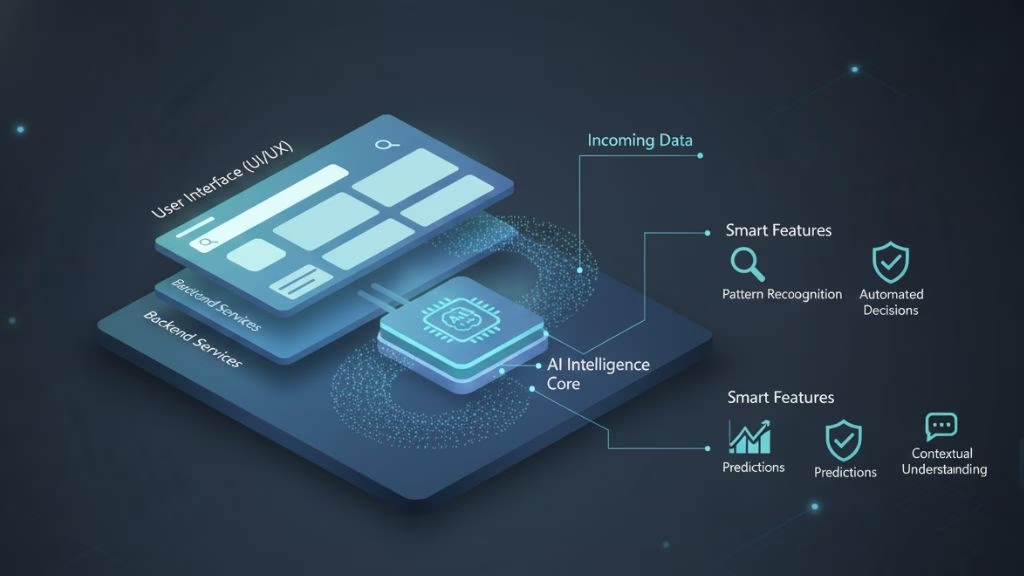
An AI app is any application that can learn from data and make decisions instead of following only hard-coded rules. Unlike traditional apps, where every action is predefined, AI apps adapt based on patterns they see over time.
In practical terms, this could mean an app that understands customer messages, recommends products, flags unusual activity, or predicts future outcomes. Technologies like machine learning, language models, and image recognition usually sit behind these features, but users experience them simply as smarter, more responsive software.
Most AI apps are not “pure AI” from top to bottom. In many cases, AI is one part of a larger system, working alongside standard front-end and back-end code. This distinction matters, because the role AI plays in the app directly affects how long development takes. A lightweight AI feature can be built fairly quickly, while an app built around custom intelligence takes more time and iteration.
How Long Does It Take to Build an AI App? (Quick Answer)
If you’re looking for a short, practical answer, the timeline for building an AI app usually falls into one of these ranges:
- Simple AI prototype: around 2 to 6 weeks
- AI MVP: roughly 2 to 4 months
- Production-ready AI app: about 4 to 8 months
- Large-scale or enterprise AI app: 6 to 12 months or more
These timelines are not strict rules, but they give a realistic starting point. A simple prototype might focus on proving that an idea works, often using existing AI models and limited data. An MVP takes longer because it needs to handle real users, basic reliability, and feedback.
Production-ready AI apps require more time for data preparation, testing, performance tuning, and monitoring. Enterprise-level AI apps take the longest, as they usually involve security reviews, compliance requirements, scalability planning, and long-term maintenance considerations.
The key takeaway is that AI app development time grows with complexity. The more intelligence, accuracy, and reliability your app needs, the more time you should expect to invest.
AI App Development Timeline by Project Scope
The scope of your project plays a major role in determining how long AI app development will take. Different goals require different levels of effort, data, and testing, which directly affects the overall timeline. The table below shows how timelines typically vary based on project scope.
| Project Scope | What It Includes | Typical AI App Development Time |
| Prototype / Proof of Concept | Basic AI functionality, limited data, minimal UI, focus on feasibility | 2–6 weeks |
| AI MVP | Core AI feature, real user flow, basic data pipeline, early feedback | 2–4 months |
| Production-Ready AI App | Stable models, scalable backend, testing, monitoring, integrations | 4–8 months |
| Enterprise AI Application | Advanced security, compliance, scalability, long-term maintenance | 6–12+ months |
A prototype is usually built to validate an idea quickly, often using existing AI models or APIs. An AI MVP takes longer because it must support real users, handle live data, and collect meaningful feedback.
A production-ready AI app requires additional work around reliability, performance tuning, and system integration. Enterprise AI applications take the longest, not only because of AI complexity, but also due to security, compliance, and operational requirements.
It also explains why two AI apps that seem similar on the surface can take very different amounts of time to build.
Now that you’ve seen how AI app development timelines change based on project scope, the next step is understanding what actually causes those timelines to stretch or shrink.
Key Factors That Affect AI App Development Time
There is no fixed timeline for AI app development because several moving parts influence how long the process takes. Even small changes in one area can add weeks or months to the overall timeline.
One of the biggest factors is feature complexity. An AI app that performs a single prediction task is far quicker to build than one that makes real-time decisions, handles multiple inputs, or continuously learns from new data.
Data readiness also plays a major role. If clean, well-structured data is already available, development can move forward quickly. If data needs to be collected, cleaned, labeled, or unified from multiple sources, this phase alone can significantly slow progress.
Another key factor is whether the app uses pre-trained AI models or custom-built models. Leveraging existing APIs or models reduces development time, while training and tuning custom models adds more experimentation and iteration.
Integration requirements often get overlooked early. Connecting the AI app with existing systems such as databases, CRMs, or third-party services introduces additional development and testing effort.
Finally, team experience and compliance needs matter. Experienced teams move faster and avoid common pitfalls, while regulated environments require extra steps for security, validation, and documentation.
Together, these factors explain why AI app development timelines can vary widely, even for apps that seem similar at a high level.
AI App Development Phases and Estimated Duration
AI app development is not a single step process. It unfolds in stages, each building on the previous one. While some phases may overlap, understanding these stages makes it much easier to estimate timelines and avoid surprises later in the project.
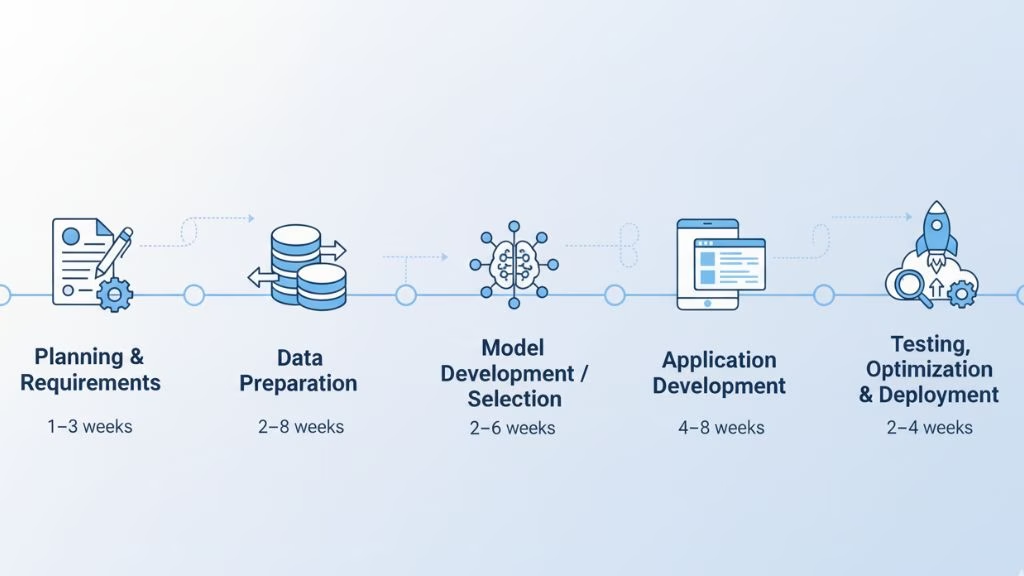
Below is a breakdown of the key phases involved in AI app development and how long each typically takes.
Planning and Requirements
Every AI app starts with clarity. This phase focuses on defining the problem the app should solve, the role AI will play, and how success will be measured. Decisions made here shape the entire development process, from data needs to model selection.
Taking time to align goals, scope, and expectations early helps prevent delays caused by unclear requirements or changing priorities later. This phase usually takes one to three weeks.
Data Preparation
Once requirements are clear, attention shifts to data. Data needs to be collected, cleaned, structured, and, in many cases, labeled before it can be used effectively. This step often reveals gaps or quality issues that were not obvious at the start.
Because AI models depend heavily on data quality, this phase is rarely rushed. Depending on data availability and complexity, data preparation can take two to eight weeks or more.
Model Development or Selection
With data in place, teams decide whether to use pre-trained models, fine-tune existing ones, or build custom models. This phase involves experimentation, testing, and refinement to reach acceptable performance.
Iteration is common here, especially when accuracy or reliability targets are high. Model development or selection typically takes two to six weeks.
Application Development
After the AI model is ready, it needs to be integrated into a functional application. This phase includes building the user interface, backend systems, APIs, and ensuring the AI works smoothly within the app’s overall architecture.
This is where the AI capability becomes usable for real users. Application development generally takes four to eight weeks, depending on feature scope and integrations.
Testing, Optimization, and Deployment
Before launch, the app must be tested under real-world conditions. This phase focuses on performance tuning, error handling, monitoring setup, and final adjustments to ensure reliability.
Once testing is complete, the app is deployed and prepared for ongoing monitoring and improvement. This phase usually takes two to four weeks.
Although these phases are shown sequentially, AI app development is often iterative. Feedback loops between data, models, and application logic are normal and should be factored into any realistic timeline.
Timeline Examples for Common AI App Use Cases
AI apps don’t all take the same path. Two apps might both be labeled “AI-powered,” yet their development timelines can look very different depending on what the app actually does behind the scenes. Looking at common use cases makes these differences easier to understand.
AI Chatbots and Virtual Assistants
Chatbots are often where teams start because they feel approachable and relatively quick to build. A basic chatbot that answers common questions or routes users to the right place can be developed fairly fast, especially when it relies on existing language models.
Timelines stretch when the chatbot needs to handle nuanced conversations, connect with internal tools, or adapt based on past interactions. In those cases, more testing and fine-tuning are required, which adds time.
Recommendation Systems
Recommendation systems depend heavily on user behavior data. A simple version can be built once enough data is available, but the real work begins when accuracy and relevance matter.
Improving recommendations usually means experimenting with different models, adjusting logic, and validating results over time. This is why recommendation systems often take longer than expected, even though the idea itself seems straightforward.
Predictive Analytics Applications
Predictive apps focus on forecasting outcomes, such as demand, risk, or performance trends. These projects move more slowly because predictions need to be reliable, not just functional.
Teams often spend significant time validating assumptions, checking results against real data, and refining models. Small changes in data or logic can have a big impact, which is why these apps take patience to get right.
Computer Vision Applications
Computer vision projects tend to be the most time-intensive. They rely on large volumes of images or video and usually require extensive training and testing.
Even when pre-trained models are used, adapting them to real-world conditions takes effort. Lighting, angles, noise, and edge cases all affect performance, and each one needs to be addressed before the app can be trusted.
The takeaway here is simple: AI app development time is shaped less by the label “AI” and more by the type of problem you are solving. Once that is clear, timelines become much easier to estimate.
How Timelines Differ Based on Project Goals
The goal behind an AI app often sets the pace of development. Two teams can build similar features, yet move at very different speeds depending on what they expect from the final product.
When the goal is experimentation or learning, timelines are usually shorter. These projects focus on exploration rather than perfection. Teams test ideas quickly, accept rough edges, and move fast to understand what works and what does not.
Projects aimed at validation take longer. Here, the AI app needs to support real users and deliver consistent results. This adds time for better data handling, usability improvements, and feedback loops, even if the feature set stays relatively small.
When an AI app is built to support business operations or revenue, timelines naturally expand. Reliability, performance, and accuracy become non-negotiable. Teams spend more time testing edge cases, monitoring outcomes, and ensuring the app behaves predictably in real-world conditions.
Finally, AI apps designed as long-term platforms move at the slowest pace. These projects require scalable architecture, ongoing model updates, and clear governance from the start. The extra time invested early often pays off later, but it does shift timelines significantly.
Understanding the goal behind your AI app makes timeline estimates more realistic. It helps teams decide where speed matters and where patience is necessary.
Once timelines are tied to clear goals, it’s easier to see where time can realistically be saved.
How to Speed Up AI App Development
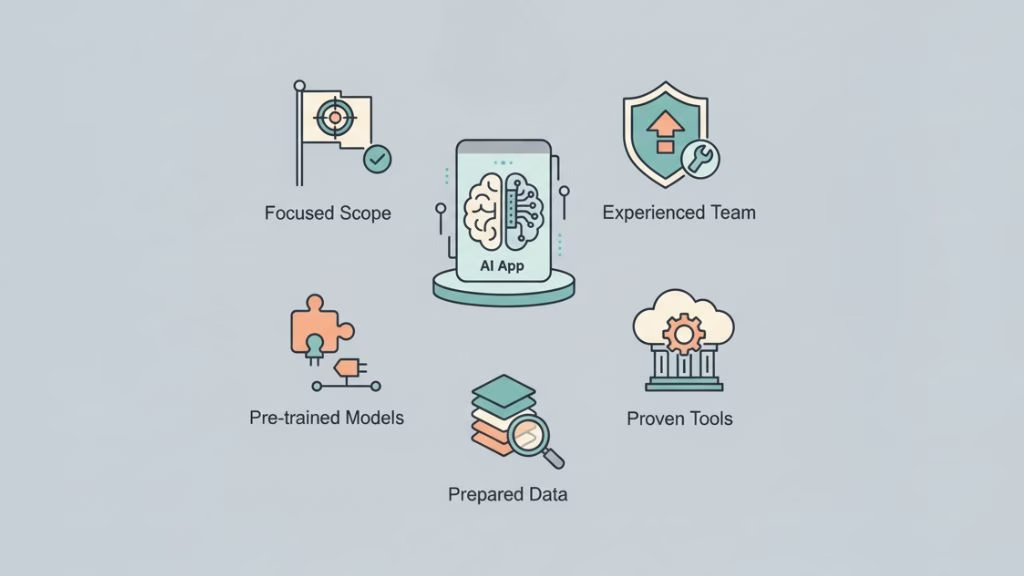
Speeding up AI app development does not mean cutting corners or lowering quality. In most cases, it comes down to making a few thoughtful decisions early in the process that reduce rework and unnecessary complexity later.
Below are some proven approaches you can use to move faster:
Start with a focused scope
Trying to solve too many problems at once is one of the most common reasons AI projects slow down. By narrowing the initial scope to a single, well-defined use case, teams can move faster, test ideas earlier, and refine the app without constant changes.
Use pre-trained models or existing AI APIs
Many AI apps do not need custom models at the beginning. Leveraging pre-trained models or established AI APIs helps skip long training cycles and allows teams to focus on building useful features instead of reinventing the wheel.
Prepare data early
Data-related issues discovered late in development can cause major delays. Working with available data from the start, even if it is not perfect, helps uncover gaps and quality problems before they become blockers.
Rely on proven tools and infrastructure
Using well-supported frameworks and cloud platforms reduces setup time and technical overhead. This keeps development focused on the app itself rather than infrastructure challenges.
Work with experienced AI developers
Experience makes a difference. Teams that have built AI apps before tend to make better early decisions, avoid common pitfalls, and move through development with fewer setbacks.
When approached thoughtfully, speeding up AI app development is less about rushing and more about removing friction from the process.
When Custom AI Development Becomes Necessary
Not every AI app needs custom development, but there are situations where off-the-shelf tools or pre-trained models are simply not enough. Knowing when custom AI is required helps avoid wasted time and unrealistic expectations.
Custom AI development becomes necessary when your app relies on unique or proprietary data. If the intelligence of the app depends on patterns that are specific to your business or use case, generic models often fall short.
It is also important when accuracy and reliability are critical. Applications involved in decision-making, risk assessment, or automation usually need models that are trained and tuned specifically for their environment.
Another common trigger is scalability and long-term growth. As an AI app evolves, custom models offer greater control over performance, updates, and future expansion.
Finally, compliance and security requirements often make custom development unavoidable. Industries with regulatory obligations need transparency, control, and auditability that off-the-shelf tools may not provide.
Custom AI development typically takes more time upfront, but it often results in a solution that fits better, performs more consistently, and scales more effectively over time.
Common Reasons AI App Projects Get Delayed
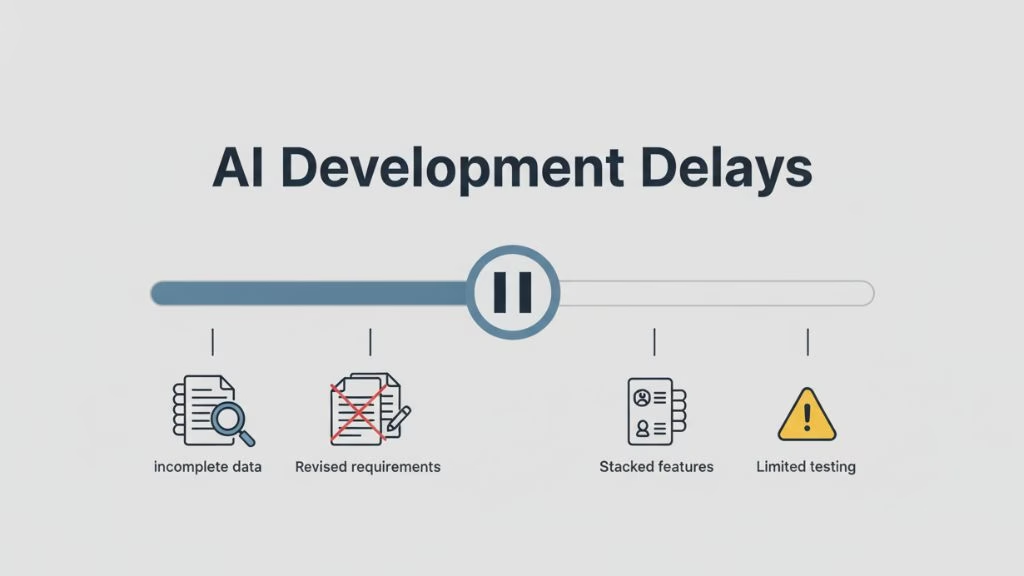
AI app projects rarely fall behind schedule because of a single big mistake. More often, delays happen due to small issues that compound over time. Understanding these common problem areas makes it easier to plan realistically and avoid unnecessary setbacks.
Below are some of the most common reasons AI app development timelines get extended:
Underestimating data preparation
Many teams assume their data is ready to use, only to discover gaps, inconsistencies, or labeling issues once development is underway. Fixing data problems late in the process can slow everything down and force teams to revisit earlier decisions.
Unclear or changing requirements
When goals are not clearly defined at the start, development becomes reactive. Frequent changes to features, workflows, or success criteria often lead to rework, longer testing cycles, and stalled progress.
Trying to build too much at once
Overloading the first version of an AI app with too many features increases complexity. This makes testing harder, introduces more failure points, and delays launch when a smaller, focused version would have delivered value sooner.
Insufficient testing and feedback
Skipping or rushing testing often leads to issues surfacing later, when they are more expensive and time-consuming to fix. AI apps benefit from early and continuous feedback to catch problems before they grow.
Limited experience with AI development
Teams new to AI app development may spend extra time experimenting, selecting tools, or correcting avoidable mistakes. Lack of experience often leads to slower decision-making and longer iteration cycles.
Most AI app delays are preventable. Clear planning, early data validation, and realistic expectations can significantly reduce the risk of timelines slipping.
Final Thoughts
Building an AI app takes more than writing code. The timeline depends on what the app is meant to do, how complex the problem is, and how prepared you are with data and planning.
Some AI apps can be built quickly using existing tools, while others require more time due to custom logic, testing, and reliability needs. What matters most is setting realistic expectations early and choosing an approach that matches your goals.
When timelines are planned thoughtfully, AI app development becomes more predictable and far less stressful.
Frequently Asked Questions
1. How long does it take to build an AI app?
Building an AI app typically takes 2 weeks to 12 months, depending on the app’s complexity, data readiness, and whether pre-trained or custom AI models are used.
2. Can an AI app be built in 30 days?
Yes, a basic AI prototype or simple AI feature can be built in about 30 days, but full-scale or production-ready AI apps usually require more time.
3. Does AI app development take longer than traditional app development?
Yes. AI app development usually takes longer because it includes data preparation, model training, testing, and iteration, which traditional apps do not require.
4. What takes the most time in AI app development?
Data preparation often takes the most time. Cleaning, labeling, and validating data typically requires more effort than building the AI model itself.
5. Can AI APIs reduce AI app development time?
Yes. Using pre-trained AI models or APIs can significantly reduce development time by eliminating the need to train models from scratch.
6. How long does it take to build an AI MVP?
An AI MVP usually takes 2 to 4 months, allowing time to build core functionality, test with real users, and refine model performance.
7. Can one person build an AI app alone?
One person can build a small or learning-focused AI app, but production-level or business-critical AI apps usually require a team.
8. Why do AI app development timelines change during a project?
AI app timelines often change due to data issues, evolving requirements, or model performance challenges, which are common in AI development.
This page was last edited on 8 January 2026, at 2:31 pm
Contact Us Now

Contact Us Now
Start a conversation with our team to solve complex challenges and move forward with confidence.


