
- What Are Agentic Workflows?
- How Do Agentic Workflows Work?
- Key Components of Agentic Workflows
- Agentic Workflows vs. Traditional Workflows
- Benefits of AI Agentic Workflows for Complex Tasks
- Challenges of AI Agentic Workflows
- Examples of AI Agentic Workflows
- Steps for Implementing AI Agentic Workflows
Agentic workflows are changing how businesses work with AI. Instead of following strict rules or static scripts, these workflows use smart AI agents that can think, decide, and act on their own within predefined operational boundaries. They understand goals, break tasks into steps, and adjust as needed without waiting for step-by-step instructions.
As large language models (LLMs) and AI tools grow more powerful, companies are using them to build workflows that adapt in real time. These agentic systems can manage tasks across IT, HR, customer service, and more, saving time, reducing errors, and scaling operations like never before.
In this guide, you’ll learn what agentic workflows are, how they work, where they help most, and how to start building them for your organization.
What Are Agentic Workflows?
Agentic workflows are AI-powered processes designed to operate with autonomy within defined constraints and governance boundaries. Unlike traditional workflows that follow pre-set rules, agentic workflows use AI agents to make decisions, take actions, and adapt to changes with limited human intervention and defined oversight mechanisms.
An AI agent in this context is a software program that understands goals, plans steps, and interacts with tools or systems to get results. These agents rely on advanced technologies such as large language models (LLMs), machine learning, and natural language understanding to guide their behavior.
In simple terms, agentic workflows mimic how a human might handle a task:
- Understand the goal.
- Break it down into steps.
- Use tools and knowledge to execute each step.
- Adjust when something unexpected happens.
- Learn from experience.
This shift from static scripts to dynamic, learning-based systems allows businesses to automate more complex, unpredictable, or multi-step tasks across departments.
How Do Agentic Workflows Work?
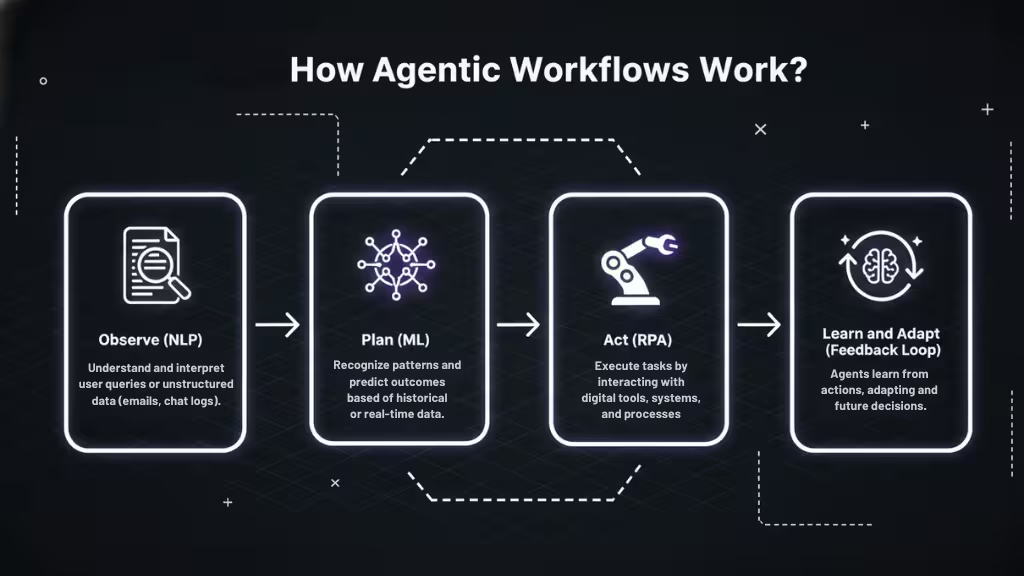
Agentic workflows operate through a smart combination of technologies that let AI agents observe, plan, act, and adapt, coordinated through orchestration and control layers. Unlike simple bots that follow rules, these agents make real-time decisions using advanced tools. Here’s a closer look at the core technologies that make agentic workflows work:
Machine Learning (ML) Algorithms
Machine learning gives AI agents the ability to recognize patterns, predict outcomes, and improve over time. These algorithms allow agents to make better decisions based on historical data or real-time feedback.
Natural Language Processing (NLP)
With NLP, agents can understand and generate human language. This means they can read emails, interpret requests, or create responses just like a human would. NLP is essential for interacting with users or processing unstructured data like documents or chat logs.
Robotic Process Automation (RPA)
RPA handles repetitive digital tasks, like moving files, copying data, or clicking through software interfaces. In agentic workflows, RPA bots often serve as execution tools carrying out the steps that AI agents decide on.
Together, these technologies form a feedback loop managed by orchestration and decision-validation layers:
- The agent understands the task (NLP).
- It decides how to complete it (ML).
- It acts through digital tools (RPA).
- It learns from what happens next.
This flexible approach lets agentic workflows respond to changing conditions, making them more powerful than rule-based systems.
Key Components of Agentic Workflows
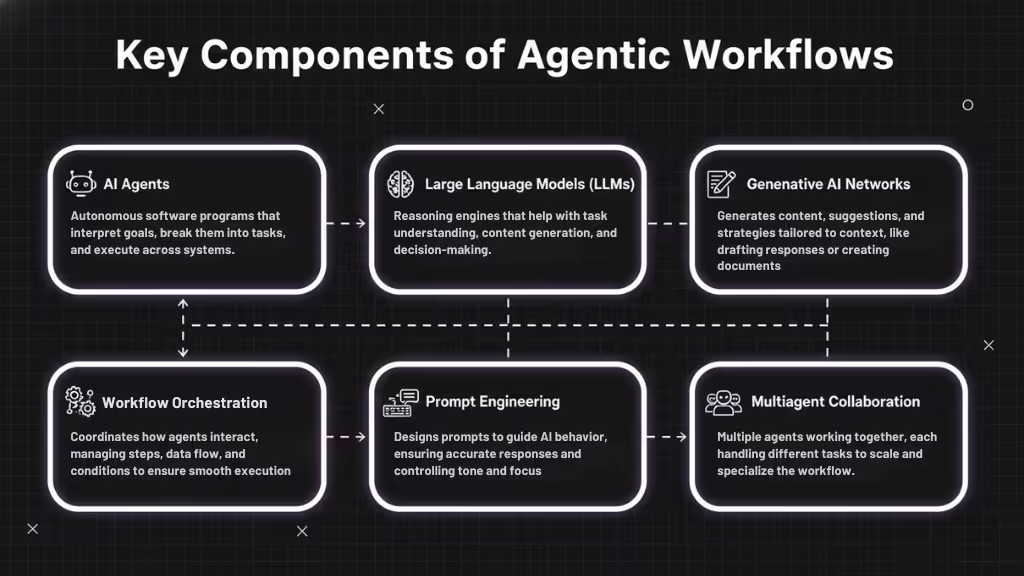
Agentic workflows rely on a mix of intelligent tools and architectural elements that allow them to operate independently while remaining observable, controllable, and auditable within defined constraints to achieve goals. Below are the key components that power these next-generation workflows:
AI Agents
At the heart of every agentic workflow is an AI agent an autonomous software entity that interprets goals, breaks them into tasks, and determines what actions to take across systems. Unlike rule-based bots, agents continuously evaluate new information and adapt their behavior based on outcomes.
Reasoning: planning and reflection
A key capability of AI agents is iterative reasoning, which allows them to actively “think” throughout the problem-solving process. This reasoning typically serves two functions:
Planning:
Agents perform task decomposition by breaking complex objectives into smaller, actionable steps. Planning may also involve query decomposition, where complex questions are split into simpler subqueries to improve accuracy and reliability when retrieving information or making decisions.
Reflection:
After actions are taken, agents evaluate outcomes against expectations, policies, or retrieved data. This reflection process allows them to adjust plans, retry steps, choose alternative tools, or escalate issues rather than repeating ineffective behavior.
Large Language Models (LLMs)
LLMs provide the core reasoning and language understanding capabilities that power AI agents. They enable agents to interpret natural language instructions, analyze unstructured data, generate structured outputs, and support both planning and reflection.
While LLMs are highly capable, their knowledge is static and parametric, meaning it is limited to information available during training. As a result, LLMs are paired with tools and memory to operate effectively in real-world, dynamic environments.
Generative AI Networks
Generative AI enables agents to produce new content, strategies, or recommendations based on context and goals. This includes drafting messages, generating reports, suggesting next-best actions, or proposing solutions within a workflow.
By generating outputs dynamically rather than relying on fixed templates, generative AI allows workflows to remain flexible while still operating within defined constraints and governance rules.
Workflow Orchestration
Workflow orchestration acts as the control layer that manages how agents, tools, and systems interact. It coordinates execution order, handles dependencies between steps, routes data across systems, and manages retries or failure handling.
In enterprise environments, orchestration also enforces permissions and safeguards, ensuring agents only perform actions they are authorized to execute and that workflows remain observable, auditable, and reliable at scale.
Prompt Engineering
Prompt engineering defines how agents interact with LLMs and shapes their behavior within the workflow. Well-designed prompts clarify goals, provide contextual instructions, enforce constraints, and control output structure or tone.
Prompt engineering also plays a role in determining how and when agents may use tools, helping guide reasoning without hardcoding logic into the workflow.
Multiagent Collaboration
In complex workflows, multiple agents may work together to achieve a shared goal. Each agent can specialize in a specific function, such as research, analysis, validation, or executio,n while sharing context and intermediate results.
This collaborative approach allows workflows to scale more effectively, handle complex tasks, and reduce the cognitive load placed on any single agent.
Tools and Memory (How Agents Act and Learn)
To move beyond static text generation, agents rely on external tools such as APIs, databases, web search engines, computational frameworks, and robotic process automation (RPA). These tools provide access to real-time data and enable agents to interact with other applications and systems.
When an agent selects and invokes a tool, it uses a mechanism often referred to as function calling, which extends its capabilities beyond language generation into real-world action. Tool selection may be predefined for simpler workflows or dynamically chosen by the agent for more complex tasks, depending on the level of flexibility required.
Memory enables agents to retain context and learn over time:
- Short-term memory stores immediate context such as conversation history, recent actions, and intermediate decisions, helping agents determine next steps within a workflow.
- Long-term memory persists information across sessions, allowing agents to personalize responses, retain knowledge, and improve performance over time.
These components work together to create workflows that are not just automated but autonomous, adaptive, and context-aware, with safeguards in place to ensure reliability and compliance.
Many of these components operate at the agent level, forming the internal capabilities of AI agents that are then coordinated through workflows and orchestration layers
Agentic Workflows vs. Traditional Workflows
Traditional workflows are rule-based systems that follow a fixed sequence of steps. They work well for simple, repetitive tasks like sending a confirmation email or updating a database. But they struggle when tasks become unpredictable or involve decision-making.
Agentic workflows, on the other hand, are dynamic and are often layered on top of existing rule-based systems rather than replacing them entirely. They use AI agents that can understand goals, adjust to new inputs, and change their approach midstream. Here’s how they compare:
| Feature | Traditional Workflows | Agentic Workflows |
|---|---|---|
| Structure | Fixed, linear | Dynamic, goal-driven |
| Decision-making | Predefined rules | Real-time reasoning |
| Adaptability | Low | High |
| Use of AI | Minimal | Core to operation |
| Error Handling | Manual exception handling | Context-aware adaptation |
| Best For | Simple, repetitive tasks | Complex, multi-step processes |
In essence, agentic workflows are built for complexity and are most effective when combined with traditional automation in hybrid architectures. They’re ideal for modern enterprise environments where tasks evolve, data changes quickly, and scale matters.
Benefits of AI Agentic Workflows for Complex Tasks
Agentic workflows bring major advantages to businesses managing complicated, multi-step tasks. By combining decision-making, automation, and adaptability, these workflows help teams work smarter, not just faster. However, implementing agentic workflows also introduces challenges related to system complexity, cost, monitoring, and governance that organizations must plan for early
1. Increased Flexibility
Agentic workflows adjust to changing conditions. If new data appears or priorities shift, the AI agent can replan and adapt without needing to rewrite code or restart the process.
2. Better Decision-Making
Agents can evaluate options, weigh pros and cons, and select the best path forward. They do this using machine learning models trained on historical data and real-time feedback.
3. Faster Execution
With multiple agents working in parallel or collaborating, businesses can handle large, complex tasks more quickly than with manual workflows.
4. Reduced Human Error
By automating decision-making and execution, agentic workflows reduce the risk of mistakes caused by fatigue, oversight, or incomplete information.
5. Scalability Across Teams
Agentic workflows aren’t locked to one team or tool. They can scale across departments from IT to HR to marketing while staying consistent in quality and output.
6. Enhanced User Experience
By responding to users in natural language and learning from interactions, agentic systems can deliver faster, more personalized support and service.
7. Continuous Learning and Improvement
These workflows can track their own performance, learn what works best, and improve over time. This creates a cycle of ongoing optimization.
In short, agentic workflows help organizations handle the complexity of modern work without getting stuck in rigid systems.
Challenges of AI Agentic Workflows
While agentic workflows offer powerful benefits, they also bring new challenges, especially for teams unfamiliar with AI systems or large-scale automation. Understanding these hurdles is key to building workflows that are both effective and trustworthy.
1. Data Quality and Integration
AI agents rely on accurate, timely data to make smart decisions. If your systems are siloed or your data is outdated, the workflow can fail or behave unpredictably.
2. Trust and Explainability
AI decisions can sometimes seem like a “black box.” Teams may struggle to understand why an agent made a certain choice, which can slow adoption or raise compliance concerns.
3. Oversight and Governance
Without clear guardrails, agents might take actions that conflict with company policies or user expectations. Human-in-the-loop oversight is often needed, especially early on.
4. Technical Complexity
Setting up agentic workflows involves more than plugging in a chatbot. It requires coordination across LLMs, APIs, orchestration layers, and possibly RPA tools, plus the skills to maintain them.
5. Cost and Resource Demands
Building and training AI agents can require significant time, expertise, and computing resources. Small teams may struggle to justify the investment without a clear ROI plan.
6. Change Management and Team Training
Agentic workflows often shift responsibilities and workflows. Without proper onboarding, employees may feel left out or resist the transition.
These challenges don’t mean you should avoid agentic workflows; they just mean success depends on careful planning, clear communication, and cross-functional collaboration.
Examples of AI Agentic Workflows
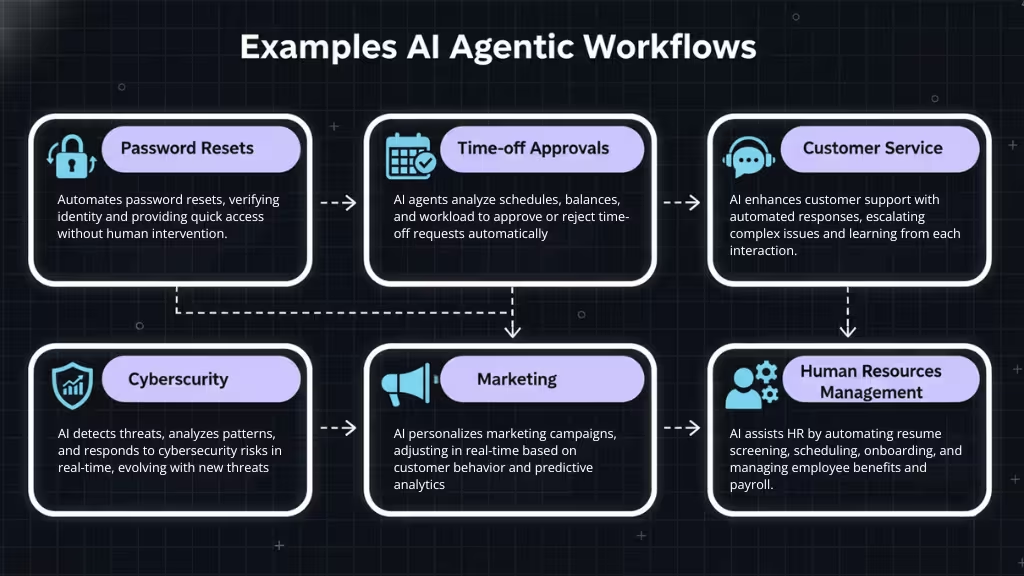
Agentic workflows can be used across many departments and business functions. Below are real-world examples where AI agents automate and adapt tasks that used to require human effort.
1. Password Resets
Password resets make up around 40% of all IT service desk calls. AI-powered systems can manage and automate these password resets so your employees don’t have to wait for assistance.
When someone forgets their password, AI helps by verifying their identity through multi-step processes, allowing them to regain access quickly. Agentic workflows can save time and reduce costs by automating this task. Requests are handled quickly around the clock, offering a smooth user experience.
2. Time-off Approvals
Approving time-off requests is a time-consuming task for HR departments, especially during peak vacation seasons. Automation can ensure requests are processed smoothly and without delays.
AI agentic workflows can simplify this by analyzing employee schedules, department needs, and workload impacts before granting approvals. An AI system uses reasoning to check against schedules, remaining leave balances, and workload impact, so that its decisions are well-informed.
HR departments can focus on more strategic tasks when they no longer have to handle time-off requests. Employees enjoy faster responses, making the process more fluid and predictable.
3. Customer Service
AI enhances customer service by providing instant adaptive responses to common inquiries and automating repetitive tasks. For example, in customer service automation, these systems can handle routine questions autonomously, escalating more complex issues to human agents with relevant context. This helps to speed up resolution times, improve customer satisfaction, and free up human agents to handle more complicated issues.
AI systems can continuously learn from interactions, so their responses improve over time. You can also integrate them with your CRM to provide personalized experiences through predictive analytics. Your customers enjoy consistent, high-quality interactions, and you improve your brand reputation and customer loyalty.
4. Cybersecurity
AI also plays a role in cybersecurity through dynamic threat detection and response capabilities. Instead of relying on fixed rules, these systems analyze patterns, detect anomalies, and adapt to new threats in real-time.
This proactive approach not only mitigates risks faster but also evolves to handle sophisticated cyber-attacks. It provides robust, ever-improving defense mechanisms for your organization.
AI’s monitoring systems are capable of acting swiftly during incidents, reducing response times and damage. These systems continually adjust to new threats, giving you improved protection for your organization’s sensitive data.
5. Marketing
AI can optimize marketing campaigns by analyzing customer behavior and tailoring content or ads to individual preferences. These workflows can autonomously adjust campaigns in real-time based on customer interactions and engagement data.
AI agents also use predictive analytics to forecast customer behavior, creating highly targeted promotions that improve conversion rates and drive sales. As the AI system learns more over time, it becomes even more effective at creating personalized and engaging content for each customer.
6. Project Management
Project management can benefit greatly from agentic workflows, especially when dealing with complex projects or teams. AI agents can track task progress, adjust timelines, and notify team members of any delays or updates.
These workflows can also assist with resource allocation by analyzing workloads, prioritizing tasks, and ensuring that the right team members are assigned to the right projects. By automating routine project management tasks, teams can focus on high-level strategic decisions and problem-solving.
7. Human Resources Management
AI-driven workflows in human resources (HR) can streamline a variety of tasks, from recruitment to onboarding. AI agents can help HR teams by screening resumes, scheduling interviews, and even providing initial responses to candidate inquiries.
Beyond recruitment, agentic workflows can assist with employee benefits management, payroll, and performance reviews by automating data entry, generating reports, and offering personalized feedback to employees. This not only saves time but also reduces administrative burdens, allowing HR teams to focus on employee engagement and strategic initiatives.
Steps for Implementing AI Agentic Workflows
Implementing AI agentic workflows involves more than just introducing new technology; it’s about laying the foundation for a system that can automate complex tasks, learn over time, and adapt to changing business needs. Follow these steps to ensure a smooth and successful implementation:
1. Assess Readiness
Before diving into agentic workflows, you need to evaluate your organization’s readiness. This step helps identify any gaps in your technology, data, and team knowledge that could hinder successful implementation.
- Data Quality: Are your data systems integrated? AI agents rely on accurate, structured data. If your data is siloed or inconsistent, your agentic workflows won’t function correctly.
- Technology Infrastructure: Do you have the computing power and systems in place to support AI? This could mean upgrading servers, adopting cloud solutions, or ensuring your current platforms are capable of handling AI integration.
- Team Skills: Is your team prepared for AI-driven changes? Your workforce must understand how to work with AI agents. This means evaluating skill gaps and considering whether to provide training on AI basics, data management, and monitoring systems.
- Stakeholder Buy-In: Make sure leaders across departments are on board with the shift. Whether it’s HR, IT, or customer service, each department should understand how agentic workflows will improve their specific functions.
2. Identify Automation Opportunities
Now that you’ve assessed readiness, it’s time to pinpoint where agentic workflows will have the biggest impact. Look for tasks that involve multiple steps or require real-time decision-making; these are ideal for AI agents.
- Repetitive Tasks: Focus on tasks that are highly repetitive and time-consuming, such as data entry, password resets, or onboarding. These tasks are great candidates for automation with agentic workflows.
- Multi-Step Processes: If a process requires several steps that involve decision-making or adaptation (like evaluating employee time-off requests or handling customer service tickets), AI agents can step in to make those decisions and adapt in real time.
- Data-Heavy Tasks: Tasks that require processing large volumes of data (e.g., fraud detection, risk assessment, or market analysis) can benefit from the AI’s ability to learn and process information quickly.
- Cross-Departmental Workflows: Tasks that span multiple departments or require coordination between various systems (e.g., approvals, reporting, or project management) can be optimized with agentic workflows, as they allow multiple agents to collaborate seamlessly.
By identifying the right tasks for agentic workflows, you can ensure the automation you’re implementing provides tangible value.
3. Select Your AI Agent
Once you’ve identified automation opportunities, the next step is to select the right AI agent framework. Your choice will depend on your specific needs, budget, and existing technology stack.
- Platform Selection: There are a variety of tools and platforms that support AI-driven workflows, including open-source frameworks like LangChain or Rasa, enterprise platforms like IBM Watsonx, or products from companies like Microsoft or UiPath. Choose the platform that aligns with your business requirements, whether it’s scalability, ease of integration, or specific features like natural language processing (NLP).
- Customization Needs: Some platforms offer pre-built workflows, while others allow for extensive customization. Determine whether your workflows require high levels of customization or if off-the-shelf solutions will suffice. For example, workflows for customer service might require custom NLP models to handle unique queries.
- AI Agent Capabilities: Consider the capabilities of the AI agent. Does it support multi-agent collaboration? Can it integrate with the tools your team already uses? Will it be able to handle complex decision-making tasks with the adaptability you need? Make sure the platform supports the flexibility required for your workflows.
4. Train Your Team
Implementing AI agentic workflows requires more than just choosing the right technology it also involves preparing your team to effectively use and manage AI-powered systems.
- AI Training: Employees must understand how agentic AI workflows work, especially when interacting with the AI agents. This includes understanding how workflows are triggered, how decisions are made, and how to step in when necessary (e.g., if the agent needs human oversight).
- Change Management: Introduce change management strategies to ensure a smooth transition. Help your team understand how AI will enhance their work rather than replace it. Address concerns about job displacement and highlight how these tools will empower employees to focus on higher-value tasks.
- AI Monitoring: AI agents are not “set and forget.” Teams need to be trained to monitor their performance. This involves looking at metrics like task completion rates, decision accuracy, and user satisfaction. Establish a system for flagging issues and troubleshooting when workflows go wrong.
- Collaboration with IT: Ensure your IT team is prepared to support AI workflows, from infrastructure to security concerns. They must understand how AI agents interact with existing systems, including data storage, software integrations, and any necessary security measures.
5. Test Each AI Agentic Workflow
Before scaling your agentic AI workflows across the entire organization, it’s important to test each one in a controlled environment. This allows you to identify any issues or inefficiencies that could arise when the workflows go live.
- Pilot Programs: Start with a small pilot program to test workflows in a specific department or function. For example, you might begin by automating password resets in the IT department before expanding to HR or customer service.
- Edge Cases and Exceptions: AI agents can handle a lot of scenarios, but they may struggle with edge cases or unexpected inputs. Test workflows thoroughly to see how the AI reacts to unusual situations and determine whether it can adapt appropriately.
- User Feedback: Collect feedback from the users interacting with the workflows, whether they’re internal employees or external customers. Their feedback can provide valuable insights into the system’s effectiveness, user-friendliness, and areas for improvement.
- Iterate and Improve: After gathering feedback and identifying any issues, adjust and improve the workflows before scaling. This might involve refining decision-making rules, adding more data sources, or enhancing integrations with other tools.
By testing workflows thoroughly, you ensure that they’ll operate smoothly and effectively at scale.
Conclusion
Agentic workflows represent a significant evolution in enterprise automation. They go beyond static scripts and rule-based bots by introducing AI agents that can plan, act, and adapt with built-in controls and monitoring. For enterprise software teams and AI researchers, this shift opens up new possibilities for scaling operations, improving decision-making, and driving innovation.
By combining tools like LLMs, RPA, and orchestration platforms, organizations can automate tasks once thought too complex for machines. But to succeed, teams must prepare: align systems, train staff, and roll out workflows thoughtfully.
Organizations that adopt agentic workflows thoughtfully and incrementally can gain a competitive edge by working smarter, not harder.
FAQs
What is an agentic workflow?
An agentic workflow is an AI-driven process where autonomous agents perform tasks, make decisions, and adapt as needed with appropriate oversight and governance controls. These workflows use AI technologies like machine learning, natural language processing, and robotic process automation to handle complex tasks.
How are agentic workflows different from traditional workflows?
Traditional workflows follow predefined rules and steps, which can be inflexible. In contrast, agentic workflows are dynamic, using AI agents that can adjust to changes in real time and make decisions independently.
Can agentic workflows be used in any industry?
Yes, agentic workflows can be applied in a wide range of industries, including IT, HR, customer service, marketing, finance, and cybersecurity. They are especially useful for complex, multi-step processes that require decision-making and adaptability.
What are the key benefits of agentic workflows?
Agentic workflows provide benefits such as increased flexibility, faster execution, reduced human error, better decision-making, scalability, and continuous learning. They can improve efficiency and accuracy while freeing up employees for higher-value tasks.
What challenges should I expect when implementing agentic workflows?
Challenges include data quality and integration, ensuring transparency and explainability of AI decisions, addressing security and governance concerns, and training staff to work with these new systems. Proper planning and oversight are essential for success.
How do I get started with implementing agentic workflows?
To implement agentic workflows, first assess your organization’s readiness and identify tasks suitable for automation. Then, select the appropriate AI agents, train your team, and test workflows in a controlled environment before scaling.
Are agentic workflows fully autonomous?
No. Most production agentic workflows operate with defined constraints, monitoring, and human-in-the-loop controls. While agents can act independently within boundaries, critical decisions often require validation, approvals, or escalation to ensure safety and compliance.
Do agentic workflows use large language models (LLMs)?
Yes. LLMs commonly power reasoning, planning, and reflection in agentic workflows. However, LLMs are typically combined with tools, orchestration layers, and memory systems to enable real-world actions and reliable execution beyond text generation.
How do agentic workflows handle failures or incorrect actions?
Agentic workflows are designed to expect failure. They include retries, fallback strategies, replanning logic, and escalation paths. If an action fails or produces unexpected results, the agent adapts its plan instead of stopping or repeating the same step.
What role does orchestration play in agentic workflows?
Orchestration manages execution order, dependencies, retries, permissions, and state tracking. It ensures that agent actions occur safely and predictably, making agentic workflows observable, auditable, and scalable in production environments.
How do agentic workflows interact with external systems?
Agentic workflows interact with external systems through tools such as APIs, databases, RPA bots, and search services. Agents use function calling to select and invoke tools dynamically, enabling real-time data access and system-level actions.
Do agentic workflows use memory?
Yes. Agentic workflows use short-term memory to track current task context and long-term memory to retain knowledge across sessions. Memory allows agents to behave consistently, avoid repeating mistakes, and improve performance over time.
What are the risks of using agentic workflows?
Key risks include over-autonomy, poor validation, unclear governance, and integration complexity. These risks are mitigated through orchestration, approval gates, monitoring, and careful scoping of agent permissions.
Are agentic workflows replacing RPA?
No. Agentic workflows complement RPA rather than replace it. RPA handles execution of repetitive tasks, while agents provide decision-making and adaptability, especially in complex or changing scenarios.
This page was last edited on 22 December 2025, at 5:22 pm
Contact Us Now

Contact Us Now
Start a conversation with our team to solve complex challenges and move forward with confidence.


