
Microsoft Power Automate can cost $0 with Microsoft 365, while paid plans start at $15/user/month for Premium, $150/bot/month for unattended RPA, and $215/bot/month for Hosted Process. Bigger teams may also pay $500/unit/month for AI Builder or $5,000/tenant/month for Process Mining, so the real cost depends on users, bots, premium connectors, and add-ons.
If you’ve ever tried to make sense of Microsoft Power Automate‘s pricing, you’re not alone. Between what’s bundled in Microsoft 365, the standalone paid plans, RPA add-ons, and AI Builder credits, the real cost isn’t always obvious at first glance.
Here’s the short answer: Microsoft Power Automate paid plans start at $15/user/month and go up to $215/bot/month, with a free tier included in most Microsoft 365 subscriptions. But what you actually end up paying depends heavily on your use case.
That’s why we put this Microsoft Power Automate Cost guide together: to cut through the pricing confusion and show what real teams should expect to pay. Instead of just listing plan names, we’ll break down the free Microsoft 365 access, Premium licenses, RPA pricing, AI Builder credits, Process Mining costs, and the hidden fees that often show up after deployment.
Microsoft Power Automate Pricing at a Glance
| Plan | Price | Best For |
|---|---|---|
| Free (M365 included) | $0 | Standard connector automations within Microsoft 365 |
| Power Automate Premium | $15/user/month | Premium connectors + attended RPA |
| Power Automate Process | $150/bot/month | Unattended RPA bots (no human required) |
| Power Automate Hosted Process | $215/bot/month | Unattended RPA on Azure-hosted machines |
| Process Mining (add-on) | $5,000/tenant/month | Enterprise process discovery and analysis |
| AI Builder (add-on) | $500/unit/month | Advanced ML and document intelligence |
All paid plans are billed annually. A 30-day free trial is available for the paid tiers.
What’s Free with Microsoft 365?
If your organization already runs Microsoft 365 Business Basic, Business Standard, E3, or E5, you already have Power Automate—with limits.
The included version covers standard connectors only, meaning you can automate between Microsoft apps like Outlook, SharePoint, Teams, and Excel without paying a cent extra. For many teams whose workflows live entirely in the Microsoft ecosystem, this is genuinely enough.
What’s locked behind a paywall:
- Premium connectors (Salesforce, SAP, Oracle, SQL, HTTP, custom APIs)
- Attended robotic process automation (RPA) via Power Automate Desktop
- Unattended RPA bots
- AI Builder for document processing and prediction models
- Process Mining for workflow analysis
So before you budget for Power Automate, check whether your existing M365 license already covers what you need.
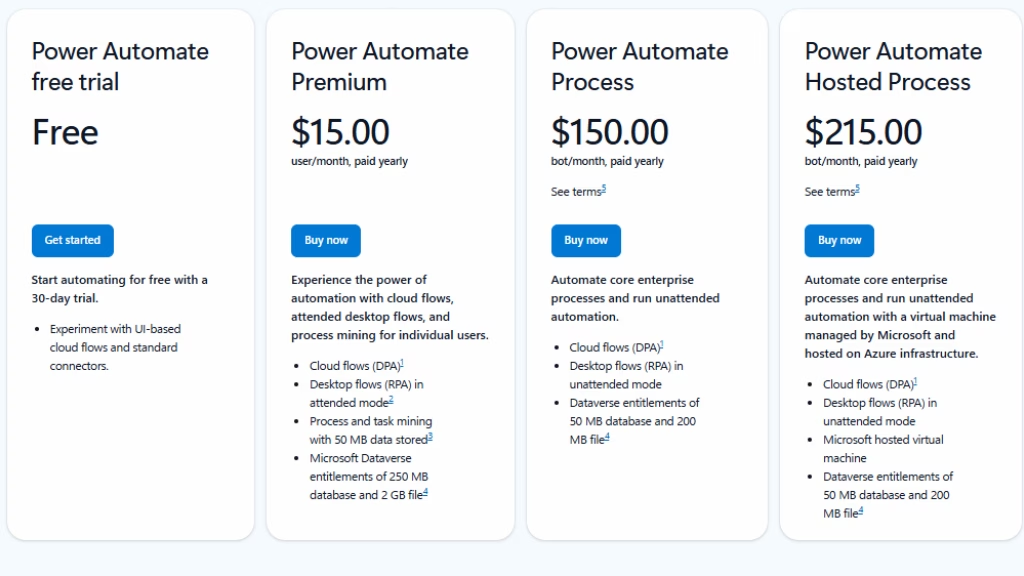
Pricing verified as of June 2026. Microsoft pricing is subject to change; always confirm current rates at the official Power Automate pricing page before purchasing.
Power Automate Premium — $15/user/month
The entry-level paid plan is the most popular for business teams. At $15 per user per month (billed annually), it unlocks:
- Unlimited cloud flows (digital process automation)
- Unlimited attended desktop flows (UI-based RPA)
- Premium connectors — including Salesforce, SAP, SQL, and custom APIs
- 250 MB Dataverse database storage per user
- 5,000 AI Builder credits per month
- Process Mining (up to 50 MB per user, max 100 GB per tenant)
Who it’s for: Teams that need to connect to non-Microsoft services or want to automate legacy desktop applications through attended RPA. If you have employees interacting with older Windows apps that lack APIs, this is your plan.
Real-world cost example: A 20-person ops team on Premium = $300/month. If that automation replaces two hours of manual work per person per week, the ROI is immediate.
The catch: Attended RPA means a user must be logged in when the flow runs. For overnight or batch processing, you need the next tier.
Power Automate Process — $150/bot/month
This is where Power Automate shifts from per-user to per-bot licensing. The Process plan is built for unattended automation—flows that run in the background without anyone sitting at a machine.
Each bot license includes:
- Unlimited unattended desktop flow runs
- All cloud flow capabilities
- One bot can execute one unattended flow at a time
- Multiple licenses are required for concurrent runs
Who it’s for: Finance teams running overnight invoice processing, manufacturing teams doing automated data migration, or any organization with high-volume, repetitive batch work. The ROI is strong when you’re replacing significant manual labor.
Important: The pricing switches from per-user to per-bot here. If you need four parallel unattended processes running simultaneously, you’re looking at $600/month in bot licenses alone—before factoring in Premium licenses for the users building and managing those flows.
Power Automate Hosted Process — $215/bot/month
The Hosted Process plan adds one key feature over the standard Process plan: Microsoft provides and manages the virtual machine. You don’t need to maintain your own RPA infrastructure on-premises.
What’s included:
- Everything in the Process plan
- Azure-hosted VM managed by Microsoft
- No need for on-premise machine management
Who it’s for: Organizations that want the full power of unattended automation without the overhead of managing their own RPA servers. It’s particularly clean for teams already running Azure infrastructure, though it does increase vendor dependency on the Microsoft stack.
Add-On Microsoft Power Automate Costs to Know About
The base plan prices are just the starting point. Several add-ons significantly impact the real total cost of Power Automate at scale.
AI Builder — $500/unit/month
AI Builder adds machine learning capabilities like document processing, form recognition, object detection, and prediction models. The Premium plan includes 5,000 credits per month, but heavy usage—especially processing large document volumes—will burn through credits fast and require additional units.
Process Mining — $5,000/tenant/month
This is the big one that catches teams off guard. Process Mining lets you discover, visualize, and analyze business processes to identify automation opportunities before you build them. It’s priced at the enterprise level and is only available as an add-on to the Premium plan.
For a large organization with complex, multi-department processes, the value can justify the cost. For most teams, it’s an easy skip.
Premium Connectors
Premium connectors aren’t a separate line item—they’re gated behind the Premium plan. But if you currently have the free M365 tier and connect to Salesforce, ServiceNow, or custom APIs, that’s the cost driver pushing you to $15/user/month.
What Does Power Automate Actually Cost for Real Teams?
Power Automate pricing looks simple on paper, but the real cost depends on how many users need premium features, whether you use RPA bots, and whether advanced tools like Process Mining are required. Here’s what common team scenarios can look like in practice:
| Team Scenario | Estimated Monthly Cost | What It Covers |
|---|---|---|
| Small business with 10 users using only Microsoft 365 workflows | $0/month | Basic automations included with Microsoft 365, such as email notifications, SharePoint approvals, and Teams alerts. |
| 10-person team needing Salesforce integration | $150/month | 10 Premium users at $15/month each for premium connectors and attended automation. |
| 50-person enterprise team using attended RPA | $750/month | 50 Premium users at $15/month each, useful for automating legacy desktop apps with attended workflows. |
| Enterprise using 4 unattended bots + 10 Premium users | $750/month | 4 unattended bots at $150/month each plus 10 Premium users at $15/month each. This is where costs can rise quickly. |
| Large organization using Process Mining | $5,750/month | $750/month for users and bots, plus $5,000/month for Process Mining. Best suited for mature automation programs. |
For small teams already using Microsoft 365, Power Automate can be nearly free for basic workflows. But once you add premium connectors, attended RPA, unattended bots, or Process Mining, the monthly cost increases fast. The biggest budget jumps usually come from unattended bot requirements and advanced enterprise analytics.
Hidden Microsoft Power Automate Costs Most Buyers Miss
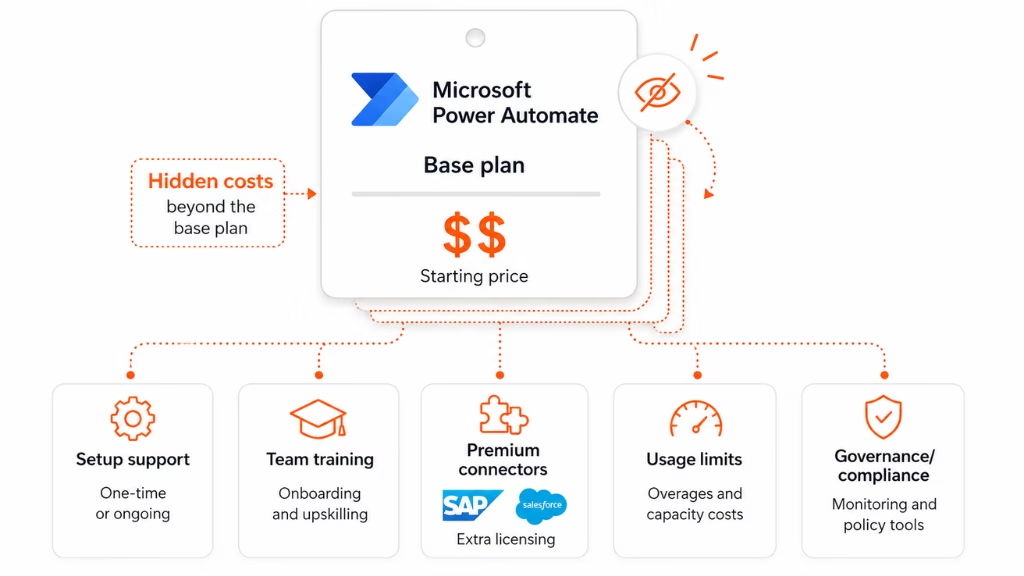
Beyond the licensing fees, there are costs that show up later in real deployments:
Implementation and setup
Complex automation programs often require a consultant or dedicated IT resource to design, build, and govern flows properly. This is especially true for RPA and multi-department rollouts.
Training
Power Automate has a learning curve, particularly for desktop flows and advanced connectors. Factor in time for upskilling or external training.
Connector licensing
Power Automate Premium unlocks access to premium connectors—but you still need valid licenses for the connected services (Salesforce, SAP, etc.).
API request limits
Each licensed user and flow has a daily limit on Power Platform requests. High-volume automation hitting these limits can throttle performance without a clear warning.
Governance overhead
As automation scales across departments, organizations often need dedicated tooling and personnel to manage flow governance, error handling, and security compliance.
Is Power Automate Worth the Cost?
For most organizations already paying for Microsoft 365, Power Automate is a no-brainer up to the standard connector tier—it’s included. The $15/user/month Premium plan is cost-effective the moment it replaces meaningful manual work, which is almost always true for any real automation use case.
The cost-benefit equation gets more complex at the RPA tier. Unattended bots at $150/month each are only worth it if the processes they’re replacing have significant labor costs or error rates. Run the ROI math before committing: what does the manual process cost in hours per month × hourly rate vs. $150/month per bot?
Power Automate is the right choice if:
- Your team is already Microsoft-first (M365, Azure, Dynamics)
- You need tight SharePoint, Teams, or Outlook integrations
- You require attended or unattended desktop RPA
- You’re a mid-market or enterprise organization with IT resources to manage governance
Consider alternatives if:
- Your stack is heavily non-Microsoft
- You want simpler pricing without per-seat complexity
- You need a larger library of native integrations out of the box
How to Get the Best Price on Power Automate
Use what’s already included. Audit your M365 licenses before buying standalone Power Automate plans. Many workflows can be built at no extra cost.
Buy annually. Power Automate plans are priced for annual billing. Month-to-month pricing, if available, is typically higher.
Start with Premium, not Process. Many organizations buy unattended RPA bots before they’ve maximized attended automation. Start with the $15 Premium plan, prove out the use cases, then scale to bots when you have clear ROI.
Negotiate for volume. Microsoft offers enterprise agreements and volume licensing. For organizations with 100+ seats, contact Microsoft directly or work with a Microsoft partner for custom pricing.
Use the 30-day free trial. The trial gives full Premium access to test your exact workflows before committing.
Frequently Asked Questions
Does Power Automate have a free plan? T
here’s no standalone permanent free plan, but Power Automate is included at no extra cost with Microsoft 365 Business and Enterprise subscriptions for standard connector flows. A 30-day free trial is available for Premium features.
What’s the difference between attended and unattended RPA in Power Automate?
Attended RPA (included in Premium) requires a user to be logged into the machine when the flow runs. Unattended RPA (Process plan) runs in the background on a bot without human interaction—ideal for overnight batch processing.
Can I use Power Automate without Microsoft 365?
Yes. The Premium, Process, and Hosted Process plans are available as standalone subscriptions. You don’t need M365 to purchase them.
What are premium connectors in Power Automate?
Premium connectors are integrations with third-party or advanced services like Salesforce, SAP, Oracle, SQL Server, and custom HTTP APIs. They require a Premium plan or higher—they’re not available on the free M365-included tier.
How does Power Automate licensing work for flows used by many people?
If a flow uses premium features, the user who triggers it needs a Premium license. Alternatively, the Process plan’s bot licensing allows unlimited users to benefit from a single automation without individual per-user licensing.
Is Power Automate included with Microsoft 365 E3 or E5?
Yes, but only for flows using standard Microsoft 365 connectors. Premium connectors and RPA capabilities require an additional Premium license.
The Bottom Line
Microsoft Power Automate pricing ranges from free (with M365) to $215/bot/month, with most teams landing on the $15/user/month Premium plan as their starting point. The pricing is competitive for Microsoft-first organizations, but the jump to unattended RPA—and especially enterprise add-ons like Process Mining—can push costs significantly higher than the headline price suggests.
Do your homework upfront: audit your M365 entitlements, map out whether you need attended or unattended automation, and model your bot count before committing to the Process tier. That’s where the budget surprises happen.
For most teams already inside the Microsoft ecosystem, Power Automate delivers strong ROI at the Premium tier. Start there, prove the value, then scale.
This page was last edited on 30 June 2026, at 3:48 pm

Start a conversation with our team to solve complex challenges and move forward with confidence.