


Digital transformation in the insurance industry is no longer optional—customers expect seamless, mobile-first experiences from their insurers. As traditional carriers face pressure from InsurTechs, the ability to deliver efficient, secure, and user-centric insurance apps has become an industry imperative.
Building an insurance app today isn’t just about technology—it’s about driving efficiency, winning customer loyalty, and ensuring regulatory compliance. This guide breaks down the end-to-end insurance app development process, helping decision-makers avoid common pitfalls, clarify costs, and build future-proof digital products. Follow our actionable framework on how to build an insurance app to move from idea to launch with confidence.
What Is an Insurance App and Why Is It Critical?
An insurance app is a dedicated digital solution—typically on mobile or web—that allows customers, agents, or employees to manage policies, file claims, make payments, and access support seamlessly. Unlike traditional insurance software, these apps are designed for real-time accessibility, ease of use, and mobile-first engagement.
Key business scenarios include:
- Claims management: Customers can file and track claims digitally.
- Policy administration: Digital onboarding, renewals, and updates.
- Customer self-service: 24/7 access to policy documents, payments, and support.
- Agent enablement: Dedicated portals for quotes, CRM, and reporting.
Effective insurance apps drive operational efficiency, increase policyholder satisfaction, and can set insurers apart in a crowded market. According to McKinsey, digital leaders in insurance report improved customer retention and lower servicing costs compared to laggards.
Which Types of Insurance Apps Exist—and Who Are the Users?

Insurance apps vary based on both the target business line and the user role. Understanding these segments is crucial for defining project scope and feature sets.
| App Type | Main Users | Key Use Cases |
| Health Insurance | Policyholders, Agents | Claims filing, telemedicine, benefits tracker |
| Auto Insurance | Drivers, Agents | Accident reporting, policy renewal, roadside assist |
| Life Insurance | Policyholders, Beneficiaries | Policy management, premium tracking |
| Travel Insurance | Travelers | Policy purchase, claims on the go |
| Business Insurance | Owners, Brokers | Multi-policy dashboards, claims, analytics |
| Agent Portals | Agents, Employees | CRM, quoting, reporting, lead management |
Mapping features and design to these user roles ensures the app meets real-world needs—for example, a health insurance app often includes a provider finder and telemedicine, while a business insurance app prioritizes multi-policy management and analytics.
What Features Should an Insurance App Include (by User & App Type)?
Every insurance app must address must-have functionality, role-specific workflows, and compliance requirements. Here’s a practical checklist:
Essential Features (for all app types):
- Policy search and management
- Digital onboarding and e-signature capture
- Claims initiation and tracking
- Payments and billing history
- Secure document uploads/downloads
Agent-Specific Features:
- Quote engine and comparative pricing
- Integrated CRM and contact management
- Analytics dashboards and reporting tools
Compliance & Security Features:
- Multi-factor authentication (MFA)
- Encrypted data transmission and storage
- Detailed audit trails
- User consent management (for GDPR, etc.)
Advanced/Nice-to-have:
- AI chatbot for support and claims triage
- Push notifications for renewals and alerts
- Telemedicine (health), accident reporting (auto)
- In-app video calls or messaging
A well-planned feature set reduces rework, maximizes ROI, and ensures the app can scale as user expectations evolve.
What Are the Non-Negotiable Compliance and Security Requirements?

Strict compliance and robust security are table stakes in insurance app development, given the sensitivity of customer data and regulatory scrutiny.
Core Regulations:
- GDPR: Data privacy for EU users
- HIPAA: Health insurance and personal health information (US)
- PCI DSS: Secure handling of payment data
- AML/KYC: Anti-money laundering and identity verification (onboarding)
Security Pillars:
- End-to-end encryption (in transit and at rest)
- Multi-factor authentication (MFA)
- Secure user account and session management
- Regular penetration testing and vulnerability scans
Other Considerations:
- Multi-market compliance: Apps serving multiple geographies require localization and alignment with regional laws.
- Accessibility: ADA (US), WCAG (global) compliance to serve all customers.
- App store privacy and security requirements for approval/distribution.
Ignoring these requirements can lead to rejected app submissions, data breaches, and substantial fines.
Step-by-Step: How to Build an Insurance App Successfully
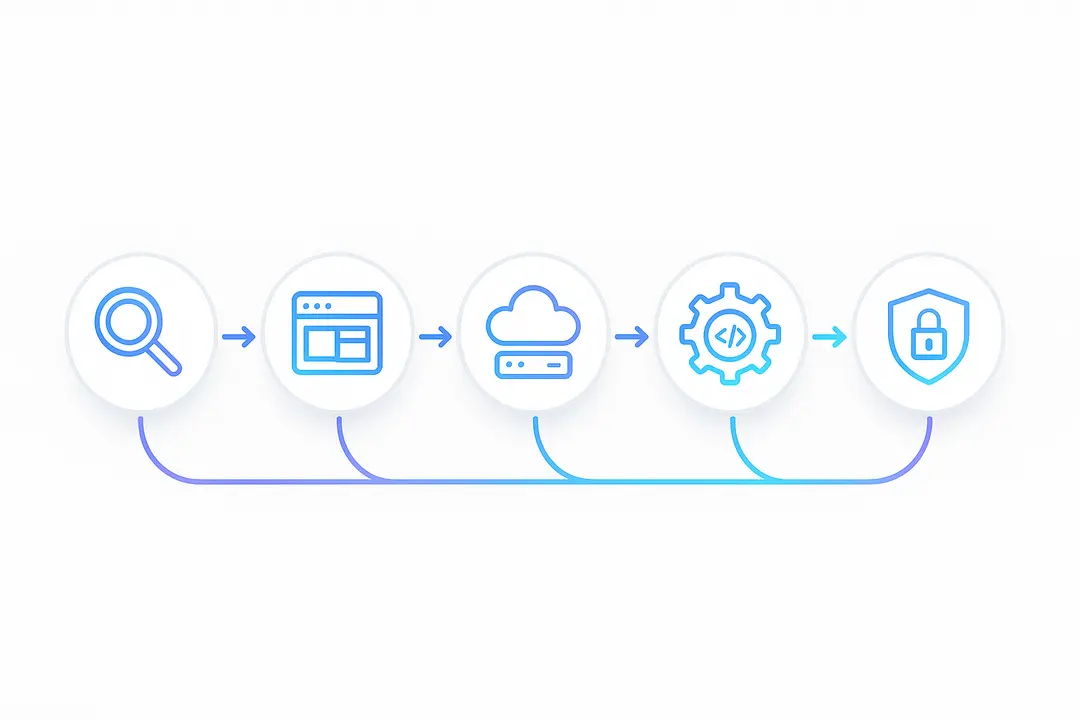
Project Discovery & Goal Setting
Start with a deep dive into business objectives, user needs, and compliance scope.
- Conduct stakeholder mapping (product, legal, IT, compliance).
- Analyze competitors and existing solutions.
- Draft detailed requirements (including regulatory).
- Identify integration touchpoints with legacy/core systems.
UX/UI Design & Prototype Creation
Prioritize user-centric design validated by real feedback.
- Map user journeys for each persona (customer, agent, admin).
- Create interactive prototypes (using Figma, Adobe XD).
- Ensure accessibility is tested early (color contrast, readable fonts).
- Iterate designs with stakeholder and user input.
Tech Stack & Architecture Selection
Choose technology based on project scale, timeline, and required integrations.
| Build Type | Pros | Cons |
| Native (iOS/Android) | Best performance, deep hardware access | Higher cost, longer development |
| Cross-platform (React Native, Flutter) | Faster dev, code reuse | Slightly lower performance |
| Low/No-Code | Rapid prototyping, lower cost | Limited customization, scalability |
Decide on backend: Cloud-native (AWS, Azure) for scalability; API-first architecture. Assess 3rd-party integration needs: payment gateways, policy systems, analytics tools.
Agile Development & Integration
Structure agile sprints for manageable modules and compliance by design.
- Divide into functional modules (onboarding, claims, payments, etc.).
- Integrate with legacy/core systems using established patterns (APIs, middleware).
- Use compliance checklists in each sprint to prevent security/regulatory gaps.
Testing, Security & Compliance Validation
Multiple testing layers ensure both app stability and regulatory readiness.
- Run automated and manual QA tests for all user flows.
- Penetration testing for security vulnerabilities.
- User acceptance testing (UAT) by business and end-users.
- Prepare compliance documentation for audits and app store submissions.
Deployment & Scaling
Deploy in phases to capture early feedback and ensure reliability.
- Submit to app stores (Apple, Google), following listing and security guidelines.
- Use CI/CD pipelines for continuous delivery and updates.
- Start with beta/soft launch; monitor for bugs, crashes, and real-user issues.
- Plan scaling for peak usage periods and business growth.
Post-Launch Maintenance and Evolution
Continuous improvement is key for retention and innovation.
- Monitor analytics: usage data, feature adoption, crash reports.
- Establish feedback loops and support channels.
- Release regular updates: security patches, compliance updates, new features.
- Maintain a feature roadmap informed by user needs.
Following this step-by-step insurance app development process reduces planning risk and ensures a robust, compliant, and scalable solution.
How Much Does It Cost to Build an Insurance App?
Costs for insurance app development vary—primarily depending on complexity, required integrations, compliance needs, and delivery region.
| App Complexity | Estimated Cost | Typical Timeline | Example Features |
| Simple App | $60,000 – $120,000 | 3–6 months | Claims, policy view, payments |
| Advanced App | $120,000 – $250,000 | 6–9 months | CRM, e-signature, reporting |
| Enterprise/Custom | $250,000+ | 9–15 months | Multi-market, analytics, AI, legacy integration |
Main cost drivers:
- Custom integrations (core systems, payment gateways)
- Compliance and security features
- Advanced UX/UI and cross-platform delivery
ROI factors:
- Ongoing maintenance and enhancement can represent 15–20% of initial build costs per year.
- Investing in scalable architecture and user research upfront reduces costly post-launch rework.
Should You Build In-House or Outsource? (Vendor Models Compared)
Choosing between in-house development and outsourcing impacts cost, control, and speed.
| Model | Pros | Cons |
| In-House | Full control, knowledge retention | Higher cost, longer ramp-up, hiring/training overhead |
| Outsourced Team | Access to expertise, faster start, cost flexibility | Less control, vendor management/confidentiality |
| Staff Augmentation | Bridge skill gaps, flexible scale | Cultural/alignment challenges, process integration |
When to Insource: If you have a strong IT team, regulatory needs, or wish to own all IP.
When to Outsource: For faster delivery, cost efficiency, or access to proven InsurTech experts.
A hybrid model—core leadership in-house, specialist functions outsourced—is common for successful insurance app projects.
How to Select the Right Insurance App Development Partner
Choosing the right vendor is critical. Use a systematic vendor vetting and selection process to lower risk.
Checklist for partner evaluation:
- Proven insurance industry experience and relevant case studies
- Strong compliance and security expertise (GDPR, HIPAA, PCI DSS)
- Robust in-house team (not just freelancers/outsourced devs)
- Certifications (ISO, SOC, etc.)
- Positive client references and testimonials
Key questions to ask:
- What regulatory frameworks have you implemented before?
- Can you provide references in the insurance sector?
- How do you ensure post-launch support?
Warning signs:
- Vague proposals lacking project milestones or compliance detail
- Pushback or evasiveness about security practices or audits
A well-run RFP process, including demos and reference checks, helps reduce surprises and sets the stage for project success.
What Are the Biggest Challenges and How to Mitigate Them?
Building an insurance app is complex, with frequent hurdles. Being proactive about these obstacles prevents costly missteps.
Common pitfalls:
- Legacy system integration: Outdated core systems can slow new app development—use middleware or API gateways.
- Data migration: Cleaning and migrating old data requires careful planning and validation.
- Compliance gaps: Missing regulatory details can stall launches or trigger penalties.
- Poor UX: Ignoring real user needs leads to low app adoption.
Risk mitigation tactics:
- Conduct thorough discovery and user research upfront.
- Stage rollouts with pilot users to catch issues early.
- Build continuous feedback and validation into project sprints.
- Invest in change management and user training to drive adoption.
Learning from industry case studies—including failed launches—helps anticipate and avoid recurring problems.
Internationalization, Accessibility, and Global Compliance: What’s Often Overlooked?
Insurers with global or diverse user bases must design with internationalization, localization, and accessibility as core goals—not afterthoughts.
Critical strategies:
- Language support: Offer multiple languages; plan for region-specific content.
- Regional compliance: Adapt to varying rules (GDPR, CCPA, APAC standards).
- Accessibility: Follow ADA/WCAG 2.1 guidelines for app usability by all, including users with disabilities.
- Cross-border data flows: Prepare for legal constraints on where data is stored and transmitted.
Cautionary tales: Several high-profile insurers have faced delays or fines from misaligned localization, underscoring the cost of neglecting these requirements.
Real-World Case Studies and Lessons Learned
Case 1: Health Insurance App Launch
A regional health insurer launched a customer-facing app focusing on digital onboarding, claims, and telemedicine. By involving compliance and UX teams early, the firm achieved a six-month launch, 25% higher user NPS, and a 15% reduction in phone support calls.
Case 2: Legacy Insurer Goes Digital
A multi-line insurance provider modernized its decades-old systems, integrating with cloud-first microservices and mobile frontends. Initial missteps—including underestimating data migration complexity—were resolved by engaging a hybrid in-house and vendor team. The project delivered a 20% faster quote process and sharp increase in consumer digital engagement.
Key metrics to watch:
- User adoption rates
- Customer NPS (Net Promoter Score)
- Claims processing time
- Cost per acquisition and operational savings
Key Takeaways Table: Building Your Insurance App Roadmap
| Pillar | Summary |
| Essential Steps | Discovery → Design → Stack Selection → Dev & Integration → Testing → Deployment → Maintenance |
| Must-Have Features | Policy, claims, payments, security, compliance |
| Cost & Timeline | $60K–$250K+, 3–15 months based on scope |
| Vendor Selection | Prioritize compliance, experience, references |
| Ongoing Success | Continuous updates, analytics, feedback loops |
Frequently Asked Questions (Insurance App Development)
What are the main steps to build an insurance app?
The key steps include project discovery, UX/UI design, selecting the tech stack, agile development, integrating core systems, thorough testing for security and compliance, app store deployment, and post-launch maintenance.
How much does it cost to develop an insurance app?
Costs typically range from $60,000 for simple apps to $250,000+ for complex enterprise solutions. Actual budgets depend on features, integrations, compliance, and geography.
What features should an insurance app include for policyholders and agents?
Must-have features for policyholders include policy management, claims, payments, and support. Agents benefit from CRM, quoting tools, reporting, and alerts.
How do you ensure security and regulatory compliance in insurance apps?
Follow established regulations like GDPR and HIPAA, implement strong data encryption, deploy multi-factor authentication, maintain audit trails, and run regular penetration tests.
Which tech stack is best for insurance app development?
Choose between native (Swift/Java/Kotlin) for performance, cross-platform (React Native, Flutter) for speed, or low-code platforms for prototypes, based on goals and required integrations.
What are common challenges in insurance app development?
Top challenges include integrating with legacy systems, handling data migration, achieving compliance, and ensuring good user experience.
How to integrate legacy systems with a new insurance app?
Use modern APIs, middleware solutions, and thorough data mapping strategies. Pilot test integrations early to resolve issues.
Should you build your insurance app in-house or outsource development?
In-house teams offer more control but higher costs; outsourcing brings faster, more cost-effective access to specialized talent.
How do you maintain and update an insurance app post-launch?
Regularly release feature updates, security patches, and compliance fixes. Monitor usage analytics and user feedback for ongoing improvements.
What is the typical timeline for insurance app development?
Simple apps can launch in as little as 3–6 months, while enterprise projects often require 9–15 months.
Conclusion
Building a successful insurance app in 2026 demands more than development skills—it requires deep industry understanding, user-first design, regulatory expertise, and a disciplined process. By following this guide’s proven framework, you can navigate complexity, control costs, and deliver a compliant, high-value solution to customers and stakeholders.
Ready to map your roadmap or choose a development partner? Download our comprehensive insurance app build checklist, estimate your project costs, or consult with insurance technology experts to get started on your digital transformation.
This page was last edited on 7 March 2026, at 12:57 pm

Start a conversation with our team to solve complex challenges and move forward with confidence.










