


- What Is an AI Voice Agent?
- How Does an AI Voice Agent Work?
- How to Build an AI Voice Agent: Step-by-Step Process
- Testing, QA & Monitoring AI Voice Agents
- How to Design Prompts & Behaviours for AI Voice Agents
- Key Features of an AI Voice Agent Platform
- Real-Life Examples of Companies Using the Best AI Voice Agents
- AI Voice Agent Development Challenges & How to Overcome Them
If you’re looking to build an AI voice agent, you’re entering one of the fastest-moving areas in tech. The best voice agents today don’t just answer questions; they handle full conversations, understand intent, adapt to tone, and complete real tasks from start to finish. And the gap between a basic bot and a truly capable voice agent comes down to how well you design, build, and train it.
The good news? You don’t need a huge engineering team to create one. You just need to understand the core components that make voice AI work, how they fit together, and the right approach for your use case.
This guide breaks down everything you need: the key technologies, the building process, the platform features that matter, real examples from companies already using voice AI, common challenges, and what it actually costs to build an agent that feels natural and reliable.
If your goal is to create an AI voice agent that responds instantly, speaks naturally, and actually gets things done, let’s start here.
What Is an AI Voice Agent?
An AI voice agent is a software system that can carry out a conversation with a person using spoken language. Instead of relying on rigid phone menus or scripted responses, a modern voice agent can understand what someone says, interpret the intent behind it, and reply in a natural-sounding voice.
At its core, a voice agent is designed to handle tasks that normally require a human on a call answering questions, troubleshooting issues, booking appointments, gathering information, or routing a conversation to the right place. It listens, reasons, and responds in real time, enabling businesses to offer fast, consistent, always-available support without putting customers on hold.
The key difference between yesterday’s voice bots and today’s AI voice agents is flexibility: people can speak naturally, interrupt, change direction mid-sentence, or ask follow-up questions, and the system is able to keep up.
How Does an AI Voice Agent Work?
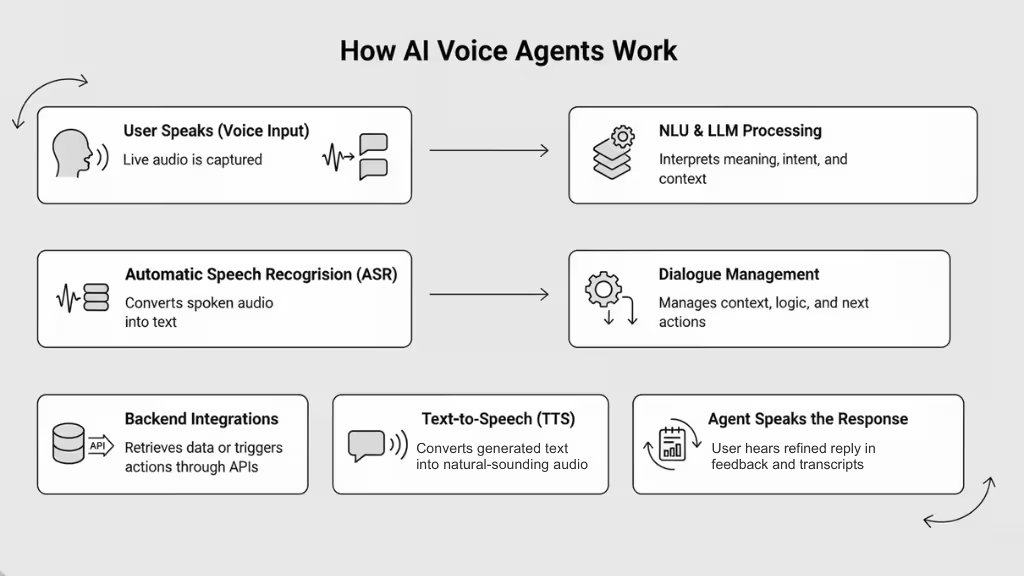
An AI voice agent is powered by a set of core and supporting components that together enable real-time, natural, voice-based conversation. Below is a breakdown of how the system works under the hood:
Core Technologies (the “Engine”)
- Automatic Speech Recognition (ASR): The “ears” of the system. ASR converts incoming audio (speech) into text, allowing the system to understand what the user said even in realistic conditions: background noise, different accents, overlapping speakers.
- Natural Language Understanding (NLU) & Processing (NLP / LLMs): Once speech is transcribed, NLU (or an LLM-based pipeline) interprets meaning, intent, context, and entities. This is the “brain” that figures out: What does the user want? What action is appropriate?
- Text-to-Speech (TTS): The “voice” of the agent. After determining what to say, TTS synthesizes a natural-sounding spoken response, handling prosody, pause, and intonation making the conversation feel fluid rather than robotic.
Supporting & Orchestration Components (the “Conductor”)
- Dialogue Management / Conversation Flow Controller: This module orchestrates the conversation: it keeps track of context (previous exchanges, session state), handles follow-ups, manages turn-taking or interruptions, and decides the next action. It links together input (ASR → NLU), logical reasoning/routing (LLM or business logic), and output (TTS).
- Real-Time Processing / Streaming Support: For natural conversations, latency (delay) matters. Many modern voice agents rely on streaming ASR and low-latency TTS to minimize delay between user speech and agent response so conversation feels immediate rather than delayed.
- Integration & Backend Connectivity (APIs, Databases, Logic): Real-world voice agents often need to fetch data, perform actions (schedule an appointment, pull up user info, route calls). The NLU or LLM layer passes structured intent/data to backend services, and the response may depend on external data.
- Optional: Continuous Learning & Feedback Loop: Some advanced systems store transcripts, user feedback or metrics from interaction to retrain or improve their understanding, response quality, or domain knowledge over time.
Interaction Flow: From User Voice to Spoken Response
- User speaks: Live audio (voice) is captured.
- ASR processes audio → text: Speech recognition converts audio to textual form.
- NLU/LLM interprets text: Understands intent, extracts entities/context, determines required action or response.
- Dialogue Manager decides next step: Might involve calling backend services (e.g., fetch order status), executing business logic, or generating a textual reply.
- TTS converts text → speech: The reply is converted into spoken audio.
- Agent speaks back to user: The user hears a natural voice response; context and session are updated for next turn.
Thanks to streaming ASR/TTS and a tight orchestration of modules, this entire loop can happen within a few hundred milliseconds fast enough to feel like a real human conversation rather than a delayed bot.
Why This Architecture Matters
- Natural conversation flow: Users can speak freely, interrupt, change direction just like with a human.
- Flexible, context-aware interactions: Because dialogue state is tracked, agents can handle multi-turn dialogues, follow-up questions, context switching.
- Scalability + automation: Businesses can automate high-volume, repetitive voice interactions (support, scheduling, order status) without hiring human agents.
- Rich integration & real work: Not just answering queries voice agents can trigger real backend workflows (appointments, data retrieval, workflows).
- Constant improvement (if configured): With transcripts & feedback, agents can learn over time, improving accuracy, domain understanding, and user satisfaction.
How to Build an AI Voice Agent: Step-by-Step Process
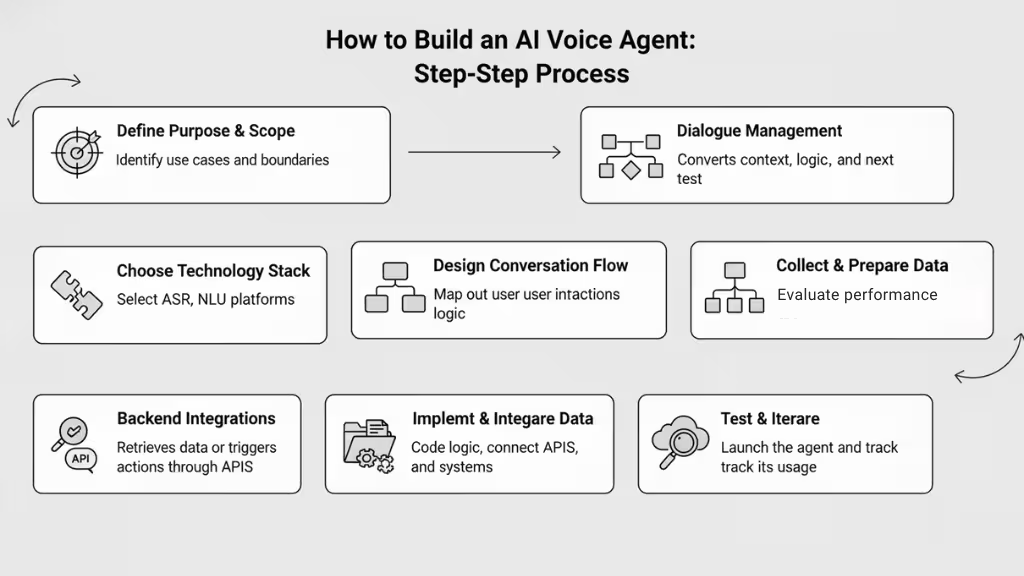
Building an AI voice agent involves integrating speech recognition, language processing, and speech synthesis for real-time conversations. Based on current practices in 2025, the process typically follows these key steps, though variations depend on whether you opt for no-code platforms or custom coding:
- Define the agent’s purpose and scope to align with user needs.
- Select a technology stack for core functions like speech-to-text and response generation.
- Design conversation flows for natural interactions.
- Collect and prepare data for training.
- Implement and integrate components.
- Test iteratively for accuracy and usability.
- Deploy and monitor for ongoing improvements.
While straightforward for basic agents, complexities like latency or multilingual support may require adjustments. Tools and frameworks evolve rapidly, so verify compatibility with your setup.
- Preparation
Start by outlining the agent’s goals, such as customer support or appointment booking, to guide decisions. This ensures focus and avoids scope creep.
- Core Building Phases
Choose between no-code (e.g., for quick prototypes) or code-based approaches (e.g., for customization). Assemble the pipeline: input audio processing, intent understanding, response creation, and output speech.
- Testing and Refinement
Simulate real scenarios to catch issues like noise interference. Iterate based on feedback for smoother performance.
- Deployment
Host on cloud platforms and integrate with channels like phones or apps for live use.
Building an AI voice agent requires a structured approach to create a system capable of real-time, conversational interactions via speech. This in-depth guide synthesises best practices from 2025 resources, focusing on the step-by-step process across no-code and code-based methods.
It assumes familiarity with basic components (e.g., ASR for speech-to-text, NLP/LLM for processing, TTS for text-to-speech) and emphasises practical implementation without redundant overviews. Variations exist based on use case e.g., phone-based support vs. embedded assistants but the core pipeline remains: audio input → transcription → reasoning → response generation → audio output, with orchestration for low-latency streaming.
Step 1: Define the Agent’s Purpose and Scope
Establish clear objectives to inform all subsequent choices and prevent over-engineering.
- Identify the target users (e.g., customers in eCommerce, employees in operations) and primary tasks (e.g, handling FAQs, scheduling, or troubleshooting).
- Specify the interaction style: single-turn (simple queries) or multi-turn (contextual conversations with memory).
- Define personality traits (e.g., professional tone for banking, empathetic for healthcare) and constraints (e.g., multilingual support or compliance with GDPR/HIPAA).
- Sketch high-level requirements: Will it integrate with external systems like calendars? Handle interruptions? Operate in noisy environments?
This step typically takes 1-2 hours for simple agents but longer for complex ones, ensuring alignment with outcomes like reducing call volumes.

Step 2: Choose Your Technology Stack
Select tools based on your skill level, budget, and need for customisation. No-code for rapid prototyping; code for control.
- No-Code Path:
- Platforms like Voiceflow or Vapi orchestrate ASR, LLM, and TTS automatically.
- Sign up, connect APIs (e.g., ElevenLabs for TTS), and configure via dashboards.
- Code-Based Path:
- ASR/STT: OpenAI Whisper, Deepgram, or FastWhisper for low-latency transcription.
- NLP/LLM: GPT-4, Llama 3.3 70B, or Claude for intent detection and response generation.
- TTS: ElevenLabs, Amazon Polly, or Kokoro-82M for natural output.
- Orchestration Frameworks: Pipecat for streaming pipelines, LiveKit for real-time audio handling, or Vocode for telephony.
- Add-ons: Silero VAD for speech detection, WebRTC for browser integration.
Evaluate via trials: Aim for sub-500ms end-to-end latency. Budget for API costs (e.g., $0.01-0.05 per minute for TTS).
| Approach | Pros | Cons | Recommended Tools | Latency Target |
|---|---|---|---|---|
| No-Code | Fast setup, no programming needed | Limited customization | Voiceflow, Vapi | 500-1000ms |
| Code-Based | Full control, scalable | Steeper learning curve | Pipecat + FastWhisper + Llama | <300ms |
| Hybrid | Balance speed and flexibility | Integration overhead | LiveKit + AssemblyAI + ElevenLabs | 300-600ms |
Step 3: Design the Conversation Flow
Map out interactions to ensure natural, user-friendly dialogues.
- Use flowcharts or tools like Voiceflow Canvas to outline paths: Greeting → User input → Branching (e.g., if query matches “book appointment,” route to calendar check).
- Incorporate prompts: Short, clear responses (e.g., “How can I assist today?”) with re-prompts for unclear input (e.g., “Could you repeat that?”).
- Handle edge cases: Interruptions (via barge-in detection), context switching (maintain session memory), and fallbacks (e.g., transfer to human).
- Add logic: Conditional branches (e.g., if user says “cancel,” confirm before action) and variables (e.g., store user name for personalisation). Test flows manually: Simulate 10-20 scenarios to refine for conciseness and clarity.
Step 4: Collect and Train with Contextual Data
Prepare data to make the agent domain-specific and accurate.
- Gather samples: Transcripts of real interactions, FAQs, or domain vocabulary (e.g., “refill prescription” for healthcare).
- Clean and preprocess: Remove noise, label intents/entities, and include diverse accents/languages (40+ supported in tools like Whisper).
- Train models: Fine-tune LLM with Retrieval-Augmented Generation (RAG) for knowledge retrieval; use a few dozen high-quality examples initially.
- For no-code: Upload data to platforms like Vapi for automatic training.
- For code: Use Hugging Face datasets or custom scripts to feed into models like Llama.
Iterate: Start with 50-100 samples, expanding based on performance metrics like intent accuracy.
Step 5: Implement and Integrate the Voice Layer
Build the functional core by connecting components.
- No-Code Implementation:
- In Voiceflow: Add modules like “Talk” for responses, “Logic” for conditions, “API” for external calls (e.g., POST to webhook for booking).
- Configure voice: Select provider (e.g., ElevenLabs), toggle custom voices, and add background audio.
- Code-Based Implementation (e.g., Python with Pipecat):
- Set up environment: Install packages (e.g., assemblyai, ollama, elevenlabs).
- Initialise pipeline: Create a class for the agent, handle API keys, and maintain a transcript for context.
- Process audio: Use VAD to detect speech, transcribe with FastWhisper (partial for words, final on pause >700ms).
- Generate response: Feed to LLM (e.g., Llama via Ollama) for reasoning/tool calls.
- Output speech: Convert with TTS (e.g., Kokoro), stream playback.
- Integrate: Use WebRTC/Twilio for input/output; add S2S models like Moshi for end-to-end if latency-critical.
Run locally first: Test loop in a console or app.
| Integration Type | Steps | Tools | Example Use |
|---|---|---|---|
| Telephony | Connect number, handle inbound/outbound | Twilio | Phone support agents |
| Web/App | Embed widget, use WebRTC | LiveKit | Browser-based assistants |
| API/Webhook | Send GET/POST, capture responses | Make.com | Calendar bookings |
Step 6: Test, Iterate, and Optimize
Validate performance through rigorous evaluation.
- Simulate environments: Test accents, noise, interruptions, and slang using diverse recordings.
- Metrics: Measure Word Error Rate (WER <10%), response time (<500ms), user satisfaction (via feedback loops), and hallucination rates.
- Debug: In no-code, use canvas previews; in code, log transcripts and monitor dashboards (e.g., Vapi for latency/costs).
- Iterate: Retrain on failed cases, optimise latency (e.g., lightweight models like Distil-Whisper), and add features like emotion detection.
- Ethical checks: Monitor bias in datasets, ensure transparency (e.g., “I’m an AI”), and secure data. Conduct 20-50 test runs per iteration, aiming for 95% accuracy before production.
Step 7: Deploy and Monitor
Launch the agent and maintain it post-launch.
- Hosting: Use cloud platforms (AWS, Azure, Google Cloud) for scalability; no-code deploys via publish buttons.
- Channels: Phone (Twilio), web (embed widgets), apps (SDKs), or messaging (WhatsApp/Discord).
- Monitoring: Track usage analytics, logs, and drop-offs; tools like Vapi dashboards provide real-time insights.
- Scale: Start with pilots, expand to handle concurrent users (e.g., Pipecat for thousands).
- Updates: Retrain periodically with new data; budget for ongoing costs (e.g., API usage).
Post-deployment, review weekly for improvements, ensuring compliance and security.
This process can take 1-4 weeks for a basic agent, scaling to months for advanced features. Adapt based on resources, prioritizing low-latency for user retention.
Testing, QA & Monitoring AI Voice Agents
The process for testing, QA, and monitoring AI voice agents follows a structured workflow. It includes checks before launch and continuous monitoring after release. Because voice agents rely on probabilistic AI models, their behaviour can change over time. A clear, repeatable process helps keep performance stable and predictable.
Phase 1: Define Objectives and Scope
- Start by aligning the testing process with your business goals. Decide what the agent should achieve: faster support, fewer human handoffs, or better customer satisfaction.
- Set KPIs such as task completion, latency, or user satisfaction.
- Define the types of conversations you will test (simple, complex, transactional, etc.).
- Create a scorecard with SMART goals so everyone understands the standards.
- This phase ensures the whole team works toward the same outcome.
Phase 2: Establish Quality Standards and Metrics
Set clear benchmarks for performance. For example, Word Error Rate (WER) should be below 15–18%, and latency should ideally be under 500ms.
Organize metrics into layers:
- Infrastructure metrics: time to respond, interruption handling
- Execution metrics: prompt accuracy, consistency
- User reaction metrics: frustration, engagement
- Business outcomes: completed tasks, customer satisfaction
Use automated tools like LLM-based scoring to check flow quality, repetition, or naturalness. Combine both numbers (quantitative data) and human judgment (qualitative data). This phase ensures you measure the right things throughout the process.
Metrics Table
| Metric Category | Examples | Target Benchmarks | Purpose |
|---|---|---|---|
| Accuracy | Word Error Rate (WER), Intent Match Rate | WER <15–18% | Measures how well the system understands users |
| Efficiency | Latency, Average Handle Time (AHT) | Latency <500ms | Ensures fast, natural conversation flow |
| Robustness | Human Takeover Rate, Fallback Frequency | Takeover <5% | Shows how well the system handles unexpected input |
| User Reaction | Frustration Indicators, Customer Effort Score (CES) | CES >4/5 | Tracks user satisfaction |
| Business Outcomes | Task Completion Rate, Net Promoter Score (NPS) | Completion >90% | Connects agent performance to business impact |
Phase 3: Implement Testing and Evaluation Frameworks
Testing should be part of the entire development cycle. Use a layered approach:
- Create Test Data: Build a list of test prompts. Include normal cases, tricky ones (accents, noise), and edge cases.
- Run Functional Testing: Check if conversations make sense. Test multi-turn dialogue, branching, and interruptions.
- Performance and Scalability Testing: Simulate many users at once to check response speed and system stability.
- Robustness Testing: Test bad inputs, network failures, and noisy environments. Use fuzz tests to expose unexpected weaknesses.
- Manual and Crowd Testing: Have real people test the agent to check for natural flow, accent handling, and unexpected behaviours.
- Automate Where Possible: Use automated tests in your CI/CD process. A/B test different versions of prompts or flows.
- Evaluate Results: Use “LLM-as-a-judge” scoring to rate the quality of responses on clarity, tone, and accuracy. Compare results over time to identify regressions.
During QA, set rules such as: “Do not repeat the same question more than twice.” Collect user feedback to understand pain points and confusion.
Phase 4: Integrate QA Into Development and Operations
Make QA an ongoing part of your workflow, not a one-time task. Use AI tools to monitor sentiment, detect unusual behavior, and score conversations automatically.
Create feedback loops by reviewing logs, updating the agent’s knowledge, and adjusting prompts. Check platform compliance before large updates. Run key checks regularly: regression tests after changes, robustness tests monthly, and full audits quarterly.
Phase 5: Continuous Monitoring and Improvement
Once the agent is live, rely on real-time monitoring:
- Detect Anomalies: Use dashboards to watch for latency spikes, rising error rates, or drops in sentiment. Set alerts for quick response.
- Trace Workflows: Log full conversation traces (inputs and outputs) so teams can debug issues fast.
- Evaluate Quality: Combine automatic scoring with human reviews to check accuracy and compliance.
- Analyze and Improve: Review important conversations. Use production data to strengthen weak areas and retrain the model. Track patterns to detect long-term issues early.
Best practices across all phases: Automate when possible, monitor continuously, improve the model with high-quality examples, and review performance across the four layers: infrastructure, execution, user reaction, and business outcomes.
Process Summary Table
| Phase | Key Steps | Tools/Methods | Frequency |
|---|---|---|---|
| 1: Define Objectives | Set KPIs and scope | Scorecards, alignment meetings | Initial setup |
| 2: Establish Metrics | Set benchmarks & categories | Custom scorers, LLM prompts | Before testing |
| 3: Implement Testing | Build data, run tests, evaluate | Automation, fuzzing, A/B testing | During development |
| 4: Integrate QA | Add QA to workflows | Analytics, audits | Ongoing |
| 5: Monitoring | Track, evaluate, improve | Dashboards, alerts, logs | Continuous |
How to Design Prompts & Behaviours for AI Voice Agents
Designing prompts and behaviours for an AI voice agent is one of the most critical steps in determining how “human,” helpful, and reliable the system feels. Unlike text-based chatbots, voice agents must respond quickly, sound natural when spoken aloud, and adapt to an unpredictable range of user behaviours. This requires thoughtful prompt design, clear behavioural rules, and ongoing refinement based on real interactions.

Below is a structured, readability-friendly (grade ~8) guide to building strong prompts and conversational behaviours for voice AI.
Start With the Agent’s Role and Personality
Begin by defining exactly who your agent is and how it should sound. Give it a clear role (e.g., support rep, concierge, booking specialist) and a personality aligned with your brand:
- Calm and reassuring for healthcare
- Efficient and direct for banking
- Friendly and conversational for retail
- Neutral and professional for enterprise IT
A well-defined persona helps the LLM stay consistent and reduces tone drift during longer conversations.
Use Clear, Natural, and Concise Language
Voice agents must avoid long sentences or overly formal wording. People process spoken information differently from text.
Effective prompts:
- Use short, simple sentences
- Avoid jargon
- Remove filler or complex phrasing
- Focus on clarity and pacing
Example:
❌ “Please provide the necessary identifiers to proceed.”
✅ “Can you share your booking ID so I can look it up?”
The goal is natural conversational flow not scripted dialogue.
Set Firm Behavioural Rules
Strong voice agents follow consistent rules to stay predictable. Prompts should define:
- How long should responses be
- When to ask for clarification
- How to confirm information
- When to take action versus ask more questions
- How to avoid repeating themselves
- When to escalate to a human agent
Without these rules, LLMs may ramble, over-explain, or act outside your intended scope.
Handle Uncertainty Gracefully
Voice agents must expect confusion, unclear audio, and ambiguous requests.
Good prompts instruct the agent to:
- Ask one short follow-up question
- Rephrase the original question
- Offer simple choices (e.g., “Is this about billing or orders?”)
- Never blame the user or sound frustrated
This keeps the conversation moving without making callers repeat themselves unnecessarily.
Guide the Agent’s Thinking With Structured Prompts
Structured instructions help LLMs respond more reliably:
- “Think step-by-step before replying.”
- “Always keep answers under 20 words unless explaining instructions.”
- “Confirm important details before completing an action.”
- “Use the customer’s name when available.”
- “Pause when unsure and ask a clarifying question.”
These behavioural anchors reduce hallucinations and improve task completion.
Write Prompts That Work With Spoken Output
Remember that everything the agent says is heard, not read.
Prompts should instruct the agent to:
- Use a warm, natural voice
- Add small conversational cues (“I can help with that,” “Let me check”)
- Maintain a steady pace
- Avoid lists longer than three items
- Skip emojis, complex formatting, or long numbers
- Break complex instructions into small steps
This helps the TTS engine produce smooth, listener-friendly responses.
Include Edge Case Handling in the Prompt
Real callers often:
- Interrupt mid-sentence
- Change their minds
- Ask unrelated questions
- Jump between topics
- Repeat themselves when unsure
Your prompt should explicitly define how the agent reacts:
- “If the user interrupts, stop speaking immediately and listen.”
- “If the user changes topics, follow the new topic and drop the old one.”
- “If the user repeats the same request, keep your answer consistent.”
- “If the user sounds upset, speak more gently and offer help.”
These rules prevent the agent from getting stuck or confused.
Use Examples (Few-Shot Prompting) to Shape Behaviour
LLMs learn patterns from examples. Provide 3–5 sample dialogues that show:
- The desired tone
- How to answer common questions
- How to handle confusion
- How to escalate
- How to ask clarifying questions
Well-designed examples can make the agent far more reliable than instructions alone.
Define When and How to Escalate to a Human Agent
Voice agents must know when to step aside. Prompts should include:
- “If the user requests a human, escalate immediately.”
- “If you’re unsure after two clarification attempts, transfer the call.”
- “If emotions escalate, hand off to a human agent with full context.”
Clear escalation rules prevent negative user experiences.
Test and Refine Prompts With Real Conversations
Prompt design is not “set and forget.”
Review real call transcripts to find:
- Overly long answers
- Confusing replies
- Missed intents
- Repeating loops
- Situations where the tone felt off
Improve prompts by adding rules or examples that target these weaknesses. Over time, this turns the voice agent into a dependable, consistently performing system.
Build a Behaviour Checklist for Future Updates
To keep the agent consistent across updates, maintain a simple checklist:
- Response length
- Tone and persona
- Clarification rules
- Interrupt handling
- Escalation logic
- Use of user names
- Prohibited phrases
- Constraints (no medical or legal advice, no assumptions)
This ensures new or retrained versions of the agent still behave as intended.
Key Features of an AI Voice Agent Platform
A mature AI voice agent platform does much more than convert speech into text. To operate at an enterprise level, it must deliver intelligence, adaptability, compliance, and seamless integration with existing systems. Below are the capabilities that define a modern, production-ready voice AI platform.
Multilingual and Culturally Aware Conversations
Modern voice agent platforms aren’t limited to literal translation. They recognize regional accents, understand idiomatic expressions, and adapt their delivery to local norms. This cultural intelligence allows companies to scale support across markets without losing authenticity.
Interruption Handling That Feels Human
Real callers don’t wait politely for a system to finish speaking. A capable platform detects interruptions instantly, pauses its response, and shifts into listening mode without breaking the rhythm of the conversation.
Responses Shaped by Tone and Emotion
Advanced systems analyze tone, pacing, and sentiment to understand how a user feels. If someone sounds frustrated or anxious, the agent adjusts its delivery and prioritizes clarity or urgency accordingly.
Context Awareness Across the Entire Conversation
A strong platform keeps track of what was said earlier and what step the caller is on. This prevents repetitive questions and enables smooth multi-turn dialogues where the agent picks up naturally from the previous exchange.
Deep Integration With Business Systems
Behind every good voice agent is a robust set of integrations. Whether it’s pulling customer data from a CRM, updating a ticket, or triggering a workflow, the platform must work seamlessly with existing business tools.
Effortless Handoff to Human Agents
When a situation requires human involvement, the platform hands off the customer to a live agent with full context. The transition feels seamless, and the customer never has to repeat themselves.
Continuous Learning From Real Interactions
Enterprise platforms analyse real conversations to improve performance. New scenarios, updated product details, and emerging customer behaviours can all be reflected in the agent’s knowledge with quick, incremental updates.
Built-In Observability and Analytics
Visibility is essential at scale. Teams need access to transcripts, logs, and performance metrics to assess behaviour, identify gaps, and continuously refine the agent.
Compliance, Redaction, and Secure Data Handling
Regulated industries require strict controls. Leading platforms include automatic redaction of sensitive information, audit-friendly reporting, encrypted storage, and support for frameworks such as SOC2, HIPAA, and GDPR.
Real-Life Examples of Companies Using the Best AI Voice Agents
AI voice agents are already being used across industries to automate routine conversations, reduce operational costs, and improve customer experience. Here are concise examples of how different companies are applying them in real business environments.
Healthcare: Appointment Scheduling & Patient Support
Large healthcare networks use AI voice agents to manage high-volume scheduling, prescription refills, and basic triage. Patients can book or change appointments without waiting on hold, while the system escalates complex cases to staff. This reduces call-center strain and improves response times.
E-Commerce: Order Tracking & Returns
Retailers deploy voice agents to instantly provide order status, shipping updates, refund timelines, and product information. These agents integrate with fulfillment systems to retrieve real-time data, allowing customers to get answers in seconds instead of speaking to a human representative.
Banking & Fintech: Account Queries and Fraud Checks
Financial institutions use voice agents for routine account questions, card activation, balance checks, and fraud verification. Because these systems include strict authentication and redaction tools, they help maintain compliance while reducing operational workload.
Real Estate: Lead Qualification
Real estate platforms use voice agents to answer property inquiries, schedule viewings, and qualify leads based on buyer preferences. Agents gather details, route serious prospects to brokers, and streamline the early stages of the sales funnel.
Travel & Hospitality: Booking and Guest Support
Airlines and hotels use AI voice agents for booking changes, loyalty program questions, and itinerary updates. They provide multilingual support for global travelers and reduce the load on human agents during peak travel seasons.
Utilities & Telecom: Outage Reporting & Troubleshooting
Utility companies and telecom providers use voice agents to automate outage reporting, plan maintenance updates, and basic troubleshooting steps. Customers receive instant guidance, while the system flags escalations for technicians when needed.
AI Voice Agent Development Challenges & How to Overcome Them
Building an AI voice agent is not just about connecting ASR, LLMs, and TTS. Real-world deployments introduce technical, conversational, and operational challenges that can impact reliability and user experience. Below are the most common obstacles teams face and proven strategies for overcoming them.
| Challenges | How to Overcome |
|---|---|
| Latency and Real-Time Performance | • Use streaming ASR & TTS instead of batch processing • Pick lightweight/optimized LLMs • Cache common responses• Reduce unnecessary API hops • Deploy models closer to users geographically • Target <500ms (ideal <300ms) end-to-end latency |
| Handling Accents, Noise & Real-World Speech | • Choose ASR trained on diverse accents • Add Voice Activity Detection (VAD) • Test with noisy and realistic audio samples • Use clarifying questions when ASR confidence drops |
| Misunderstanding User Intent | • Add domain-specific examples in prompts • Use RAG or knowledge base retrieval instead of pure LLM memory • Confirm important intents before taking action • Retrain using real conversation data |
| Hallucinations & Inconsistent Responses | • Add strict behavioural constraints in system prompts • Validate important outputs with backend systems • Use retrieval grounding for factual questions • Log hallucination examples and retrain on them |
| Interruptions, Overlaps & Turn-Taking Issues | • Implement barge-in detection • Use real-time VAD for quick listening transitions • Teach agent to pause/resume naturally • Test with rapid interruption scenarios |
| Complex Multi-Step Conversations | • Add a dialogue management layer for memory • Break flows into smaller steps • Confirm key details before moving on • Handle topic switching gracefully |
| Backend Integration Challenges | • Use stable APIs with clear documentation • Add retries + fallback logic for failures • Validate retrieved data before using it • Cache static data to reduce API load |
| Security, Privacy & Compliance Risks | • Enable automatic PII redaction • Encrypt audio and text data • Follow SOC2, HIPAA, GDPR standards • Maintain audit logs and role-based access |
| Inconsistent Tone or Brand Voice | • Define a clear persona and tone rules • Keep responses short for spoken delivery • Add few-shot examples showing correct tone • Review weekly audio samples for consistency |
| Performance Degrading Over Time | • Monitor key metrics daily (latency, WER, fallback rate) • Retrain models with fresh data • Run regression tests after every update • Update knowledge base regularly |
Conclusion
Building an AI voice agent is completely within reach, whether you start with a simple no-code setup or a fully custom solution. You now know the essential components, how to build and test one, the challenges to expect, and what it costs to bring it to life.
At this point, the path forward is straightforward: start small, launch early, and improve continuously. Voice AI gets better with real conversations, and every iteration brings you closer to a smooth, reliable, human-like experience.
With the right approach, your AI voice agent won’t just answer calls it will transform how your business communicates.
FAQs: AI Voice Agents
What exactly is an AI voice agent?
An AI voice agent is a system that listens to a user’s speech, understands their intent, and responds with natural-sounding voice output—similar to a human support agent.
How is an AI voice agent different from a chatbot or IVR?
Chatbots are text-based, and IVRs rely on menu options. AI voice agents understand open-ended speech, support natural conversation, and can complete tasks without rigid scripts.
How do AI voice agents understand what people are saying?
They use ASR (speech-to-text), NLU/LLMs (to understand intent), and a dialogue manager to keep context across the conversation.
Can an AI voice agent handle different accents and languages?
Yes—most modern ASR models are trained on global datasets and support multilingual speech. However, accuracy varies based on language complexity and background noise.
How much does it cost to build an AI voice agent?
Costs range from $500 to $5,000 for no-code setups, $10,000 to $75,000 for hybrid builds, and $75,000+ for enterprise-grade custom systems. Runtime costs are typically $0.03–$0.15 per minute.
Do I need coding experience to build an AI voice agent?
Not necessarily. Many platforms offer no-code builders for simple voice agents. More advanced or custom use cases require software engineering skills.
What tools are commonly used to build AI voice agents?
1. Whisper, Deepgram, AssemblyAI (ASR)
2. GPT, Claude, Llama (LLMs)
3. ElevenLabs, Polly, Kokoro (TTS)
4. LiveKit, Vapi, Voiceflow, Pipecat (orchestration)
How long does it take to build a production-ready AI voice agent?
A basic agent can be built in 1–2 weeks. A complex or enterprise agent can take 1–3 months, depending on integrations and compliance needs.
Can AI voice agents integrate with my CRM or ticketing system?
Yes. Most modern platforms support API integrations with CRMs, ERPs, scheduling systems, and help desks.
How natural can AI voice agents sound in 2026?
With modern neural TTS and emotion-aware generation, AI voices can be highly natural. Many listeners cannot distinguish them from humans in short interactions.
Can AI voice agents handle interruptions?
Yes—advanced systems support barge-in detection, meaning the agent stops speaking when the user speaks and instantly switches back to listening.
How do I train a voice agent for my industry?
By providing transcripts, FAQs, internal documents, and domain-specific examples. Some teams also use RAG (Retrieval-Augmented Generation) to inject accurate knowledge in real time.
What are the biggest challenges in building AI voice agents?
1. Handling background noise
2. Achieving low latency
3. Maintaining context across turns
4. Integrating with external systems
5. Preventing hallucinations
Are AI voice agents secure for industries like banking or healthcare?
Yes—if built with compliance in mind. Look for platforms that support SOC2, GDPR, HIPAA, encryption, and automatic redaction.
Will AI voice agents replace human agents?
Not fully. AI handles repetitive, high-volume tasks, while humans address complex or emotional cases. Most companies use a hybrid model.
Do AI voice agents improve over time?
Yes. Modern systems learn from transcripts, feedback, and error reports. Teams refine prompts, add data, and optimize logic continuously.
Can a voice agent personalize responses?
If integrated with customer data, it can personalize greetings, recommendations, and workflows—similar to a human agent.
What industries benefit most from AI voice agents?
Top industries include: Retail, healthcare, fintech, telecom, hospitality, logistics, real estate, and SaaS support.
This page was last edited on 9 July 2026, at 11:08 am

Start a conversation with our team to solve complex challenges and move forward with confidence.










