
Automated Machine Learning, or AutoML, is the practice of automating the repetitive, time-consuming tasks involved in the machine learning lifecycle. As demand for machine learning grows across industries, many teams face a shortage of experienced data scientists. AutoML helps close this skill gap by making machine learning more accessible while still delivering high-quality results. It allows teams to focus on solving business problems instead of spending time on complex manual model-building steps.
In this article, we will explain what AutoML is, how it works, the core techniques behind it, the common tasks it supports, and how to use it.
What is Automated Machine Learning (AutoML)?
Automated Machine Learning (AutoML) is a set of techniques and tools that automate the end-to-end process of building machine learning models. Instead of manually handling every step like cleaning data, selecting algorithms, tuning parameters, and evaluating models, AutoML performs these tasks automatically.
The goal of AutoML is to make machine learning faster, easier, and more accessible. It helps developers, data analysts, and businesses create high-quality models without needing deep expertise in data science. AutoML also helps experts by saving time on repetitive steps so they can focus on strategy, data understanding, and advanced problem-solving.
How AutoML Works
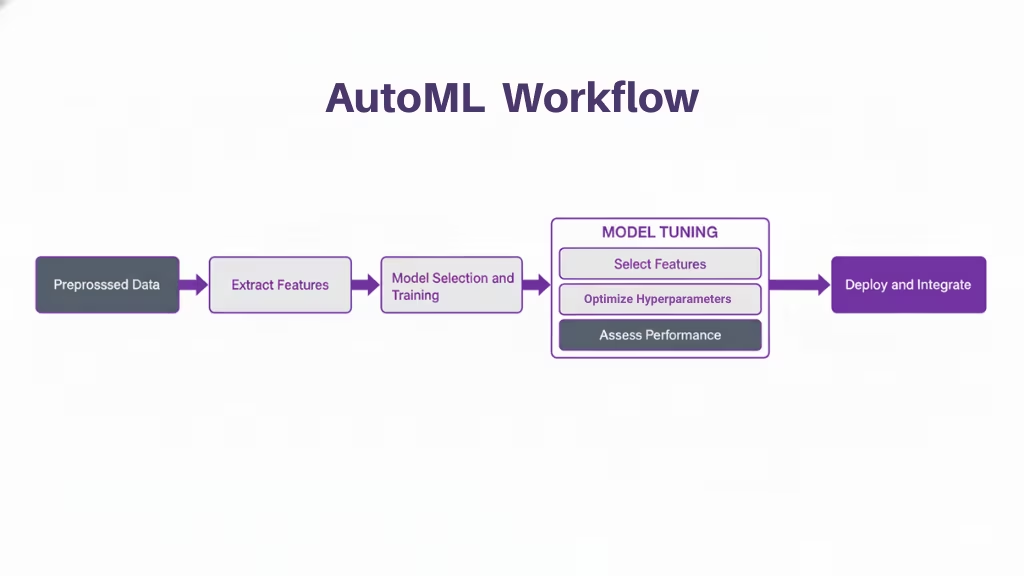
AutoML works by automating every major step of the machine learning pipeline. You provide the dataset and define the problem, and the system handles the rest by running multiple experiments to discover the best model. Below are the core stages, each explained clearly and with proper subheadings.
Data Preprocessing and Preparation
This is the first stage in the AutoML pipeline. The system automatically cleans and prepares your raw data so it is ready for modeling. It fills in missing values, removes outliers, fixes inconsistent formats, normalizes numerical columns, and encodes categorical variables. In traditional ML, this step takes a lot of manual work. AutoML performs it automatically, making sure the dataset is consistent and usable without requiring you to write preprocessing code.
Feature Engineering and Selection
Once the data is cleaned, AutoML begins transforming it into more informative inputs. It creates additional features from timestamps, extracts meaningful information from text or categories, scales values when needed, and removes features that do not contribute to learning. This stage is important because the quality of features directly affects model performance. AutoML handles this entire process on its own, generating and selecting features that help the model learn patterns more effectively.
Model Selection
After preparing the data and features, AutoML begins choosing the most suitable algorithm for the problem. Instead of selecting one manually, AutoML tests a wide range of models such as linear models, decision trees, gradient boosting methods, and neural networks. It trains each model on your dataset and compares their performance. The system then identifies the model type that delivers the strongest and most consistent results.
Hyperparameter Tuning
Every model has hyperparameters that control how it learns. AutoML automatically tunes these hyperparameters by trying different configurations and measuring the results. It uses methods like grid search, random search, or Bayesian optimization to explore thousands of combinations. This entire process is automated, allowing AutoML to discover high-performing settings without requiring manual trial-and-error.
Model Evaluation and Validation
Once models are trained, AutoML evaluates them using appropriate metrics. It splits the dataset into training and validation sets and measures factors like accuracy, precision, recall, F1-score, or RMSE depending on the task. AutoML also uses validation strategies such as cross-validation to make sure the results are stable and not caused by overfitting. This ensures the chosen model performs well beyond the training data.
Ensemble Modeling
Some AutoML systems go a step further by creating ensembles. Instead of relying on one model, they combine several high-performing models into a stronger, unified model. This usually results in higher accuracy and better overall performance. Ensembling is something experienced data scientists often do manually, but AutoML can generate ensembles automatically, saving both time and effort.
Deployment and Monitoring
The final stage of AutoML involves deploying the best model and keeping track of its performance. Many AutoML platforms can publish the model as a live API or service that applications can use immediately. They also provide tools to monitor how the model behaves in the real world, detect performance declines caused by data drift, and retrain the model when necessary. This allows machine learning systems to stay accurate and reliable over time.
Core AutoML Techniques
| ML Pipeline Stage | AutoML Techniques | Description |
|---|---|---|
| Data Preparation | Automated Cleaning, Scaling, Encoding | Automates tasks like handling missing values, scaling numerical features, and encoding categorical variables to prepare data for modeling. |
| Feature Engineering | Automated Feature Creation & Selection | Systematically explores feature combinations and transforms raw data to extract the most useful features for the model, often a time-consuming manual task. |
| Model Selection | Algorithm Search & Ranking | Automatically explores a vast search space of machine learning algorithms (such as logistic regression, decision trees, and neural networks) to find the best fit for the dataset and task. |
| Hyperparameter Optimization (HPO) | Bayesian Optimization, Evolutionary Algorithms | Uses advanced search strategies to find the optimal combination of hyperparameters that maximizes performance metrics such as accuracy or precision. |
| Deep Learning | Neural Architecture Search (NAS) | Automates the design of neural network architectures, determining the ideal number of layers, nodes, and connections for deep learning tasks. |
| Ensemble Methods | Automated Model Combination | Combines multiple high-performing models into an ensemble to enhance accuracy, stability, and overall robustness. |
How They Work Together
AutoML systems function by systematically searching through the vast possible combinations of data processing steps, algorithms, and hyperparameters to identify the optimal pipeline for a given problem. This search process is often guided by optimization algorithms and meta-learning, which leverage insights from previous ML tasks to inform the current search more efficiently.
This automation accelerates the machine learning workflow, making the power of predictive analytics more accessible to a wider audience, including domain experts and business analysts, while freeing up experienced data scientists to focus on higher-value, strategic work like problem formulation and result interpretation.
Common AutoML Tasks
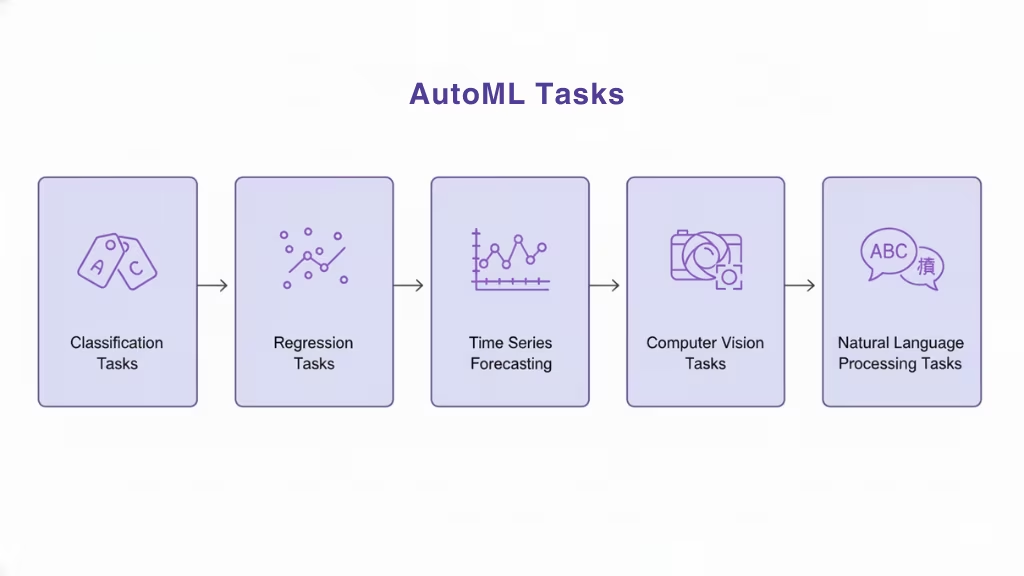
AutoML is designed to handle a wide range of machine learning problems. These tasks appear across many industries and datasets, and AutoML streamlines them by automating the entire workflow from data preparation to model selection. Below are the major types of tasks AutoML can perform, each explained clearly so you understand how AutoML applies to real-world problems.
1. Classification Tasks
Classification is one of the most common tasks AutoML handles. In a classification problem, the goal is to predict a category or label. Examples include identifying whether an email is spam, determining if a customer will churn, or predicting whether a transaction is fraudulent.
AutoML automatically selects the appropriate algorithms, such as logistic regression, random forests, or gradient boosting models, then tunes them to maximize classification performance. It evaluates metrics like accuracy, F1 score, and recall to choose the best model.
2. Regression Tasks
Regression tasks involve predicting a numerical value. This includes forecasting sales, predicting house prices, or estimating delivery times.
AutoML handles these tasks by testing a range of regression algorithms and transformations that can improve linear and nonlinear relationships. It also chooses the best evaluation metric, such as RMSE or MAE, to ensure the predictions are as accurate as possible.
3. Time Series Forecasting
Time series forecasting involves predicting future values based on historical trends. This is essential in demand forecasting, financial prediction, and inventory planning.
AutoML systems can automatically detect seasonality, trend patterns, and cyclical behavior in the data. They may apply specialized methods such as ARIMA, Prophet, or gradient-boosted models optimized for time-based data. Many AutoML tools also handle feature extraction from dates and time intervals without user input.
4. Computer Vision Tasks
AutoML can also support image-based tasks such as object detection, image classification, and visual inspection. These tasks typically require deep learning models.
Instead of manually designing neural network architectures, AutoML uses techniques like Neural Architecture Search to find the best model layout. This means the system can automatically build and train convolutional networks tailored to the dataset.
5. Natural Language Processing (NLP) Tasks
NLP tasks involve working with text, such as sentiment analysis, document classification, or keyword extraction.
AutoML tools can automatically tokenize text, remove noise, extract features, and test various models that are suited for language data. Some systems even automate parts of deep learning workflows for NLP, such as embedding creation or transformer-based model tuning.
How to Use AutoML
Using AutoML follows a simple, structured process. Even though AutoML automates most of the technical work, you still guide the overall direction of the project. The steps below explain how to approach AutoML in a practical and intuitive way.
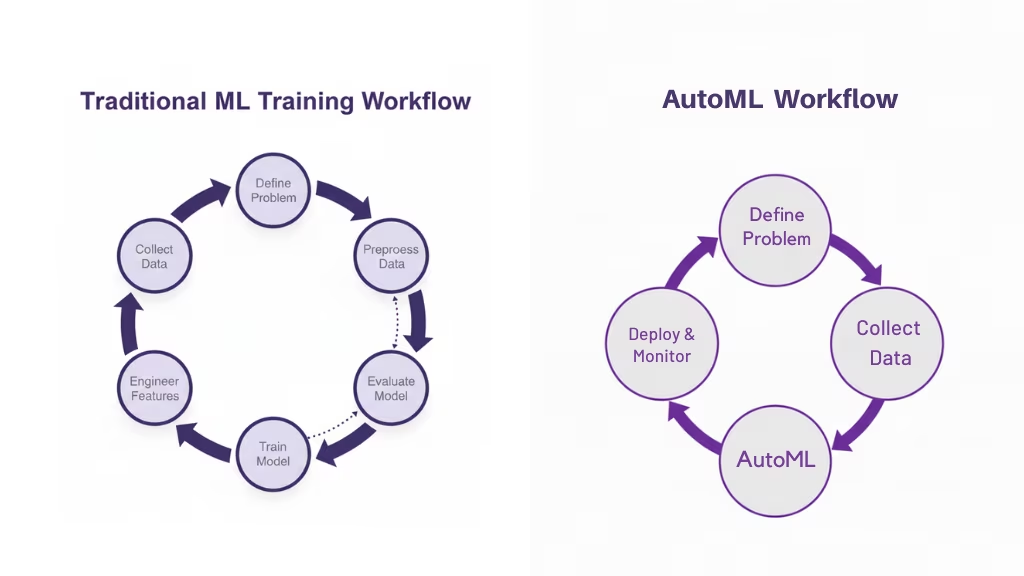
Define a Problem
The first step is understanding what you want to achieve. You identify the task, such as predicting churn, forecasting revenue, or classifying images, and determine whether it is a classification, regression, time series, vision, or NLP problem. A clear problem definition helps AutoML align its search toward the right type of models and evaluation metrics.
Collect Data
Next, you gather the data related to the problem. This might come from databases, APIs, files, or other sources. The quality and relevance of your dataset strongly influence the final model. AutoML does not replace the need for good data; it simply makes better use of what you provide.
Preprocess Data
Once your dataset is ready, AutoML begins preprocessing it. Although AutoML handles tasks such as cleaning, encoding, scaling, and transforming, you may still want to review the data for issues, understand its structure, and ensure it reflects the real-world behavior you are trying to model. Good preprocessing, even when automated, begins with understanding your data.
Train a Model
After preprocessing, AutoML starts the model training process. It tests many possible algorithms, applies feature engineering, tunes hyperparameters, and evaluates multiple pipelines. You don’t train just one model you let AutoML train dozens or hundreds of models, each with different configurations. The system then identifies the models with the strongest performance.
Evaluate the Model
Once AutoML finishes training, you review the results. The system provides metrics, validation scores, and sometimes a leaderboard of models. You examine these results to confirm that the best-performing model aligns with your goals. If needed, you can adjust your inputs or constraints and run AutoML again to refine the results.
AutoML vs Traditional Machine Learning
AutoML and traditional machine learning follow the same overall goal, building models that learn from data, but they differ a lot in how the work is done, who can do it, and how long it takes to get results.
| Category | AutoML | Traditional Machine Learning |
|---|---|---|
| Level of Automation | Highly automated; handles preprocessing, feature engineering, model selection, tuning, and evaluation | Mostly manual; data scientists perform each step |
| Required Expertise | Lower; suitable for developers, analysts, and mixed teams | High; requires strong statistical and ML knowledge |
| Speed of Development | Fast; explores many models and configurations automatically | Slower; each experiment is designed and executed manually |
| Control and Customization | Limited control over internal processes | Full control over every modeling decision |
| Model Performance | Often strong due to broad search and ensembling | Depends heavily on the expert’s skill and available time |
| Interpretability | May be lower, especially with ensembles or complex structures | Higher; easier to trace decisions and explain model behavior |
| Scalability | Easily scales across teams and workflows | Scaling requires more people and more manual effort |
| Use Case Fit | Ideal for standard ML tasks like classification, regression, and forecasting | Best for complex, custom, or research-level tasks |
| Error Handling | Handles common issues automatically; risk of hidden problems if data is flawed | Errors and data issues are manually identified and adjusted |
| Deployment | Often includes automated deployment and monitoring | Deployment depends on custom engineering workflows |
Importance of AutoML
AutoML has become an essential part of modern machine learning because it removes many of the barriers that slow down or limit traditional ML development. As demand for AI solutions grows across industries, AutoML offers a practical and efficient way to build high-performing models without requiring large teams of highly specialized experts.
AutoML Saves Significant Time
Traditional machine learning requires many manual steps, from cleaning the data to tuning hyperparameters. These steps can take days or even weeks, especially when experimenting with multiple models. AutoML accelerates this entire workflow by automating the repetitive tasks and running many experiments in parallel.
AutoML Makes Machine Learning More Accessible
Not every organization has a large team of expert data scientists. AutoML helps bridge this skill gap by making machine learning easier for developers, analysts, and business teams. The system handles the complex parts of model building, letting users focus on understanding the problem rather than worrying about ML techniques.
AutoML Improves Model Quality
Another important advantage is its ability to uncover high-performing models. AutoML tests a wide range of algorithms, feature transformations, and hyperparameter combinations. This broad search often leads to results that are more accurate and more stable than manually built models.
AutoML Enables Enterprise-Scale Machine Learning
For enterprises, AutoML makes it easier to scale machine learning across multiple departments and workflows. It allows teams to build more models in less time while maintaining consistent quality. AutoML also reduces the risk of human error by applying standardized processes across all stages of model development.
AutoML Accelerates AI Adoption Across Industries
Finally, AutoML plays a crucial role in the widespread adoption of AI. By removing technical barriers and reducing costs it allows companies to integrate AI solutions more quickly. Businesses can bring intelligent features to market faster, make better data-driven decisions, and stay competitive in environments where speed and innovation matter.
Limitations of AutoML
Limited Control Over the Modeling Process
AutoML automates many decisions that data scientists normally make manually. While this improves speed and ease of use, it reduces the amount of direct control you have over the modeling process.
In situations where you need full customization, such as defining custom loss functions, applying domain-specific rules, or building specialized architecture,s AutoML can feel restrictive.
Challenges with Model Interpretability
Because AutoML often selects complex models or ensembles, it can be difficult to fully understand how the model makes predictions. This lack of transparency becomes a problem in regulated industries where organizations must explain model decisions to auditors, customers, or compliance teams. AutoML does not always provide the level of interpretability required for high-risk environments.
Dependence on Data Quality
Even though AutoML handles preprocessing, it cannot correct deeper issues in the data. Problems such as biased samples, mislabeled entries, missing context, or poor data collection practices will still lead to unreliable outcomes. AutoML can only work with what it is given, so a flawed dataset will produce flawed models no matter how advanced the automation is.
High Computational Cost
AutoML explores many algorithms, hyperparameters, and pipeline configurations. This broad search requires significant computational power.
For small teams or organizations with limited infrastructure, long AutoML runs can be expensive or slow. In some cases, the computational cost outweighs the benefits of automation.
Lack of Domain-Specific Understanding
While AutoML is skilled at pattern discovery, it lacks human intuition. Domain expertise is often essential for tasks like understanding business goals, identifying edge cases, or recognizing when data patterns are meaningful.
AutoML cannot replace the insights that come from industry knowledge, and it may overlook important nuances.
Not Ideal for Highly Customized or Research-Level Tasks
Some machine learning problems require creativity, experimentation, or new techniques that AutoML is not designed to handle. If a project involves advanced architectures, unusual training objectives, or novel research methods, manual modeling is still necessary.
AutoML excels at standard ML problems, but it is not suited for pushing the boundaries of what ML can do.
AutoML Tools
AutoML has grown rapidly, and a wide range of tools now support automated machine learning for different skill levels, industries, and deployment environments. Some platforms focus on enterprise-scale automation, while others are open-source frameworks designed for developers. Below is an overview of the major AutoML tools and what they offer.
Microsoft Azure AutoML
Azure AutoML is a cloud-based service that automates model training, selection, and tuning. It provides an easy-to-use interface along with full API support, making it suitable for developers and enterprise teams.
Azure AutoML integrates tightly with Azure data services, supports both classical ML and deep learning tasks, and generates ready-to-deploy models that can be published as endpoints. It is widely used in corporate environments because it offers strong scalability, governance, and monitoring features.
H2O.ai’s AutoML
H2O AutoML is a powerful open-source solution known for its speed, performance, and flexibility. It automates training, hyperparameter tuning, and model ensembling. H2O is used by data scientists who want automation without giving up too much control.
It also includes Driverless AI, a commercial product with advanced automation features such as feature engineering, model explanations, and time series forecasting capabilities. Many enterprises choose H2O because it supports both on-premises and cloud deployment.
Google Cloud AutoML
Google Cloud AutoML offers a set of AI services that automate model creation for vision, language, translation, tables, and more. It is designed for users who want high-quality models without requiring deep ML expertise.
Google’s AutoML combines ease of use with powerful neural architecture search technology. It integrates naturally with BigQuery, Vertex AI, and Google Cloud storage, making it attractive for organizations already using Google’s ecosystem.
DataRobot
DataRobot is a commercial AutoML platform focused on enterprise workflow automation. It supports automated preprocessing, feature engineering, model building, deployment, and monitoring within a single environment.
DataRobot is known for its strong explainability features, making it easier to interpret models and meet regulatory requirements. It is frequently used in industries such as finance, insurance, and healthcare, where compliance and model transparency are essential.
Databricks’ AutoML
Databricks AutoML automates training and tuning within the Databricks Lakehouse platform. It generates notebooks that show the full pipeline it builds, which makes it useful for developers who still want visibility and control.
Databricks AutoML is well-suited for teams that work with large-scale data, want tight integration with Spark, and need automated tooling that still fits into a collaborative notebook-based workflow.
Auto-sklearn
Auto-sklearn is an open-source AutoML framework built on scikit-learn. It automatically selects algorithms, optimizes hyperparameters, and constructs ensembles.
Auto-sklearn is popular among Python developers because it is easy to integrate into existing projects and supports a wide range of classical ML tasks. It is especially useful for tabular data and academic research.
AutoKeras
AutoKeras is an open-source deep learning AutoML framework built on top of Keras. It automatically searches for the best neural network structures using techniques like neural architecture search.
AutoKeras is well-suited for tasks such as image classification, text processing, and other deep learning applications. It appeals to developers who want automated deep learning without dealing with complex model architecture design.
Auto-PyTorch
Auto-PyTorch is another open-source framework focused on automating model selection, architecture design, and hyperparameter optimization for PyTorch models. It is ideal for deep learning tasks and supports flexible customization for advanced users.
Auto-PyTorch is often used for research and high-performance modeling scenarios where developers want both automation and the ability to modify components.
Example of AutoML: Customer Churn Prediction
Imagine you work for a subscription-based company, and your goal is to predict which customers are likely to cancel their subscription in the near future. This is a classic binary classification problem: churn vs. no churn. Traditionally, you would spend a lot of time cleaning data, engineering features, selecting algorithms, and tuning hyperparameters. With AutoML, most of that work is automated.
1. Problem Setup
You start with a historical dataset where each row represents a customer and columns represent attributes such as subscription age, usage frequency, payment behavior, support tickets, plan type, and a churn label indicating whether the customer left or stayed. Your target variable is a binary column like churn with values 0 (no churn) and 1 (churn).
Your objective is to train a model that predicts the probability that a current customer will churn in the next period. This allows the business to trigger retention campaigns, discounts, or personalized outreach.
2. Loading and Splitting the Data
You load the dataset with pandas and split it into train and test sets. Here is a simple setup in Python using auto-sklearn as the AutoML engine.
import pandas as pd
from sklearn.model_selection import train_test_split
from sklearn.metrics import roc_auc_score, classification_report

import autosklearn.classification

# Load your churn dataset
data = pd.read_csv("customer_churn.csv")

# Assume 'churn' is the target column (0 = stay, 1 = churn)
target_col = "churn"
X = data.drop(columns=[target_col])
y = data[target_col]

# Train–test split
X_train, X_test, y_train, y_test = train_test_split(
    X, y, test_size=0.2, random_state=42, stratify=y
)
At this point, you have your features and labels ready, and a clean separation between training and testing data.
3. Running AutoML
Instead of hand-picking algorithms and tuning them, you let AutoML explore the search space for you. Auto-sklearn will automatically build preprocessing pipelines, pick algorithms, tune hyperparameters, and even create ensembles.
automl = autosklearn.classification.AutoSklearnClassifier(
    time_left_for_this_task=1800,          # total AutoML budget in seconds (e.g., 30 min)
    per_run_time_limit=300,               # time limit per model
    metric=autosklearn.metrics.roc_auc,   # optimize for AUC
    n_jobs=-1                             # use all available cores
)

automl.fit(X_train, y_train)
During this run, AutoML is doing all the heavy lifting: data preprocessing, algorithm selection, hyperparameter tuning, and ensemble construction. You do not manually define pipelines; you define constraints and goals, and AutoML searches the space.
4. Evaluating the Best Model
After AutoML finishes its search, you evaluate the chosen model on the test set and inspect key performance metrics.
y_proba = automl.predict_proba(X_test)[:, 1]
y_pred = automl.predict(X_test)

auc = roc_auc_score(y_test, y_proba)
print("Test AUC:", auc)
print("\nClassification report:")
print(classification_report(y_test, y_pred))
You now have a clear measure of how well the model distinguishes between churners and non-churners. AUC is a natural choice here because it captures ranking quality, which is useful when prioritizing customers for retention actions.
5. Inspecting the Model Ensemble
Auto-sklearn typically builds an ensemble of several good models rather than relying on a single one. You can inspect which models were selected and how they were combined.
print("\nFinal model ensemble:")
print(automl.show_models())

print("\nLeaderboard:")
print(automl.leaderboard())
This reveals which algorithms performed best on your churn dataset, such as gradient boosting, random forests, or logistic regression, and how much each contributes to the final ensemble.
6. Using the Model in Production
Once you are satisfied with the metrics, you can serialize the trained AutoML model and integrate it into your application or scoring pipeline.
import joblib

joblib.dump(automl, "churn_automl_model.pkl")

# Later, for inference:
# loaded_model = joblib.load("churn_automl_model.pkl")
# churn_probabilities = loaded_model.predict_proba(new_customers)[:, 1]
In production, you would periodically feed new customer data to this model and get churn probabilities. Customers with high predicted churn risk can be flagged for proactive retention strategies.
7. What AutoML Did for You
In this example, AutoML took over several complex tasks:
- It built preprocessing pipelines for numerical and categorical features.
- It tried many models and hyperparameter combinations in an organized way.
- It created an ensemble to squeeze out extra performance.
- It allowed you to focus on understanding the business problem and interpreting the results rather than tuning knobs manually.
The end result is a high-quality churn prediction model built with far less manual iteration than a fully hand-crafted approach, while still using solid machine learning practices under the hood.
Use Cases of AutoML
AutoML is ideal for tasks that require rapid experimentation, large-scale model comparisons, or repeated model updates. It is commonly used for prediction, classification, forecasting, anomaly detection, and pattern recognition. Organizations rely on AutoML to speed up model development cycles, reduce dependency on specialized talent, and scale AI solutions across departments.
Finance
In finance, AutoML supports fraud detection, credit scoring, risk assessment, and customer segmentation. It helps financial institutions respond quickly to emerging threats by retraining models automatically when transaction patterns change. AutoML also reduces the time needed to build compliant and accurate risk models.
Healthcare
Healthcare organizations use AutoML for disease prediction, medical image analysis, patient risk monitoring, and treatment recommendation systems. AutoML accelerates clinical modeling workflows and helps teams build reliable models from complex datasets such as lab results, medical histories, and diagnostic images.
Retail
In retail, AutoML is applied to demand forecasting, customer churn prediction, product recommendations, and inventory optimization. It enables retailers to react faster to shifting consumer behavior and improves pricing accuracy by automating predictive models for sales patterns.
Manufacturing
Manufacturers use AutoML for predictive maintenance, defect detection, quality control, and supply chain forecasting. AutoML helps detect anomalies in machinery data and improves uptime by predicting equipment failures before they occur.
Energy
In the energy sector, AutoML supports load forecasting, energy consumption prediction, grid optimization, and fault detection. It helps providers manage fluctuations in demand and maintain efficient energy distribution.
Agriculture
Agriculture increasingly uses AutoML for crop yield prediction, soil analysis, plant disease detection, and resource optimization. Farmers benefit from automated insights that improve crop management and reduce waste.
Transportation
Transportation companies rely on AutoML for route optimization, vehicle maintenance prediction, traffic forecasting, and safety monitoring. Automated modeling helps improve logistics efficiency and reduce operational costs.
Cybersecurity
AutoML enhances cybersecurity systems by detecting suspicious behavior, identifying anomalies, preventing fraud, and classifying threats in real time. Automated retraining ensures that the models stay updated as new attack patterns emerge.
Education
Education systems apply AutoML for student performance prediction, personalized learning recommendations, dropout risk detection, and administrative planning. AutoML helps institutions deliver more tailored support to students.
E-commerce
In e-commerce, AutoML powers recommendation engines, dynamic pricing models, review classification, and customer lifetime value prediction. Platforms use AutoML to analyze user behavior and optimize the shopping experience automatically.
Telecommunication
Telecom companies use AutoML for network optimization, customer churn prediction, fraud detection, and fault diagnosis. Automated modeling improves service quality and enhances customer retention strategies.
Insurance
The insurance industry uses AutoML for claims prediction, fraud identification, underwriting automation, and risk scoring. AutoML reduces manual modeling time and improves decision-making accuracy for policy evaluations.
Conclusion
Automated Machine Learning has become one of the most practical advancements in modern AI. By automating the essential steps of data preparation, feature engineering, model selection, tuning, and deployment, AutoML allows individuals and organizations to build high-quality machine learning models faster and more efficiently. It bridges the gap between limited expertise and growing demand for AI across industries, making machine learning accessible to developers, analysts, and business teams who may not specialize in data science.
FAQs
What is Automated Machine Learning (AutoML)?
AutoML is a technology that automates the entire machine learning pipeline, from preparing data to deploying the final model. It removes the need for manual coding of preprocessing, model selection, tuning, and evaluation, making machine learning faster and more accessible.
Is AutoML suitable for beginners?
Yes. AutoML is designed to help users with limited ML knowledge build effective models. Beginners can focus on defining the problem and preparing the data, while the AutoML system handles the technical workflow.
Can AutoML replace data scientists?
No. AutoML reduces repetitive work but cannot replace domain knowledge, problem understanding, or advanced modeling skills. Data scientists still play a critical role in designing workflows, ensuring fairness, interpreting results, and guiding business decisions.
How accurate are AutoML models?
AutoML models are often highly accurate because the system tests many algorithms and parameter combinations. Some AutoML platforms also create ensembles, which can outperform manually built models. However, accuracy still depends on data quality.
What kind of problems can AutoML solve?
AutoML supports a wide range of tasks, including classification, regression, time series forecasting, computer vision, and natural language processing. It is used in industries such as finance, healthcare, retail, manufacturing, and more.
Do I need to clean my data before using AutoML?
While AutoML handles many preprocessing steps automatically, good data still matters. You should review your data to ensure it is relevant, representative, and free from major issues like mislabeling or missing context.
Is AutoML expensive to run?
It depends on the tool and the size of your data. Some open-source tools are free, while cloud-based AutoML platforms charge based on compute usage. Because AutoML runs many experiments, large searches can be computationally costly.
How long does it take for AutoML to train a model?
Training time varies based on the dataset, the complexity of the problem, and the search space. AutoML can run for minutes on small datasets or hours on large ones. Some tools allow you to set time limits.
Can AutoML deploy models automatically?
Many AutoML platforms support one-click deployment to generate APIs or web services. They also help monitor model performance and detect drift, making long-term model maintenance easier.
Is AutoML safe for regulated industries?
AutoML can be used in regulated industries, but transparency and interpretability must be considered. Some platforms offer explainability tools, but complex models or ensembles may not always meet strict regulatory requirements.
Which AutoML tool is best?
The best tool depends on your use case. Cloud-based services like Azure AutoML and Google Cloud AutoML are good for enterprises. Open-source tools like Auto-sklearn, AutoKeras, and Auto-PyTorch are ideal for developers and researchers.
This page was last edited on 10 December 2025, at 11:24 am

Start a conversation with our team to solve complex challenges and move forward with confidence.










