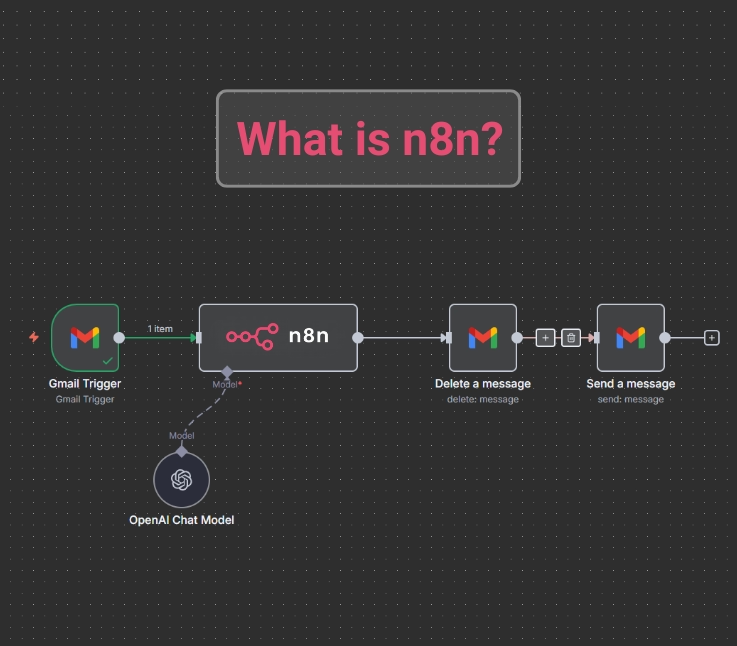

Think about how much time you lose each week doing the same digital chores:
Pulling data from tools that don’t talk to each other, cleaning it up, sending it to an LLM, then packaging the results so they actually make sense. It’s the same pattern, over and over, and yet every team still rebuilds it from scratch.
Now imagine if all of that just… ran itself.
That’s the shift platforms like n8n are creating. Instead of duct-taping workflows together or writing disposable scripts, you get a self-hostable automation engine that connects your apps, orchestrates your AI logic, and turns those repetitive pipelines into something repeatable, scalable, and genuinely smart.
What Is n8n, Actually?
n8n (pronounced “n-eight-n” and sometimes called“nodemation”) is an open-source workflow automation platform that lets you connect apps, move data, and automate complex processes without needing to write mountains of code. Think of it as a visual automation engine: you drag, drop, and link “nodes” together to build workflows the same way you’d connect pipes in a puzzle game or assemble modules in SimCity.
At its core, n8n helps you automate anything that follows a sequence. Sync data between tools, trigger alerts, enrich records, run multi-step LLM pipelines, or build full-blown business processes—n8n handles it all.
What sets n8n apart is its hybrid no-code + pro-code design:
- Non-technical users can assemble workflows using a clean, visual interface and hundreds of prebuilt nodes.
- Developers can go deeper, writing JavaScript or Python directly inside workflows, pulling in npm or Python packages, or even creating custom nodes for unlimited extensibility.
Because it’s open-source, you can self-host it locally, on your server, or inside Docker—giving you full control over your data and costs. And for teams that prefer convenience, n8n also offers a hosted cloud version.
Tools like Zapier, Make, and Node-RED aim for similar goals, but n8n sits in a sweet spot: simpler than developer-heavy tools like Node-RED, more flexible and extensible than typical no-code automation platforms, and free to run on your own hardware.
So what is n8n, actually?
It’s your automation engine.
Your AI pipeline orchestrator.
Your “do this for me so I never have to again” machine.
And once you start using it, you realise: this is how your workflows should have been running all along.

The Real Origin of n8n
n8n was created by Jan Oberhauser in Berlin after he became frustrated with automation tools that were closed-source, restrictive, and expensive to scale. He wanted something open, flexible, and powerful — a tool where users could connect any app to anything else without being locked into a vendor.
So in 2019, he built n8n as an open-source, node-based workflow automation platform that developers and non-developers could both use. The community quickly grew, contributing new nodes and integrations, which helped n8n expand fast.
As AI automation exploded, n8n evolved from a simple workflow tool into a platform that connects LLMs to real-world applications. This shift led to massive growth, major adoption, and over $73M in funding by 2025.
Is n8n a No-Code or Pro-Code Platform?
Unlike typical no-code tools like Zapier or Make, n8n positions itself as a “low-code” or “pro-code” automation platform. This means:
- Non-technical users can design workflows visually without writing code.
- Developers can extend functionality by scripting logic, building custom nodes, or deploying the tool in complex environments.
You can run n8n:
- On n8n Cloud (fully managed, quick setup).
- Or self-hosted, using Docker, npm, or serverless environments for full control over data and infrastructure.
This hybrid flexibility, visual simplicity with developer depth, is what sets n8n apart in the modern automation landscape.
How Does n8n Work?
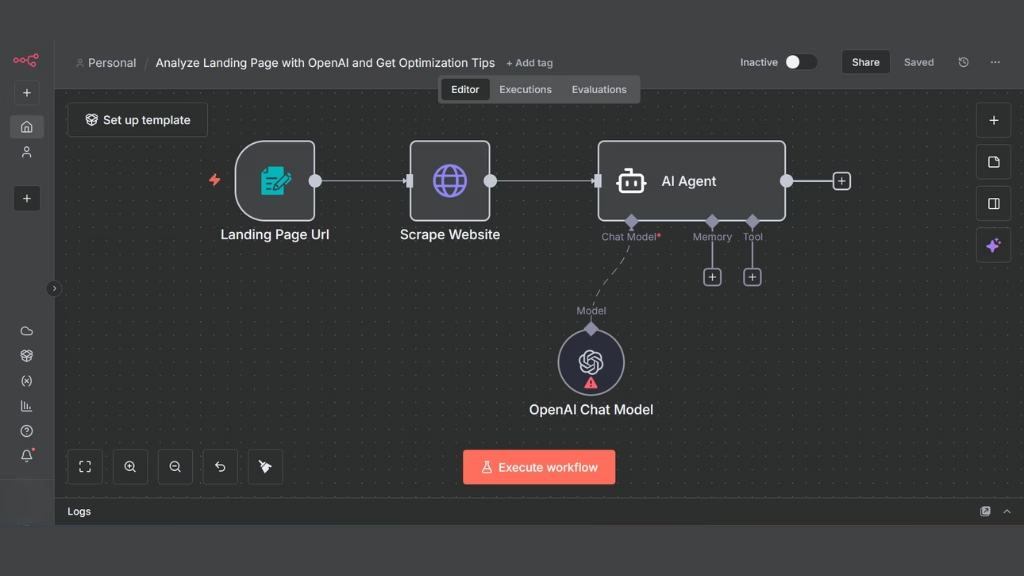
n8n is a visual workflow engine that lets you connect digital tools together, kind of like drawing a map of how your apps should talk to each other, and then letting n8n run that map automatically.
1. The Core Idea Workflows Made of Nodes
Think of a workflow as a chain of actions.
In n8n, each link in that chain is called a node.
- A Trigger Node starts the workflow (like “When a form is submitted” or “Every morning at 8 AM”).
- The next nodes perform Actions, such as sending an email, making an API call, or transforming some data.
- The output from one node becomes the input for the next.
If you’ve ever drawn a flowchart, that’s almost exactly how n8n works, except the chart actually runs and performs real tasks.
2. How n8n Executes Your Workflow
When you hit “Execute Workflow,” here’s what happens behind the scenes:
- Trigger – Something starts the workflow (a webhook, schedule, or event).
- Execution Plan – n8n reads your workflow, step by step, and builds an execution path.
- Data Flow – Each node receives data (in JSON format), processes it, and passes it forward.
- Engine Control – The n8n engine keeps track of which node runs next, handles retries, and logs everything for you to review later.
So, it’s like a relay race: one node finishes its job, hands the baton (data) to the next node, and the engine makes sure no one drops it.
3. Main Mode vs Queue Mode
By default, everything runs inside one main n8n process called Main Mode. It’s simple and great for small projects.
But if you start automating a lot of tasks or handling heavy loads (for example, hundreds of webhooks per minute), you can switch to Queue Mode.
In Queue Mode:
- The main process just schedules the jobs.
- A Redis queue keeps the list of jobs.
- One or more worker processes pick up and run those jobs independently.
This setup lets you scale horizontally and add more workers when you need more power, like adding more hands to get the job done faster.
4. Data, Logs, and Debugging
Every time a workflow runs, n8n keeps track of:
- The execution ID (so you can replay or inspect it later).
- The input and output data for each node.
- Any errors or retries that happen mid-way.
This makes debugging much easier. You can open the execution logs and see exactly where something went wrong and what data was flowing at that point.
5. Security and Credentials
When your nodes need to connect to external apps (like Google Sheets or Slack), n8n uses credentials.
- These are stored securely and encrypted in your database.
- You can manage them inside the UI or by using environment variables.
- It supports everything from API keys and OAuth2 to SSH and Basic Auth.
This means you don’t have to hardcode secrets or tokens into your workflows; they’re safely managed and reusable.
6. Custom Code and Extensibility
One of the biggest reasons developers love n8n is flexibility.
You can:
- Write custom JavaScript functions directly in your workflow (with the “Function” node).
- Create your own custom nodes with TypeScript using the n8n Node Creator CLI.
- Embed n8n into your own app using its REST API or webhooks.
So, you can start with simple drag and drop and grow into more complex, code-driven automations as your needs evolve.
7. Where n8n Runs
You can run n8n almost anywhere:
- On your local machine for testing.
- In Docker for simple team setups.
- In Queue Mode with Redis and multiple workers for scaling.
- Or use n8n Cloud, the hosted version that takes care of updates and infrastructure for you.
If you self-host, n8n stores all your data in PostgreSQL (recommended) or SQLite, keeping full control in your hands.
8. Observability and Monitoring
n8n includes built-in tools to keep you informed:
- A dashboard where you can view workflow runs and errors.
- Metrics endpoints compatible with Prometheus and Grafana.
- Enterprise options like audit trails and role-based access control.
You always know what’s running, who changed what, and whether workflows are succeeding.
Core Features of the n8n Automation Platform
n8n stands out for its blend of visual simplicity and technical flexibility. It’s built to handle both lightweight automations and enterprise-grade workflows through a modular, open architecture.
1. Visual Workflow Editor
The visual editor is where you design automations.
It uses a drag-and-drop interface where each node represents a function like sending an email, making an HTTP request, or parsing data. You can connect nodes visually, set parameters, and test in real time.
Key advantages:
- Instantly see how data moves between steps.
- Use execution previews to debug without affecting live workflows.
- Clone and reuse complex workflows with version control support.
2. Pre-Built Nodes and Integrations
n8n ships with 400+ ready-made nodes, covering popular apps like Slack, Google Sheets, Airtable, GitHub, and OpenAI. Each node comes with preconfigured fields, so you don’t have to manually set API calls unless you want to.

For developers, n8n’s node SDK allows creating new integrations using TypeScript so internal APIs or custom services can plug in just as easily as mainstream tools.
3. Triggers, Conditions, and Logic Control
You can automate everything from simple scheduled events to complex decision trees.
n8n supports:
- Trigger nodes (Webhook, Cron, Email, etc.)
- Conditional logic (If/Else, Switch, Merge, Split)
- Loops and error handling for reliable automation flows
This allows you to design intelligent workflows that adapt to different data or runtime conditions.
4. Extensibility with Code
While most platforms stop at visual automation, n8n lets you inject custom logic directly inside workflows.
You can:
- Use Function and Code nodes to write JavaScript snippets.
- Apply inline transformations (data mapping, API responses, or JSON restructuring).
- Build custom nodes that act like plugins, reusable components your entire team can share.
This makes n8n uniquely suited for technical teams who need both automation and control.
5. Self-Hosting and Deployment Options
n8n can run anywhere on your local machine, a private server, or in Docker containers.
The self-hosted model ensures full data ownership and compliance, while n8n Cloud offers a managed alternative for teams that want zero maintenance.
Deployment modes:
- Main Mode: Simplified single-instance setup.
- Queue Mode: Uses Redis and workers for horizontal scaling and distributed execution.
This flexibility gives you the freedom to start small and scale up as automation demand grows.
6. Secure Credentials and Environment Management
All sensitive information, like API keys and OAuth tokens, is stored encrypted in n8n’s database.
You can manage credentials centrally, share them securely across workflows, and isolate environments (development, staging, production).
Advanced users can integrate secret managers such as HashiCorp Vault or AWS Secrets Manager for enterprise-grade security.
7. Observability and Error Handling
Built-in monitoring tools let you inspect, debug, and improve your automations:
- Execution logs with node-level data previews
- Automatic retries on failed executions
- Real-time error alerts and metrics endpoints for Prometheus/Grafana
This observability layer makes n8n reliable for critical business workflows.
8. Includes AI/LLM Features
You can plug in models like OpenAI, Claude, local LLMs, etc. Think of n8n as the “middle layer” between:
- Your data (emails, databases, documents, forms, APIs)
- Your LLM (OpenAI, Claude, local models, custom models)
- Your output (Slack messages, PDFs, summaries, dashboards, updates)
n8n’s AI features let you:
1. Send data to an LLM automatically: Every time a new customer signs up → summarise their info → save it to Notion.
2. Build multi-step AI workflows: LLM → filter results → enrich with another API → send final output.
3. Connect any LLM
- OpenAI
- Claude
- HuggingFace
- Local LLMs
- Custom API-driven models
4. Run AI agents: Not fictional agents, actual multi-step logic: “Based on this input, decide what to do → choose next action → execute.”
5. Chain LLM prompts: One model generates, another checks, another formats. (Like building a mini AI factory.)
6. Clean and prepare data before sending to an LLM: Most people just throw messy data into GPT. n8n can clean, slice, merge, or structure data first better results.
7. Route AI output anywhere: Slack, email, databases, CMS, dashboards, PDFs, APIs… anywhere.
9. Code When You Want (JavaScript/Python)
n8n lets you build workflows without writing any code — you just connect visual blocks. But sometimes you may want to do something more customized. For that, n8n gives you special nodes where you can write JavaScript or Python.
This means beginners can build everything visually, and people who know coding can add extra logic whenever they need. You’re never forced to code, but you always can if you want more control.
10. Fair-Code Licensing and Customisation
n8n is released under a Sustainable Use License (SUL), meaning it’s source-available but not fully open source.
You can freely self-host and modify it for internal use, but reselling it as a hosted service requires a commercial license.
This approach allows n8n to stay open for developers while funding sustainable long-term growth.
Common n8n Use Cases
n8n can automate almost any digital workflow from marketing notifications to AI-powered data pipelines. Its node-based logic and API integrations make it adaptable to both simple and enterprise-grade automation needs.
Notifications and Alerts
Keep your team informed automatically. n8n can send instant alerts via Slack, Microsoft Teams, or email whenever key events occur, like new customer signups, payment failures, or system errors.
Example: When a user submits a form, n8n can trigger a Slack message and log the data in a CRM simultaneously.
Benefits:
- Eliminates manual monitoring
- Reduces response time
- Ensures consistent communication
Data Synchronisation Across Platforms
Sync data seamlessly between apps or databases. With n8n, you can connect multiple tools such as HubSpot, Notion, Google Sheets, and PostgreSQL to keep information up to date across systems.
Example: When a new lead is added to a CRM, n8n automatically updates a Google Sheet and sends the data to a marketing platform.
Benefits:
- Avoids duplicate entries
- Maintains data accuracy
- Saves hours of manual transfer
Invoice and Payment Processing
Automate financial workflows with secure, rule-based logic. n8n can integrate Stripe, PayPal, or accounting platforms like QuickBooks and Xero.
Example: When a payment succeeds, n8n can generate an invoice, email it to the client, and update the finance database all automatically.
Benefits:
- Reduces admin work
- Improves financial accuracy
- Speeds up client communication
Automated Reporting
Generate and deliver reports without lifting a finger.
n8n can compile analytics from sources like Google Analytics, Datadog, or internal dashboards and send periodic reports.
Example: Every Monday morning, n8n aggregates sales data and emails a visual report to your leadership team.
Benefits:
- Enables consistent reporting cadence
- Reduces human error
- Improves data visibility
Web Scraping and Data Collection
Gather insights at scale. Use n8n’s HTTP Request node to pull data from public APIs or web pages, then transform and store it in your preferred database.
Example: Scrape competitor pricing data nightly and alert your sales team when thresholds change.
Benefits:
- Automates market intelligence
- Reduces manual research time
- Supports data-driven strategy
Smart Home and IoT Automation
Control connected devices programmatically. n8n can communicate with IoT platforms, smart sensors, or APIs like Home Assistant.
Example: When your calendar shows “Meeting,” n8n can dim the lights, pause music, and mute notifications.
Benefits:
- Bridges apps and physical devices
- Increases efficiency and comfort
- Showcases API orchestration flexibility
Limitations of n8n
n8n is great, but like any tool, it has its limits. Understanding these limitations is important, especially if you plan to run large or mission-critical workflows.
- Technical: n8n can become slow or inefficient when handling millions of data rows because everything flows through nodes in JSON format.
- UX: Workflows can become messy and hard to read if you don’t name nodes or organise branches carefully. (Beginner users often struggle here.)
- Operational: Self-hosting requires DevOps knowledge; you must manage backups, updates, scaling, Redis workers, Postgres, etc.
These limitations matter most for teams working with massive datasets, complex enterprise workflows, or strict testing and deployment requirements. For everyday automation, API integrations, internal tools, and AI-powered pipelines, n8n performs reliably.
How n8n Compares to Other Tools in Real Scenarios
Most automation tools look similar on the surface: drag nodes, connect apps, run workflows. But in real-world use, the differences become obvious very quickly. Here’s how n8n stacks up against platforms like Zapier, Make, and Node-RED when you’re actually building and running workflows.
1. When You Need Flexibility and Custom Logic → n8n Wins
You need to merge API data, run a custom calculation, clean the results, and then send them into another system.
- Zapier: Can’t handle this without paid features or workarounds.
- Make: Better than Zapier, but custom logic is limited.
- Node-RED: Very flexible but requires heavy coding.
- n8n: You can do all of this using a mix of visual nodes and optional JS/Python code.
Why n8n wins:
It’s the only tool that blends no-code and code seamlessly.
2. When You Need Self-Hosting or Full Data Control → n8n Wins Easily
Your company must keep data on-prem, comply with GDPR, or avoid sending data to third-party clouds
- Zapier & Make: Cloud-only → no control over data.
- Node-RED: Can self-host but lacks modern workflow features.
- n8n: Self-hosting is built-in and fully supported.
Why n8n wins:
It gives you complete data ownership without sacrificing features.
3. When You Need Simple Tasks and Speed Over Flexibility → Zapier Wins
You just want: “When a new email arrives → send a Slack message.”
- Zapier: One-minute setup.
- Make: Also easy.
- n8n: Possible, but slightly more steps and less polished templates.
Why Zapier wins:
It’s optimized for very simple, one-to-one automations.
4. When You Need Large Multi-Step Workflows → n8n vs. Make (Tie)
A 40-step marketing automation that includes branching, filters, and API calls.
- Zapier: Struggles with complexity and becomes expensive fast.
- Make: Handles complex logic visually, good UX.
- n8n: Handles complexity well, but the canvas can get messy.
Verdict:
Make has better visual UX,
n8n has better power, flexibility, and self-hosting.
Choose based on:
- UX preference → Make
- Control + customization → n8n
5. When You Need AI/LLM Workflows → n8n Wins Strongly
You’re building:
- multi-step LLM chains
- text enrichment pipelines
- AI agents
- data prep + LLM + validation flows
- Zapier: Very basic LLM support
- Make: Decent, but limited branching and logic
- Node-RED: Possible but code-heavy
- n8n: Purpose-built for AI integrations with flexible logic and data handling
Why n8n wins:
It supports complex AI pipelines better than any mainstream automation platform.
6. When You Need Enterprise-Grade Integration → n8n vs Node-RED
You want to integrate internal systems, IoT devices, or hardware.
- Node-RED: Strong for IoT and custom devices
- n8n: Strong for SaaS apps, APIs, LLMs, and business workflows
Verdict:
IoT → Node-RED
Business automation + AI → n8n
7. When Scaling Is Important → Depends on the Team
Processing thousands of workflows per minute.
- Zapier/Make: Scaling is automatic but locked behind expensive plans
- n8n: Can scale massively through worker mode — but requires DevOps
- Node-RED: Can scale but needs engineering effort
Verdict:
- No DevOps? → Zapier/Make
- DevOps team exists? → n8n scales cheapest and cleanest
Pricing and Availability
n8n offers both free self-hosting and paid cloud plans. You can run it locally at no cost or use n8n Cloud for managed hosting with advanced features, scalability, and team support.
Is n8n Free to Use?
Yes, n8n is free to self-host. You can install it using Docker, npm, or your preferred deployment method. This makes it attractive for developers, startups, and technical teams who want full control over their data without ongoing subscription fees.
Free version includes:
- Access to all workflow-building features
- Unlimited custom nodes and integrations
- Local or server deployment
- Personal and small-team usage rights
However, the fair-code license limits commercial reselling or embedding n8n in your own SaaS without a separate agreement.
n8n Cloud vs. Self-Hosted Deployment
| Feature | n8n Cloud | Self-Hosted n8n |
|---|---|---|
| Setup | Fully managed, no installation required | Requires manual setup via Docker or CLI |
| Hosting & Maintenance | Managed by n8n GmbH | Managed by your own team |
| Scaling | Auto-scaling with worker queues | Custom scaling via Redis, Postgres, Kubernetes |
| Data Control | Data stored in n8n’s EU cloud | Full data ownership and compliance flexibility |
| Team Features | Built-in collaboration, RBAC, and SSO | Configurable based on infrastructure |
| Pricing | Subscription-based (tiered by executions/month) | Free to run, but infrastructure costs apply |
Best for:
- n8n Cloud: Teams that prioritize convenience, reliability, and quick start.
- Self-hosted: Developers and enterprises needing compliance, privacy, or custom scalability.
Fair-Code License and Commercial Use
n8n uses the Sustainable Use License (SUL), a fair-code model.
This means the source code is publicly available, but certain commercial uses require a license for example, embedding n8n as part of a commercial SaaS product.
In practical terms:
- You can use n8n freely for internal or client automations.
- You need a commercial agreement if you offer n8n as part of your own service.
This licensing model balances open development with long-term sustainability for the n8n project.
Pricing Snapshot (as of 2025)
- Free Tier: Self-hosted or limited executions on n8n Cloud
- Starter Plan: ~$20/month includes managed hosting and higher limits
- Professional Plan: ~$50–100/month adds collaboration, priority support, and increased executions
- Enterprise Custom Plans: Tailored to volume, SLAs, and security needs
(Pricing may vary; always confirm on n8n.io/pricing)
Conclusion
n8n bridges the gap between no-code simplicity and developer-grade flexibility, giving teams full control over how and where their workflows run. It’s one of the few platforms that’s both open, extensible, and self-hostable, making it ideal for technical users who want scalability without vendor lock-in.
Its node-based architecture and visual builder let anyone design automations intuitively, while developers can extend functionality using JavaScript, APIs, and AI nodes.
Unlike closed ecosystems such as Zapier or Make, n8n gives you the freedom to own your data, deploy anywhere, and build anything from simple notifications to multi-step AI agents and data pipelines. The result is a tool that grows with your organization, not against it.
Whether you’re a startup optimizing workflows or an enterprise building internal automation infrastructure, n8n provides the flexibility, transparency, and power you need to automate at scale.
FAQ Section
These frequently asked questions address the most common queries about n8n’s capabilities, pricing, and deployment, optimized for search and answer engines.
What is n8n used for?
n8n is a workflow automation tool used to connect apps, APIs, and databases. It helps automate repetitive tasks like syncing data, sending alerts, or running AI-powered workflows without needing complex code.
Is n8n free?
Yes. n8n is free to self-host on your own server or local machine. You can also use n8n Cloud, a managed version with paid plans that include scaling, collaboration, and enterprise features.
Is n8n open source?
n8n is source-available under the Sustainable Use License (SUL). This “fair-code” model allows personal and business use but restricts reselling or embedding n8n into your own commercial SaaS without a license.
Can I build AI workflows in n8n?
Yes. n8n includes AI nodes that let you connect large language models (like OpenAI or Anthropic) to your workflows. You can chain multiple nodes to create AI agents that perform tasks such as writing summaries, processing data, or answering questions.
How do I install n8n?
Docker: docker run -it –rm -p 5678:5678 n8nio/n8n
npm: npm install n8n -g
Cloud: Sign up at n8n.io for an instant managed setup.
Is n8n better than Zapier or Make?
Zapier/Make are great for non-technical users with ready-made integrations.
n8n is better for developers or teams who want flexibility, self-hosting, and complex logic (e.g., loops, conditions, and custom code).
Can enterprises use n8n?
Yes. n8n supports enterprise-grade features like SSO, RBAC (role-based access control), audit logs, and scalable deployment. Many companies use it internally to integrate data pipelines, marketing systems, and AI tools securely.
What does “n8n” stand for?
“n8n” is short for “Node-to-Node”, representing how workflows connect different nodes (tasks) to form automated processes.
Does n8n require coding skills?
Not necessarily. You can build complete workflows visually, but if you know JavaScript or TypeScript, you can extend n8n with custom code for more complex automations.
How secure is n8n?
n8n uses encrypted credentials, environment variables, and role-based access to keep workflows secure. Self-hosted deployments give teams full data control, while n8n Cloud follows strict EU data protection standards.
This page was last edited on 10 December 2025, at 11:24 am
Contact Us Now

Contact Us Now
Start a conversation with our team to solve complex challenges and move forward with confidence.


