
In 2026, choosing the right software development tools to use can genuinely make or break your project’s success. With countless platforms, frameworks, and utilities emerging every year, decision fatigue is a real challenge for both teams and solo developers.
Smart tool selection directly impacts productivity, code quality, and how effectively teams can collaborate across the software development lifecycle (SDLC). This guide delivers not just a list of the best software tools for developers but also a practical framework for making confident decisions.
By reading on, you’ll find up-to-date recommendations, hands-on selection criteria, and comparison matrices tailored for teams, solo devs, and every stage of software delivery.
Software Development Tool Types, Top Picks, and Best Use Cases
Here’s a table summarizing the top software development tools by category, with key use cases and critical features. Use this as your quick reference as you assess what best suits your stack and workflow.
| Tool Category | Top Pick(s) | Best For | Free/Paid | OS/Platform | Unique Perks |
|---|---|---|---|---|---|
| IDEs & Code Editors | Visual Studio Code, IntelliJ IDEA | Multi-language coding | Free/Paid | Win/Mac/Linux | Rich extension ecosystem, smart code assist |
| Version Control | Git, GitHub, GitLab | Collaboration, versioning | Free/Paid | Cross-platform | Open source support, CI/CD integration |
| CI/CD Automation | Jenkins, CircleCI, GitHub Actions | Automated build & deploy | Free/Paid | Cloud/On-prem | Plugin systems, scalability |
| Project Management | Jira, Trello, Basecamp | Agile & Scrum tracking | Free/Paid | SaaS/Linux/Mac | Agile boards, customization |
| Collaboration Tools | Slack, Loom | Remote team sync | Free/Paid | Web/Mobile/Desktop | Real-time messaging, async video |
| Testing & QA | Selenium, Playwright, Code Climate | Automated test & code quality | Free/Paid | Cross-platform | Browser automation, code metrics |
| Monitoring & Security | PagerDuty, Sentry, Sematext | Incident response & monitoring | Free/Paid | SaaS/Cloud | Alerting, deep diagnostics |
| Documentation | Confluence, Notion | Spec/knowledge base | Free/Paid | Web/Mobile/Desktop | Collaborative docs, templates |
Use this matrix to quickly shortlist tools by role, budget, or feature priorities. Further breakdowns by SDLC phase and team scenario appear in the sections below.
How to Choose the Right Software Development Tools
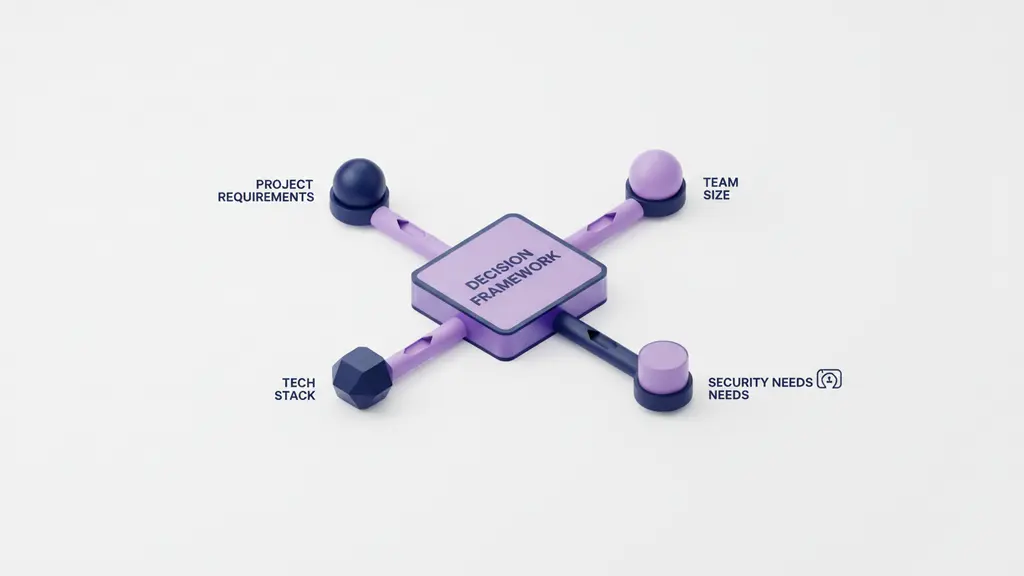
Choosing the best software tools for developers starts with matching a tool’s strengths to your project, team, and workflow. Use the following framework and checklist to guide selection and avoid common pitfalls.
Summary Decision Framework:
- Define your project’s requirements: complexity, language, deadlines.
- Assess team size and structure: solo, small agile, large distributed.
- Map your tech stack: front-end, back-end, mobile, cloud.
- Evaluate workflow: in-house vs. remote, Agile vs. Waterfall.
- Confirm security, scalability, and integration needs.
- Check cost constraints: free vs. premium, licensing fit.
Decision Checklist:
- Project Type: Web, mobile, desktop, API, microservices
- Tech Stack: Language, frameworks, platform support
- Team Dynamics: Number, roles, remote vs. on-site
- Security: Compliance needs, access controls
- Scalability: Growth forecast, performance requirements
- Integration: Compatibility with existing tools
- Support: Community strength, vendor SLAs
Visual Decision Flowchart:
Step 1: What is your primary technology stack?
→ Step 2: Solo or team development?
→ Step 3: Remote, hybrid, or on-site?
→ Step 4: Budget—are free tools sufficient?
→ Step 5: Any regulatory, security, or scalability needs?
Common Pitfalls to Avoid:
- Overprioritizing “trendy” tools that don’t fit your use case.
- Ignoring integration with existing systems.
- Underestimating training time and adoption friction.
- Opting for free tools with insufficient long-term support.
Aligning your choices with these criteria reduces risk, maximizes team productivity, and ensures you adopt the right developer productivity tools for lasting success.
What Are the Essential Software Development Tools at Each SDLC Phase?

Understanding which tools deliver the most value at each software development lifecycle (SDLC) stage is key to building an effective stack. Here’s how to prioritize tool adoption throughout planning, coding, testing, deployment, and ongoing monitoring.
Planning & Documentation: Building the Foundation
Efficient planning and clear documentation are the backbone of successful projects. Tools in this category provide shared spaces for requirements, architecture, and collaboration.
- Confluence: Enterprise-level documentation that integrates with Jira.
- Notion: All-in-one workspace for notes, tasks, and databases—flexible for teams or individuals.
- SmartDraw: Diagramming software for process maps, ERDs, and architecture grids.
- Excalidraw: Simple, collaborative whiteboarding ideal for real-time ideation.
Use these tools to:
– Centralize requirements, technical specs, and wikis.
– Synchronize architecture diagrams with real project boards.
– Support remote or distributed planning sessions.
Coding & Code Editors: Writing Robust Code Faster
Choosing the right code editor or Integrated Development Environment (IDE) accelerates development and improves code quality.
- Visual Studio Code: Free, open-source, supports dozens of languages; highly extensible with plugins and themes.
- IntelliJ IDEA: Robust for Java, Kotlin, and enterprise development; advanced code intelligence and refactoring.
- JetBrains Suite: Specialized IDEs (PyCharm, WebStorm) for language-specific needs.
- Atom (sunsetting): Previously a strong open-source choice; migration recommended.
- Sublime Text: Lightweight, blazing fast, suitable for quick scripting.
Key criteria in code editor comparison:
– Language and framework support.
– Performance and startup times.
– Extension ecosystem and community support.
– Debugging, testing, and code quality integrations.
Version Control & Repository Management: Managing Change
Version control systems are essential for collaboration, managing code history, and enabling rollbacks.
- Git: The gold standard for distributed version control.
- GitHub: Cloud-based Git repository hosting with pull requests, actions, and social coding.
- GitLab: Integrated CI/CD pipelines, on-premise deployment available.
- Bitbucket: Atlassian’s Git solution, closely integrated with Jira and Confluence.
Benefits include:
– Safe collaborative development (branching, merging).
– Tracking of issues, pull requests, and code reviews.
– Integration with CI/CD and bug tracking software.
Project Management & Collaboration: Staying Aligned
Keeping teams in sync with project management software and collaboration tools enables transparency and productivity.
- Jira: Industry-leading for Agile and Scrum workflows; issue tracking, sprints, and detailed dashboards.
- Trello: Intuitive Kanban boards—excellent for visual thinkers or smaller teams.
- Basecamp: Simple task management and messaging for less complex workflows.
- Slack: Real-time messaging, file sharing, and hundreds of integrations.
- Loom: Asynchronous video messaging; great for distributed teams.
Use cases:
– Task tracking, backlog grooming, and sprint planning.
– Streamlining daily stand-ups, retros, and project documentation.
– Enhancing remote team visibility and knowledge sharing.
Continuous Integration & Deployment (CI/CD): Automate the Pipeline
CI/CD platforms automate building, testing, and deployment, accelerating release cycles and improving reliability.
- Jenkins: Highly customizable, large plugin ecosystem, widely used for end-to-end pipelines.
- CircleCI: Cloud-native, easy setup, strong Docker support.
- GitHub Actions: Deep integration for automation inside GitHub repositories.
- Travis CI: Simple configuration, especially for open source projects.
Benefits:
– Reduce manual intervention and eliminate deployment errors.
– Enable faster feedback loops and trend toward “continuous everything”.
– Scale pipelines for large, distributed engineering teams.
Testing & Quality Assurance: Ensuring Reliability
High-quality code and early bug detection rely on automated QA and testing tools.
- Selenium: Browser-based automation testing suite, supports multiple languages.
- Playwright: Modern, reliable end-to-end browser automation, good for front-end and regression tests.
- Test.ai: AI-powered test generation and coverage.
- Code Climate: Code quality analytics, maintainability metrics, integration with PRs.
- SonarQube: Comprehensive code analysis—detects bugs, vulnerabilities, and code smells.
Outcomes:
– Faster feedback on new commits.
– Fewer bugs advance to production.
– Insights into codebase health and technical debt.
Monitoring & Security: Post-Deployment Health
Once in production, robust monitoring and security tools are critical for reliability, compliance, and rapid response to incidents.
- PagerDuty: Real-time incident alerting and escalation.
- Sematext: Full-stack monitoring from infrastructure to application.
- Sentry: Powerful error tracking for apps and services.
- Fugue: Cloud security and compliance automation.
Core features:
– 24/7 uptime and error visibility.
– Automated response and audit trails for compliance.
– Continuous vulnerability and risk assessment.
Free vs Paid Software Development Tools: Which Is Right for You?

Choosing between free (often open source) and paid tools requires a careful balance between cost, capability, and long-term support. Many free tools rival paid counterparts, especially for small teams or MVP projects, but premiums can be justified for scale, support, or regulatory compliance.
Pros & Cons Table:
| Type | Advantages | Limitations |
|---|---|---|
| Free/Open Source | Low cost, strong communities, flexible | May lack support, advanced features, or integrations |
| Paid | Dedicated support, advanced features, SLAs | Licensing costs, vendor lock-in |
Consider when to upgrade:
– Project complexity demands advanced automation or scaling.
– Regulatory, security, or SLA requirements.
– Need for integrations or features only available in premium tiers.
Top free tools that rival paid solutions:
- VS Code (vs. premium IDEs)
- Git (core for version control)
- Trello (lightweight project management)
- Selenium (test automation)
Evaluate based on your team’s growth trajectory, critical dependencies, and the ROI of premium features for your scenario.
Emerging and AI-Powered Development Tools for 2025–2026
2026 brings a new wave of software development tools that leverage AI, cloud, and continuous innovation to boost productivity.
Emerging trends and popular tools:
- AI Code Assistants: GitHub Copilot, Tabnine—accelerate routine coding, catch errors in real-time.
- Cloud-based IDEs: Gitpod, Replit—code from any browser, perfect for distributed teams and hackathons.
- DevOps Automation Platforms: Harness, Azure DevOps—integrate build, test, and deploy with AI-driven optimizations.
- LLM Integration: Tools that leverage large language models (OpenAI, Anthropic) for code suggestions, review, and documentation.
- Fast-Growing Open Source Projects: New frameworks and plugins actively supported on platforms like GitHub.
Expert Tip:
Pilot AI tools within non-critical projects before full-scale adoption. Monitor developer productivity and code quality impact before investing deeply.
Staying updated ensures your stack remains competitive and future-ready.
Which Software Development Tools Are Best for Your Role or Team Size?
No single toolset fits every developer or team. Here’s how to select developer productivity tools tailored to your focus area, collaboration needs, and workflow—ensuring efficiency and scalability.
For Front-End Developers
- IDEs/Editors: VS Code, WebStorm
- Frameworks: React, Vue, Angular integrations
- Browser Tools: Chrome DevTools, Firefox Developer Edition
- Testing: Jest, Cypress
Best for rapid prototyping, cross-browser debugging, and tight integration with modern front-end stacks.
For Back-End Developers
- IDEs/Editors: IntelliJ IDEA, PyCharm, Visual Studio
- APIs/Databases: Postman (API testing), DBeaver, MongoDB Atlas
- Deployment: Docker, Kubernetes, serverless frameworks
- Debugging: Loggly, DataDog
Focus on robust API management, database ops, and scalable server-side logging.
For Full-Stack Developers
- All-in-one IDEs: VS Code (extensions for all stacks)
- Version Control: Git, GitHub/GitLab
- CI/CD: GitHub Actions, CircleCI
- End-to-End Testing: Playwright, Selenium
- Docs: Notion, Confluence
Emphasize tools that streamline switching between client and server, automate deployments, and simplify documentation.
For Teams (Agile, Remote, Cross-Functional)
- Project Management: Jira, Trello, Notion (docs)
- Communication: Slack, Loom
- CI/CD & Collaboration: GitHub, GitLab (built-in reviews, actions)
Ideal for distributed teams using Agile, ensuring high-visibility tracking, and maximized async collaboration.
For Solo Developers & Freelancers
- Editors: VS Code, Sublime Text
- All-in-one Docs/PM: Notion, Trello
- Free Version Control: Git + GitHub (private repos)
- Low-cost Automation: GitHub Actions (free allotments)
Prioritize tools with generous free tiers, minimal setup, and versatility.
Conclusion
The right software development tools do more than just speed up coding—they empower teams, keep projects on track, and adapt to industry shifts. By applying a structured decision framework and leveraging expert-by-role recommendations, you can cut through decision fatigue and ensure every tool in your stack delivers measurable value.
Now is the time to benchmark your current toolset, try our downloadable checklists, or explore deep guides tailored to your workflow. Confident, informed choices today set your projects up for long-term resilience and success.
Key Takeaways
- A practical decision framework is critical for selecting the best software development tools in 2026.
- Top tools differ by SDLC phase—plan, code, test, deploy, and monitor using specialized solutions.
- Free and open source tools cover most needs, but paid tiers offer scalability and support for larger teams.
- AI-powered tools and cloud-based platforms are shaping the future of developer productivity.
- Tailor your tool stack to your specific role, team size, and workflow for maximum impact.
FAQs About Software Development Tools
What are the most essential software development tools to use in 2026?
Key tools include IDEs (VS Code, IntelliJ IDEA), version control (Git, GitHub), project management (Jira, Trello), CI/CD automation (Jenkins, GitHub Actions), testing (Selenium, Playwright), and collaboration platforms (Slack, Loom).
How do I choose the right software development tools for my team?
Consider project type, tech stack, team size, workflow style, security, scalability, integration, and budget. Map needs to solutions that streamline your process and support team growth.
Are there free alternatives to paid development tools like Jira or GitHub?
Yes. Trello, Notion, and open source tools like Git, GitHub (community/free plans), and Jenkins offer extensive features at no cost.
What are the best tools for remote software development collaboration?
Slack, Loom, Notion, and cloud IDEs like Gitpod are excellent for distributed team communication, documentation, and joint coding efforts.
Which tools support the entire software development lifecycle (SDLC)?
Atlassian (Jira & Confluence), GitHub (with Actions), and GitLab provide integrated features from planning through deployment and monitoring.
What are the benefits of AI-powered software development tools?
AI tools automate routine coding, assist in bug detection, speed up documentation, and improve productivity through intelligent suggestions.
How do software development tools differ for solo developers vs teams?
Solo devs favor simpler, all-in-one tools with minimal overhead; teams rely on collaborative platforms, robust workflow support, and scalable integrations.
How do I integrate version control with project management tools?
Most leading platforms offer direct or plugin-based integrations, enabling automatic linking of code changes, issues, and progress tracking.
What are the latest trends in software development tools?
Up-and-coming trends include AI code assistants, DevOps automation, cloud IDEs, and deeper security integrations across all stages.
What role do documentation and code review tools play in the development workflow?
They provide centralized, accessible specs, enforce code quality standards, and facilitate knowledge sharing and compliance.
This page was last edited on 5 February 2026, at 4:26 pm
Contact Us Now

Contact Us Now
Start a conversation with our team to solve complex challenges and move forward with confidence.


