- What Is an AI Chatbot?
- Why Integrate an AI Chatbot Into Your Application?
- Pre-Integration Planning Checklist
- Choosing the Right Chatbot Integration Approach
- Step-by-Step Guide: How to Integrate an AI Chatbot Into Your Application
- Chatbot Integration Architecture
- Building Architecture for AI Chatbot Integration for Business Applications
- Cost and Timeline Considerations
- How Different Industries Are Successfully Using AI Chatbot Integration
- Future Trends in AI Chatbot Integration
- Conclusion
- Frequently Asked Questions (FAQs)
AI chatbots are quickly becoming a core feature of modern applications, not an optional add-on. From SaaS platforms and mobile apps to enterprise systems, users now expect instant answers, personalized interactions, and support that is available at any time. Traditional interfaces and manual support models are no longer enough to meet these expectations.
Learning how to integrate an AI chatbot into your application allows you to meet these demands while improving efficiency and scalability. An AI chatbot can guide users, automate repetitive tasks, reduce support workload, and create a more interactive experience inside your app. When implemented correctly, chatbot integration improves both user satisfaction and business performance.
In this guide, you will learn what an AI chatbot is, the different types of AI chatbots used in applications, and a clear, practical process for AI chatbot integration. Whether you are planning a simple chatbot feature or a more advanced conversational AI system, this article will help you make the right decisions and integrate an AI chatbot into your application step by step.
What Is an AI Chatbot?
Before learning how to integrate an AI chatbot into your application, it is important to understand what an AI chatbot actually is and how it functions inside an app.
An AI chatbot is a software system designed to communicate with users through text or voice using artificial intelligence. Unlike traditional chat systems that rely only on predefined rules, an AI chatbot can understand user input, interpret intent, and generate relevant responses dynamically. This makes AI chatbots more flexible and capable of handling real-world conversations.
AI chatbots rely on a few core technologies that enable them to understand language and respond intelligently.
- Natural Language Processing helps the chatbot understand and interpret human language as users type or speak.
- Machine Learning allows the chatbot to improve its responses over time by learning from interactions and data.
- Large Language Models enable more natural, human-like conversations by understanding context and generating meaningful replies.
Within an application, an AI chatbot typically acts as a communication layer between users and backend systems. It can connect to APIs, databases, and services to retrieve information, complete tasks, or guide users through workflows. This makes AI chatbot integration a powerful way to simplify user interactions while keeping the core application logic intact.
With a clear understanding of what an AI chatbot is, the next step is to explore the different types of AI chatbots and how they are used in real applications.
Why Integrate an AI Chatbot Into Your Application?
Once you understand what an AI chatbot is, the next step is understanding the real value it brings when integrated into an application.
AI chatbot integration is not just about adding automation. It is about creating a smoother experience for users while making the application easier to scale and manage over time.
Business Benefits
From a business perspective, integrating an AI chatbot into your application helps improve efficiency without sacrificing user experience.
- Automates repetitive interactions such as common questions, onboarding steps, and basic support requests
- Keeps users engaged inside the application by offering help exactly when they need it
- Supports growth without increasing operational costs by handling more conversations as usage scales
Technical Advantages
From a technical standpoint, AI chatbots reduce friction for both users and internal teams.
- Provides instant responses without waiting for manual support
- Reduces workload on support and engineering teams by resolving common issues automatically
- Improves system efficiency by filtering and routing requests before they reach backend services
Real-World Impact
In real applications, the benefits of AI chatbot integration are easy to measure.
- Faster response times and fewer unresolved user issues
- Higher satisfaction and retention rates due to consistent in-app support
- More stable and scalable applications that can handle growth confidently
These results explain why AI chatbots are becoming a standard feature in modern application development.
Pre-Integration Planning Checklist
Before you integrate an AI chatbot into your application, there are a few important things you should decide first. The following checklist helps ensure your AI chatbot integration is planned properly before any development begins.
Define Your Chatbot Goals
Start by deciding what you want the AI chatbot to achieve inside your application. Common goals include customer support, user onboarding, lead qualification, or internal assistance. Clear goals make it easier to design conversations and measure success later.
Match Goals to the Right Chatbot Type
Not every chatbot type fits every use case. Simple tasks may work well with rule-based chatbots, while complex interactions often require AI or hybrid chatbots. Aligning goals with the right chatbot type keeps integration efficient and cost-effective.
Identify Required Data Sources
Next, identify the data the chatbot needs to access. This may include FAQs, product information, user accounts, or internal APIs. Planning data access early helps ensure smooth AI chatbot integration with your application backend.
Consider Security and Compliance
Finally, review security and compliance requirements. If your chatbot handles personal or sensitive data, you need proper access control, encryption, and compliance with relevant regulations. Addressing this early prevents issues later in development.
Choosing the Right Chatbot Integration Approach
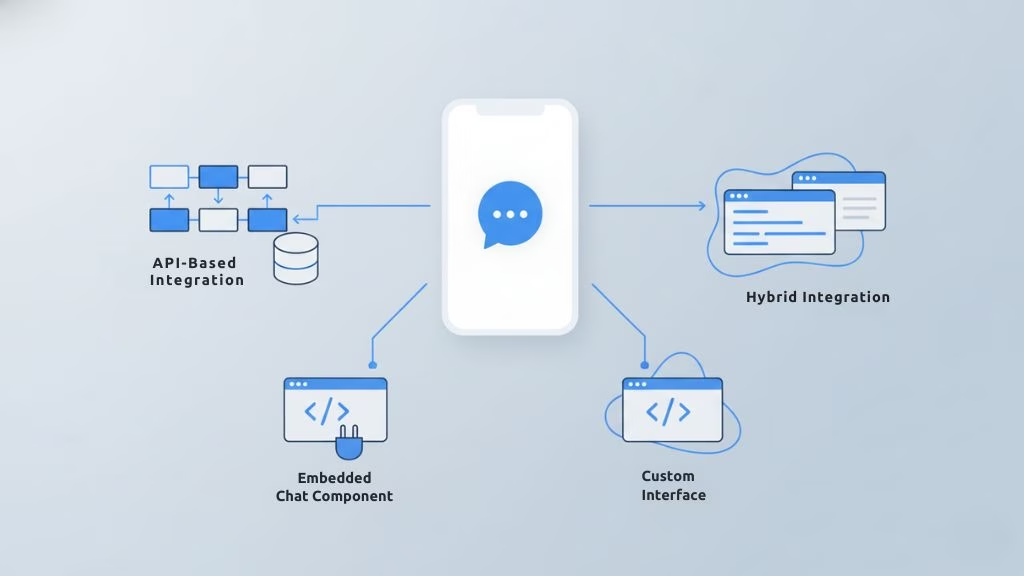
After planning your AI chatbot integration, the next step is deciding how to integrate the chatbot into your application. Each integration approach affects development effort, flexibility, and long-term scalability.
API-Based Integration
API-based integration connects an AI-powered chatbot to your application through backend APIs. Your system sends and receives messages programmatically, allowing deep control over chatbot behavior.
- Best for custom and scalable applications
- Full control over logic, data, and conversational AI integration
- Requires backend development effort
Embedded Chat Widgets
Embedded chat widgets are prebuilt chat interfaces that can be added to an application with minimal setup. They handle most of the UI and communication automatically.
- Quick to implement with minimal development
- Suitable for basic chatbot use cases
- Limited customization options
Custom UI With Backend Integration
Custom UI with backend integration involves building a tailored chat interface and connecting it directly to backend systems and AI services.
- Ideal for complex workflows and branded experiences
- Full control over chatbot architecture and UI
- Higher development time and cost
Hybrid Integration Approaches
Hybrid integration approaches combine multiple methods, allowing applications to start simple and evolve their AI chatbot integration over time.
- Flexible and scalable as requirements grow
- Balances speed of deployment and customization
- Common choice for long-term AI chatbot development
Choosing the right integration approach ensures your chatbot integration process aligns with your application goals and future growth.
Step-by-Step Guide: How to Integrate an AI Chatbot Into Your Application
Now that you have your goals and integration approach, it is time to follow a clear chatbot integration process from planning to launch.
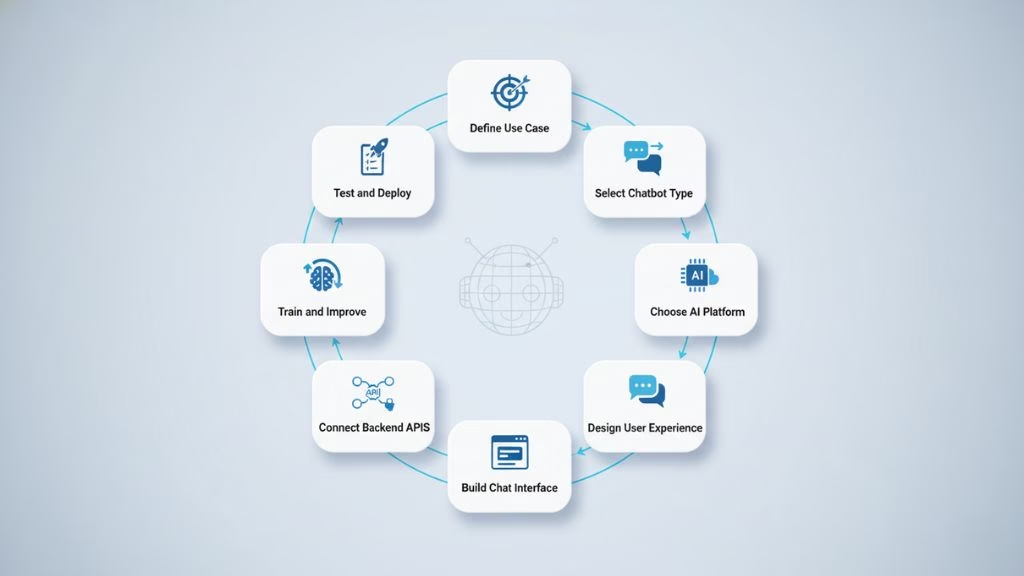
The steps below explain how to integrate an AI chatbot into your application in a way that is practical, scalable, and easy to maintain.
Step 1: Define the Use Case, Scope, and Success Metrics
A successful AI chatbot integration starts with clarity. Without it, you risk building a chatbot that looks impressive but does not solve real user problems.
Decide where the chatbot will live inside your product, since a chatbot in a login flow serves a different purpose than one in a dashboard or checkout.
Define what the chatbot should handle and where human support is needed. Then choose clear success metrics to measure impact and guide improvement.
- Identify core use cases such as support, onboarding, or order tracking
- Set boundaries between chatbot and human responsibilities
- Track metrics like resolution rate, response time, or user satisfaction
This clarity lays the foundation for effective AI chatbot development.
Step 2: Select the Right Chatbot Type for Your Application
Once you know what you want the chatbot to do, choose a chatbot type that can deliver those outcomes reliably. Rule-based chatbots are easier to control but limited in flexibility, while LLM-based solutions are more powerful and require stronger safeguards. Many applications use hybrid models to balance control and intelligence.
If your application relies on predictable workflows, rule-based logic may be enough. For open-ended user questions, an AI-powered or hybrid chatbot is a better fit.
- Use rule-based chatbots for structured flows like FAQs or form guidance
- Use conversational AI integration for natural, intent-based interactions
- Choose an AI chatbot for web or mobile applications based on where users interact most
- Consider hybrid models when you need both structured actions and natural conversation
This step helps ensure the chatbot design aligns with real user behavior inside your application.
Step 3: Choose Your AI Platform, Framework, and Model Strategy
This is where technical decisions begin, affecting cost, speed, and control over the chatbot architecture.
Some teams choose hosted platforms for faster AI chatbot integration, while others prefer open-source frameworks for deeper customization. The right choice depends on budget, compliance needs, and system complexity.
You should also decide how the chatbot accesses knowledge and user context.
- Hosted services reduce setup time and engineering effort
- Open-source frameworks offer more long-term control
- Define how the chatbot uses FAQs, documentation, or product data
- Plan how user context like account status is handled
This decision shapes long-term maintenance and scalability.
Step 4: Design the Conversation Flow and User Experience
A chatbot can be technically powerful and still fail if the user experience is unclear. Design conversations as part of the product interface, not as a separate feature. Users should quickly understand what the chatbot can do and how to interact with it.
Fallback behavior is also important. Even the best AI chatbot will face questions it cannot answer confidently.
- Define a clear opening prompt to set expectations
- Create conversation flows for key use cases
- Plan fallback responses when the chatbot is unsure
- Add escalation options such as human support or ticket creation
This step is especially important for AI chatbots in web and mobile applications, where UI constraints differ.
Step 5: Build and Integrate the Chat Interface
Now you begin integrating the chatbot into your application interface. In a web app, this may involve embedding a chat widget or building a custom chat component. In a mobile app, the chatbot might appear as a full screen view, floating button, or tab-based feature.
The interface should feel native to the product and support common user actions such as copying messages, opening links, or attaching files.
- Choose between embedded chat widgets or a custom UI with backend integration
- Make the chatbot accessible across key screens
- Handle message states like loading, failure, and retry
- Keep the UI lightweight to avoid performance issues
This step determines whether the chatbot feels like a real product feature or an added-on tool.
Step 6: Connect Backend Systems, APIs, and Data Sources
This is where AI chatbot integration becomes real. Without backend connections, a chatbot is only conversational. With backend integration, it becomes a functional assistant.
Define what the chatbot can do through APIs, such as checking order status, updating profiles, fetching invoices, or searching a knowledge base. This is also where chatbot architecture decisions matter. Instead of giving broad access, use controlled API layers.
- Use API-based integration to connect the chatbot with the backend
- Connect relevant systems such as CRM, support tools, or product databases
- Apply authentication and permission controls for secure data access
- Log interactions for monitoring and debugging
This step forms the core of integrating a chatbot into an application securely and at scale.
Step 7: Train, Ground, and Improve the Chatbot
Training is not always about model training in a strict sense. In most applications, improvement comes from grounding the chatbot in your knowledge and refining how it responds.
When using LLMs, accuracy improves by connecting the chatbot to trusted sources such as documentation or policies. This keeps responses consistent and reduces hallucinations.
- Add knowledge sources like help docs, FAQs, and product guides
- Use structured content to improve retrieval and response quality
- Review conversation logs to identify gaps
- Update prompts to align tone and safety rules
This step is essential for sustainable AI chatbot development.
Step 8: Test, Deploy, and Monitor the Chatbot in Production
Testing is where many chatbot projects fail because teams focus only on ideal scenarios. You should test real-world behavior, including unclear inputs and edge cases.
Deploy the chatbot gradually so performance can be monitored without affecting all users at once. After launch, monitoring becomes part of the ongoing AI chatbot integration process.
- Test common flows, unusual questions, and error conditions
- Validate performance under load and peak usage
- Deploy in phases, starting with internal testing
- Monitor metrics like resolution rate, fallback frequency, and user satisfaction
This final step helps ensure your AI chatbot integration stays reliable after launch.
Chatbot Integration Architecture
After understanding the chatbot integration process, it helps to see how the main components work together. Chatbot integration architecture explains how the AI chatbot connects with the application and supporting systems.
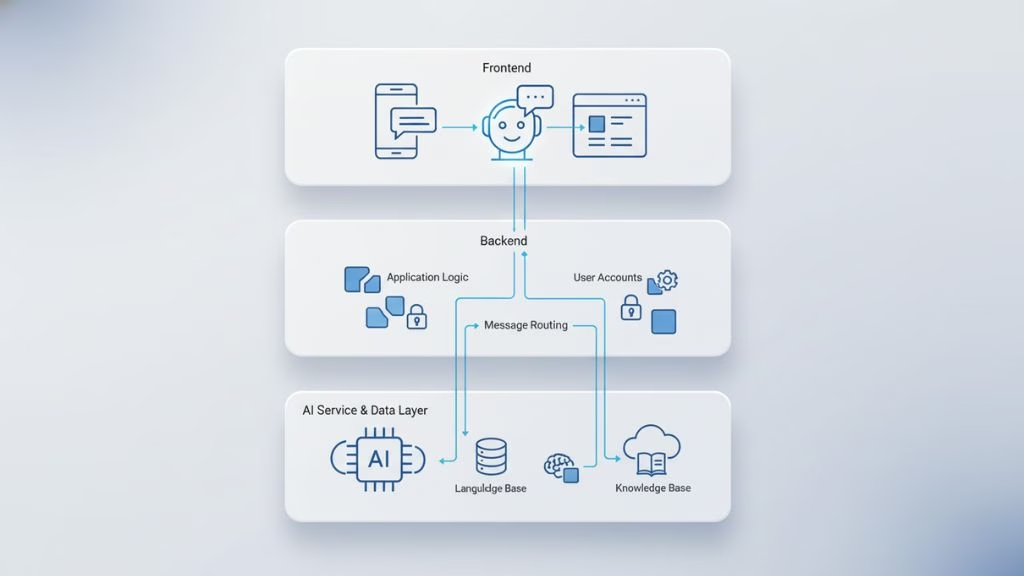
A simple and well-structured chatbot architecture helps ensure your AI chatbot integration remains secure, scalable, and easy to manage.
Frontend Layer
The frontend layer is where users interact with the AI-powered chatbot inside a web or mobile application.
At this level, the frontend is responsible for how the chatbot looks and how users interact with it.
- Captures user messages and displays chatbot replies
- Handles basic interaction states such as loading or errors
- Ensures the chatbot feels like a natural part of the application
Backend Layer
The backend layer controls how the chatbot operates behind the scenes and connects it with the rest of the application.
At this level, the backend focuses on managing behavior, access, and communication.
- Handles user context and permissions
- Routes messages between frontend and AI service
- Applies basic business rules
AI Service and Data Layer
The AI service and data layer power the intelligence behind the chatbot and support accurate responses.
At this level, the focus is on understanding user input and delivering relevant answers.
- Interprets user input and generates responses
- Uses trusted data sources to answer accurately
- Logs interactions for improvement
Building Architecture for AI Chatbot Integration for Business Applications
Once the business plan for your chatbot is clear, the next major step is defining how the system will technically work. This part of the AI chatbot integration process often determines whether the solution scales into an enterprise-grade tool or stays stuck as a limited pilot.
Build, Buy, or Hybrid Approaches
The first architectural decision is how you will source and shape your chatbot platform. This choice greatly influences cost, control, flexibility, and risk.
Some organizations choose established chatbot platforms to speed up deployment, taking advantage of built-in features, analytics, and multi-channel support. However, these solutions may limit deep customization or data ownership over time.
Others build a fully custom system that lets them control security, data access, and business logic more tightly. This is often preferred when compliance or internal integration is critical, especially in highly regulated industries.
Many enterprises adopt a hybrid approach, where a reliable AI engine is paired with internal integration layers and governance controls. This strategy keeps sensitive data protected while reducing initial risk and accelerating AI chatbot integration.
Plan Your Model Strategy
A key architectural question is how the AI component will run. You need to decide whether to use external AI APIs, run private models, or leverage a mixed approach that combines both.
Public APIs allow faster conversational capability with less engineering setup, making them suitable for early testing or quick deployments. Private or fine-tuned models give more control over how data is processed and how responses are generated, which matters when accuracy and compliance are priorities.
Many enterprise teams also use techniques like Retrieval-Augmented Generation (RAG) to ground chatbot responses in trusted business data. RAG helps improve accuracy by pulling answers from verified sources rather than relying solely on generative wording, reducing the risk of incorrect outputs.
Choose a Flexible Integration Approach
Another architectural focus is how the chatbot connects to your application and business systems. A flexible integration strategy ensures that as your needs grow, the chatbot can tap into tools like CRM systems, analytics platforms, or internal databases.
Using well-designed APIs keeps conversations connected to essential systems and makes scaling new use cases easier. Planning integration across multiple touchpoints early helps maintain consistent behavior and avoid costly rewrites later.
Build Security and Compliance In From the Start
In business environments, security cannot be an afterthought. The architecture should include safeguards that protect sensitive data, comply with regulatory requirements, and help maintain customer trust.
Early decisions around encryption, identity control, and monitoring help ensure safe operations. Putting these controls in place from the outset reduces risk and prevents costly retrofits once the chatbot is live.
A thoughtful architecture doesn’t just keep the system safe. It lays a foundation that supports expansion to new use cases, higher user volumes, and advanced capabilities without major rework.
Cost and Timeline Considerations
When you plan AI chatbot integration, understanding cost and timeline early helps set realistic expectations and avoid surprises during development. There is no single fixed price or duration. Instead, both depend on factors such as chatbot complexity, features, integrations, and usage scale.
Expected Cost Ranges
The cost to build and integrate an AI chatbot depends on its complexity and goals. Simple chatbots with basic integrations are more affordable, while advanced conversational systems require a higher investment.
Rule-based chatbots often start at a few thousand dollars. More advanced AI-powered chatbot solutions with strong natural language understanding typically range between $18,000 and $80,000 or more.
Highly customized, enterprise-level chatbots can exceed this range, especially when they include deep backend integration or multi-platform support. Ongoing costs may also apply for hosting, AI model usage, conversation volume, and maintenance.
What Drives the Cost
Several factors influence the total budget for AI chatbot integration:
- Complexity of the chatbot Whether you need simple rule-based interactions or advanced conversational AI
- Integrations required Connecting to backend systems, CRMs or databases
- Customization level Tailored user interfaces for web or mobile applications
- AI service costs Usage of LLMs or third-party AI services
- Maintenance and training Ongoing improvements and updates over time
This explains why even similar integrations can have very different price tags.
Typical Timelines
The time it takes to integrate a chatbot into an application depends on how much planning, customization, and testing is involved.
- A basic integration with a ready-made widget or simple API can happen in a matter of a few days to a few weeks.
- A moderately complex integration that includes a custom UI or deeper backend connections usually takes several weeks, as requirements are finalized, testing is completed, and performance is optimized.
- A full-featured AI chatbot system, especially one with personalized context, multiple integrations, and advanced conversational capability, can take 8 to 14 weeks or more.
One reason timelines can vary is that a more tailored chatbot often requires iterative testing and refinement of conversations to ensure a smooth user experience.
Balancing Cost and Speed
If you are just getting started with AI chatbot integration, one effective strategy is to launch with a minimal viable chatbot (MVP) that covers your core use cases and then expand features over time as you learn from user interactions. This approach helps manage cost while still delivering value early.
Planning the integration in phases also helps you spread costs and refine priorities based on real usage data rather than assumptions.
How Different Industries Are Successfully Using AI Chatbot Integration
AI chatbot integration is delivering measurable value across industries when applied to real workflows. Adoption data and industry reports show that chatbots are now core components of many business applications, not experimental tools.
E-Commerce and Retail
E-commerce and retail platforms use AI-powered chatbots for product discovery, order tracking, returns, and customer support. Industry studies show that chatbots can handle up to 70 percent of routine retail customer queries, significantly reducing response times and support workload.
Retailers that integrate chatbots into their web and mobile applications also benefit from higher engagement during browsing and checkout, which helps reduce cart abandonment.
Banking and Financial Services
The banking sector is one of the most mature adopters of AI chatbot integration. Reports indicate that around 92 percent of banks in North America use AI chatbots to support customer interactions such as balance checks, transaction history, and service inquiries.
These chatbots succeed because they are tightly integrated with backend systems and follow strict security and data access controls, allowing high-volume automation without compromising compliance.
Healthcare and Telemedicine
Healthcare platforms integrate AI chatbots for appointment scheduling, symptom pre-screening, and patient guidance. Studies suggest that automated systems, including chatbots, can manage up to 30 percent of administrative healthcare interactions, reducing staff workload and improving access to care.
Successful healthcare chatbot integrations focus on supporting patients with verified information while ensuring clear escalation paths to medical professionals.
SaaS and Enterprise Applications
SaaS and enterprise software providers use AI chatbot integration to improve onboarding, feature discovery, and in-app support. Research shows that over 30 percent of companies actively use AI chatbots as part of their customer experience strategy.
By embedding chatbots directly into applications and connecting them with documentation and user context, SaaS companies reduce support tickets and accelerate product adoption.
Education and Learning Platforms
Education platforms use AI chatbots to assist with course navigation, deadlines, and student support. Institutions report that chatbots can resolve more than 40 percent of repetitive student inquiries, allowing staff to focus on higher-impact tasks.
These implementations succeed by prioritizing consistency, clarity, and reliable access to academic information.
Logistics and Supply Chain
Logistics and supply chain applications integrate chatbots to provide shipment updates, delivery tracking, and issue resolution. Automated chat systems deliver responses up to three times faster than traditional support channels, improving transparency and communication.
These industry-specific results show that AI chatbot integration succeeds when chatbots are designed around practical use cases and connected to the right systems. This data-backed adoption across sectors sets the foundation for understanding where AI chatbot integration is headed next.
Future Trends in AI Chatbot Integration
AI chatbot integration is moving beyond scripted interactions toward intelligent, autonomous systems powered by Generative AI. These chatbots are becoming more proactive, context-aware, and deeply embedded in business applications.
Key Trends in AI Chatbot Integration
- Hyper-Personalization and Empathy
Chatbots will use user history and behavior to deliver tailored responses and adjust tone based on emotional cues. - Multimodal Interactions
Future chatbots will combine text, voice, and visual inputs, creating more natural and flexible user interactions. - Proactive and Autonomous Behavior
Instead of only reacting, chatbots will anticipate issues, suggest actions, and automate complex workflows. - Industry-Specific Intelligence
Domain-focused chatbots will handle specialized workflows in sectors such as finance, healthcare, and legal services. - Omnichannel Context Awareness
Chatbots will retain conversation context across web, mobile, messaging, and voice channels. - Advanced NLP and Generative AI
Improved language understanding and real-time content generation will make chatbot conversations more human-like.
Conclusion
Integrating an AI chatbot into your application is most effective when planned as part of the overall system, not added as an afterthought. Choosing the right chatbot type, integration approach, and architecture helps ensure long-term reliability.
Across industries, AI chatbot integration delivers the most value when it is aligned with real use cases and connected to reliable data and systems. Treating chatbots as a core part of the application experience leads to better outcomes.
As chatbot technology evolves, focusing on scalability, accuracy, and maintainability allows applications to grow without major rework and keeps chatbot integrations useful over time.
Frequently Asked Questions (FAQs)
How do you integrate an AI chatbot into an application?
AI chatbot integration involves defining the chatbot’s purpose, selecting the chatbot type, choosing an integration method such as API-based or embedded widgets, and connecting it to relevant data sources. After integration, the chatbot is tested, deployed, and monitored to ensure accuracy and performance.
What is AI chatbot integration?
AI chatbot integration is the process of connecting an AI-powered chatbot to a web or mobile application so it can interact with users, access data, and perform tasks. It typically involves frontend UI integration, backend APIs, and an AI service layer.
Which chatbot integration approach is best for business applications?
API-based chatbot integration is usually the best option for business applications because it offers flexibility, scalability, and control. Embedded chat widgets work well for simple use cases, while many businesses prefer a hybrid approach that combines speed with customization.
How much does AI chatbot integration cost?
AI chatbot integration costs depend on chatbot complexity and integration depth. Basic chatbots can cost a few thousand dollars, while AI-powered chatbot integrations with backend systems and conversational AI can range from tens of thousands of dollars, plus ongoing maintenance costs.
How long does it take to integrate an AI chatbot?
Integrating an AI chatbot typically takes a few weeks for simple implementations. More advanced AI chatbot development with custom UI, backend integration, and testing can take several weeks to a few months, depending on scope and requirements.
Can AI chatbots be used in both web and mobile applications?
Yes, AI chatbots can be integrated into both web and mobile applications. The same backend and AI logic can be reused, while the chat interface is adapted for each platform to provide a consistent user experience.
What data is required for an AI chatbot to work properly?
AI chatbots work best when connected to reliable data such as FAQs, documentation, product information, or user data. Grounding chatbot responses in verified data sources improves accuracy, consistency, and trust.
Are AI chatbots secure for business use?
AI chatbots can be secure when designed correctly. Security depends on controlled API access, proper data handling, permission rules, and a well-structured chatbot architecture that prevents unauthorized actions or data exposure.
Can a rule-based chatbot be upgraded to an AI-powered chatbot later?
Yes, many businesses start with rule-based chatbots and later upgrade to AI-powered chatbots. This phased approach allows teams to validate use cases first and gradually add conversational AI capabilities.
Why should businesses integrate AI chatbots into applications?
Businesses integrate AI chatbots to improve user experience, automate repetitive tasks, and scale support efficiently. When properly integrated, AI chatbots become a core part of the application workflow rather than a standalone tool.
This page was last edited on 28 January 2026, at 11:39 am
Contact Us Now

Contact Us Now
Start a conversation with our team to solve complex challenges and move forward with confidence.


