
Building custom property management software (PMS) is transforming the way real estate is managed, offering new efficiency, control, and insight for property professionals. Many property managers face bottlenecks with generic, off-the-shelf solutions or outdated manual workflows, leading to lost revenue and frustrated tenants.
This guide will walk you through a practical, step-by-step framework to build property management software that is designed, developed, and successfully launched for both growing portfolios and complex real estate businesses. By following these expert-driven steps, you’ll be empowered to make smarter investment decisions, implement must-have features, and avoid common pitfalls on your path from idea to deployment.
What Is Property Management Software & Who Needs It?
Property management software (PMS) is a digital system that streamlines and automates key real estate operations like lease management, rent collection, maintenance, and tenant communications. Custom PMS platforms are designed specifically for the unique needs of individual property owners, managers, and agencies.
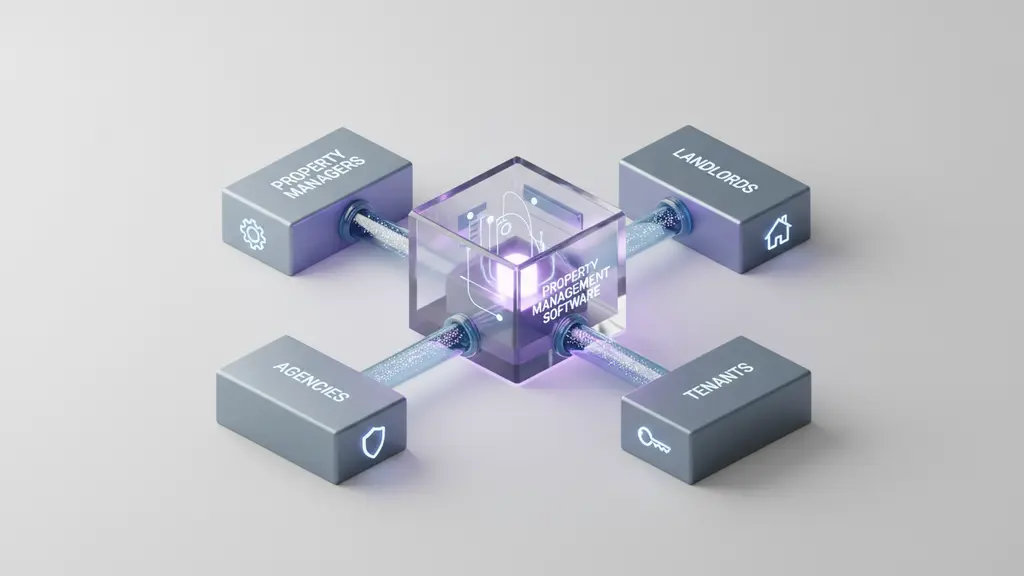
Property management software serves several key user groups:
- Property managers: Oversee multiple properties, handle leases, finances, vendors, and compliance.
- Landlords: Manage smaller portfolios or single properties, often seeking automation for routine tasks.
- Property management agencies: Coordinate large teams, portfolios, and client reporting.
- Tenants: Access rent payments, maintenance requests, and communications via online portals.
Core functions of PMS include:
- Lease and tenant management
- Maintenance and repair tracking
- Automated rent invoicing and payments
- Financial and tax reporting
- Document storage and compliance management
What is property management software?
A property management software (PMS) is a centralized digital platform that automates property leasing, maintenance, rent collection, and reporting for property managers, landlords, and real estate agencies.
Why Build Custom Property Management Software Instead of Buying?
Building a custom property management software solution delivers greater flexibility, scalability, and data control compared to standard, off-the-shelf PMS products. Many organizations outgrow pre-packaged systems or find them insufficient for their operational complexity.
Key limitations of off-the-shelf PMS:
- Hard-to-modify features and workflows
- Limited integration with existing business systems
- Pay-per-user pricing can hinder scalability
- Less control over data privacy and compliance
Advantages of custom PMS:
- Tailor-made features and user experiences
- Complete ownership and data control
- Seamless integration with unique workflows, accounting, or IoT devices
- Future-proof scalability as your portfolio grows
When to consider building custom PMS:
- Complex operations or regulatory needs
- Unique leasing or maintenance workflows
- Rapid business growth or diversified property types
| Feature/Factor | Off-the-Shelf PMS | Custom PMS |
|---|---|---|
| Feature Flexibility | Limited | Unlimited |
| Integration Options | Often Limited | Tailored |
| Scalability | User/license caps | Enterprise-ready |
| Data Ownership | Vendor-controlled | Full control |
| Upfront Cost | Lower | Higher |
| Long-Term ROI | Mixed | Often Higher |
What Features Should Property Management Software Include?
Property management software should include a mix of essential modules and advanced tools to stay competitive, deliver strong ROI, and ensure smooth property operations.
Essential PMS Features:
- Lease management: Digital lease creation, renewals, expirations, and automated alerts.
- Rent collection: Online invoicing, automated payment reminders, late fee automation.
- Maintenance requests: Ticketing, assignment, vendor management, real-time status tracking.
- Accounting integration: Income/expense tracking, bank reconciliation, tax preparation tools.
- Document management: Secure upload and storage of leases, inspection reports, compliance documents.
- Communications: Automated notifications, tenant messaging, owner portals.
Advanced & Modern Features:
- Mobile apps: For property managers and tenants.
- Dashboards & analytics: Occupancy, revenue, and maintenance trends.
- IoT/smart integrations: Smart locks, energy management, leak detection.
- Automated workflows: Document e-signatures, bulk communications.
- User roles & permissions: Access control for managers, accounting, maintenance teams, and tenants.
- Security & compliance: Data encryption, GDPR/CCPA compliance, audit trails.
| Feature | Essential | Advanced |
|---|---|---|
| Lease management | ✔️ | |
| Online rent payments | ✔️ | |
| Maintenance tracking | ✔️ | |
| Accounting integration | ✔️ | |
| Document automation | ✔️ | |
| Mobile apps | ✔️ | |
| IoT (smart locks, sensors) | ✔️ | |
| Analytics dashboards | ✔️ | |
| Security/compliance | ✔️ | ✔️ |
Feature Checklist:
- Lease & tenant management
- Maintenance ticketing
- Online payments
- Owner and tenant portals
- Mobile access
- Reporting & analytics
- Secure document management
- Regulatory compliance tools
What Types of Property Management Software Exist?
Different types of property management software cater to unique industry needs, including residential, commercial, and hospitality sectors. Choosing the right type ensures a stronger feature–need fit and effective results.
| Type | Typical Use-Cases | Distinct Features |
|---|---|---|
| Residential | Apartments, condos, single-family rentals | Lease cycles, tenant portals, HOA tools |
| Commercial | Offices, retail, industrial, mixed-use | Advanced billing, space optimization |
| Hospitality | Hotels, vacation rentals, serviced apartments | Booking engines, housekeeping, channel mgmt |
Example Workflows:
- Residential PMS: Focuses on recurring rent invoicing, tenant screening, and lease renewals.
- Commercial PMS: Supports complex rental structures, shared amenities management, and multi-site reporting.
- Hospitality PMS: Integrates reservation engines, payment processing, and guest services.
Step-by-Step Guide: How to Build Property Management Software the Right Way
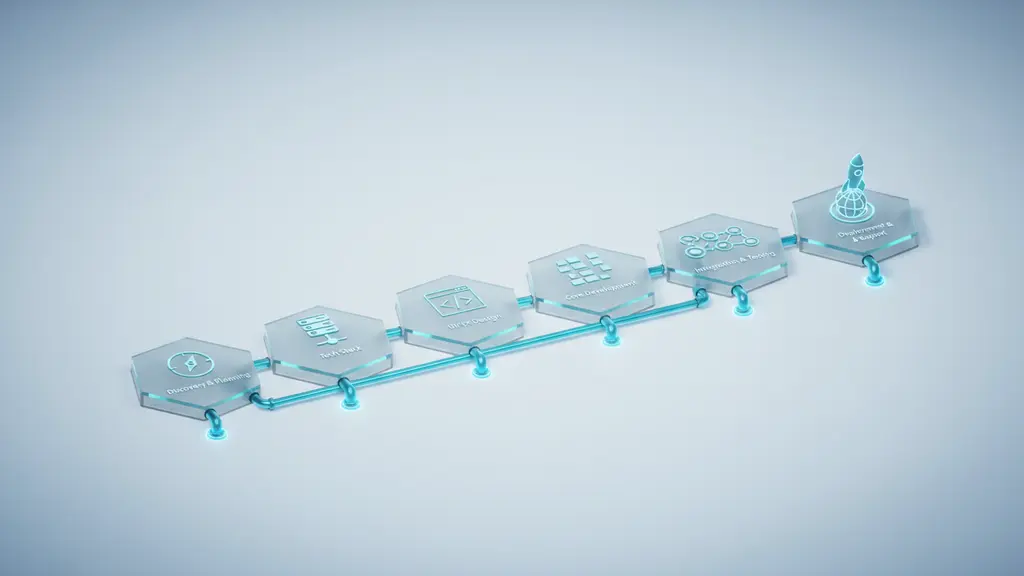
Step 1: Discovery & Planning
Start by aligning business goals, engaging stakeholders, and defining your minimum viable product (MVP).
- Identify goals: What problems must your PMS solve? Interview property managers, accountants, and tenants to gather requirements.
- Define MVP features: Focus on must-haves—leasing, maintenance, billing—for initial launch.
- Compliance assessment: Map out local and regional regulations (e.g., GDPR, CCPA). Prioritize data privacy, e-signature, and reporting needs.
Step 2: Choosing the Tech Stack and Architecture
Select robust, scalable technologies and architecture patterns, considering cloud vs. on-premise deployment.
- Front-end: React.js, Angular, or Vue.js for responsive web apps.
- Back-end: Node.js, Python, Java, or .NET for scalable APIs.
- Database: PostgreSQL, MySQL for transactional data; MongoDB for flexibility.
- Hosting: Cloud-based (AWS, Azure, GCP) for flexibility; on-premise for strict compliance.
- Key considerations: Scalability, API integration (accounting, payments, IoT), and strong security credentials.
Step 3: UI/UX Design and Prototyping
Create user journeys and interfaces that prioritize ease-of-use and accessibility for managers and tenants.
- User roles: Map admin, property manager, tenant, and vendor experiences.
- Accessibility: Ensure WCAG compliance and mobile-first design.
- Wireframes: Develop interactive wireframes or clickable prototypes to gather feedback early.
Step 4: Core Feature Development
Build primary PMS modules incrementally, ensuring each is robust and customizable.
- Tenant/lease management: Automate lease renewals, create digital onboarding flows.
- Accounting: Integrate with leading accounting tools or build in invoicing and tax features.
- Maintenance management: Allow ticketing, vendor assignment, and automated updates.
- Custom integrations: Connect with payment gateways, IoT devices (like smart locks), or reporting tools.
Step 5: Integration & Testing
Connect to third-party services and rigorously test for reliability, security, and compliance.
- Third-party APIs: Payments, IoT devices, analytics platforms.
- QA process: Combine automated testing (unit, integration) with user acceptance testing.
- Security checks: Enforce data encryption, secure authentication, and regulatory checklists.
Step 6: Deployment, Training, and Support
Move from development to live operation through careful rollout and ongoing support.
- Deployment: Opt for cloud SaaS or private hosting; ensure rapid rollback capability.
- Training: Onboard users with step-by-step guides, video tutorials, and live Q&A.
- Support & updates: Set up help desks, schedule regular feature updates, and monitor system performance.
How to Build Property Management Software (Summary Steps):
- Plan business needs and compliance.
- Choose your tech stack and architecture.
- Design intuitive UI/UX.
- Develop essential modules.
- Integrate third-party tools and test thoroughly.
- Deploy, train users, and maintain support.
How Much Does It Cost to Build Property Management Software?
The cost of building property management software varies by project scope, feature depth, technology choice, and long-term needs. Budgeting accurately helps avoid overruns and ensures project viability.
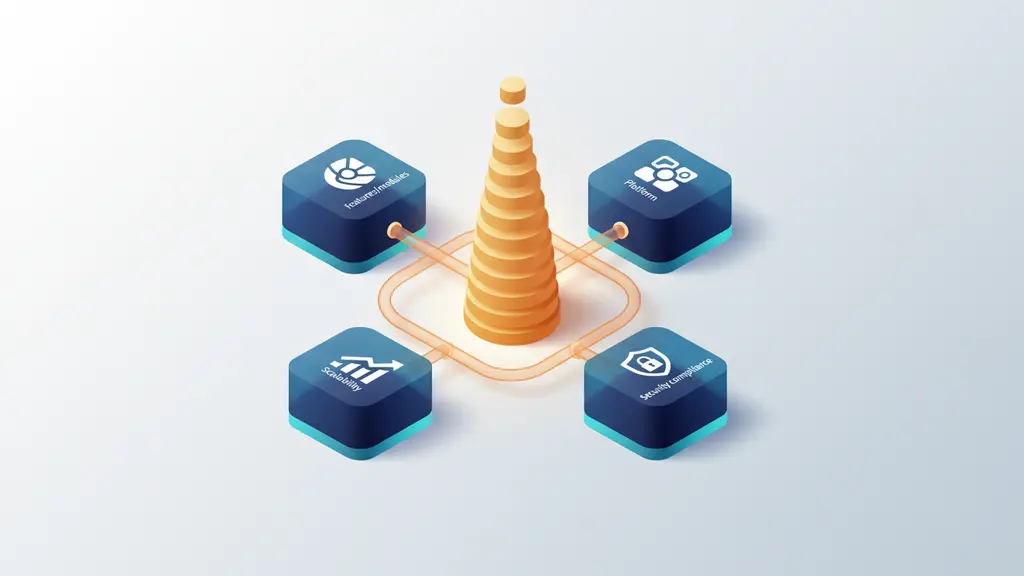
Cost Factors:
- Features & modules: More advanced features and custom integrations mean higher development costs.
- Platform choice: Web-only vs. web + mobile platforms.
- User count/scalability: More users or properties require a more robust system.
- Security/compliance: Advanced data protection and compliance features add complexity.
- Ongoing support: Maintenance, updates, and cloud hosting fees.
| Project Phase | Typical Cost Range (USD) |
|---|---|
| Discovery & Planning | $5,000 – $20,000 |
| UI/UX Prototyping | $10,000 – $30,000 |
| Core Development | $50,000 – $150,000+ |
| Integrations | $10,000 – $40,000 |
| Testing & QA | $10,000 – $25,000 |
| Deployment & Support | $5,000 – $15,000+/year |
Sample Budget Template:
| Feature/Module | Estimated Cost |
|---|---|
| Lease Management | $10,000 – $25,000 |
| Rent Payments | $8,000 – $20,000 |
| Maintenance Tracking | $8,000 – $18,000 |
| Accounting | $12,000 – $30,000 |
| Mobile Apps | $20,000 – $50,000 |
| IoT Integrations | $10,000+ |
Custom vs. Off-the-Shelf:
- Off-the-shelf PMS: $50–$250/user/month, lower upfront but less flexible.
- Custom PMS: Higher initial investment, but better long-term ROI and no user limits.
According to industry benchmarks, most mid-sized custom PMS projects range from $100,000 to $300,000 depending on complexity.
What Challenges and Common Pitfalls Should You Prepare For?
Developing property management software can introduce a range of challenges, from technical hurdles to organizational adoption issues. Awareness and proactive planning are key.
Common challenges include:
- Data migration: Transferring legacy data is intricate and error-prone.
- System integration: Connecting with external accounting, IoT, or payment systems can lead to compatibility headaches.
- Security & compliance: Meeting evolving data privacy laws (GDPR, CCPA) requires ongoing vigilance.
- User adoption: Staff may resist new tools; comprehensive onboarding is vital.
- Scaling up: Systems not built for growth can accrue technical debt, slowing future innovation.
Best Practices:
- Start with a pilot rollout to catch issues early.
- Build documentation from day one—both user and technical.
- Prioritize modular architecture for easy updates.
Real-World Case Studies and Practitioner Insights
Studying real examples of PMS development can reveal practical lessons and strategies for success.
Case Study 1: Custom PMS for Regional Rental Agency
A mid-size agency found off-the-shelf platforms unable to support their regional compliance needs and unique maintenance workflows. Developing a custom PMS enabled automated late fee calculation, multi-region tax reporting, and API-driven vendor management. The result was a 30% reduction in manual admin time and improved resident satisfaction.
Case Study 2: IoT-Enabled Commercial Portfolio
A property company managing office complexes integrated IoT sensors and smart locks into their custom PMS, allowing tenants to book meeting spaces and access building amenities on demand. The company saw maintenance costs decline due to proactive alerts and streamlined vendor assignments.
Frequently Asked Questions About Building Property Management Software
What is property management software?
Property management software is a digital platform that automates leasing, maintenance, billing, and tenant management for real estate professionals and landlords.
Why build custom property management software instead of buying?
Building custom PMS enables greater flexibility, tailored features, seamless integrations, and full data control. It’s the right choice when off-the-shelf products cannot meet your business’s scalability, security, or workflow requirements.
What are essential features of property management software?
Key features include lease management, rent collection, maintenance tracking, accounting integration, reporting dashboards, and robust security controls.
How much does it cost to build property management software?
Typical budgets for mid-sized custom PMS projects range from $100,000 to $300,000 or higher, depending on scope, advanced features, integrations, and compliance needs.
What is the typical timeline for developing a PMS?
Building a standard PMS usually takes 6 to 12 months from planning to deployment, varying with complexity and team size.
What tech stack should I use for PMS development?
Modern PMS solutions often use React or Angular for the front-end, Node.js or Python for the backend, PostgreSQL or MySQL databases, and cloud hosting (AWS, Azure) for flexibility and scalability.
Who uses property management software?
Property managers, landlords, tenant-facing agencies, asset management firms, and real estate owners of all portfolio sizes use PMS to improve operational efficiency.
What are the most common challenges in PMS development?
Key challenges include data migration, security/compliance, system integration, user adoption, and preparing for scalability.
How do I ensure security and data compliance in PMS?
Follow best practices for encryption, robust authentication, and regular audits. Map compliance requirements (such as GDPR, CCPA) from the start and update policies as regulations evolve.
Can PMS integrate with other systems (accounting, payments, IoT)?
Yes, leading PMS platforms support integration with accounting software, payment gateways, IoT devices, and analytics platforms via APIs for streamlined operations.
Key Takeaways & Action Checklist
- Custom property management software offers unmatched flexibility for scaling portfolios and unique workflows.
- Essential PMS features include lease management, maintenance tracking, accounting, and robust security.
- Building PMS demands careful planning, the right tech stack, and stakeholder alignment.
- Budgeting should factor in project phases, must-have modules, and long-term maintenance.
- Prioritize data migration, compliance, and user onboarding to avoid common pitfalls.
Conclusion
Custom property management software is a strategic investment that empowers your organization to operate efficiently, adapt quickly, and deliver top-tier property experiences. Begin by mapping your unique business needs and assembling the right partners and technology choices. Whether you’re ready to plan, need an expert consultation, or want to explore case studies and feature checklists, taking action today will position your portfolio for a smarter, digital-first future.
This page was last edited on 16 February 2026, at 9:58 am

Start a conversation with our team to solve complex challenges and move forward with confidence.










